Recording
src/record/recorder.cpp, src/record/recorder.h
Raw frames and raw audio are fed to an ffmpeg child process over pipes. Two rules shape the whole design.
PushVideo() is called from the render thread with a freshly read-back frame. It
copies into a triple buffer — the same shape as the capture sink — and returns.
A writer thread owns the pipes.
If the encoder cannot keep up, frames are dropped from the recording, never from the screen. The screen is what you play on.
The readback itself is asynchronous. QueueReadback() issues a CopyResource
into a staging texture and FetchReadback() maps it two frames later, so the
display path never waits on the GPU. The recording is therefore a frame or two
behind the screen, which is the right trade.
The card's clock and the PC's clock drift apart over an hour. The video timeline is derived from the number of audio samples written, duplicating or dropping frames to match — which makes sync arithmetic instead of hope, and produces constant frame rate output, which both MKV and MP4 prefer.
if (audioIsMaster) target = (uint64_t)((double)audioFrames / (double)audioRate_ * fps_);
else               target = (uint64_t)(QpcSeconds(now - startQpc_) * fps_);
Measured drift over the file: 1 ms over 15 seconds.
Two cases, both handled by falling back to the wall clock:
At the start. ffmpeg opens its inputs in order and blocks reading video before it ever opens the audio pipe, so waiting for audio samples before writing the first frame deadlocks both sides.
If it stops. A device disappearing mid-recording would otherwise freeze the video timeline forever:
const bool audioStalled = lastAudioProgressQpc_ != 0 &&
                          QpcSeconds(now - lastAudioProgressQpc_) > 2.0;
Two seconds of no progress, then the wall clock takes over and a warning goes to the log.
for (uint64_t i = written; i < target && running_; ++i) {
  if (!WriteAll(videoPipe_, held, frameBytes_)) { … }
  videoFramesWritten_.fetch_add(1, …);
  if (!fresh || i > written) duplicated_.fetch_add(1, …);
}
Skipping one would make the video shorter than the audio and desync the file for good. If the encoder stalls, the pipe blocks right here — which is exactly where the waiting belongs, on the writer thread and not on the renderer.
The duplicated_ counter is what the statistics overlay reports.
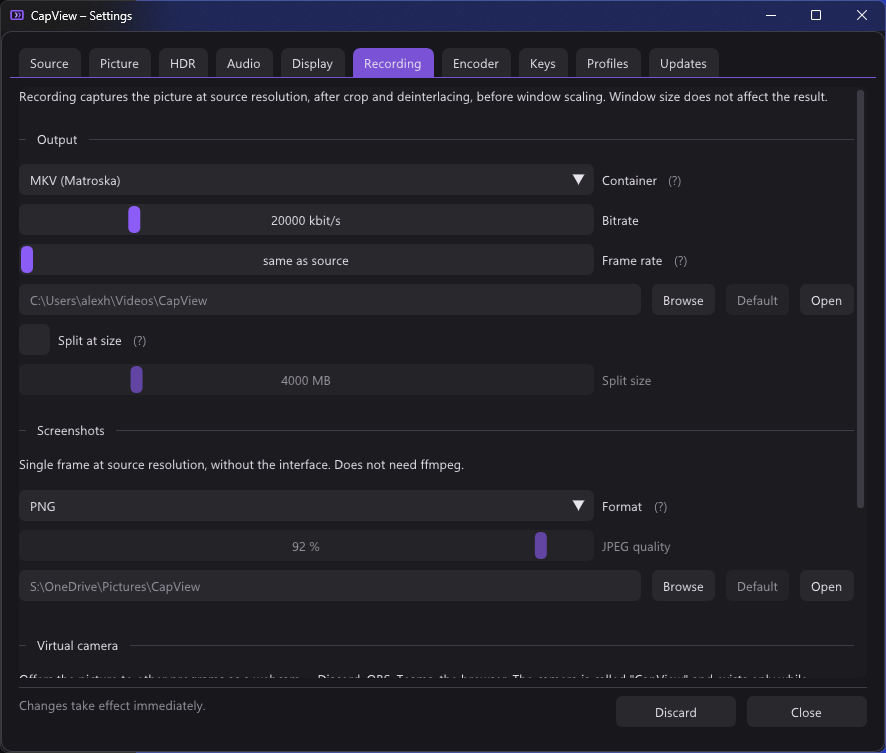
The picture at source resolution, after crop, deinterlacing and rotation, and before window scaling. Window size does not affect the result, and neither does sharpening.
Odd sizes break 4:2:0 chroma, so the width and height are rounded down by a
pixel (width & ~1). The alternative is telling somebody their 1439 pixel
capture cannot be recorded, which helps nobody.
Video goes in on pipe:0 — ffmpeg's standard input. Every audio track goes
through its own named pipe, because a process has only one standard input.
AudioThread() connects each pipe with an overlapped ConnectNamedPipe and a
100 ms polling wait, so an ffmpeg that never starts cannot leave the thread stuck
and hang the whole shutdown.
-hide_banner -loglevel error -y
-f rawvideo -pix_fmt <from the renderer> -s WxH -r <fps> -i pipe:0
[-f f32le -ar <rate> -ac 2 -i <capture pipe>]
[-f f32le -ar <rate> -ac 2 -i <mic pipe>]
[-filter_complex "[1:a][2:a]amix=inputs=2:duration=first:normalize=0[mix]"]
-map 0:v -map …
-c:v <encoder> <encoder options>
-pix_fmt nv12 | -pix_fmt p010le -color_primaries bt2020 -color_trc smpte2084 -colorspace bt2020nc -color_range tv
-b:v … -maxrate … -bufsize …
[-c:a aac -b:a 192k -metadata:s:a:N title="…"]
<output file>
A few of those lines are load-bearing:
The pixel format comes from the renderer (VideoRenderer::kReadbackPixelFormat)
rather than being spelled out in the recorder. These two have to agree byte for
byte, and a literal in the recorder is exactly how they came apart once already:
the staging texture is R8G8B8A8_UNORM, so the bytes run R, G, B, A — that is
ffmpeg's rgba, not bgra. Getting it wrong is not a crash; red and blue simply
trade places and orange comes back blue.
Declaring -r on the input is what makes the output constant frame rate. The
writer thread guarantees that many frames per second actually arrive.
normalize=0 on amix matters: amix otherwise divides every input by the
number of inputs, which would make the game quieter in the mix than on its own
track and leave people wondering what happened. The sum can clip if both are
hot — that is what the level meters are for.
The three colour description flags for HDR are not optional. Nothing else in the file says the picture is on the PQ curve, and a player that is not told will assume it is not.
Named audio tracks, so a player and an editor both show which is which instead of "Audio 1" and "Audio 2".
With both a capture source and a microphone, three layouts are available:
| Mode | Tracks in the file |
|---|---|
| Both (default) | Mix, Capture, Microphone |
| Mixed only | Mix |
| Separate only | Capture, Microphone |
The mix is made by ffmpeg rather than in CapView, so the separate tracks stay exactly what each device delivered — no resampling, no drift correction, no volume. See Audio for why that matters.
The microphone is never played back and never mixed into what you hear.
MKV and MP4, with MKV the default because it survives a crash: a truncated
MKV plays right up to the point the power went out, where an MP4 whose moov
atom was never finalised has no header and will not open at all.
MP4 is what everything else wants to be handed, so the two together need a step
in between. src/record/remuxer.cpp is that step, reachable from the Recording
tab: pick any number of finished recordings and it rewraps them into the other
container. Nothing is re-encoded — the frames are copied across byte for byte,
which takes seconds rather than the length of the recording and cannot lose
quality.
It runs on its own thread with a progress bar, and only failures are listed in the UI afterwards: a success is its own file on disk.
Optional, and by file size only — splitSizeMb, default 4000, which is the
FAT32 case it exists for.
App::FeedRecorder() polls outputFileSize() once a second and, past the limit,
calls StopRecording() immediately followed by StartRecording().
That is a restart, not a seamless cut: ffmpeg has to close the container it is writing, and a fraction of a second is lost at the boundary. Which is why it is off unless somebody really is on FAT32.
FeedRecorder() also checks recorder_.failed() each pass. If the child process
exited on its own, the recording is stopped cleanly and the error is shown as a
toast, rather than the writer thread continuing to fill a dead pipe.