Source and signal
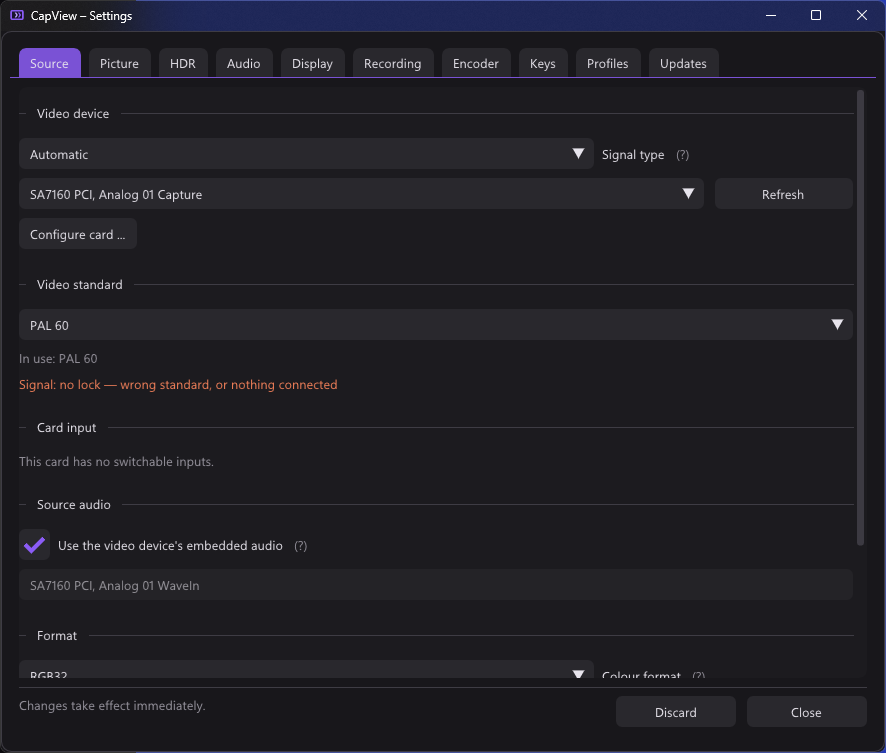
src/capture/dshow_util.cpp, src/capture/video_capture.cpp, src/capture/device_config.cpp
Devices come from CLSID_VideoInputDeviceCategory through
ICreateDevEnum::CreateClassEnumerator. Each moniker's property bag supplies the
friendly name and the device path; the path is what gets written to the
configuration, because friendly names are not unique and change with driver
updates.
Audio devices are enumerated twice over: once through WASAPI
(src/audio/audio_devices.cpp) and once through
CLSID_AudioInputDeviceCategory, because a card's embedded audio is sometimes
only reachable as a DirectShow filter. See Audio.
The capture pin's IAMStreamConfig advertises a list of
(AM_MEDIA_TYPE, VIDEO_STREAM_CONFIG_CAPS) pairs. CapView shows colour format,
resolution and frame rate as three independent pickers rather than as one list
of combinations, which is what makes forcing possible.
ApplyFormat() in dshow_util.cpp does the work:
-
Pick a template. Every advertised capability is scored: 3 for an exact subtype and resolution match, 2 for the right subtype at a resolution at least as large, 1 for the right subtype at any size, −1 for nothing. The highest scoring media type is copied.
The template matters. A driver's media type carries fields CapView has no business inventing — palette entries,
pbFormattails that are vendor private,dwControlFlags. Patching a real one keeps all of that intact. -
Patch it.
PatchMediaType()rewritesbiWidth,biHeight,biSizeImageandAvgTimePerFramein theVIDEOINFOHEADERorVIDEOINFOHEADER2, and recomputeslSampleSize. -
Set it. If
SetFormatfails and a frame rate was asked for, the call is retried with the template's ownAvgTimePerFrameand only the resolution changed. Some drivers reject an unusual frame interval but accept the size. -
Read back what actually happened.
GetFormatis called afterwards and parsed into theVideoFormatInforeturned to the caller, so the UI reports the format in force rather than the one requested.
This is what covers the common case of a card advertising only 1080p30 for a mode it will in fact deliver at 1080p60. The driver's list is what it is prepared to state, not the boundary of what it accepts.
Cards with multiple physical inputs expose an IAMCrossbar, found through
ICaptureGraphBuilder2::FindInterface on the capture filter.
EnumerateCrossbarInputs() walks the input pins, reads
get_CrossbarPinInfo(TRUE, …) for each, and turns the physical type into a name
(PhysicalConnectorName() — Composite, S-Video, SCART, Component, HDMI/SDI and
the rest).
RouteCrossbarInput() routes the chosen video input to whichever output pin
accepts it, and routes the related audio pin alongside it when the card reports
one (relatedAudioIn from the same call).
Switching the crossbar puts a different signal on the same pins without the
media type changing, so every measured verdict — colour range, interlace,
content bounds — is thrown away at that point via
VideoRenderer::ResetAnalysis(). Nothing about the old signal is still true.
Cards with an analogue decoder expose IAMAnalogVideoDecoder.
-
get_AvailableTVFormatsgives a bitmask of what the decoder supports. -
put_TVFormat/get_TVFormatset and read the current one. -
get_HorizontalLockedreports whether the decoder has locked to a signal.
The table in dshow_util.cpp (kStandards) holds twenty entries with their
line counts. The index is written to the configuration, so entries may be
appended but never reordered.
This matters more than it looks on a console that can do both 50 and 60 Hz:
| Lines | Field rate | |
|---|---|---|
| PAL B/G/I/D/H/N | 625 | 50 |
| PAL 60, PAL M | 525 | 60 |
| NTSC M | 525 | 60 |
| SECAM | 625 | 50 |
Setting the wrong one gives either no picture at all or one with the wrong number of lines in it. A GameCube running a 50 Hz PAL title wants PAL B; the same console running a 60 Hz title wants PAL 60.
The setting has three states, encoded in one long in the profile:
| Value | Meaning |
|---|---|
0 |
Leave alone — never call put_TVFormat
|
-1 |
Automatic |
| anything else | That standard, set once when the graph starts |
Two pieces, both in src/app.cpp.
StartSignalWatch() spawns a thread that polls VideoStandardLocked() every
250 ms (as twenty-five 10 ms naps, so shutdown does not have to wait a quarter
second) and publishes the answer into signalLocked_ with a sequence counter
signalSeq_. The thread holds its own ComPtr reference to the filter, so
tearing the graph down cannot pull the object out from under it — the worst case
is asking a filter that is no longer running and being told so.
UpdateVideoStandard() runs on the main loop and is the state machine:
- Does nothing unless the profile says
-1and the capture is running. - Waits for two fresh readings since the standard was last changed
(
signalSeq_ - standardSeqAtSet_ >= 2), so what is being judged is the standard that is actually set rather than the one before it. -
Locked → settled. If a candidate was being tried, the line count may have
changed with it, so
StartCapture()rebuilds the graph around the new format and a toast names the standard that won. -
Not locked → after
kStandardLostSeconds(1.5 s) of no lock, step to the next candidate, set it, and waitkStandardSettleSeconds(0.6 s) before looking again. - After one full pass with nothing locking, back off for
kStandardBackoffSeconds(6 s). The console is probably off, and there is no point poking the card ten times a second about it.
AutoStandardCandidates() returns one candidate per line count and colour
system, not one per table entry: PAL B, PAL 60, NTSC M, NTSC M (Japan), SECAM
B. Trying PAL B and then PAL G would be asking the same question twice — they
differ in the sound carrier, which is no part of the picture.
The only measurement a card offers is whether its decoder has locked. On this hardware some standards report a lock with nothing connected at all. The mode therefore cannot distinguish "no signal" from "right standard", and will settle on whatever answers first.
That is why the tab shows which standard it settled on rather than leaving you to guess, and why the mode is not the default.
VideoStandardSubcarrierSamples() converts the standard into samples per cycle
of the colour subcarrier, against BT.601's 13.5 MHz active-line sampling:
| Standard | Carrier | Samples per cycle |
|---|---|---|
| NTSC M, NTSC M (Japan), PAL M | 3.579545 MHz | 3.77 |
| PAL, PAL 60, SECAM, NTSC 4.43 | 4.43361875 MHz | 3.04 |
This number is handed to the renderer with SetCarrierSamples() and scaled by
the capture width in effectiveCarrierPeriod(). The
composite filter is built around it, which is the reason
the video standard matters even after a picture is on screen.
src/capture/device_config.cpp
The Configure card button opens the driver's own property pages through
ISpecifyPropertyPages and OleCreatePropertyFrame. Whatever the driver keeps
to itself — input selection, decoder tuning, vendor controls, proc-amp settings
CapView does not expose — lives there.
OleCreatePropertyFrame is modal and does not return until the dialog is
dismissed, so DevicePropertyPages runs it on a thread of its own
(DevicePropertyPages::Run) with its own COM apartment. That is what keeps the
picture running while the pages are open.