

이 프로젝트는 국토공간정보연구사업 중 [공간정보 SW 활용을 위한 오픈소스 가공기술 개발]과제의 연구성과 입니다.
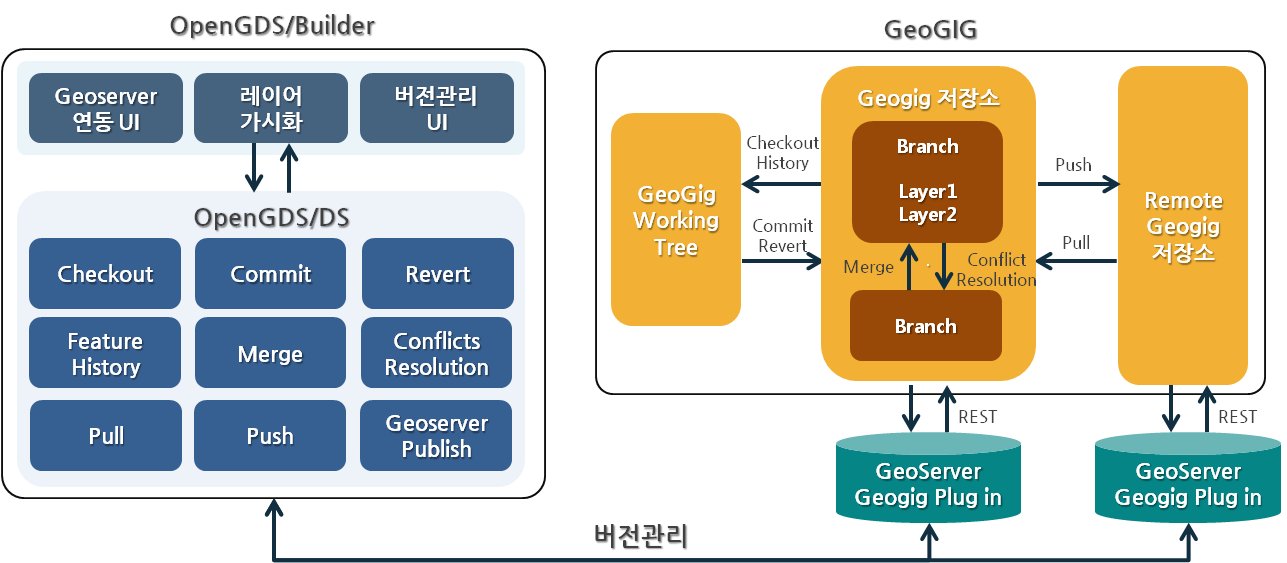
오픈소스 분산 버전 관리 시스템인 Geogig을 사용하여 개발한 공간자료 편집 이력 관리 및 협업 지원 분산 버전 관리 시스템(Distributed Version Control System)이며 OpenGDS/Builder(공간자료 편집도구)와 연동하여 공간데이터 편집 및 버전관리가 가능합니다.
감사합니다. 공간정보기술(주) 연구소 http://www.git.co.kr/ OpenGeoDT 팀
- OpenGDS/DS는 Java 기반의 Library로 Geogig 시스템에 접근하기 위한 REST Client Library 입니다.
- Geogig은 Git Flow와 동일한 방식의 분산 버전관리 시스템으로 저장소 Clone, 브랜치 병합, 저장소 Pull/Push, 버전 충돌 관리 등 기능을 제공합니다.
- Geoserver 내에 Plug in 형태로 설치한 후 Geogig 시스템에 RESTAPI로 접근합니다.
- 모든 공간자료는 Geogig을 통해 PostgreSQL 저장소에 버전별로 저장됩니다.
- OpenGDS/DS는 공간자료 Import 및 삭제 기능을 제외한 편집 기능은 제공하지 않으므로 OpenGDS/Builder(공간자료 편집도구)를 연동하여 사용하는 것을 권장합니다.
세부 책임 : 부산대학교 http://www.pusan.ac.kr/
연구 책임 : 국토연구원 http://www.krihs.re.kr/
- Java – OpenJDK 1.8.0.111 64 bit
- eclipse neon
- PostgreSQL 9.4
- Geoserver 2.13.2
- geogig-1.2.1
- http://geoserver.org/ 접속 후 Geoserver 2.13.2 Windows Installer 다운로드
** jdk 1.8 버전 이상 사용 시 Geoserver 2.8 버전 이상 사용 - Windows Installer 실행 후 C:\Program Files (x86) 경로에 설치
- https://github.com/locationtech/geogig/releases/ 접속하여 geogig-1.2.1-geoserver-2.12-plugin.zip 다운로드 후 C:\Program Files (x86)\GeoServer 2.13.0\webapps\geoserver\WEB-INF\lib 경로에 압축 해제
- 프로젝트 내 guava-23.0.jar 다운로드 후 Geoserver 설치 경로 내 WEB-INF/lib 폴더에 위치
- C:\Program Files (x86)\GeoServer 2.13.2\bin 경로의 startup.bat 실행
- http://www.postgresql.org/download/ 접속 후 PostgreSQL 다운로드 및 설치
- pgAdmin 실행 후 Databases 생성 후 New Database 클릭
- "geogig" Name으로 입력 후 Database 생성
- https://github.com/ODTBuilder/OpenGDS-DS 접속 후 Git 또는 SVN을 통해 Clone 하거나 zip 파일 형태로 소스코드 다운로드
- eclipse 실행 후 Project Import
- src/test/com/git/gdsbuilder/VersionControlTest.java 클래스 생성
- PostgreSQL 타입의 Geogig 저장소 생성
// Geogig Repository Information
String baseURL = "http://localhost:9999/geoserver";
String username = "admin";
String password = "geoserver";
String repository = "github";
String dbHost = "localhost";
String dbPort = "5432";
String dbName = "geogig";
String dbSchema = "public";
String dbUser = "postgres";
String dbPassword = "postgis";
String authorName = "github";
String authorEmail = "github@git.co.kr";

// Creating a GeoGig repository backed by PostgreSQL
InitRepository init = new InitRepository();
init.executeCommand(baseURL, username, password, repository, dbHost, dbPort, dbName, dbSchema, dbUser, dbPassword, authorName, authorEmail);- Importing PostGIS Table
// Begin Transaction
BeginTransaction beginTransaction = new BeginTransaction();
GeogigTransaction transaction = beginTransaction.executeCommand(baseURL, username, password, repository);
String transactionId = transaction.getTransaction().getId();

// PostGIS Table Information
String fidAttrib = "gid";
String table = "gis_osm_transport";

// Importing GIS Data
PostGISImport postgisImport = new PostGISImport();
GeogigTasks tastks = postgisImport.executeCommand(baseURL, username, password, repository, transactionId, fidAttrib, table, dbHost, dbPort, dbSchema, dbName, dbUser, dbPassword);

// Adding Repostiroy
AddRepository addRepos = new AddRepository();
GeogigAdd add = addRepos.executeCommand(baseURL, username, password, repository, transactionId);

// Committing Repository
CommitRepository commitRepos = new CommitRepository();
GeogigCommit commit = commitRepos.executeCommand(baseURL, username, password, repository, transactionId, "github test", authorName, authorEmail);

// EndTransaction
EndTransaction endTransaction = new EndTransaction();
transaction = endTransaction.executeCommand(baseURL, username, password, repository, transactionId);- Geogig 저장소에 Import된 Layer 목록 조회
// List All Layers In Geogig Repository
LsTreeRepository lsTree = new LsTreeRepository();
GeogigRevisionTree geogigTree = lsTree.executeCommand(baseURL, username, password, repository, null, false);- PostGIS Table 수정 후 위의 'Importing PostGIS Table'과 동일한 방식으로 ReImporting
- Geogig 저장소는 수정한 객체에 대해 편집 이력 저장
- 브랜치 생성
// Branch Information
String branchName = "myBranch";
String source = "master";

// Creating Branch
CreateBranch create = new CreateBranch();
GeogigBranch branch = create.executeCommand(baseURL, username, password, repository, branchName, source);- 브랜치 병합 및 충돌 관리 -> 충돌 객체에 대해 특정 브랜치의 객체로 덮어씀
// Begin Transaction
BeginTransaction beginMergeTransaction = new BeginTransaction();
GeogigTransaction MergeTransaction = beginMergeTransaction.executeCommand(baseURL, username, password, repository);
String mergetTransactionId = MergeTransaction.getTransaction().getId();

// Merge Branch Information
String targetBranch = "master";
String mergeBranch = "myBranch";

// Switch to targetBranch
CheckoutBranch checkoutBranch = new CheckoutBranch();
GeogigCheckout checkout = checkoutBranch.executeCommand(baseURL, username, dbPassword, repository,mergetTransactionId, targetName);

// Merge into targetBranch
MergeBranch mergeBranch = new MergeBranch();
GeogigMerge merge = mergeBranch.executeCommand(baseURL, username, password, repository, mergetTransactionId, mergeName);

Merge mergeResult = merge.getMerge();
if (mergeResult.getConflicts() != null) {
    // Merge Conflict Resolution
    String version = "ours"; // ours : targetBranch, their : mergeBranch
    List conflictFeatures = mergeResult.getFeatures();
    for (Feature conflict : conflictFeatures) {
        if (conflict.getChange().equals("CONFLICT")) {
             String path = conflict.getId();
             checkoutBranch.executeCommand(baseURL, username, dbPassword, repository, transactionId, path, version);
	 }
    }
}

// EndTransaction
EndTransaction endMergeTransaction = new EndTransaction();
transaction = endMergeTransaction.executeCommand(baseURL, username, password, repository, mergetTransactionId);- 기타 기능 및 자세한 사용 방법은 개발자 API(javadoc) 참고
- Geogig 1.2.1 (Eclipse Distribution License (a BSD 3 Clause license)) http://geogig.org/
- ApachePOI 3.14 (Apache License 2.0) http://poi.apache.org
- ApacheCommons 1.3.3 (Apache License 2.0) commons.apache.org/proper/commons-logging/
- JACKSON 1.9.7 (Apache License (AL) 2.0, LGPL 2.1)
- JSON 20160212 (MIT License)
- JSON.simple 1.1.1 (The Apache Software License, Version 2.0) http://code.google.com/p/json-simple/
Developer : SG.LEE ghre55@git.co.kr