






🏆 Officially recognized as an OWASP Incubator Project
Fast, developer-friendly vulnerability scanning for JavaScript and TypeScript projects.
Practical fix guidance. Offline support. Usage-aware reachability. Clear direct vs transitive visibility.
Scan. Understand. Fix.
🆓 Free to useNo account, no subscription, no cloud required |
🏠 Runs locallyScans your lockfile on your machine. Nothing leaves your environment |
⚡ FastResults in seconds. Local cache keeps rescans near-instant |
Quick Start • Usage • Screenshots • HTML Report • Compare • Roadmap • Contributing
npm install -g cve-lite-cli
cve-lite /path/to/project
Or one-off with npx:
npx cve-lite-cli /path/to/projectCVE Lite CLI scans JavaScript and TypeScript projects for known dependency vulnerabilities and tells you what to fix first. It reads your lockfile locally, queries OSV for advisory data, and produces a practical remediation plan — not just a list of advisory IDs.
It is built for the moment right before release: fast, local-first, and honest about what it does and does not do.
Key differentiators:
- Copy-and-run fix commands — turns findings into package-manager-aware
npm install,pnpm add,yarn add, orbun addcommands you can run immediately - Usage-aware reachability scanning — uses static analysis to detect if vulnerable packages are actually imported in your code, cutting alert fatigue with
--usageand--only-used - Direct vs transitive visibility — shows whether the risk comes from something you installed directly or a nested dependency
- Offline advisory DB — sync advisory data ahead of time and scan with zero runtime API calls, useful for enterprise and restricted-network environments
- No account required — no sign-up, no cloud dashboard, no source code upload
- Small dependency footprint — only four runtime dependencies, intentionally kept minimal for a security tool
| Capability | CVE Lite CLI | npm audit | OSV-Scanner | Snyk CLI | Socket CLI |
|---|---|---|---|---|---|
| JS/TS lockfile scanning | ✅ | ✅ | ✅ | ✅ | ✅ |
| npm + pnpm + Yarn + Bun support | ✅ | ❌ | ✅ | ✅ | ✅ |
| No account required | ✅ | ✅ | ✅ | ❌ | ❌ |
| Free to use | ✅ | ✅ | ✅ | ❌ | ❌ |
| Usage-aware reachability scanning | ✅ | ❌ | ❌ | ✅ | |
| Direct vs transitive visibility | ✅ | ✅ | ✅ | ✅ | |
| Copy-and-run fix commands | ✅ | ❌ | ❌ | ✅ | |
| Suggested remediation plan | ✅ | ❌ | ✅ | ||
| JSON output | ✅ | ✅ | ✅ | ✅ | ✅ |
| Offline/local advisory DB | ✅ | ❌ | ❌ | ❌ |
✅ = built-in strength ·
For detailed per-tool analysis, see Comparison with other tools.
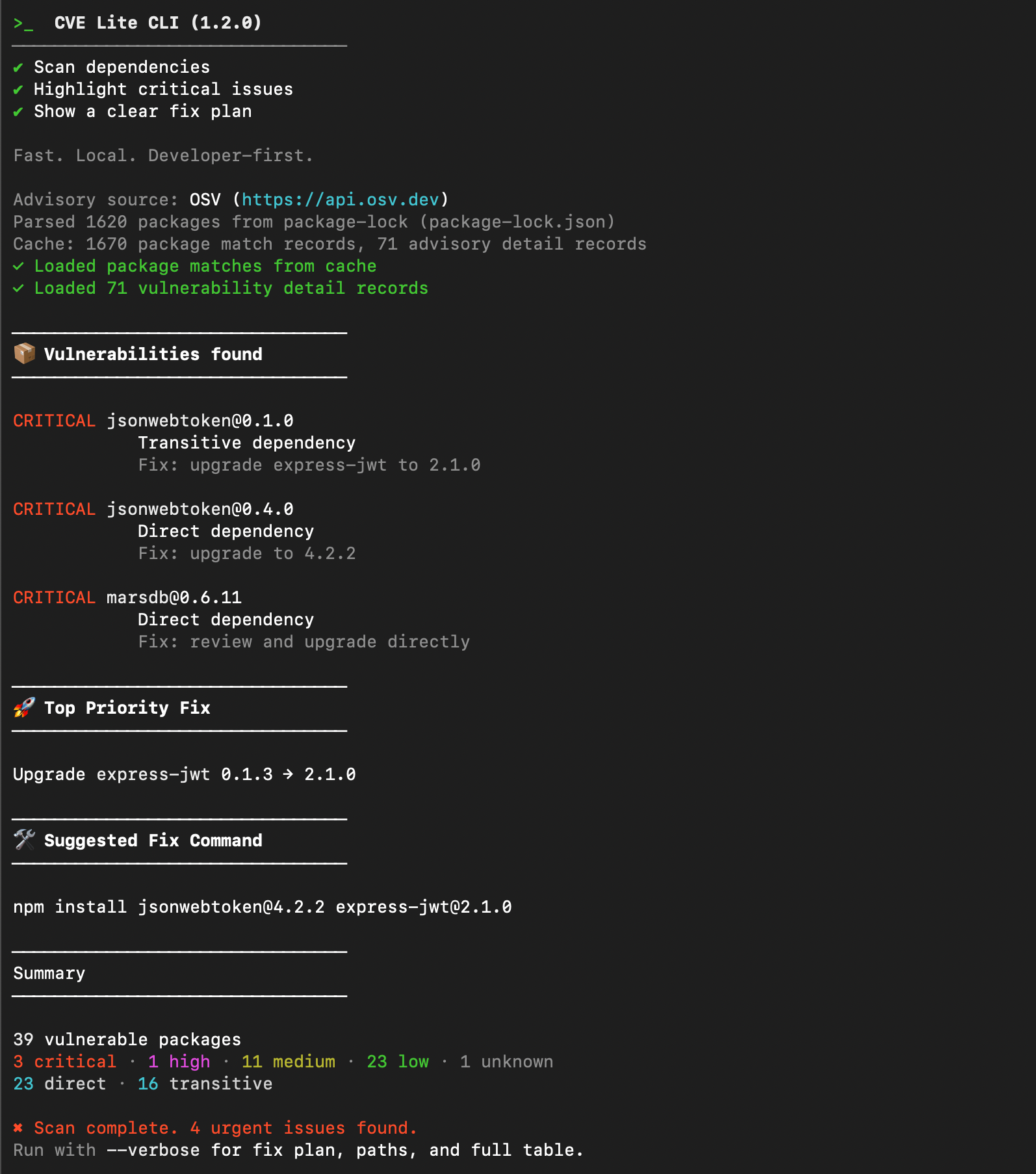
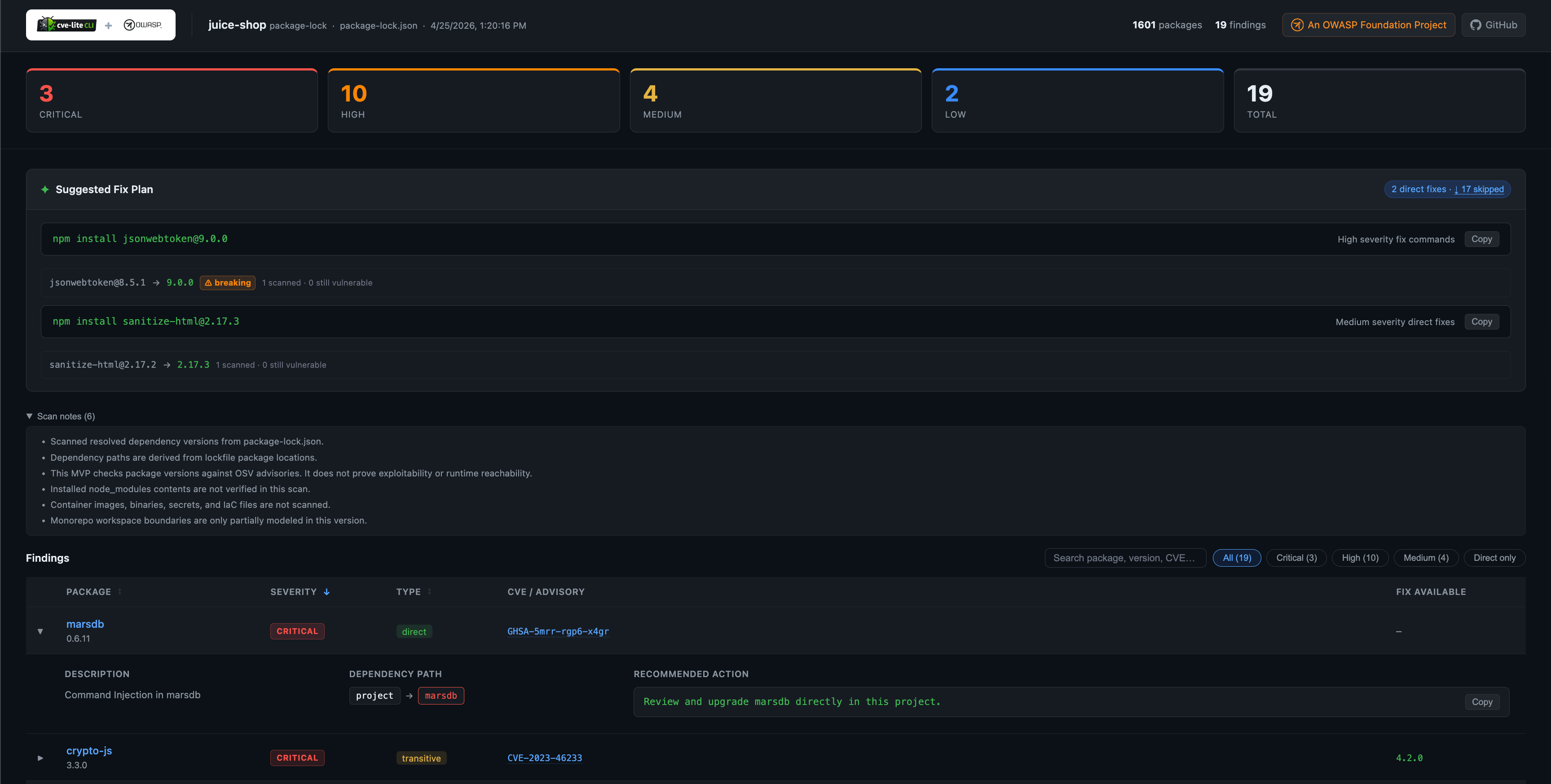
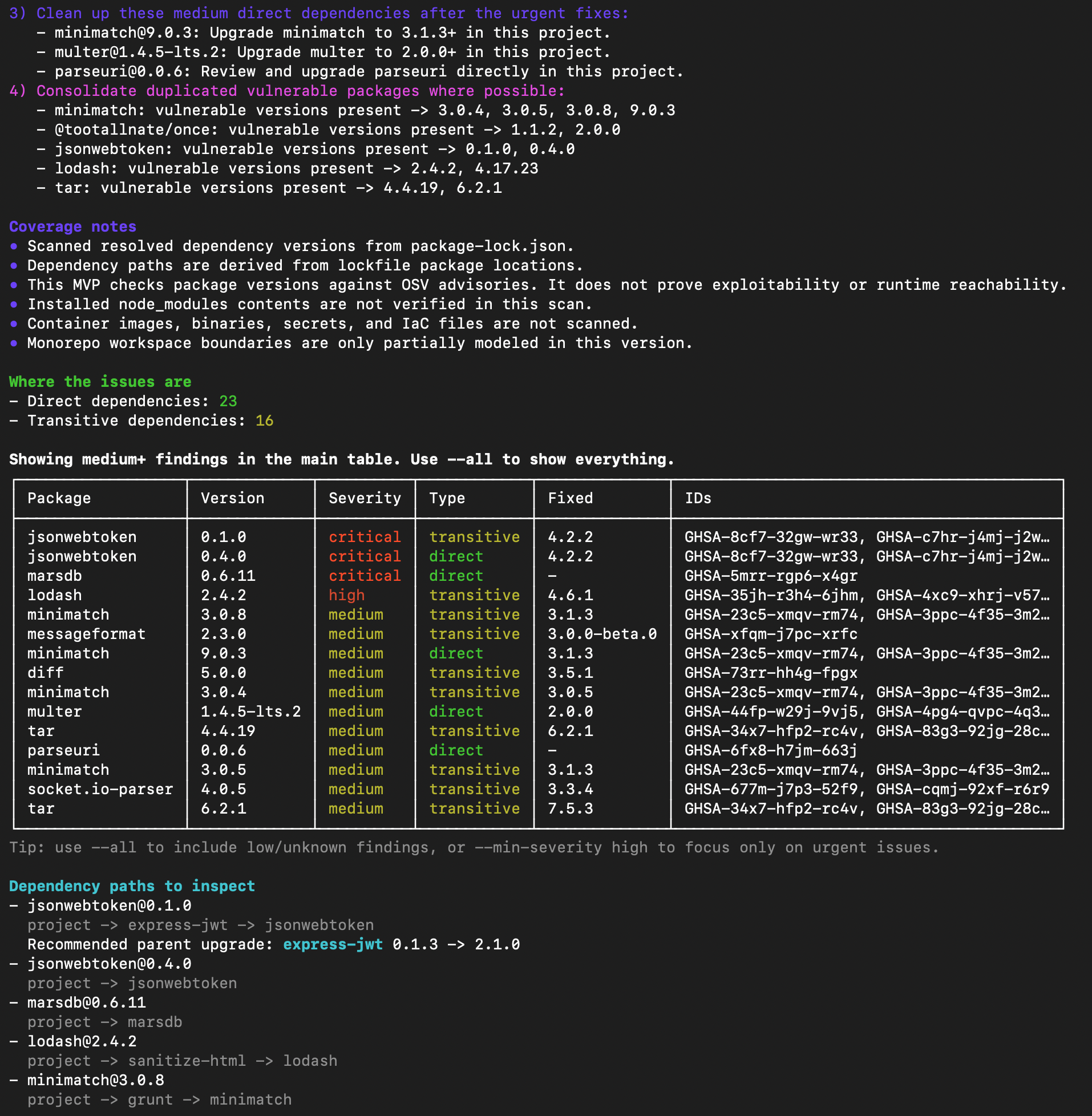
| Terminal output | HTML dashboard (--report) |
|---|---|
|
|
| Default scan output · verbose output guide | Generated with --report · HTML report guide |
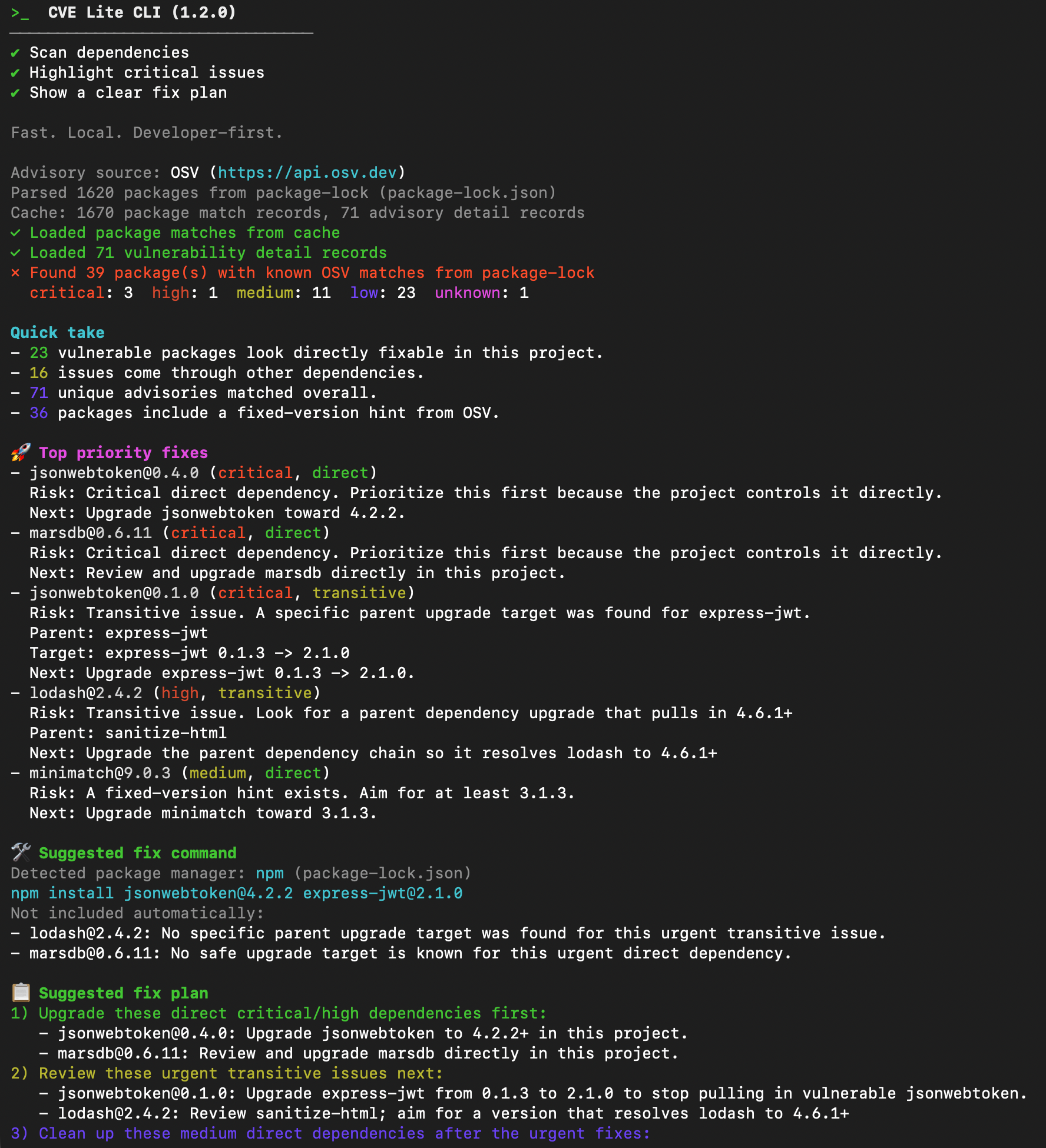
Verbose terminal output — includes the full fix plan

Generate a self-contained HTML dashboard from any scan — severity cards, an interactive findings table, and copy-ready fix commands, all written to a local directory and opened automatically in your browser.
cve-lite /path/to/project --report
cve-lite /path/to/project --report ./my-report --no-open
See the HTML Report guide for the full option reference and output details.
# Basic scan
cve-lite /path/to/project

# Show all findings
cve-lite /path/to/project --all

# Focus on urgent findings only
cve-lite /path/to/project --min-severity high

# Full output: fix plan, paths, and complete table
cve-lite /path/to/project --verbose

# Apply validated direct dependency fixes and rescan
cve-lite /path/to/project --fix

# Production dependencies only (where supported by the lockfile)
cve-lite /path/to/project --prod-only

# Fail a build on high severity and above
cve-lite /path/to/project --fail-on high

# JSON output
cve-lite /path/to/project --json

# Generate an HTML vulnerability dashboard (opens in browser automatically)
cve-lite /path/to/project --report
cve-lite /path/to/project --report ./my-report --no-open

# Scan project source files to check if vulnerable dependencies are actually imported
cve-lite /path/to/project --usage

# Filter out noise by only showing vulnerabilities in packages that are imported in your source code
cve-lite /path/to/project --usage --only-used

# Sync the local advisory DB for offline scans
cve-lite advisories sync

# Scan with zero runtime advisory API calls
cve-lite /path/to/project --offline

# Use a specific local advisory DB file
cve-lite /path/to/project --offline-db /path/to/advisories.db

# Use a custom advisory endpoint
cve-lite /path/to/project --osv-url https://security.company.internal/osv

# Show version
cve-lite --versionCVE Lite CLI is designed to be blazing fast. Scanning a lockfile is nearly instantaneous, whereas running static reachability analysis across thousands of source files takes significantly more time. Furthermore, static analysis can occasionally produce false negatives (e.g., if a package is used in a build script or dynamically imported at runtime). Making --usage opt-in ensures the default lockfile scan remains instant and strictly reflects your dependency graph, while giving you the option to aggressively filter out unreachable noise when triaging findings.
--fix applies validated direct dependency fixes using your project's package manager, then rescans automatically.
In the current version it:
- applies only direct dependency fixes with a validated lowest known non-vulnerable target
- uses
npm install,pnpm add,yarn add, orbun addbased on your lockfile - rescans automatically after applying fixes
- does not auto-apply transitive overrides or guarantee application compatibility
npx cve-lite-cli /path/to/project --fixSee the Fix mode guide for output details and interpretation.
For teams in enterprise, restricted-network, or air-gapped environments:
# Sync advisory data locally
cve-lite advisories sync

# Scan with no runtime API calls
cve-lite . --offline
Syncing ~217,065 advisory records runs in under 9 seconds after bulk SQLite ingestion optimizations — roughly 9.9x faster than the initial implementation.
See the Offline Advisory DB guide for the full workflow including CI, scheduled refresh, and controlled-network patterns.
The project ships a first-party GitHub Action on the Marketplace:
- uses: OWASP/cve-lite-cli@v1
  with:
    verbose: "true"
    fail-on: high
CVE Lite CLI also uses itself in CI to scan its own dependencies. See self-scan.yml.
For full CI patterns including offline workflows, git hooks, and scripted automation, see the CI and Workflow Integration guide.
CVE Lite CLI is an OWASP Incubator Project, peer-reviewed and maintained under the Open Web Application Security Project Foundation. Being part of OWASP means:
- Peer-reviewed by security professionals
- Community-driven development and governance
- Vendor-neutral with no commercial platform required
- Open source with transparent security practices and a minimal dependency footprint
Where it fits in the OWASP ecosystem:
CVE Lite CLI fills a specific gap — fast, local-first JS/TS dependency scanning close to release time — that broader OWASP tools are not optimized for:
| Tool | Focus |
|---|---|
| CVE Lite CLI | Lockfile-first, local developer CLI, remediation-focused, JS/TS |
| OWASP Dependency-Check | Multi-language, SAST-style, broader ecosystem |
| OWASP dep-scan | Multi-language and environment, SBOM and cloud-native |
| OWASP Dependency-Track | Platform and SBOM management, not a local CLI |
CVE Lite CLI complements these tools. It is not a replacement for continuous monitoring or full SBOM management — it is the fast local check you run before pushing.
- OWASP Juice Shop — scanning a deliberately vulnerable application with known dependency issues
- NestJS — working through a real transitive dependency remediation sequence
- Analog — scanning a modern pnpm v9 Angular monorepo (3,367 packages) with unexpected toolchain vulnerabilities
If you maintain an open-source JavaScript or TypeScript project and want CVE Lite CLI evaluated on it, open an issue and share the repository. Strong candidates may be turned into future public case studies.
CVE Lite CLI is a good fit for:
- Independent developers and OSS maintainers — quick pre-release check without any platform overhead
- Startups and small teams — lightweight CI gate at no cost
- Consultants — run a scan on a client project in seconds, with a clear fix plan to hand over
- Enterprise teams with restricted networks — offline advisory DB workflow removes the need for runtime outbound calls during scans
- Teams running npm, pnpm, Yarn, and Bun — unified scanning across all four package managers in one tool
See the CI and Workflow Integration guide for concrete patterns across these scenarios.
- does not detect malicious packages before they appear in advisory data
- does not perform behavioral malware detection or package content analysis
- does not prove exploitability or verify runtime reachability
- does not scan container images, binaries, secrets, or IaC
- does not replace a full application security program
- currently focused on JS/TS dependency scanning
- local advisory sync performance will need continued optimization as the advisory dataset grows
Runtime: yaml · yarn-lockfile · better-sqlite3 · fflate
Dev only: @types/node · tsx · typescript
This is intentional. Because CVE Lite CLI is a security-oriented tool, runtime dependencies are kept minimal and reviewable.
See roadmap.md for the full plan. Phases 1 and 2 are complete. Phase 3 (ecosystem coverage: Bun, Deno, parser improvements) is in progress.
See troubleshooting.md for common issues: no lockfile found, zero results, slow advisory sync, offline DB errors, --fix skipping findings, and CI failures.
See parser-coverage.md for supported lockfile formats, selection priority, the package.json fallback, and known edge cases including monorepos and private registries.
Feedback on output clarity, remediation guidance, ecosystem coverage, and CI usage is especially valuable.
See CONTRIBUTING.md to get started.
If you use CVE Lite CLI in your project, add this badge to your README:
[](https://github.com/OWASP/cve-lite-cli)For bug reports and feature requests: GitHub Issues
Helpful feedback includes reproducible bug reports, real-world lockfile edge cases, ideas for clearer output and remediation guidance, and CI or JSON workflow examples.
For security-related reporting: SECURITY.md
If CVE Lite CLI helps your release workflow, a GitHub star helps more developers find it.
MIT