Prerequisites
The bug
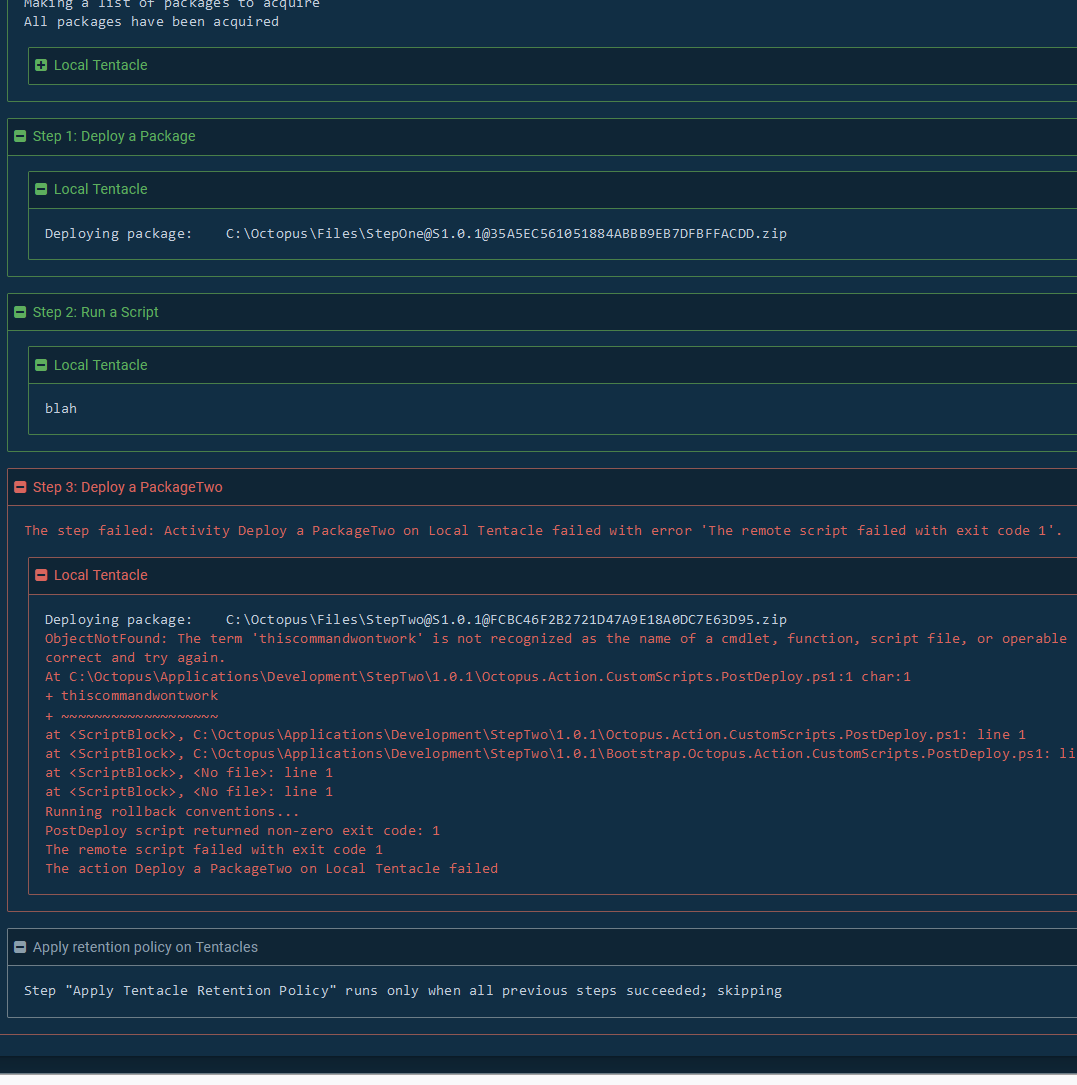
When a step has a package associated with it, whether its a Deploy a Package or even a script step, if the step fails, the package will get to the server, but the package will not be added to the deployment journal to be later cleaned up. This package will never be deleted unless it is manually intervened on.
What I expected to happen
If a package is transferred to a target, it should be added to the deployment journal regardless of if the step succeeds so it will be handled by the retention policy.
Steps to reproduce
- Create a project with a 3 release lifecycle
- Create a step with a package associated with it
- Deploy the package, incrementing the version number of the package, failing the step in one of the releases (for example, 1.0.1)
- Keep deploying and incrementing the version number of the package until retention policy kicks in, and see that the package from the failed release is not being cleaned up.
Screen capture
1.0.0 succeeded
1.0.1 for StepTwo I failed intentionally
1.0.2->1.0.4 all succeeded
1.0.0 is deleted for StepOne, but 1.0.0 remains for StepTwo and the retention logs dont even mention that it's looking for 1.0.1 for StepTwo

Failing the deploy a package step with a post deployment script:
Log exerpt
Retention policy from 1.0.4 (should clean up 1.0.0 for both releases. 1.0.1 is not being considered a package for StepTwo even though it is on the machine.)
Success: Applying retention policy using 3 Items to set Environments-1/Projects-181/Step-Deploy a Package/Machines-1/<default>

15:24:05   Verbose  |         Using Calamari.netfx 13.0.10

15:24:05   Verbose  |         Using Calamari.linux-x64 13.0.10

15:24:05   Verbose  |         Starting C:\Windows\system32\WindowsPowershell\v1.0\PowerShell.exe in working directory 'C:\Octopus\Work\20200826192405-3458-111' using 'OEM United States' encoding running as 'NT AUTHORITY\SYSTEM' with the same environment variables as the launching process

15:24:06   Verbose  |         Calamari Version: 13.0.10

15:24:06   Verbose  |         Environment Information:

15:24:06   Verbose  |         OperatingSystem: Microsoft Windows NT 10.0.17763.0

15:24:06   Verbose  |         OsBitVersion: x64

15:24:06   Verbose  |         Is64BitProcess: True

15:24:06   Verbose  |         CurrentUser: NT AUTHORITY\SYSTEM

15:24:06   Verbose  |         MachineName: WIN-KGVSE4E7CHA

15:24:06   Verbose  |         ProcessorCount: 2

15:24:06   Verbose  |         CurrentDirectory: C:\Octopus\Work\20200826192405-3458-111

15:24:06   Verbose  |         TempDirectory: C:\Windows\TEMP\

15:24:06   Verbose  |         HostProcess: Calamari (3920)

15:24:06   Info     |         Keeping this deployment and the previous 3 successful deployments

15:24:06   Verbose  |         Keeping C:\Octopus\Applications\Development\StepOne\1.0.4 and C:\Octopus\Files\StepOne@S1.0.4@1E43B34217D86F46BFBF7517DC75F5DF.zip as it is the most recent successful release

15:24:06   Verbose  |         Keeping C:\Octopus\Applications\Development\StepOne\1.0.3 and C:\Octopus\Files\StepOne@S1.0.3@4A71ACB7D849FB4AA9ACC869FE5D1FB3.zip as it is the 2nd most recent successful release

15:24:06   Verbose  |         Keeping C:\Octopus\Applications\Development\StepOne\1.0.2 and C:\Octopus\Files\StepOne@S1.0.2@9D5B1B087F0E97449EE3E0CD3D73C34A.zip as it is the 3rd most recent successful release

15:24:06   Verbose  |         Keeping C:\Octopus\Applications\Development\StepOne\1.0.1 and C:\Octopus\Files\StepOne@S1.0.1@35A5EC561051884ABBB9EB7DFBFFACDD.zip as it is the 4th most recent successful release

15:24:06   Info     |         Removing directory 'C:\Octopus\Applications\Development\StepOne\1.0.0'

15:24:06   Info     |         Removing package file 'C:\Octopus\Files\StepOne@S1.0.0@B7B9758A3F5E0D4D979A613877491CF8.zip'

15:24:06   Verbose  |         Process C:\Windows\system32\WindowsPowershell\v1.0\PowerShell.exe in C:\Octopus\Work\20200826192405-3458-111 exited with code 0

15:24:06   Verbose  |         Exit code: 0

                    |

                    |       Success: Applying retention policy using 3 Items to set Environments-1/Projects-181/Step-Deploy a PackageTwo/Machines-1/<default>

15:24:06   Verbose  |         Using Calamari.netfx 13.0.10

15:24:06   Verbose  |         Using Calamari.linux-x64 13.0.10

15:24:06   Verbose  |         Starting C:\Windows\system32\WindowsPowershell\v1.0\PowerShell.exe in working directory 'C:\Octopus\Work\20200826192406-3458-112' using 'OEM United States' encoding running as 'NT AUTHORITY\SYSTEM' with the same environment variables as the launching process

15:24:06   Verbose  |         Calamari Version: 13.0.10

15:24:06   Verbose  |         Environment Information:

15:24:06   Verbose  |         OperatingSystem: Microsoft Windows NT 10.0.17763.0

15:24:06   Verbose  |         OsBitVersion: x64

15:24:06   Verbose  |         Is64BitProcess: True

15:24:06   Verbose  |         CurrentUser: NT AUTHORITY\SYSTEM

15:24:06   Verbose  |         MachineName: WIN-KGVSE4E7CHA

15:24:06   Verbose  |         ProcessorCount: 2

15:24:06   Verbose  |         CurrentDirectory: C:\Octopus\Work\20200826192406-3458-112

15:24:06   Verbose  |         TempDirectory: C:\Windows\TEMP\

15:24:06   Verbose  |         HostProcess: Calamari (5044)

15:24:07   Info     |         Keeping this deployment and the previous 3 successful deployments

15:24:07   Verbose  |         Keeping C:\Octopus\Applications\Development\StepTwo\1.0.4 and C:\Octopus\Files\StepTwo@S1.0.4@4B56D1BB62C29C4ABD8C70468968DE74.zip as it is the most recent successful release

15:24:07   Verbose  |         Keeping C:\Octopus\Applications\Development\StepTwo\1.0.3 and C:\Octopus\Files\StepTwo@S1.0.3@017A5BEBF239714E9CCF946E47F3D5A8.zip as it is the 2nd most recent successful release

15:24:07   Verbose  |         Keeping C:\Octopus\Applications\Development\StepTwo\1.0.2 and C:\Octopus\Files\StepTwo@S1.0.2@3A395B3194506D42AF6A73B01CA17144.zip as it is the 3rd most recent successful release

15:24:07   Verbose  |         Keeping C:\Octopus\Applications\Development\StepTwo\1.0.0 and C:\Octopus\Files\StepTwo@S1.0.0@A471E0C9159B024FB4823DC40DEB18CA.zip as it is the 4th most recent successful release

15:24:07   Info     |         Did not find any deployments to clean up

15:24:07   Verbose  |         Process C:\Windows\system32\WindowsPowershell\v1.0\PowerShell.exe in C:\Octopus\Work\20200826192406-3458-112 exited with code 0

15:24:07   Verbose  |         Exit code: 0
Affected versions
Octopus Server: Latest (2020.3.3). I have not tested further back.
Workarounds
Manually delete the files. For automation you could create a scheduled runbook that compares files on the machine to the deployment journal and cleans up.
Links
Internal Ticket: https://secure.helpscout.net/conversation/1238346498/68156?folderId=3767306

Prerequisites
The bug
When a step has a package associated with it, whether its a Deploy a Package or even a script step, if the step fails, the package will get to the server, but the package will not be added to the deployment journal to be later cleaned up. This package will never be deleted unless it is manually intervened on.
What I expected to happen
If a package is transferred to a target, it should be added to the deployment journal regardless of if the step succeeds so it will be handled by the retention policy.
Steps to reproduce
Screen capture
1.0.0 succeeded

1.0.1 for StepTwo I failed intentionally
1.0.2->1.0.4 all succeeded
1.0.0 is deleted for StepOne, but 1.0.0 remains for StepTwo and the retention logs dont even mention that it's looking for 1.0.1 for StepTwo
Failing the deploy a package step with a post deployment script:

Log exerpt
Retention policy from 1.0.4 (should clean up 1.0.0 for both releases. 1.0.1 is not being considered a package for StepTwo even though it is on the machine.)
Affected versions
Octopus Server: Latest (2020.3.3). I have not tested further back.
Workarounds
Manually delete the files. For automation you could create a scheduled runbook that compares files on the machine to the deployment journal and cleans up.
Links
Internal Ticket: https://secure.helpscout.net/conversation/1238346498/68156?folderId=3767306