PropertyName="BodyAsHTML" usage requires additional info #370


Description

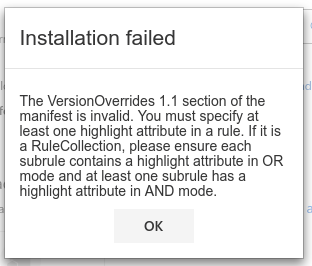
Using the XML manifest from the Outlook-Add-in-Contextual-Regex example for testing, when changing the ItemHasRegularExpressionMatch Rules from BodyAsPlaintext to BodyAsHTML outlook throws an error:
These are the only change made to the XML manifest.
<Rule xsi:type="RuleCollection" Mode="And">
   <Rule xsi:type="ItemIs" ItemType="Message" FormType="Read" />
   <Rule xsi:type="ItemHasRegularExpressionMatch" RegExName="9Digits" RegExValue="\d{9}" PropertyName="BodyAsHTML"/>
 </Rule>
<Rule xsi:type="RuleCollection" Mode="And">
  <Rule xsi:type="ItemIs" ItemType="Message" />
  <Rule xsi:type="ItemHasRegularExpressionMatch" RegExName="OrderNumber" RegExValue="CO-\d{9}" PropertyName="BodyAsHTML"/>
</Rule>
What is the "highlight attribute" it is referencing? It doesn't seem to be mentioned in the docs.
Document Details
⚠ Do not edit this section. It is required for docs.microsoft.com ➟ GitHub issue linking.
- ID: 64d9cc55-9781-d046-d612-15262d8d618e
- Version Independent ID: 8c98758c-3873-b3a4-742a-8cfbd581e56c
- Content: Use regular expression activation rules to show an Outlook Add-in
- Content Source: docs/add-ins/use-regular-expressions-to-show-an-outlook-add-in.md
- Product: outlook
- GitHub Login: @jasonjoh
- Microsoft Alias: jasonjoh