Some preferences are NOT saving in settings #106

Description

Description
I saw that there was a report on the 'No Fading' one opened on July 7th 2019, and it's been closed, but, uh, I think there's another problem.
Every time I restart NBS:
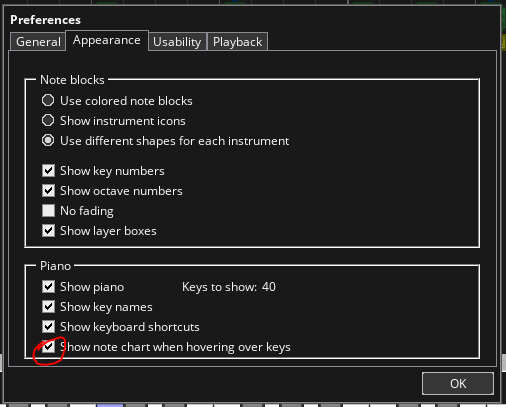
"Show note chart when hovering over keys" automatically turns back on (box ticked) when you restart nbs, and "No fading" turns off (box UNTICKED) when you restart too (I always have the box unticked anyway so that's fine but, still).
Inconsistent Directory:
The song folder directory automatically changes back to the default when you open another song from the 'file' dropdown selection, if you open another song from the startup "welcome" popup the song folder directory saves, or if you start a new song from scratch, or if you restart nbs, the directory stays the same, but it's only if you open another song from 'file'-'open song...', the pattern folder directory doesn't change though.
But even if the directory is set to default, opening songs from the 'file' dropdown in the top left still opens from where you saved so that's okay. It just caused me some confusion that's all.
To Reproduce
Steps to reproduce the behavior of preferences not being saved:
- Go to 'Settings'
- Go to 'Preferences'
- Press the 'Appearance' Tab
- Select whichever ones you want to test.
The ones that affect me are only the Note Chart and No Fading. - Restart NBS any way you want.
- Go back and check, the Note Chart Display will be on and 'No Fading' will be off no matter if you turned it off or not.
Steps to reproduce the behavior of the File Directory Display issue:
- Go to 'file'
- Click on 'Change' in the song directory
- Change the folder
- Open an already existing nbs file (not from welcome popup)
- Check directory again, the directory practically is still the same but the text displayed is as of the default folder, (which doesn't actually exist on my computer, so I assume it will have an effect on people with multiple Noteblock Project folders).
Expected behavior
I'd prefer the settings to save.
Screenshots
Mainly this one bugs me cause I compose by ear most of the time and idk it takes up a lot of the screen so I can't see the notes behind
Additional context
I have another issue I will submit later that I would rather fixed than this, I don't mind this issue as much but I just wanted to mention it because bugs are bad.