Home
Screenmap below.
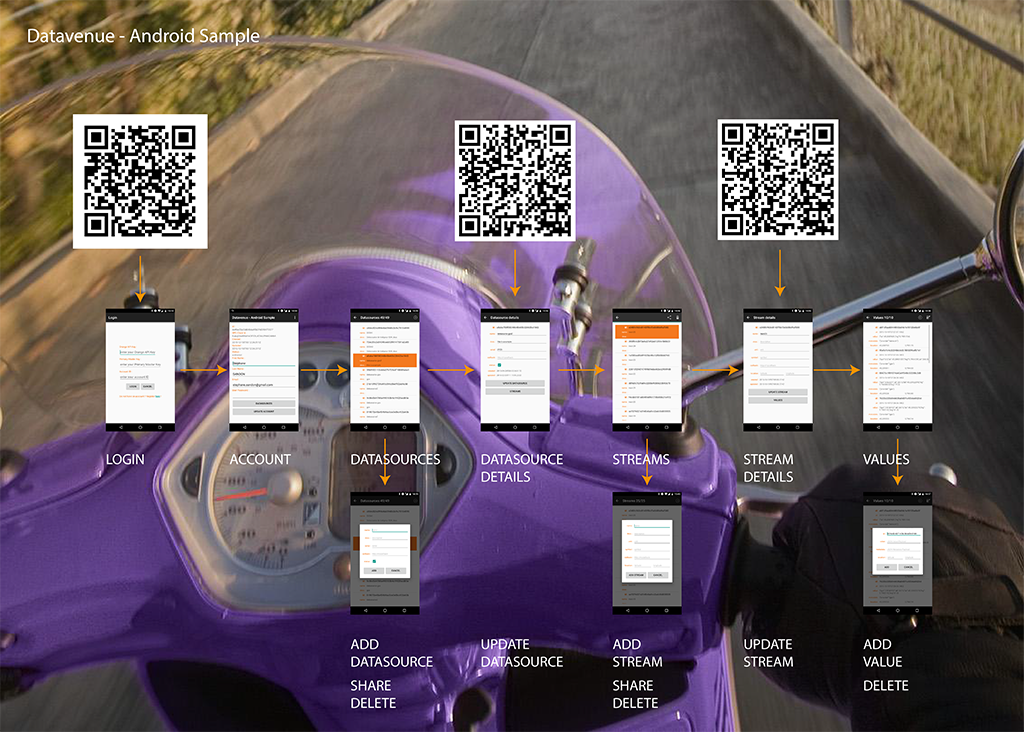
On this screen enter your credentials (mainly your API Keys).
For sake of simplicity you can access this screen simply by using URIs of this format (1). You can use a barcode generator and flash it if you want. https://api.orange.com/datavenue/v1/accounts/{accountId}?ope={ope_key}&key={api_key}
Basic information about your account. You can change your portal's password on this screen and access your datasources.
This screen basically lists your Datasources. You can add, share or delete a datasource.
Details information on a datasource. This screen lets you change Datasource settings and access the associated streams. Fast access URIs https://api.orange.com/datavenue/v1/datasources/{datasourceId}?ope={ope_key}&key={api_key}
Same as Datasources Screen except for Streams.
Stream details with update possibility. You can access Values of the stream. Fast access URIs https://api.orange.com/datavenue/v1/datasources/{datasourceId}/streams/{streamId}?ope={ope_key}&key={api_key}
Shows values of the streams. You can add or delete values.
(1) For security reason, this format is only understood by the android application, but not the rest service.