This repository provides information on how to set up a CI/CD workflow of a Node.js application hosted on Kubernetes.
- Prerequisites
- Application Set-up Workflow
- File Structure
- GitHub account.
- Docker Hub account.
- AWS account with (use Terraform to spin up servers):
- Jenkins server (t2.micro)
- SonarQube server (t2.medium)
- Kubernetes Master server (t2.medium)
- Kubernetes Worker One server (t2.micro)
- Kubernetes Worker Two server (t2. micro)


- Create t2.micro instance in AWS and name for it. Example: jenkins-server
- Software to be installed on Jenkins machine:
- Java
- Git
- Jenkins
- Ansible
- Terraform
- Once all the required software are installed Jenkins can be accessed via
http://<jenkins-server-IP>:8080 - Login to Jenkins and install the below plugins:
- Ansible plugin
- NodeJS Plugin
- SonarQube Scanner for Jenkins
- Office 365 Connector
- Create t2.medium instance in AWS and name for it. Example: sonar-qube-server
- Install SonarqQube Server software in sonar-qube-server and start sonar.
- Login to Jenkins and Integrate SonarQube server with Jenkins. (Jenkins -> Manage Jenkins -> Configure System -> SonarQube servers)
NOTE: SonarQube server can be access by http://<sonar-qube-server-IP>:9000
- Create 3 instances in AWS (use Terraform to spin up servers):
- 1 t2.medium instance and name it. Example: K8-Master-Server
- 2 t2.micro instances and name it. Example: K8-Worker-One, K8-Worker-Two
- Set-up Kubernetes cluster using Kubeadm.

Note: In real world scenario the application would have been accessed via domain name. Ex: www.sampleapp.com which can be achieved using NGINX and Router 53 AWS service. However these tools were not used as they charge a lot for Elastic Load Balancer (ELB) and Router 53 in AWS.


- Dockerfile: contains instructions to build Docker image.
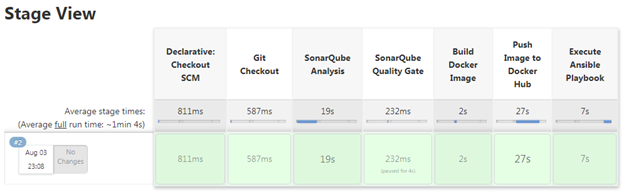
- Jenkinsfile: contains steps to run the Jenkins pipeline.
- MASTER-SERVER-FILES: Files in this folder are actually present in the Master Node. These files are placed here convenience purpose ONLY
- nodejs-app-helm: helm chart for our Node.js project. All the required manifests files are placed inside the helm chart.
Note: To demonstrate with and without referring inputs for manifest files from “values.yml” file the below actions are performed:
- For “hpa.yml”, “service.yml” referred inputs from “values.yml”
- For “deployment.yml”, ”namespace.yml” inputs are not referred from “values.yml”
- prometheus-grafana: We can deploy Prometheus and Grafana easily using Helm charts. However to demonstrate the deployment without using Helm charts I have written all manifests file individually.
- nodejs-app-helm: helm chart for our Node.js project. All the required manifests files are placed inside the helm chart.
Note: To demonstrate with and without referring inputs for manifest files from “values.yml” file the below actions are performed:
- package.json: records important metadata about a project which is required before publishing to NPM, and also defines functional attributes of a project that npm uses to install dependencies, run scripts, and identify the entry point to our package.
- playbooks: contains ansible playbooks which assists in deploying our Node.js application and monitoring tool in Kubernetes cluster.
- hosts: stores information about remote nodes, which we need to manage.
- kubernetes-helm-deployment.yml: playbook to deploy node.js application to Kubernetes application.
- kubernetes-monitoring-deployment.yml: playbook to deploy Prometheus and Grafana to Kubernetes application.
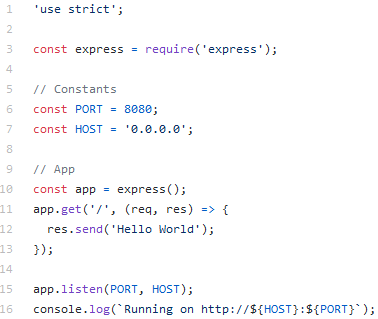
- server.js: handles our application startup, routing and other functions.
- sonar-project.js: contains SonarQube server details, properties, etc.
- terraform-scripts: Infrastructure As Code (IAC) tool.
- To demonstrate writing of terraform scripts with and without the use of “modules” the below actions are performed:
- Used “modules” for
- S3
- DynamoDB
- Terraform backend
- Used “modules” for
- To demonstrate writing of terraform scripts with and without the use of “modules” the below actions are performed: