




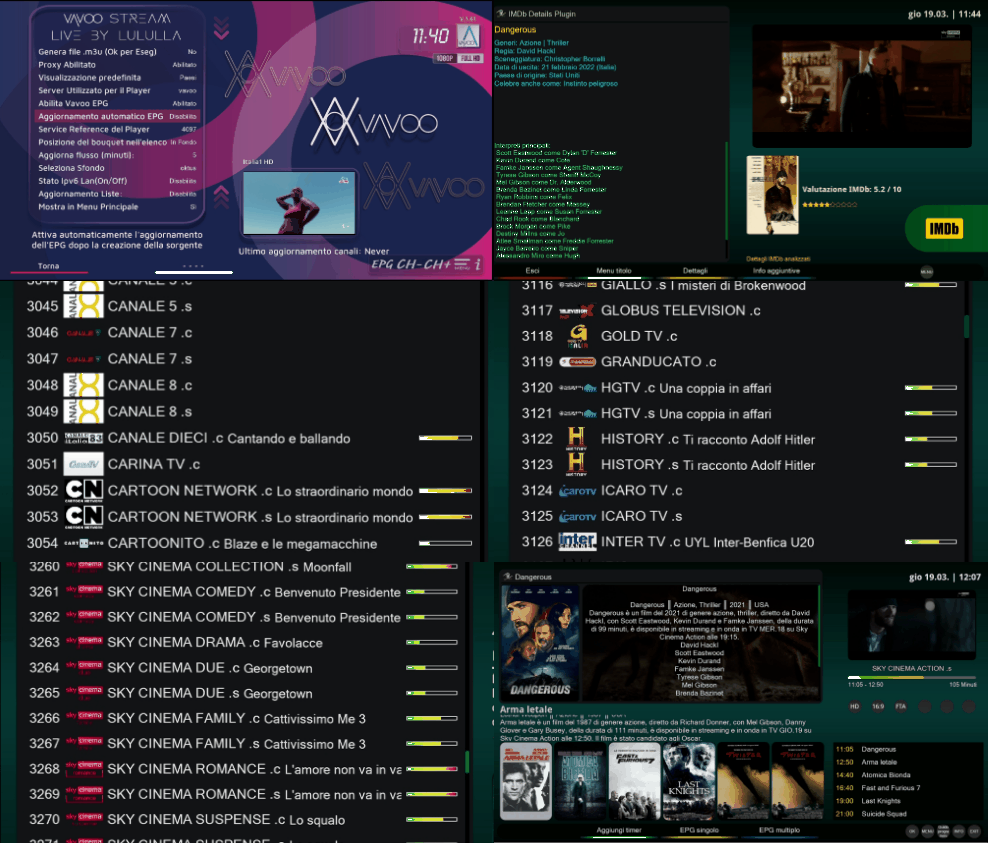
Vavoo Stream Live Plugin is an Enigma2 extension that provides access to thousands of live TV channels from multiple countries. It features a built-in local proxy for improved reliability, automatic bouquet updates, EPG integration, real-time notifications, satellite priority matching, and seamless integration with your Enigma2 receiver.
|  |
|
- Live TV Streaming – Watch live channels from various countries
- Country & Category Browsing – Organized by country and category
- Search Functionality – Find channels by name in real-time
- Enigma2 Bouquet Export – Export channels directly to your channel list
- M3U Playlist Generation – Create standard M3U playlists for external players
- EPG Integration – Electronic Program Guide for supported channels, served via GitHub
- Satellite Priority Matching – Intelligent EPG matching prioritizing user-configured satellites
- Automatic Updates – Scheduled bouquet updates to keep channels current
- Local Proxy Integration – Enhanced reliability and no 10-minute blocks
- Multi-Language Support – Including right-to-left language support
- Customizable Interface – Change backgrounds, fonts, and settings
- Proxy Status Monitor – Real-time proxy status display in main interface
- Real-time Notifications – Visual feedback for all operations (exports, EPG processing, errors)
- Complete EPG Cache – Persistent storage with matched/unmatched status and Rytec IDs
- Thread-safe Operations – Background exports with progress notifications
- Text Key Functions – Manual proxy refresh using TEXT button
- Cache Format Fix – Yellow button to clean up and fix cache format
- HTTP 451 Handling – Automatic fallback to mirror sites when primary is blocked
The plugin includes a sophisticated notification system that provides real-time feedback:
- Welcome Message – Shown when the plugin starts
- Export Progress – "Export started", "Bouquet ready", "EPG processing completed"
- Error Alerts – Clear error messages with details
- Cache Operations – Notifications during cache format fixes
- Thread-safe – Notifications work from any background thread
- Message Queue – Messages are queued if the UI isn't ready
- Singleton Pattern – Single notification manager instance across all plugin screens
| Type | Duration | Color | Example |
|---|---|---|---|
| Info | 3 seconds | Blue | "Export started. Bouquet will be available shortly." |
| Success | 4 seconds | Green | "EPG processing completed for 25 channels" |
| Warning | 4 seconds | Yellow | "An export for another country is already in progress" |
| Error | 5 seconds | Red | "Bouquet creation error: connection timeout" |
- Open the Vavoo Plugin – The proxy will start automatically (welcome notification appears)
- Select a Country – Choose your desired country (e.g., "Italy")
- Press GREEN Button – Export favorites to Enigma2 bouquets (notifications show progress)
- Return to TV – Your channels will appear in the channel list!
- Go to Menu Config → Enable "Scheduled Bouquet Update: ON"
- Choose update interval (5-15 minutes) or fixed time
- The proxy will handle everything automatically
- Enable "Enable Vavoo EPG" in the configuration menu
- The plugin generates country-specific EPG files in
/etc/epgimport/ - EPG data is fetched from GitHub and displayed in the player overlay (press OK)
- Press YELLOW button in the main menu to fix cache format
- This will add missing fields and remove duplicate entries
- A notification will show the result
In the Config Menu:
- ✅ Scheduled Bouquet Update: ON/OFF (only required setting)
- ✅ If ON: Choose interval (5-15 min) or fixed time
- ✅ Enable Vavoo EPG: Generate EPG sources for EPGImport
- ✅ Proxy Enabled: Enable/disable the local proxy (default: ON)
- ✅ List Position: Place Vavoo bouquets at top or bottom of channel list
- ✅ Select Background: Choose custom background images
- ✅ IPv6 State: Enable/disable IPv6 on your system
- ✅ Link in Main Menu: Show plugin in main Enigma2 menu
- Proxy and updates are managed automatically
- ✅ No 10-minute blocks – Proxy handles authentication tokens
- ✅ Automatic updates – Keep bouquets fresh without manual work
- ✅ Improved performance – Local proxy provides stable streams
- ✅ EPG support – Program guide for many channels with satellite priority
- ✅ Clean system – Single configuration point
- ✅ No manual refreshes – Everything happens automatically
- ✅ Real-time monitoring – Proxy status always visible
- ✅ Visual feedback – Notifications for all operations
- ✅ Manual control – Force proxy refresh with TEXT button
- ✅ Cache management – Fix cache format with YELLOW button
- Manages authentication with Vavoo servers
- Automatically renews tokens every 8-9 minutes (TOKEN_ADDON_SIG = 600 seconds)
- Provides stable URLs for bouquets
- Completely eliminates 10-minute streaming blocks
- Self-monitoring with automatic restart on failure
- Connection pool management to prevent timeouts
- Mirror Support: Automatic fallback between vavoo.to and kool.to when HTTP 451 is detected
- Token Monitor: Background thread that checks token age every 60 seconds
- Active Stream Tracking: Notifies proxy when streams start/end for better resource management
- EPG data is generated per country and stored in
/etc/epgimport/vavoo_<country>.channels.xml - A master source file (
vavoo.sources.xml) is created for EPGImport - The player fetches EPG via the proxy redirect to GitHub raw files
- Intelligent Channel Matching:
- Uses Rytec database for EPG IDs
- Scans user-configured satellites from Enigma2 NimManager
- Prioritizes matches from satellites the user actually has configured
- Falls back to Italian satellites (13°E HotBird, 5°W Eutelsat) for Italian channels
- Priority levels: Satellite > Terrestrial > Cable > IPTV
- Boost multipliers: 1.5× for user-configured satellites, 1.3× for Italian satellites
- Singleton Pattern: Single manager instance across all screens
- Thread-safe: Lock mechanism prevents race conditions
- Message Queue: Pending messages stored until UI is ready
- Auto-cleanup: Notifications automatically hide after timeout
- Fallback: Console logging when UI not available
The proxy provides these endpoints:
/status– Check proxy status/channels?country=CountryName– Get channels by country/vavoo?channel=ChannelID– Resolve stream URLs (302 redirect)/catalog– Full channel catalog/countries– List all countries/refresh_token– Force token refresh/epg/<country>.xml– Redirect to GitHub EPG file/health– Detailed health check with token age/shutdown– Gracefully stop proxy
- Path: Plugin menu → Select country → GREEN button
- Creates bouquets with proxy URLs:
http://127.0.0.1:4323/vavoo?channel=CHANNEL_ID - Service references are matched against Rytec database for EPG compatibility
- EPG mapping files are automatically generated for each country
- Supports both flat bouquets and hierarchical categories
- Path: Config Menu → "Generate .m3u files"
- Downloads playlist from proxy and saves as
vavoo_[country]_playlist.m3u - Supports single country or all countries export
- Location:
/etc/epgimport/vavoo_*.channels.xml - Source:
https://raw.githubusercontent.com/Belfagor2005/vavoo-player/master/epg_<country>.xml - Updated automatically via GitHub Actions every 6 hours
-
EPG Cache:
/etc/enigma2/vavoo_epg_cache.json– Persistent cache of matched channels with Rytec IDs{ "channel_name_country": { "id": "rytec_id", "sref": "4097:0:1:1773:60E1:217C:5A0000:0:0:0:", "name": "channel_name", "country": "it", "matched": true, "timestamp": "2026-03-19 10:23:15" } } -
Unmatched Cache:
/etc/enigma2/vavoo_epg_unmatched_cache.json– Stores channels that couldn't be matched{ "channel_name_country": { "id": "channel_name_country", "name": "channel_name", "country": "it", "sref": "4097:0:0:0:0:0:0:0:0:0:", "timestamp": "2026-03-19 10:23:15", "matched": false, "attempts": 3 } }Features:
- Tracks matching attempts count
- Auto-converts old format entries
- Persistent across plugin restarts
- Used for future matching improvements
-
SREF Map:
/etc/enigma2/vavoo_sref_map.json– Maps service references to channel IDs for the proxy
# Check proxy status
curl -s http://127.0.0.1:4323/status

# Check proxy logs
cat /tmp/vavoo_proxy.log

# Check plugin logs
cat /tmp/vavoo.log

# Check EPG cache
cat /etc/enigma2/vavoo_epg_cache.json

# Check unmatched cache
cat /etc/enigma2/vavoo_epg_unmatched_cache.json

# Check proxy health
curl -s http://127.0.0.1:4323/health| Problem | Solution |
|---|---|
| "No channels found" | Restart plugin, check internet connection |
| Bouquets don't open | Ensure proxy is running (check with curl) |
| Stream doesn't start | Proxy should auto-refresh tokens |
| M3U export fails | Verify port 4323 is accessible |
| "No programme found" | Clear EPG cache and re-export bouquet; check country EPG file exists |
| EPG not updating | Verify EPG is enabled in config and GitHub files are accessible |
| HTTP 451 errors | Proxy automatically switches to mirror sites (kool.to) |
| Duplicate cache entries | Press YELLOW button in main menu to fix cache format |
| Problem | Solution |
|---|---|
| Only first notification shows | Ensure init_notification_system(session) is called once in MainVavoo |
| Notifications from background don't appear | The singleton manager now handles this automatically |
| Message appears truncated | Check Python 2/3 encoding in notification text |
| Notifications too fast/slow | Adjust duration parameter in quick_notify(message, seconds) |
| Problem | Solution |
|---|---|
| Unmatched channels not saving | Check write permissions to /etc/enigma2/ |
| Duplicate unmatched entries | Press YELLOW button or run fix_cache_format(remove_duplicates=True) |
| Cache file corrupted | Delete the file and restart - it will be regenerated |
| Old format entries | The plugin auto-converts them on read or use YELLOW button |
- Notifications are thread-safe – You can call
quick_notify()from any background thread - Message queue system ensures no notifications are lost during plugin startup
- Unmatched channels are persistent – They survive plugin restarts and are used for future matching attempts
- Attempts counter helps track how many times a channel has been processed
- EPG cache now includes matched/unmatched status – Each entry has a
matched: true/falseflag - Satellite priority – The plugin reads your Enigma2 satellite configuration and prioritizes those channels
- Old bouquets won't work with new system – re-export required
- Proxy runs in background – bouquets work even after closing plugin
- Minimal memory usage (~20-50MB)
- Use TEXT button in main menu to manually refresh proxy token
- Use YELLOW button to fix cache format
- Proxy status is displayed in real-time in the main interface
- ✨ Cache Format Fix: Added YELLOW button to fix cache format and remove duplicates
- ✨ HTTP 451 Handling: Automatic fallback to kool.to mirror when vavoo.to is blocked
- ✨ Enhanced Proxy Monitoring: Added active stream tracking and token age display
- ✨ Improved Satellite Priority: Better detection of user-configured satellites
- 🐛 Fixed EPG cache consistency issues
- 🐛 Resolved duplicate entry problems in unmatched cache
- ⚡ Optimized EPG matching performance
- 📝 Updated documentation with new features
- ✨ Added singleton notification manager with thread-safe operations
- ✨ Implemented message queue for pre-initialization notifications
- ✨ Enhanced unmatched cache with attempt tracking and auto-conversion
- ✨ Added real-time proxy status overlay in player
- 🐛 Fixed notification display from background threads
- 🐛 Fixed unmatched cache format consistency
- ⚡ Improved EPG matching performance
- ✨ Added EPG cache in
/etc/enigma2/(persistent storage) - ✨ Implemented GitHub redirects for EPG files
- ✨ Added proxy health monitoring endpoint
- ⚡ Optimized memory usage
- Created by: Lululla (https://github.com/Belfagor2005)
- Email: ekekaz@gmail.com
- Special thanks to: @KiddaC for suggestions, Qu4k3 for technical support
- Background images: @oktus
- Contributions: Qu4k3, @Belfagor2005 (EPG integration), @giorbak
- Notification System: Based on original RaiPlay implementation
- Satellite Priority System: Based on user feedback and Enigma2 integration
- Communities: Linuxsat-support.com & Corvoboys
CC BY-NC-SA 4.0
https://creativecommons.org/licenses/by-nc-sa/4.0
Usage of this code without proper attribution is strictly prohibited. For modifications and redistribution, please maintain this credit header.
Last Modified: 2026-03-19
