


A utility for managing Digital Repeater (DR) lists compatible with any ICOM transceiver that has DR mode
Manage • Validate • Import • Export • Delete
Features • Requirements • Installation • CSV Format • Menu Structure • Field Reference • Validation Rules • Usage Tips • Logging
Any ICOM transceiver equipped with DR mode (ID-31, ID-51, ID-52, ID-5100, IC-9700, and similar models) can load a structured repeater list through the respective CS programming software. DR_list_manager.sh provides a fully interactive, menu-driven TUI (Text User Interface) to build and maintain that list directly in the terminal — no GUI tools required. Entries are stored in a plain CSV file that can be exported and imported directly into the ICOM programming software. Designed for the Amateur Radio community, with locale-aware formatting can be easily applied in any scenario.
- Interactive TUI — dynamic headers and separators that adapt to any terminal width (up to 80 columns)
- Three operating modes — DV (D-Star), FM, and FM-N, each with mode-specific field logic
- Group management — organize repeaters into up to 50 named groups; rename, remove, or move groups with automatic cascading updates across all linked entries
- Full CRUD — add, edit, and delete repeaters through guided prompts with a final review screen and save confirmation
- Clearable fields — type
-to clear the value of Name, Sub Name, or Repeater Call Sign fields during editing - Advanced search — query the database using up to 3 combined filters (Group, Mode, RPT1USE, Call Sign, Frequency) with paginated results
- Field validation — per-field rules enforce correct callsigns, frequencies, offsets, CTCSS tones, UTC offset range (±14:00), and text length limits
- Structural error detection — lines with missing or extra field delimiters are caught before parsing, with the raw CSV data shown for reference alongside the misaligned field view
- Error field highlighting — when validation errors are found, the specific fields with problems are highlighted in red within the entry detail box
- Duplicate detection — catches repeated entries (same group + name + frequency + callsign + mode) before they cause issues in the radio
- Callsign conflict detection — prevents a DV callsign from being reused in any other DV entry, and blocks the same FM/FM-N callsign from appearing in the same band twice; conflicts display both the current and conflicting entries side by side
- Automatic corrections — decimal separators (
.→,), missingHzsuffix on tones, and mismatched offset values are fixed automatically during validation, with a summary count displayed at the end - CSV import with merge — import an external CSV and choose to replace or append to the current database; group name conflicts are resolved interactively
- Export with sequential naming — exports are saved as
RptYYYYMMDD_XX.csvwith auto-incrementing sequence numbers - Create new database — create a fresh, empty CSV base with the standard 17-column header directly from the Manage Database menu
- Database deletion — safely delete CSV files from the file list with double-confirmation protection
- Instance locking — a PID-based lock file (
/tmp/dr_list_manager.lock) prevents multiple simultaneous instances - Operation log — all add, edit, delete, import, and export actions are timestamped in
dr_manager.logwith detailed correction records - Universal cancel — press
Xat any prompt to abort the current operation and return to the previous menu - Colorized prompts — default values highlighted in orange; input prompts follow a two-line format (label +
>) for clear visual separation - Locale-aware formatting — uses
;as the column separator and,as the decimal separator
| Dependency | Notes |
|---|---|
| Bash 4.0+ | Associative arrays required |
awk |
Field parsing and in-place updates |
grep |
Pattern matching |
sed |
Text substitution |
tput |
Terminal width/height detection |
mktemp |
Safe temporary file creation |
date |
Log timestamps and export filenames |
No external packages or internet access required. Runs entirely offline.
# Clone the repository
git clone https://github.com/PP5KX/DR_List_Manager.git
cd DR_List_Manager

# Make the script executable
chmod +x DR_list_manager.sh

# Run
./DR_list_manager.sh
On startup, the script automatically loads Repeater_list.csv from the current directory if it exists. A different base file can be selected at runtime from the Manage Database menu (Option 5 → 1).
⚠️ Locale formatting — importantThis application uses the following conventions, matching Brazilian system locale and the ICOM CS programming software behavior under
pt_BR:
- Column separator:
;(semicolon)- Decimal separator:
,(comma)Files using
.(period) as a decimal separator or,(comma) as a column separator will not parse correctly. The validator can auto-correct period-based decimals during import.
The CSV contains 17 columns in the following order:
| # | Column | Description | Example |
|---|---|---|---|
| 1 | Group No |
Group number (1–50) | 4 |
| 2 | Group Name |
Display name of the group (max 16 chars) | Santa Catarina |
| 3 | Name |
Repeater display name (max 16 chars) | Florianopolis |
| 4 | Sub Name |
Secondary label (max 8 chars) | Centro |
| 5 | Repeater Call Sign |
Local repeater callsign (max 8 chars) | PP5ZFP B |
| 6 | Gateway Call Sign |
D-Star gateway callsign (DV only, max 8 chars) | PP5ZFP G |
| 7 | Frequency |
Receive frequency in MHz | 439,975000 |
| 8 | Dup |
Duplex direction | DUP- |
| 9 | Offset |
Frequency offset in MHz | 5,000000 |
| 10 | Mode |
Operating mode | DV |
| 11 | TONE |
Tone type | OFF |
| 12 | Repeater Tone |
CTCSS tone with Hz suffix | 88,5Hz |
| 13 | RPT1USE |
Whether RPT1 slot is used | YES |
| 14 | Position |
Coordinate precision level | Approximate |
| 15 | Latitude |
Geographic latitude | -27,597222 |
| 16 | Longitude |
Geographic longitude | -48,549167 |
| 17 | UTC Offset |
Time zone offset | -3:00 |
Group No;Group Name;Name;Sub Name;Repeater Call Sign;Gateway Call Sign;Frequency;Dup;Offset;Mode;TONE;Repeater Tone;RPT1USE;Position;Latitude;Longitude;UTC Offset
4;Santa Catarina;Florianopolis;Centro;PP5ZFP B;PP5ZFP G;439,975000;DUP-;5,000000;DV;OFF;88,5Hz;YES;Approximate;-27,597222;-48,549167;-3:00
4;Santa Catarina;Florianopolis;;PP5ZFP;;147,075000;DUP+;0,600000;FM;TSQL;88,5Hz;YES;Approximate;-27,597222;-48,549167;-3:00
5;Parana;Curitiba Simplex;;;;146,520000;OFF;0,000000;FM;OFF;88,5Hz;YES;None;0,000000;0,000000;-3:00
The bundled Repeater_list.csv follows a geographic convention suited to Brazil, though the structure is flexible enough to be adapted to any country or region:
- Group No / Group Name — each group represents a Brazilian state (e.g. Group 4 = Santa Catarina, Group 5 = Paraná). For other regions, groups could represent countries, provinces, counties, or any other division.
- Name — identifies the city or locality where the repeater is located (e.g.
Florianopolis,Curitiba). - Sub Name — an 8-character secondary label. Use it to add context when a city has multiple repeaters of the same mode, to indicate a club callsign abbreviation, a site name, or any other distinguishing detail, (e.g.
Centro,Serra,146MHz).
The diagram below shows the full navigation structure of the application. Every branch can be cancelled at any prompt by pressing X.
flowchart TD
    START([▶ Start]) --> MAIN

    MAIN["🏠 MAIN MENU
    ──────────────────
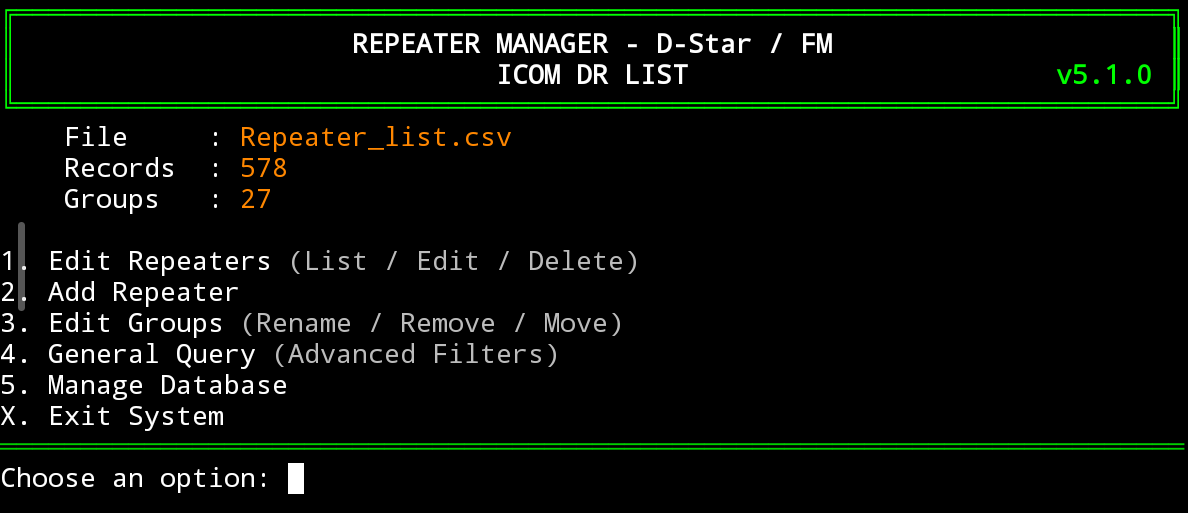
    1 · Edit Repeaters
    2 · Add Repeater
    3 · Edit Groups
    4 · Advanced Query
    5 · Manage Database
    X · Exit"]

    MAIN -->|1| OPT1
    MAIN -->|2| OPT2
    MAIN -->|3| OPT3
    MAIN -->|4| OPT4
    MAIN -->|5| OPT5
    MAIN -->|X| EXIT([🔴 Exit])

    OPT1["📋 GROUP LIST
    ─────────────────────
    Lists all groups
    with station count"]
    OPT1 --> GRPLIST["📄 REPEATER LIST
    ─────────────────────
    Paginated list
    sorted by name
    ─────────────────────
    N · Next page
    P · Prev page
    B · Back to groups
    X · Main menu"]
    GRPLIST -->|Select №| DETAIL

    DETAIL["🔍 REPEATER DETAIL
    ─────────────────────
    Shows all 17 fields
    ─────────────────────
    E · Edit
    D · Delete
    B · Back
    X · Main menu"]
    DETAIL -->|E| OPT2
    DETAIL -->|D| CONFIRM_DEL{{"Confirm\ndelete?"}}
    CONFIRM_DEL -->|y| DEL_OK(["✅ Deleted"])
    CONFIRM_DEL -->|N| DETAIL

    OPT2["✏️ ADD / EDIT FORM
    ─────────────────────
    Group No → Name
    Sub Name → Mode
    Dup → Offset
    Frequency → Call Sign
    Gateway → TONE
    RPT1USE → Position
    Lat / Lon → UTC Offset
    ─────────────────────
    Enter · keep default
    - · clear field
    X · cancel anytime
    ─────────────────────
    ✔ Review & Confirm"]
    OPT2 --> SAVED(["✅ Saved to CSV"])

    OPT3["👥 EDIT GROUPS
    ─────────────────────
    1 · Rename Group
    2 · Remove Group
    3 · Move Group
    X · Back"]
    OPT3 -->|1| RENAME["Rename → updates
    all linked entries"]
    OPT3 -->|2| REMOVE["Remove →
    Move to other group
    or delete all entries"]
    OPT3 -->|3| MOVE["Move → change
    group number across
    all linked entries"]

    OPT4["🔎 ADVANCED QUERY
    ─────────────────────
    Up to 3 filters:
    · Group (exact)
    · Mode (exact)
    · RPT1USE (exact)
    · Call Sign (partial)
    · Frequency (partial)"]
    OPT4 --> RESULTS["📊 PAGINATED RESULTS
    ─────────────────────
    Sorted by group / name
    ─────────────────────
    N · Next page
    P · Prev page
    S · New search
    X · Main menu"]
    RESULTS -->|Select №| DETAIL

    OPT5["💾 MANAGE DATABASE
    ─────────────────────
    1 · Select CSV file
    2 · Import CSV
    3 · Export CSV
    4 · Validate database
    5 · Create new database
    6 · Delete database
    7 · Clear database
    X · Back"]
    OPT5 -->|1| SEL["Select or create
    a CSV base file"]
    OPT5 -->|2| IMP["Validate external CSV
    → Replace or Append
    → Resolve group conflicts"]
    OPT5 -->|3| EXP["Save as
    RptYYYYMMDD_XX.csv"]
    OPT5 -->|4| VAL["Validate active DB
    Per-line: Correct /
    Skip / Abort"]
    OPT5 -->|5| NEW["Create empty CSV
    with standard header"]
    OPT5 -->|6| DEL["Select CSV to delete
    with double confirmation"]
    OPT5 -->|7| CLR{{"Confirm
    clear?"}}
    CLR -->|y| CLEARED(["✅ Header only kept"])
    CLR -->|N| OPT5
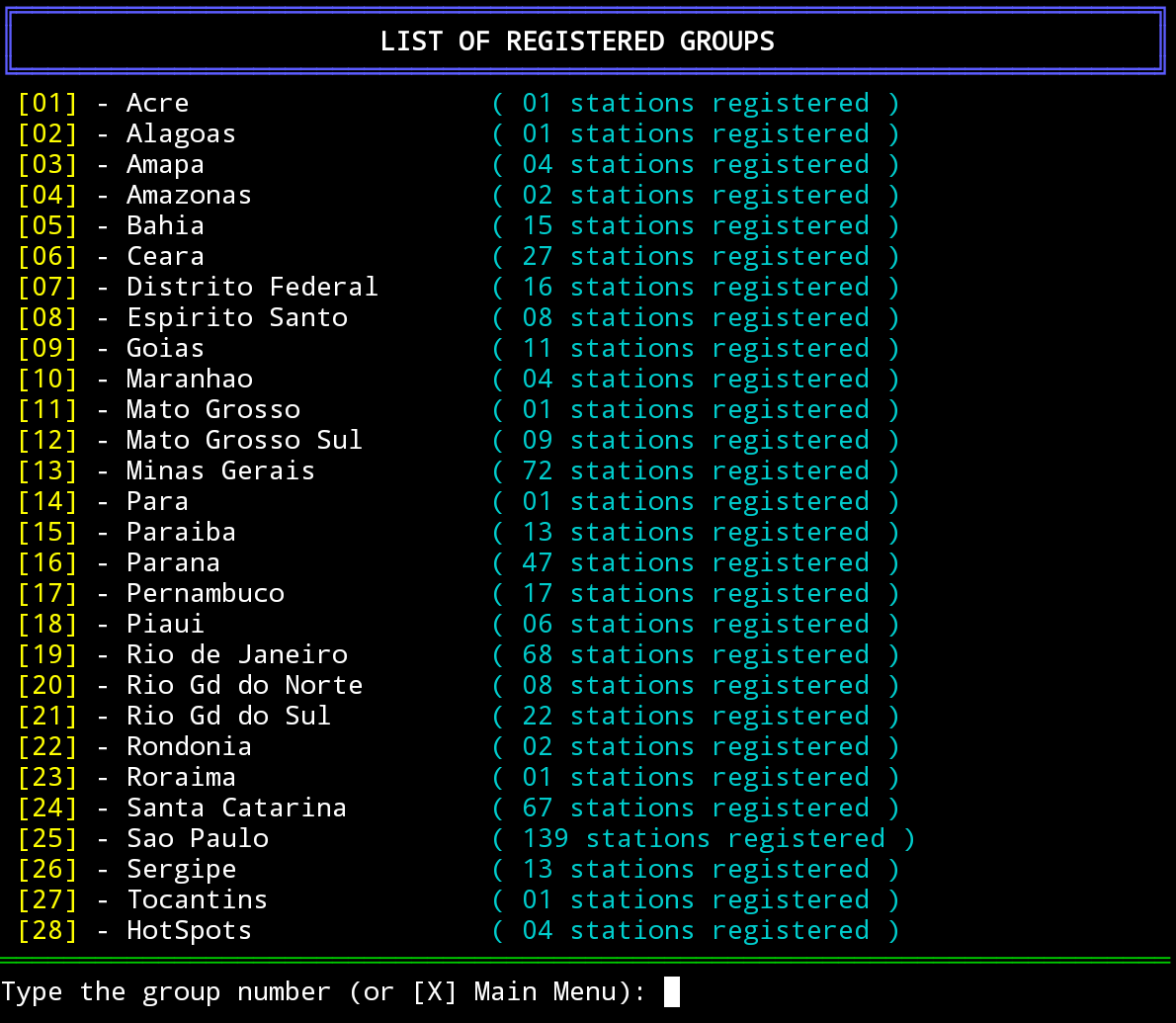
Displays all groups with their station count. Selecting a group opens a paginated list of its repeaters, sorted alphabetically by name.
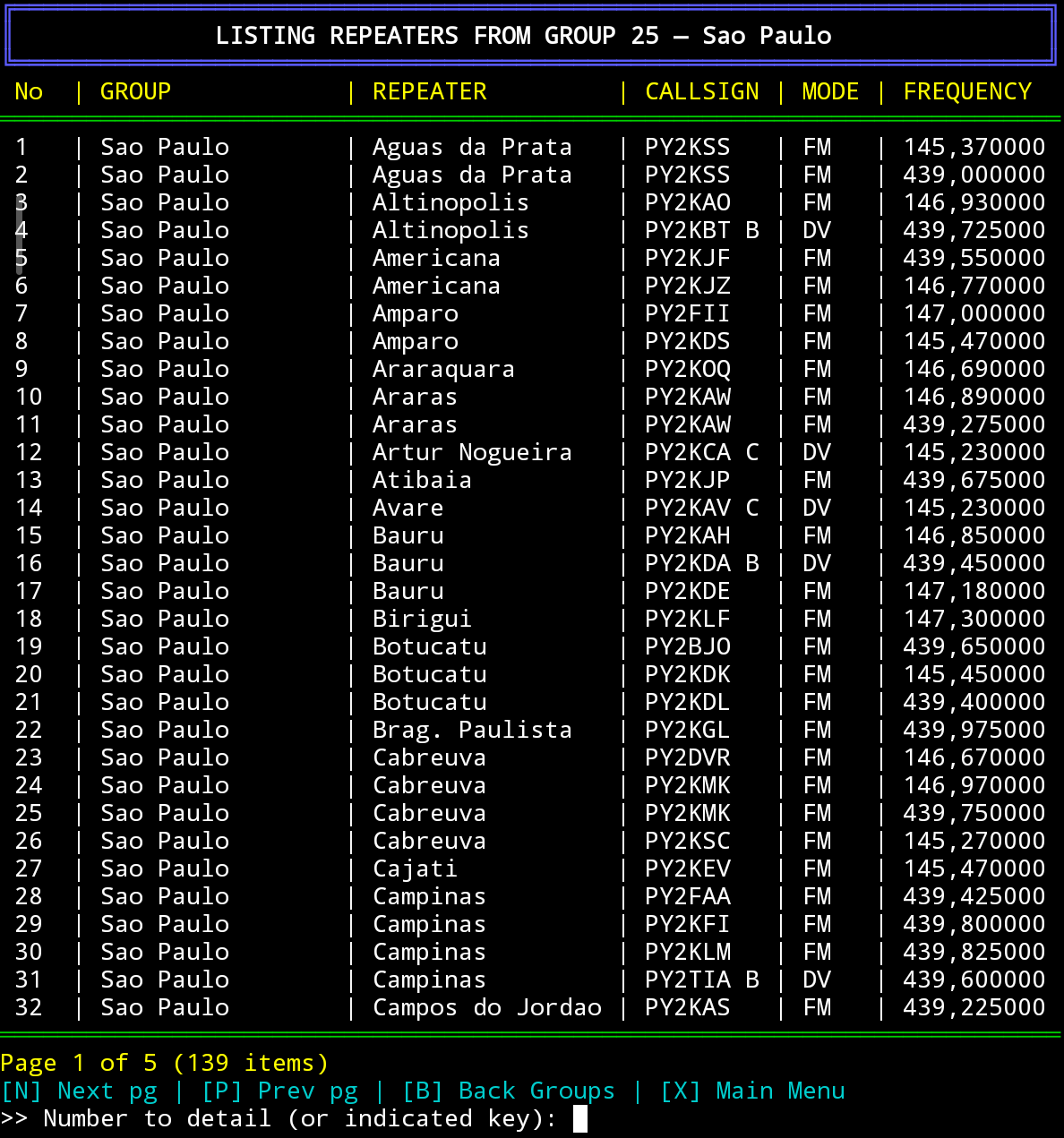
Inside a group — repeater list:
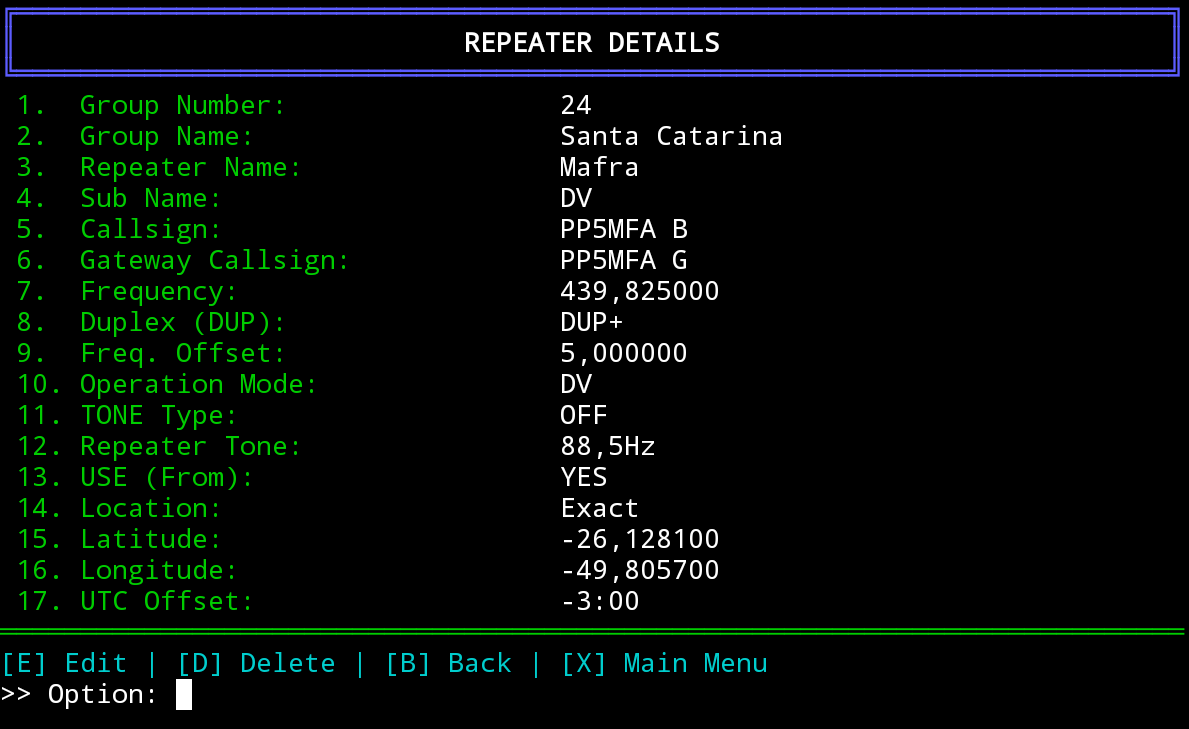
Detail view of a selected repeater:
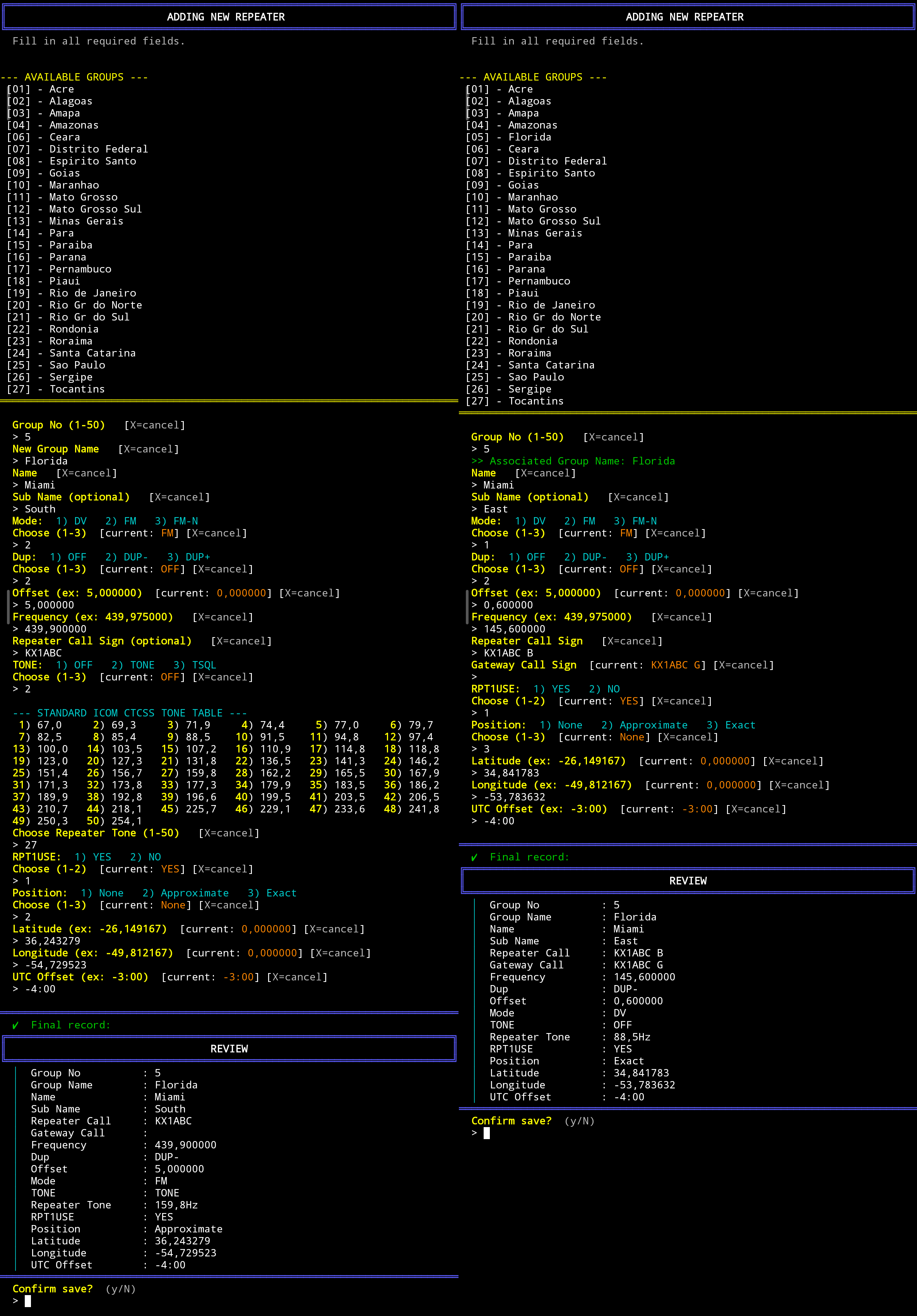
A guided sequential form that collects all 17 fields for a new entry. Prompts follow a two-line format — the label and hints on the first line, a > input marker on the second — for clear visual separation. The group name is auto-filled if the group number already exists in the database. For FM/FM-N modes, a numbered CTCSS tone table is displayed during the Repeater Tone selection step.
Clearable fields (Name, Sub Name, and Repeater Call Sign for analog duplex) display a [-=clear] hint; typing - at these prompts clears the field value.
After all fields are filled, a review screen displays the complete record for visual confirmation before saving. The user must confirm with y or cancel with N.
Field entry flow for add an Analog and Digital Repeaters.
The same form is reused for editing an existing repeater (reached from Option 1 → detail view →
[E]), pre-populated with all current values. An intro message reminds the user to press Enter to keep existing values.
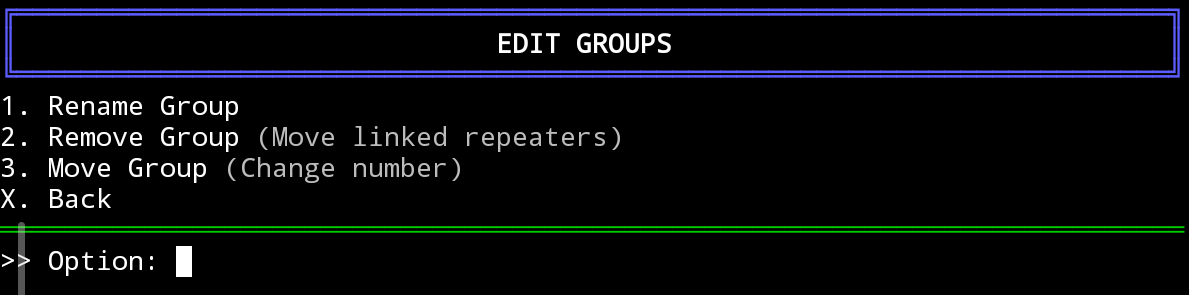
- Rename — updates the group name across every repeater entry that belongs to that group.
- Remove — offers two options: move all repeaters in the group to another group (existing or new), or delete all of them permanently. Both paths create an automatic
.backupfile before modifying the database. - Move — changes the group number to a new, unoccupied number (1–50). All repeater entries belonging to the group are updated. Available (free) numbers are displayed for convenience. A confirmation summary shows the before/after state and the number of affected repeaters.
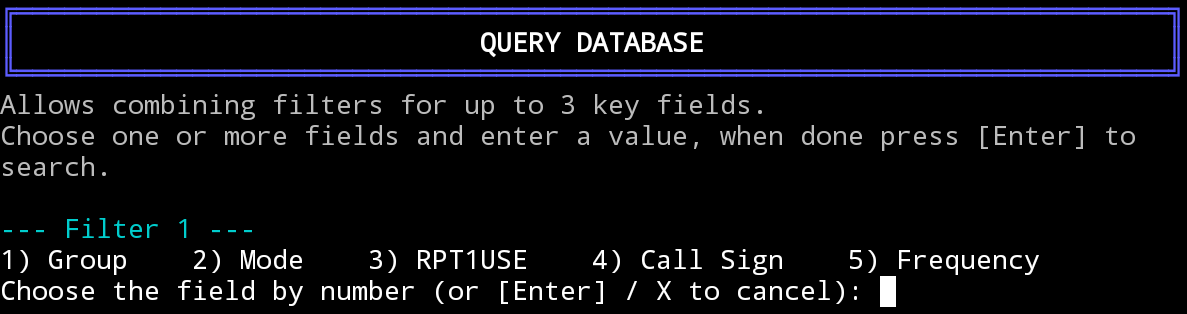
Allows filtering the entire database using up to 3 combined criteria:
| Filter | Match type | Description |
|---|---|---|
| Group | Exact | Select from a numbered list of available groups |
| Mode | Exact | Choose DV, FM, or FM-N |
| RPT1USE | Exact | Choose YES or NO |
| Call Sign | Partial | Text search against the Repeater Call Sign field |
| Frequency | Partial | Text search against the Frequency field |
Results are sorted by group name then repeater name, displayed in a paginated table. Selecting an entry number opens the full detail view, from which the entry can also be edited or deleted directly.

| Option | Description |
|---|---|
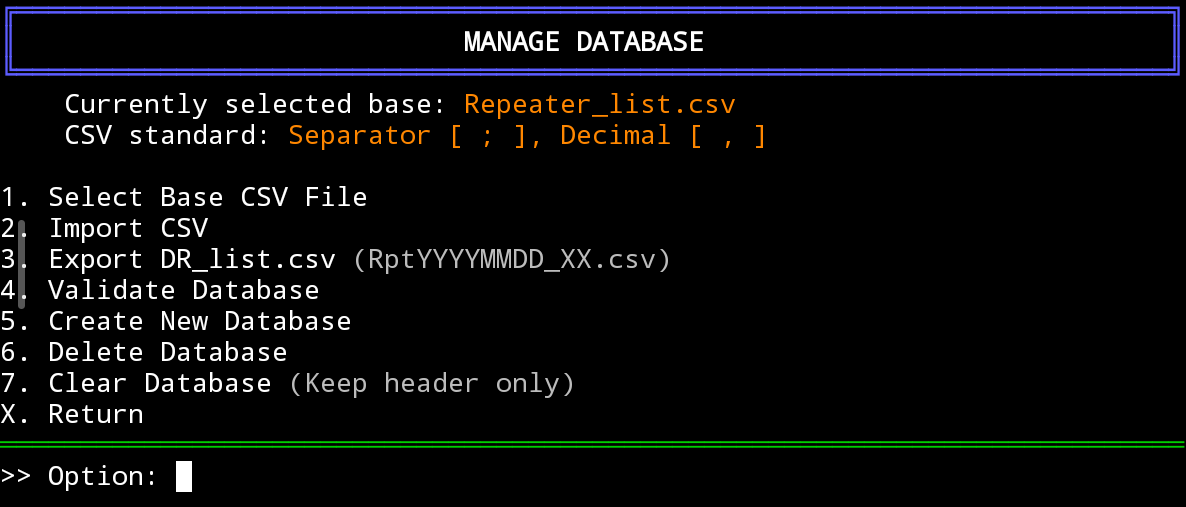
| 1 — Select CSV | Switch the active database file. Lists all .csv files in the current directory (excluding temporary files). |
| 2 — Import CSV | Validate and import an external CSV. After validation, choose to Replace the current database or Append records to it. Group name conflicts between source and target are resolved interactively with [K]eep or [U]pdate options. |
| 3 — Export | Save a copy of the current database as RptYYYYMMDD_XX.csv, where XX is an auto-incrementing sequence number to avoid overwriting previous exports from the same day. |
| 4 — Validate | Run the full validation engine on the active database. Errors are displayed with a detailed entry box showing all 17 fields (error fields highlighted in red), the conflicting entry if applicable (in yellow), and the raw CSV data for structural errors. Options: [C]orrect interactively, [I]gnore the line, or [A]bort the process. A summary of automatic corrections is displayed at the end. |
| 5 — Create | Create a new, empty CSV database with the standard 17-column header. The file name is validated and .csv extension is auto-appended. The new base is automatically selected as active. |
| 6 — Delete | List all available CSV files (excluding the currently active base and temporary files). Select one to delete with a double-confirmation prompt. Prevents accidental deletion of the working database. |
| 7 — Clear | Erase all records, retaining only the CSV header row. Requires explicit confirmation. Also removes backup files older than 7 days. |
| Field | Accepted values |
|---|---|
Group No |
Integer 1–50 |
Group Name |
Printable characters, max 16 chars |
Name |
Printable characters, max 16 chars (clearable with -) |
Sub Name |
Printable characters, max 8 chars (clearable with -) |
Repeater Call Sign |
Max 8 chars; DV requires exactly 8, last char A–Z; must be empty for simplex (Dup=OFF); clearable with - for analog duplex |
Gateway Call Sign |
Exactly 8 chars, last char G, first 7 chars must match RPT1 call sign; required for DV duplex only |
Frequency |
Format NNN,NNNNNN; must fall within 144–148 MHz (VHF) or 430–450 MHz (UHF) |
Dup |
OFF, DUP-, DUP+ |
Offset |
Format N,NNNNNN; must be 0,000000 when Dup=OFF |
Mode |
DV, FM, FM-N |
TONE |
OFF, TONE, TSQL — FM/FM-N only; must be OFF for DV |
Repeater Tone |
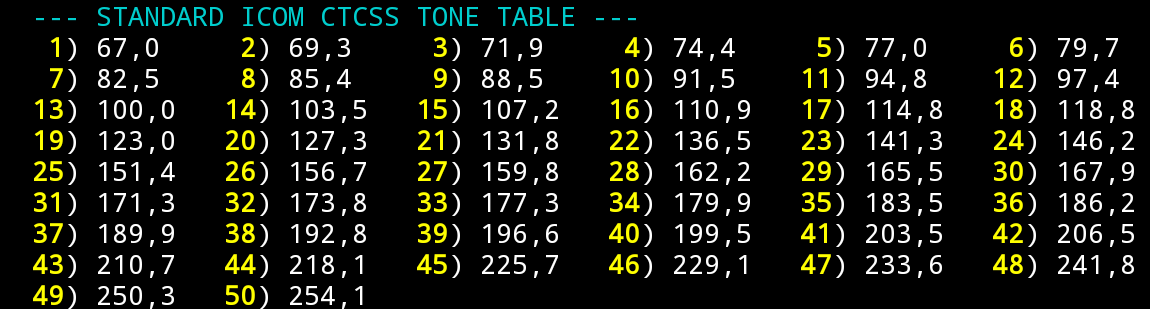
Standard CTCSS value with Hz suffix (e.g. 88,5Hz); must be 88,5Hz for DV entries |
RPT1USE |
YES, NO |
Position |
None, Approximate, Exact |
Latitude |
Format -?NN,NNNNNN (e.g. -27,597222) |
Longitude |
Format -?NNN,NNNNNN (e.g. -48,549167) |
UTC Offset |
Format ±H:MM to ±14:00, or --:-- (e.g. -3:00). Valid range: 0:00 to ±14:00 |
The following 50 standard ICOM tones are accepted (Hz, comma-decimal):
The validation engine (shared by both the manual add/edit form and the CSV import process) enforces the following rules:
- Structural integrity — each line must contain exactly 17 fields (16 semicolons). Lines with missing or extra delimiters are flagged as structural errors; the raw CSV data is displayed for reference and the entry can be corrected interactively or skipped.
- Frequency range — only VHF (144–148 MHz) and UHF (430–450 MHz) amateur bands are accepted.
- DV callsign exclusivity — a callsign used as a DV repeater cannot appear in any other DV entry in the database. The full 8-character field (including the module suffix) is compared, so
PT2MTD CandPT2MTD Bare treated as distinct callsigns. - FM/FM-N band exclusivity — the same callsign cannot serve as an analog repeater in the same band (VHF or UHF) more than once; dual-band operation with the same callsign requires separate entries on different bands. DV and FM entries with the same callsign prefix do not conflict with each other.
- Duplicate entries — records sharing the same Group No + Name + Frequency + Repeater Call Sign + Mode combination are flagged as duplicates.
- UTC Offset range — validated to the range
±14:00(the actual range of real-world time zones), rejecting values like25:00or99:99. - Mode-field consistency — DV entries must have
TONE=OFFandRepeater Tone=88,5Hz; FM/FM-N entries must have a valid non-empty CTCSS tone. - Simplex entries — both
Repeater Call SignandGateway Call Signmust be empty whenDup=OFF. - Conflict display — when a callsign conflict or duplicate is detected, both the current entry and the conflicting entry are displayed side by side (current in red, conflicting in yellow) with the specific error fields highlighted.
- Automatic silent corrections — the following are fixed without user interaction: period-based decimal separators (
.→,), missingHzsuffix on Repeater Tone values, mismatched DV tone/rpt_tone values, and non-zero Offset values when Dup=OFF. All corrections are logged indr_manager.logwith line-by-line details, and a summary count is displayed at the end of validation.
- Cancel anywhere — press
Xat any prompt (including mid-form) to abort cleanly and return to the previous menu without saving partial data. - Accept defaults — press
Enterat any prompt to keep the value shown in the[current: ...]hint. - Clear a field — type
-at prompts that display the[-=clear]hint (Name, Sub Name, Repeater Call Sign for analog duplex) to erase the field value. - Review before saving — after filling all fields in the add/edit form, a final review screen displays the complete record. Confirm with
yto save orNto discard. - Automatic backup — a
.backupfile is created automatically before any destructive operation (delete repeater, remove group, switch database). - Export before bulk changes — use Option 5 → 3 to save a timestamped snapshot before making large edits.
- Locale in spreadsheet apps — when opening the CSV in LibreOffice Calc or Excel, configure the import dialog for
;as the column delimiter and,as the decimal separator to avoid data corruption. - ICOM programming software — import the exported CSV through the CS software (CS-51, CS-52, CS-5100, etc.) using the memory channel CSV import function.
- The
;character is forbidden in all text fields and will be rejected with an error at entry time. - Single instance — the script uses a PID lock file at
/tmp/dr_list_manager.lock. If a previous session crashed and left a stale lock, the script detects and removes it automatically on next launch. - Database deletion — use Option 5 → 6 to safely remove old or unused CSV files. The currently active database cannot be deleted; switch to another base first if needed.
All significant operations are appended to dr_manager.log in the script's working directory:
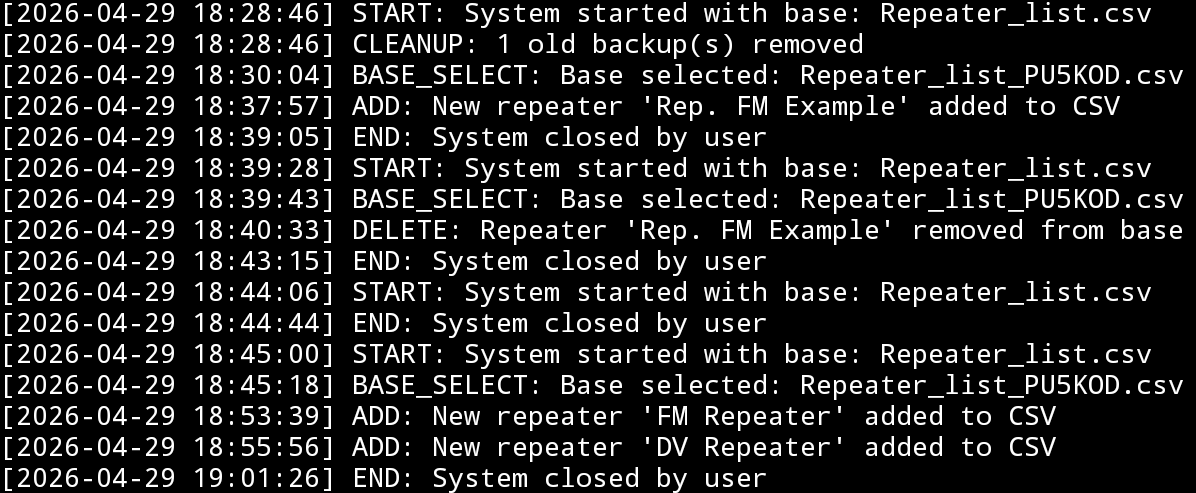
Logged event types: START, END, ADD, EDIT, DELETE, DELETE_GROUP, DELETE_BASE, RENAME_GROUP, MOVE_GROUP, CREATE_BASE, BASE_SELECT, IMPORT, EXPORT, CLEANUP, VALIDATION_STRUCTURAL_ERROR, IMPORT_AUTO_CORRECTION_LINE_*, IMPORT_VALIDATION_IGNORED, IMPORT_VALIDATION_CORRECTED, IMPORT_VALIDATION_SUMMARY.
This project follows semantic versioning:
- Decimal increments (e.g.
5.0→5.1) — bug fixes, minor UX improvements, or small feature additions. - Whole-number increments (e.g.
4.x→5.0) — significant new features or structural changes.
The current version (5.1) is displayed in the application header on every startup.
This project is released under the MIT License. See LICENSE for details.
Developed by Daniel — PP5KX
Amateur radio operator based in Mafra, Santa Catarina, Brazil
🌐 pp5kx.net · dvbr.net
Part of the dvbr.net open infrastructure project for the Brazilian amateur radio community.
73 de PP5KX