


A powerful Gradle Plugin for Android projects that tracks, compares, and reports build performance metrics — including total build time, per-module durations, per-task durations, and regressions between builds.
Never let your build times creep up again. 🚀
A Gradle Plugin is a build-time tool — it runs during your build process, not inside your app. It never becomes part of your APK. It hooks into Gradle's lifecycle to observe, measure, or modify how your project is built.
This is fundamentally different from a regular Android library:
| Regular Library (e.g. Retrofit) | Gradle Plugin (e.g. BuildPulse) | |
|---|---|---|
| Added via | implementation(...) in module's build.gradle.kts |
id(...) in root plugins {} block |
| Runs | Inside your app, on a device | During the build, on your machine |
| Part of APK? | ✅ Yes | ❌ No |
| Examples | Coil, Room, OkHttp | Hilt, KSP, BuildPulse |
- ⏱️ Total build time tracking — measures how long your entire build takes
- 📦 Module-level breakdown — see which modules (
:app,:feature-login,:core-network) are slowest - 🔧 Task-level breakdown — drill down into individual Gradle tasks
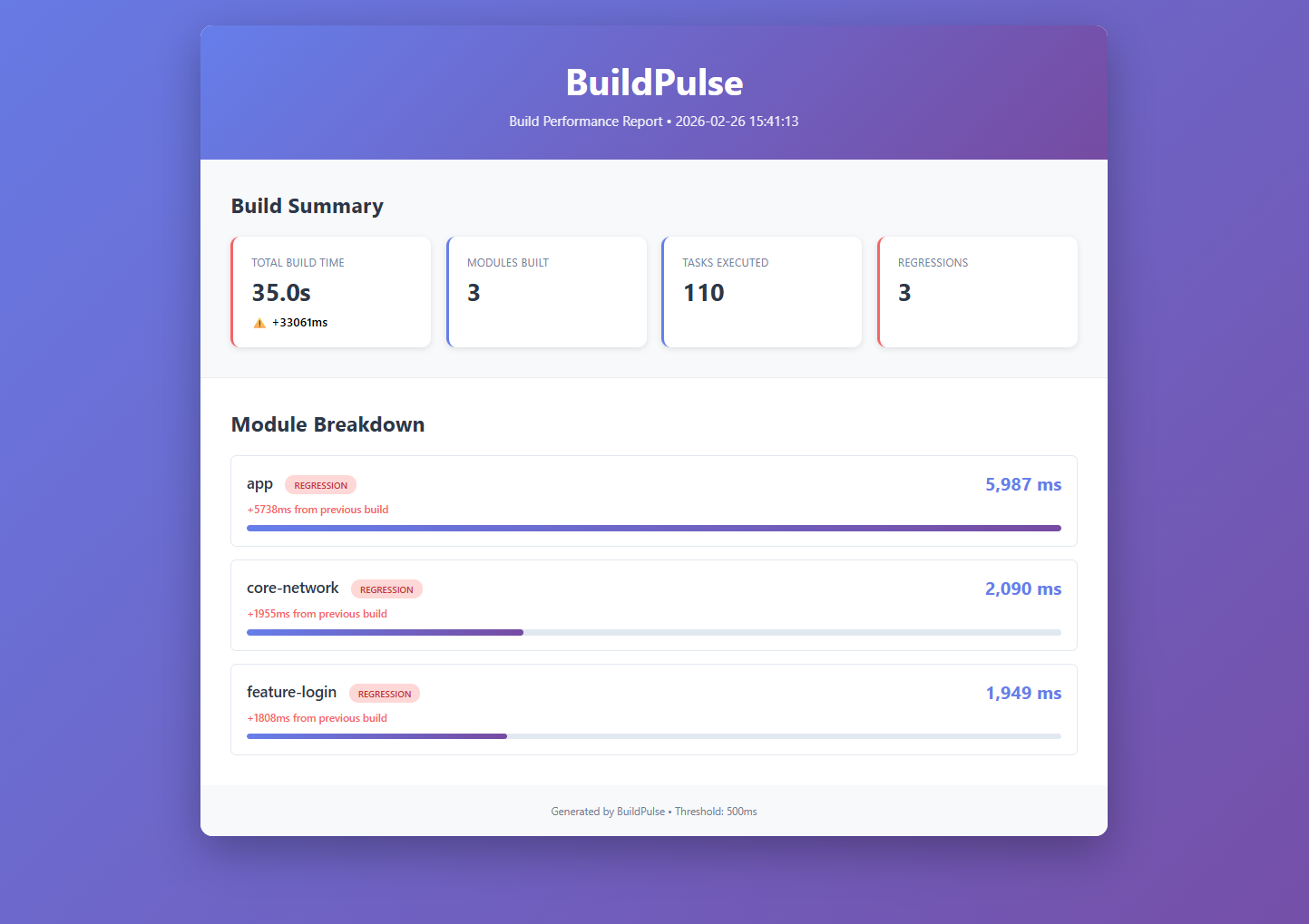
- 📊 Regression detection — compares current build vs previous build and flags slowdowns
- 🚨 CI enforcement — optionally fail the build if a regression exceeds your threshold
- 🌐 HTML report — generates a beautiful visual report at
buildpulse/build-metrics.html - 💾 Metrics persistence — saves metrics to
buildpulse/build-metrics.jsonfor comparison across builds - 🎯 Zero dependencies — pure Gradle + Kotlin stdlib, no external libraries
Add the plugin to your root build.gradle.kts:
plugins {
    id("io.github.PatilParas05.buildpulse-android") version "1.0.0"   // ← Add this
}
That's it! Sync your project and run a build.
Always use the latest version from the Gradle Plugin Portal.
BuildPulse runs automatically every time you build your project. No special commands needed.
./gradlew assembleDebugConsole Output:
╔═══════════════════════════════════════════════════╗
║          📊  BuildPulse — Metrics Summary         ║
╚═══════════════════════════════════════════════════╝

Total build time: 25.3s (first run)

Module Breakdown (sorted by time ↓)
  ─────────────────────────────────────
    app                    40,056 ms
    core-network           22,347 ms
    feature-login          16,987 ms

═══════════════════════════════════════════════════════
./gradlew assembleDebugConsole Output:
╔═══════════════════════════════════════════════════╗
║          📊  BuildPulse — Metrics Summary         ║
╚═══════════════════════════════════════════════════╝

Total build time: 18.2s (-7.1s ✅)

Module Breakdown (sorted by time ↓)
  ─────────────────────────────────────
    app                    28,120 ms   (-11,936 ms ✅)
    core-network           15,230 ms   (-7,117 ms  ✅)
    feature-login          12,450 ms   (-4,537 ms  ✅)

  ✅  BuildPulse CI Check: no regressions detected.

═══════════════════════════════════════════════════════
Open buildpulse/build-metrics.html in your browser for an interactive dashboard:
buildpulse/
  ├── build-metrics.json   ← raw metrics data
  └── build-metrics.html   ← open this in browser ✅
In Android Studio:
- Find the file in Project panel
- Right-click → Open In → Browser
All options are configured in the buildPulse { } block in your root build.gradle.kts:
| Option | Type | Default | Description |
|---|---|---|---|
enabled |
Boolean |
true |
Enable or disable the plugin entirely |
trackTasks |
Boolean |
true |
Track individual task durations |
trackModules |
Boolean |
true |
Roll up task times into module totals |
failOnRegression |
Boolean |
false |
Fail the build if a regression is detected |
maxAllowedIncreaseMs |
Long |
500L |
Threshold in ms above which a slowdown is a regression |
outputDir |
String |
"buildpulse" |
Directory where JSON and HTML reports are written |
generatedHtmlReport |
Boolean |
true |
Whether to generate the HTML visual report |
buildPulse {
    failOnRegression     = true   // ← Fail builds on regression
    maxAllowedIncreaseMs = 500L   // ← Max allowed slowdown
}
Now if any module gets slower by more than 500ms, the build fails:
❌  BuildPulse CI Check FAILED — regression detected!

  ┌─────────────────────────────────────────────────────┐
  │  Regressions  (threshold exceeded)                  │
  ├─────────────────────────────────────────────────────┤
  │  [Module]  app                              +720 ms
  │           prev: 28,120 ms  →  now: 28,840 ms
  └─────────────────────────────────────────────────────┘

BUILD FAILED
buildpulse-android/
├── plugin/                        # The Gradle plugin source
│   └── src/main/kotlin/
│       └── dev/paraspatil/buildpulse/
│           ├── BuildPulsePlugin.kt        # Plugin entry point
│           ├── BuildPulseExtension.kt     # DSL configuration
│           ├── TaskTimingListener.kt      # Hooks into Gradle task lifecycle
│           ├── MetricsCollector.kt        # Aggregates timing data
│           ├── MetricsStore.kt            # Saves/loads metrics as JSON
│           ├── MetricsComparator.kt       # Diffs current vs previous build
│           ├── ReportGenerator.kt         # Console report
│           ├── HtmlReportGenerator.kt     # HTML report
│           ├── CIEnforcer.kt              # Fails build on regression
│           └── model/
│               └── BuildMetrics.kt        # Data models
├── app/                           # Sample Android app
├── feature-login/                 # Sample feature module
├── core-network/                  # Sample core module
└── buildpulse/                    # Generated output (after build)
    ├── build-metrics.json
    └── build-metrics.html
- Plugin Registration:
BuildPulsePluginregisters aTaskExecutionListenerviaTaskTimingListener - Task Tracking: Before each task runs, it records a start timestamp; after completion, it calculates elapsed time
- Build Finished: When
gradle.buildFinishedfires,MetricsCollectoraggregates task times into module totals - Load Previous:
MetricsStoreloads the previous build's metrics from JSON (if it exists) - Comparison:
MetricsComparatordiffs the two builds to find regressions and improvements - Console Report:
ReportGeneratorprints a summary to the console - HTML Report:
HtmlReportGeneratorwrites a visual dashboard to disk - CI Enforcement:
CIEnforceroptionally throws aGradleExceptionif regressions exceed the threshold
- How Gradle plugins work internally and how they differ from Android libraries
- How
TaskExecutionListenerhooks into the build lifecycle - How composite builds (
includeBuild) allow local plugin development without publishing - How plugin marker artifacts work and the Gradle Plugin Portal submission process
- How to serialize/deserialize build metrics manually (without a JSON library)
- How to generate HTML reports from Kotlin string templates
- How to enforce build quality gates in CI/CD pipelines
Contributions are welcome! Please:
- Fork the repo
- Create a feature branch (
git checkout -b feature/amazing) - Commit changes (
git commit -m 'Add amazing feature') - Push to branch (
git push origin feature/amazing) - Open a Pull Request
MIT License - see LICENSE file for details.
Paras Patil
- GitHub: @PatilParas05
- LinkedIn: Paras Patil
- Gradle Plugin: BuildPulse Android
Built with ❤️ to solve a real pain point in Android development.
If BuildPulse helped you catch a build regression, give it a ⭐!
- 🐛 Bug reports: GitHub Issues
- 💬 Questions: GitHub Discussions
- 📖 Plugin Page: Gradle Plugin Portal
If you find BuildPulse useful:
- ⭐ Star this repo
- 🐦 Share on Twitter
- 📝 Write a blog post about it
- 💬 Tell your teammates
- 📖 Gradle Plugin Portal — Official plugin page
- 🐛 Report an Issue — Found a bug?
- 💡 Request a Feature — Have an idea?
Made with ☕ and Kotlin
BuildPulse • Keep Your Builds Fast 🚀