Debug a module with "using module" using launch.json after version 2021.12.0 not working, problem added ".{}"? #4150

Description

Prerequisites
- I have written a descriptive issue title.
- I have searched all open and closed issues to ensure it has not already been reported.
- I have read the troubleshooting guide.
- I am sure this issue is with the extension itself and does not reproduce in a standalone PowerShell instance.
- I have verified that I am using the latest version of Visual Studio Code and the PowerShell extension.
- If this is a security issue, I have read the security issue reporting guidance.
Summary
I am experiencing a problem with debugging my own modules by help of "using module xxx" in launch.json and calling classes inside the module. I think by pressing [F5] the module should be loaded but I got a error message.
This was working up to version 2021.12.0 .
Problem seems to me while pressing [F5] there is .{} added, so "using module xxx" could not be used directly in launch.json anymore. Is there a workaround in the file launch.json possible or maybe a setting in preferences(to get rid of .{})? I'm showing also my current workaround, but it's bad.
PowerShell Version
Both PS 5.1 and 7 have issues.

Name                           Value
----                           -----
PSVersion                      7.2.6
PSEdition                      Core
GitCommitId                    7.2.6
OS                             Microsoft Windows 10.0.17763
Platform                       Win32NT
PSCompatibleVersions           {1.0, 2.0, 3.0, 4.0…}
PSRemotingProtocolVersion      2.3
SerializationVersion           1.1.0.1
WSManStackVersion              3.0

Name                           Value
----                           -----
PSVersion                      5.1.17763.2931
PSEdition                      Desktop
PSCompatibleVersions           {1.0, 2.0, 3.0, 4.0...}
BuildVersion                   10.0.17763.2931
CLRVersion                     4.0.30319.42000
WSManStackVersion              3.0
PSRemotingProtocolVersion      2.3
SerializationVersion           1.1.0.1
Visual Studio Code Version
1.70.2
e4503b30fc78200f846c62cf8091b76ff5547662
x64
Extension Version
I'm working with two versions(two scenarios), latest:
ms-vscode.powershell@2022.7.2
and working one:
ms-vscode.powershell@2021.12.0
Steps to Reproduce
First steps are the files needed for both scenarios
1.) Create folders (I'm using windows) c:\test\testUM
2.) Add File testUM.psm1 in folder of step 1
Content:
class TestClass{
	[void]doSomeWork(){
		write-host ""working;
	}
}
3.) add launch.json in folder c:\test\testUM.vscode (using vscode or manual)
Content:
{
    // Use IntelliSense to learn about possible attributes.
    // Hover to view descriptions of existing attributes.
    // For more information, visit: https://go.microsoft.com/fwlink/?linkid=830387
    "version": "0.2.0",
    "configurations": [
        {
            "type": "PowerShell",
            "request": "launch",
            "name": "working till 2021.12.0",
            "args": [
                "'.\\test\\testUM';$y=[TestClass]::new();$y.doSomeWork();",
            ],
            "script": "using module ",
            "cwd": "${workspaceFolder}..\\..\\..\\"
        },
        {
            "type": "PowerShell",
            "request": "launch",
            "name": "also working till 2021.12.0",
            "args": [
                "$y=[TestClass]::new();$y.doSomeWork();",
            ],
            "script": "using module '.\\test\\testUM';",
            "cwd": "${workspaceFolder}..\\..\\..\\"
        },
        {
            "type": "PowerShell",
            "request": "launch",
            "name": "workaround for newer Version, tested with 2022.7.2 (also working in 2021.12.0)",
            "args": [
                "",
            ],
            "script": "import-module '.\\test\\testUM\\debugHelper';",
            "cwd": "${workspaceFolder}..\\..\\..\\"
        }
    ]
}
4.0) Note - this is a current workaround to get debug working - could be skipped
4.) in new folder C:\test\testUM\debugHelper add file debugHelper.psm1
Content:
using module c:/test/testUM; #using module ./test/testUM; only working in windows powershell not in 7.2
$y=[TestClass]::new();$y.doSomeWork();
Scenario 1 (ms-vscode.powershell@2021.12.0)
start debug all 3 entries, all of them are working, see visuals scenario1 debugging
Scenario 2 (ms-vscode.powershell@2022.7.2), see visuals scenario2 debugging
start debug all 3 entries, only the last entry is working (workaround for newer Version...)
I added the last case one only to show that it could be debugged with a workaround. That implies adding an extramodule for each module that should debugged - this should not be needed! launch.json should cover that.
Note:
In settings I activate Create Temporary Integrated Console
In Version 2022.5.0 there was a problem with this setting but this was solved in a later version.
Powershellversions (5.1 and 7.2) behave the same for results shown. In 5.1 there was a shortcut in debughelper.psm1 command using module ./test/testUM; was ok, this was not working in 7.2, so I used absolute path c:/test/testUM; to get identical results in both versions.
Visuals
Files for both scenarios:
launch.json

testUM.psm1
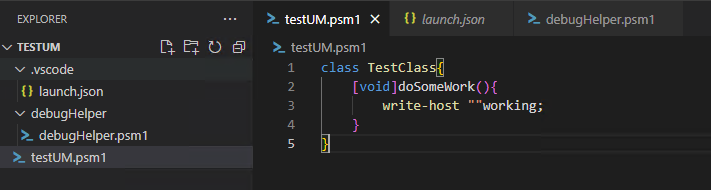
debugHelper.psm1

Debug all 3 Options
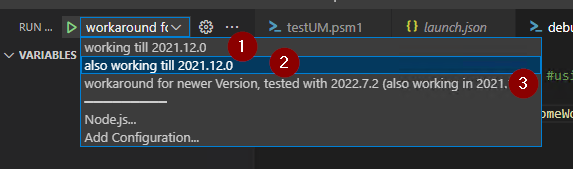
Debugging Scenario 1 results: (using version: 2021.12.0)
1.)

2.)

3.)

Debugging Scenario 2 results: (using version: 2022.7.2)
1.) (Ok in new version I have to write it together, so step 2 will solve it)
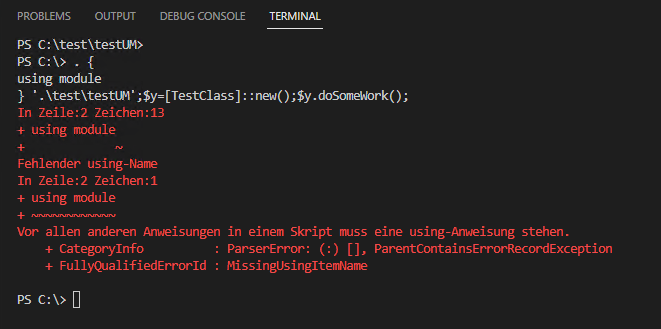
2.) (this case is the problematic one)

3.) (workaround not preferable)

Problem (my opinion) in a nutshell:
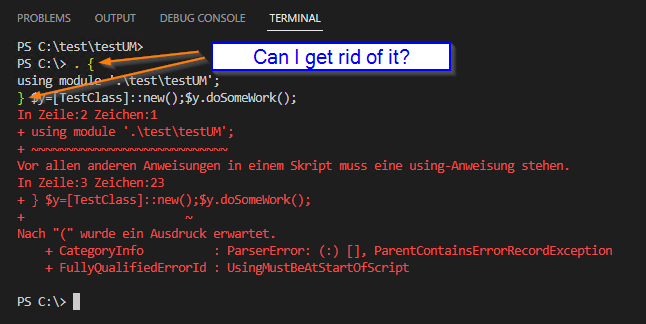
Logs
No response