System Details
- Operating system name and version: Windows Server 2012 64 bit
- VS Code version: 1.15.0-insider
- PowerShell extension version: 1.4.1
- Output from
$PSVersionTable:
Name Value
PSVersion 4.0
WSManStackVersion 3.0
SerializationVersion 1.1.0.1
CLRVersion 4.0.30319.42000
BuildVersion 6.3.9600.16406
PSCompatibleVersions {1.0, 2.0, 3.0, 4.0}
PSRemotingProtocolVersion 2.2
Copy / paste the below commands into the PowerShell Integrated Terminal, and paste the output here

code -v
code : The term 'code' is not recognized as the name of a cmdlet, function, script file, or operable program. Check the spelling of the name, or if a path was included, verify that the pa
th is correct and try again.
At line:1 char:1
+ code -v
+ ~~~~
    + CategoryInfo          : ObjectNotFound: (code:String) [], CommandNotFoundException
    + FullyQualifiedErrorId : CommandNotFoundException

PS S:\Prod> $pseditor.EditorServicesVersion

Major  Minor  Build  Revision
-----  -----  -----  --------
1      4      1      0


PS S:\Prod> code --list-extensions --show-versions
code : The term 'code' is not recognized as the name of a cmdlet, function, script file, or operable program. Check the spelling of the name, or if a path was included, verify that the pa
th is correct and try again.
At line:1 char:1
+ code --list-extensions --show-versions
+ ~~~~
    + CategoryInfo          : ObjectNotFound: (code:String) [], CommandNotFoundException
    + FullyQualifiedErrorId : CommandNotFoundException
Issue Description
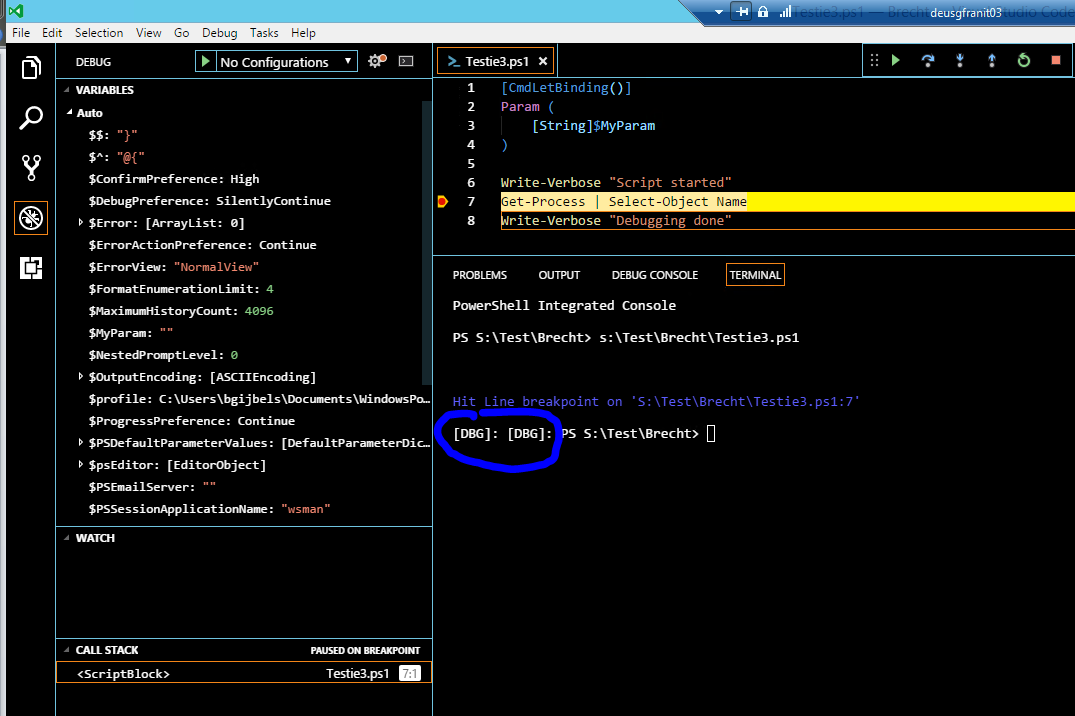
When running a script with a breakpoint, it shows the text [DBG] twice in the Terminal.

System Details
$PSVersionTable:Name Value
PSVersion 4.0
WSManStackVersion 3.0
SerializationVersion 1.1.0.1
CLRVersion 4.0.30319.42000
BuildVersion 6.3.9600.16406
PSCompatibleVersions {1.0, 2.0, 3.0, 4.0}
PSRemotingProtocolVersion 2.2
Issue Description
When running a script with a breakpoint, it shows the text

[DBG]twice in the Terminal.