Powerblock Games Godot Plugin
Welcome to the Powerblock Games Godot Plugin Docs! This plugin for Godot is SUPER helpful if you want to get started making games for Powerblock Games
but first you goatta install it!
- Download zip from here
- Extract into
addonsfolder in godot - Enable plugin in godot settings and sign in
- DONE!
Coming soon...
The plugin is generally pretty simple to use. you can do ANYTHING Nakama allows you to do.
To access everything Nakama you can use the global called NakamaManager.
Accessing the client, server, socket, etc. Can be done by referencing the NakamaManager with nakama_ before the name (to access the session: NakamaManager.nakama_session)
You can also call NakamaManager for some specific functions like getting the user (Used for metatdata, username fetchin, etc) account, or an avatar_url
NONE of these functions WORK in the plugin, they are placeholders for using it in the actual server, therefore when writing login you should always check for null responses
Example:
if await NakamaManager.get_nakama_account() != null:
    # Logic here!
You could bypass this by setting up these functions and your OWN Nakama server along with configuring connection, but for most games this is unnecessary.
When creating your game ALL assets must be in a folder that has the name of your Game ID. For example: res://pb_clicker/image.png
Also when creating your start scene you DO NOT need to specify the scene in godot bvut the scene must be named main.tscn. You can redirect as you like but that is the entrance to your game. (This should also be in res://YOUR_GAME_ID. ex: res://pb_clicker/main.tscn)
Exporting is relatively simple, export for web (test you game there and make sure it works first!) but don't use export project. As you may have guessed, you should use export PCK/ZIP and make sure in resources you ONLY have your game_id folder selected as exporting. ( Select Export all resources in the project **_except_** resources checked below and then select everything BUT your game_id folder)
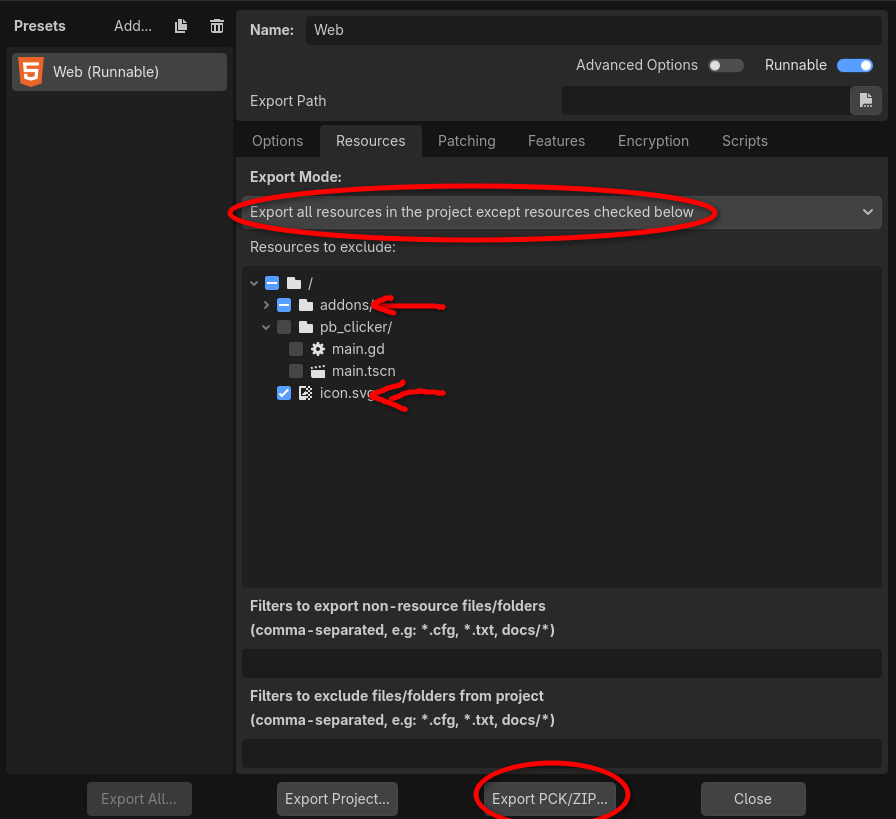
You can now upload this .PCK or .ZIP to PowerblockGames via the dev portal!