
Tac is a proof of concept programming language that tests a method factory based approach to sharing logic between objects.
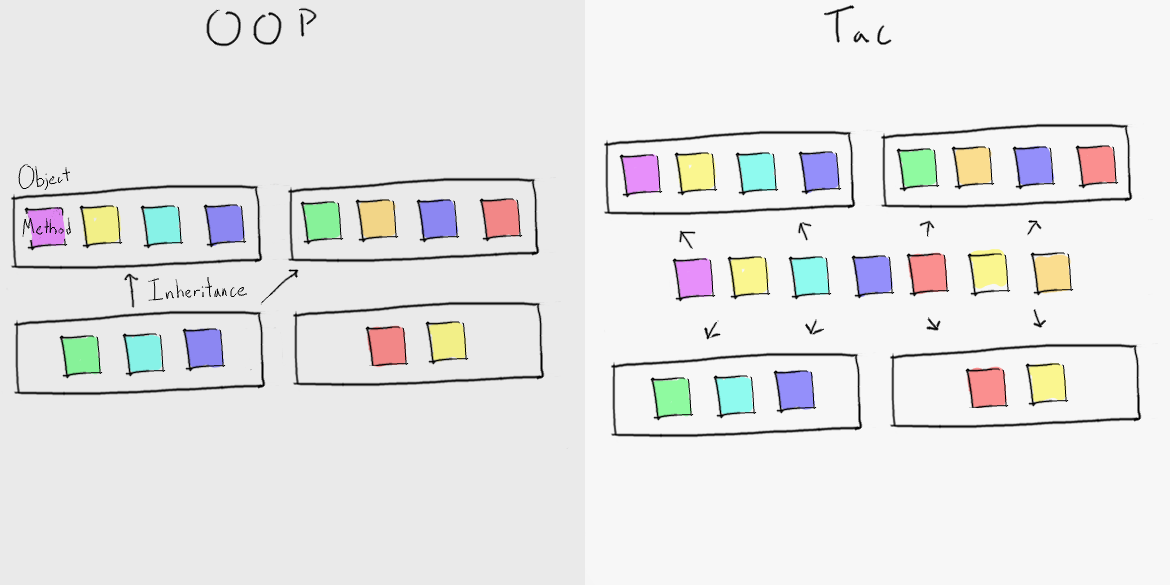
Tac has no inheritance or class hierarchies; instead, objects that share functionality are constructed using the same "building block" method-blueprints.
This approach pushes most of an app's logic from classes into method-blueprints, making it easier to access, reuse and test.
Tac has four core structures.
- Objects – Group/organize data.
- Types – Describe/classify objects.
- Methods – Group/organize logic.
- Method-blueprints – Create methods that share logic but act with respect to different contexts. They allow us to easily reuse instance methods across different kinds of object, a capacity traditionally provided by inheritance.
These are familiar concepts. Objects, types, and methods are more or less what you expect, and method-blueprints are just glorified method factories.
Objects help us organize information. They do this by grouping related values so that we can think of them as a single entity.
Objects are implemented as a set of properties. A property is a named, typed value that represents an aspect of its object. If an object models a person, its properties might include their name and age.
To create an object, we write:
object {
    string first-name := "Jared",
    string last-name := "Dunn",
    method<named, string> say-hello := ...
}
Let's break this constructor down. We start with "object" because that is what we want to make. We follow with brackets containing a comma-separated list of properties. The first-name of our object is "Jared", the last-name is "Dunn", and it has a method called say-hello (more on methods later).
If this constructor looks strange to you, it is likely because Tac has no concept of class. When you create an object in Tac, you are simultaneously defining its structure and populating it.
Types help us describe objects. They do this by classifying an object as "of the type" or "not of the type". This membership is determined by what properties an object has. Types specify a list of properties and object that have all of them are of the type.
To define a type:
type named {
    string first-name,
    string last-name
}
As with objects, we start with what we want to make – in this case, a type. Next comes what we want to call our type (named). We finish with what an object must have to be considered "named" (a string called "first-name" and a string called "last-name").
In addition to user-defined types like the one above, Tac comes with several primitive types like int, string, method and method-blueprint.
Methods are a reusable series of operations that that act on an input to produce an output.
To create a method, we write:
method<named, string> input {
    input.first-name + " " + input.last-name return;
}
As always, we start with what we are trying to make, only this time, that what is a little more complex. Methods that require different input types or produce different output types are not interchangeable. Thus, when referring to methods, we always include the input and output types next to "method" in a pair of angle brackets. We refer to these as type parameters. The first type parameter is the method's input type (named), and the second is the method's return type (string). We finish with the input parameter (input) and some code that concatenates the input's first-name and last-name.
Before we talk about method-blueprints, it is important to understand that methods always act with respect to the context in which they were created. This is best demonstrated. Say a method is defined alongside some variable i like so:
i := 0;
add-to-i := method<int, int> to-add {
    i := i + to-add;
    i return;
}
This method adds some value to i. Crucially, it always modifies the i that was defined next to it, even if a different i is defined where the method is being called. Moreover, the value of i persists from one call to the next, so calling this method repeatedly will return different values.
The method modifies that specific i because it is bound to the context in which it was created. This is generally very useful, but it can be troublesome. For example, if we wanted to create two copies of the method above that were bound to different is, it would require duplicate code. This problem becomes very real when you need to reuse logic in different objects.
Method-blueprints make it easy to reuse the same logic in multiple places without duplicate code. A blueprint is a factory that creates methods with the same logic but bound to different contexts.
Method-blueprints are really just methods. They take a context as their input and return a method that acts with respect to that context.
Unsurprisingly, defining a method-blueprint is very similar to defining a method:
say-hello-blueprint := blueprint<named, named, string> context subject {
    "Hello " + subject.first-name + ", it's " + context.first-name return;
}
Unlike methods, method-blueprints have three type parameters: the first is the context's type, the second is the input of the returned method, and the third is the output of the returned method. A blueprint definition also includes the name of the context , the name of the created method's input, and the code that will be the body of that method.
To create a method, call the blueprint like you would call a method and pass in an object that you want to be its context.
object {
    string first-name := "Jared",
    string last-name := "Dunn",
    method<named, string> say-hello := this > say-hello-blueprint
}
In summary: objects organize your data, types describe objects, methods act, and method-blueprints make it easy to reuse methods in different objects.