The following script runs a simple graphical model using EP:
https://github.com/Jammy2211/autofit_workspace_test/blob/main/graphical/expectation_propagation.py
The output of the results is as follows:
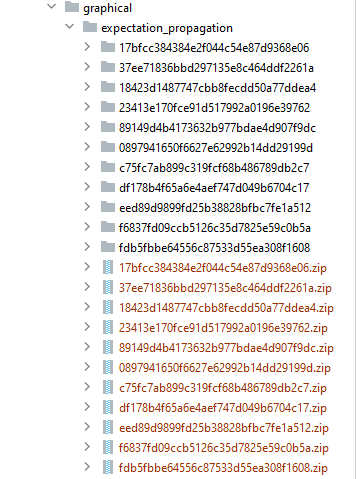
Currently, it is unclear what result corresponds to what factor, and what factors were refit, and the order of those refits.
Folder Structure
We should add an input variable folder to AnalysisFactor that add the folder name to its output path, for a more concise API (we should not use the unique_tag of a search, as this will create nasty conflicts with paths):
dynesty = af.DynestyStatic(
    path_prefix=path.join("graphical"),
    name="expectation_propagation",
    nlive=100,
    sample="rwalk",
)

analysis_factor_0 = g.AnalysisFactor(
    prior_model=prior_model_0, analysis=analysis_0, optimiser=dynesty, folder="dataset_name_0"
)
analysis_factor_1 = g.AnalysisFactor(
    prior_model=prior_model_1, analysis=analysis_1, optimiser=dynesty, folder="dataset_name_1"
)
analysis_factor_2 = g.AnalysisFactor(
    prior_model=prior_model_2, analysis=analysis_2, optimiser=dynesty, folder="dataset_name_2"
)
Now each AnalysisFactor has a folder we can think about how to structure the output results. First, I think each set of results should be in the folder corresponding to its folder=dataset_name_# (based on how paths work I think this is actually what will happens as soon as the search :
expectation_propagation
   -> dataset_name_0
   -> dataset_name_1
   -> dataset_name_2
If the AnalyisFactor's search does not have a folder , we should instead use an index with some generic folder names:
expectation_propagation
   -> factor_0
   -> factor_1
   -> factor_2
Factor Optimization Order
After adding folders, it is still not clear which unique tag corresponds to which optimiztion of the factor
expectation_propagation
   -> factor_0
         sdijdfiogjioudfnguidfshgfsd
         sdlkf;dlf;aktojopjfophgkokopf
   -> factor_1
        ncjkncjknckjnjkfnkjfnkjfnfkj
        sdpodpslfokfdospkfopkds
   -> factor_2
      dsoapsomdspomfopsdd
      dsfniodngfioujhoifdsj
We have two options, eiither add another folder expressing this:
expectation_propagation
   -> factor_0
      ->   optimize_0
                   sdijdfiogjioudfnguidfshgfsd
      -> optimize_1
                  sdlkf;dlf;aktojopjfophgkokopf
   -> factor_1
      ->   optimize_0
                ncjkncjknckjnjkfnkjfnkjfnfkj
      ->   optimize_1
                  sdpodpslfokfdospkfopkds
   -> factor_2
      ->   optimize_0
               dsoapsomdspomfopsdd
      ->   optimize_1
             dsfniodngfioujhoifdsj
Or append the unique tags with this index for conciseness (as the risk of making database interfacing more complicated)
expectation_propagation
   -> factor_0
         0_sdijdfiogjioudfnguidfshgfsd
         1_sdlkf;dlf;aktojopjfophgkokopf
   -> factor_1
        0_ncjkncjknckjnjkfnkjfnkjfnfkj
        1_sdpodpslfokfdospkfopkds
   -> factor_2
      0_dsoapsomdspomfopsdd
      1_dsfniodngfioujhoifdsj


The following script runs a simple graphical model using EP:
https://github.com/Jammy2211/autofit_workspace_test/blob/main/graphical/expectation_propagation.py
The output of the results is as follows:
Currently, it is unclear what result corresponds to what factor, and what factors were refit, and the order of those refits.
Folder Structure
We should add an input variable
foldertoAnalysisFactorthat add the folder name to its output path, for a more concise API (we should not use theunique_tagof a search, as this will create nasty conflicts with paths):Now each
AnalysisFactorhas afolderwe can think about how to structure the output results. First, I think each set of results should be in the folder corresponding to itsfolder=dataset_name_#(based on how paths work I think this is actually what will happens as soon as the search :If the AnalyisFactor's search does not have a
folder, we should instead use an index with some generic folder names:Factor Optimization Order
After adding folders, it is still not clear which unique tag corresponds to which optimiztion of the factor
We have two options, eiither add another folder expressing this:
Or append the unique tags with this index for conciseness (as the risk of making database interfacing more complicated)