[ Question ] How to use Unicode chars on Buttons #4357

Description

Type of Issue (Bug)
Bug
Operating System
macOS 11.4 (20F71)
PySimpleGUI Port (tkinter, Qt, Wx, Web)
Versions
Version information can be obtained by calling sg.main_get_debug_data()
Or you can print each version shown in ()
Python version (sg.sys.version)
sg.sys.version 3.9.2 (v3.9.2:1a79785e3e, Feb 19 2021, 09:06:10)
[Clang 6.0 (clang-600.0.57)]
PySimpleGUI Version (sg.__version__)
print(sg.__version__)
AttributeError: module 'PySimpleGUI' has no attribute 'version'
GUI Version (tkinter (sg.tclversion_detailed), PySide2, WxPython, Remi)
sg.tclversion_detailed 8.6.8
Your Experience In Months or Years (optional)
Years Python programming experience
1
Years Programming experience overall
<2
Have used another Python GUI Framework? (tkinter, Qt, etc) (yes/no is fine)
yes
Anything else you think would be helpful?
Troubleshooting
These items may solve your problem. Please check those you've done by changing - [ ] to - [X]
- Searched main docs for your problem www.PySimpleGUI.org
- Looked for Demo Programs that are similar to your goal Demos.PySimpleGUI.org
- If not tkinter - looked for Demo Programs for specific port
- For non tkinter - Looked at readme for your specific port if not PySimpleGUI (Qt, WX, Remi)
- Run your program outside of your debugger (from a command line)
- Searched through Issues (open and closed) to see if already reported Issues.PySimpleGUI.org
- Tried using the PySimpleGUI.py file on GitHub. Your problem may have already been fixed but not released
Detailed Description
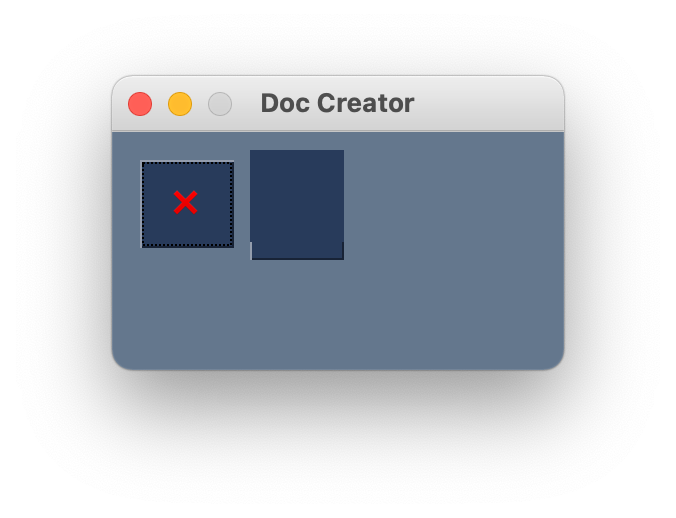
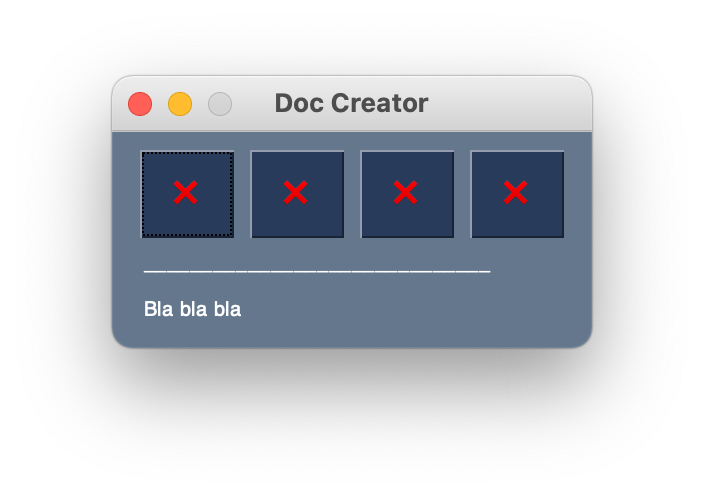
Using UTF8 emojis as button labels can lead to display errors. For example, the character 🏠 U+1F3E0 is displayed twice on the button (without size attribute). If the character is used with the size attribute, a display error occurs. The error manifests itself in the fact that either nothing is displayed or a single dark box is displayed. The emoji ❌ U+274C works fine even with the button size attribute. I tried to use the characters as images but there the resolution gets much worse when I try to make it smaller.
Code To Duplicate
A short program that isolates and demonstrates the problem (Do not paste your massive program, but instead 10-20 lines that clearly show the problem)
This pre-formatted code block is all set for you to paste in your bit of code:
# Paste your code here - partly Working

import PySimpleGUI as sg

menu = [[sg.Button('❌'),
         sg.Button('🏡'),
         sg.Button('X'),
         sg.Button('X')],
        [sg.Text('_' * 30)]]
content = [[sg.Text("Bla bla bla")]]
layout = [[menu],
          [content]]

window = sg.Window('Doc Creator', layout)

while True:
    event, values = window.read()  # Part 4 - Event loop or Window.read call
    if event == 'Exit' or event == sg.WIN_CLOSED or event == '❌':
        break

window.close()
# Paste your code here - Bug
import PySimpleGUI as sg
menu = [[sg.Button('❌', size=(-1, 2), pad=(4, 4)),
sg.Button('🏡', size=(-1, 2), pad=(4, 4)),
sg.Button('✉️', size=(-1, 2), pad=(4, 4)),
sg.Button('📄', size=(-1, 2), pad=(4, 4))],
[sg.Text('_' * 30)]]
content = [[sg.Text("Bla bla bla")]]
layout = [[menu],
[content]]
window = sg.Window('Doc Creator', layout)
while True:
event, values = window.read() # Part 4 - Event loop or Window.read call
if event == 'Exit' or event == sg.WIN_CLOSED or event == '❌':
break
window.close()# Paste your code here - Expected/Working
import PySimpleGUI as sg
menu = [[sg.Button('❌', size=(-1, 2), pad=(4, 4)),
sg.Button('❌', size=(-1, 2), pad=(4, 4)),
sg.Button('❌', size=(-1, 2), pad=(4, 4)),
sg.Button('❌', size=(-1, 2), pad=(4, 4))],
[sg.Text('_' * 30)]]
content = [[sg.Text("Bla bla bla")]]
layout = [[menu],
[content]]
window = sg.Window('Doc Creator', layout)
while True:
event, values = window.read() # Part 4 - Event loop or Window.read call
if event == 'Exit' or event == sg.WIN_CLOSED or event == '❌':
break
window.close()Screenshot, Sketch, or Drawing