Type of Issue (Enhancement, Error, Bug, Question)
Question
Operating System
Ubuntu 21.10
PySimpleGUI Port (tkinter, Qt, Wx, Web)
Qt Port
Versions
Version information can be obtained by calling sg.main_get_debug_data()
Or you can print each version shown in ()
Python version (sg.sys.version)
3.9.7 (default, Sep 10 2021, 14:59:43)
[GCC 11.2.0]
PySimpleGUI Version (sg.__version__)
0.35.0 Released 6-Jun-2020
and
0.35.0.18.1 Unreleased
GUI Version (tkinter (sg.tclversion_detailed), PySide2, WxPython, Remi)
PySide2 5.15.2
Your Experience In Months or Years (optional)
Years Python programming experience
Years Programming experience overall
Have used another Python GUI Framework? (tkinter, Qt, etc) (yes/no is fine)
Anything else you think would be helpful?
Troubleshooting
These items may solve your problem. Please check those you've done by changing - [ ] to - [X]
- [ x ] Searched main docs for your problem www.PySimpleGUI.org
- [ x ] Looked for Demo Programs that are similar to your goal Demos.PySimpleGUI.org
- [ x ] If not tkinter - looked for Demo Programs for specific port
- [ x ] For non tkinter - Looked at readme for your specific port if not PySimpleGUI (Qt, WX, Remi)
- [ x ] Run your program outside of your debugger (from a command line)
- [ x ] Searched through Issues (open and closed) to see if already reported Issues.PySimpleGUI.org
- [ x ] Tried using the PySimpleGUI.py file on GitHub. Your problem may have already been fixed but not released
Detailed Description
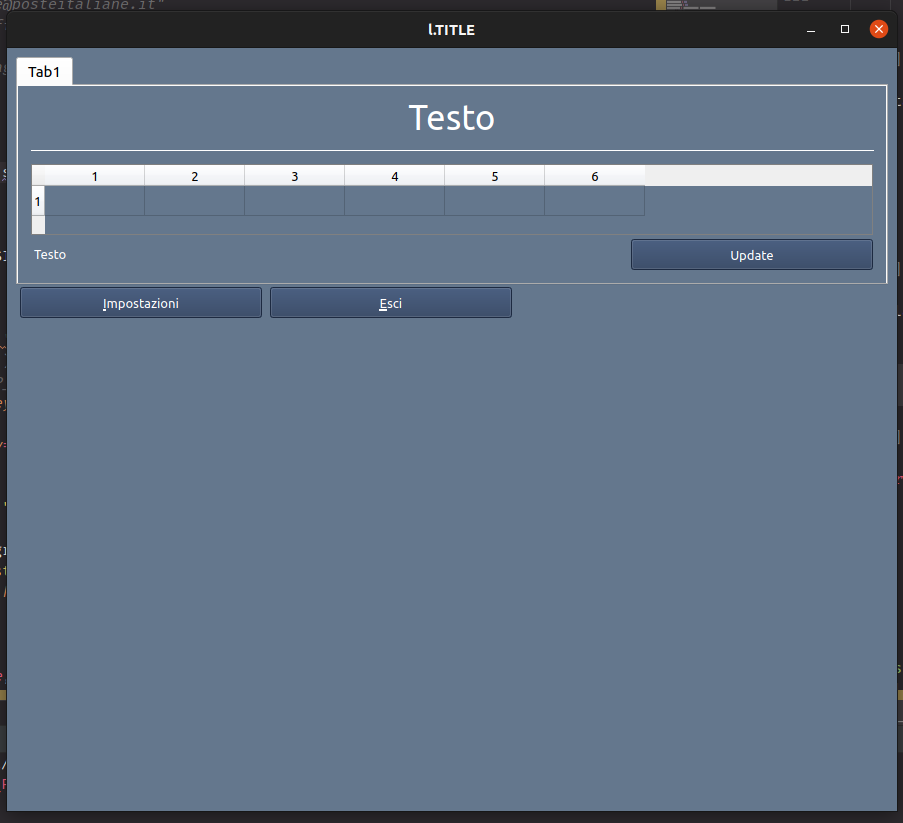
I had some code with table in tab with fixed window size, with the "stable" version 0.35.0 Released 6-Jun-2020 with an empty table i had the window filled by the tab and at the bottom I have some buttons outside the tabgroup, with the "dev" version 0.35.0.18.1 Unreleased the the tab did not fill the window. How can I change this and have the same behavior of the "stable" release without using "num_rows=x" in Table()?
Code To Duplicate
A short program that isolates and demonstrates the problem (Do not paste your massive program, but instead 10-20 lines that clearly show the problem)
This pre-formatted code block is all set for you to paste in your bit of code:
import PySimpleGUIQt as sg

WIDTH_WIN_SIZE = 890
HEIGHT_WIN_SIZE = 763
MAIN_WIN_SIZE = (WIDTH_WIN_SIZE, HEIGHT_WIN_SIZE)
BTN_SIZE = (25, 1)

orario_up_layout = [
    [sg.Text("Testo", font=('Ubuntu', 26), justification="center")],
    [sg.HorizontalSeparator()],
    # [sg.Text("", key=l.OUP_WEEK_KEY)],
    [sg.Table([[""] * 6], key="l.OUP_OUTPUT_KEY", )],
    [sg.Text("Testo"),
     sg.Button("l.BTN_UPDATE_TXT", key="l.OUP_UPDATE_BTN_KEY", size=BTN_SIZE, bind_return_key=True)]
]

tab_group_layout = [[sg.Tab("l.OUP_TITLE", orario_up_layout, key="l.OUP_TAB_KEY")]]

layout = [[sg.TabGroup(tab_group_layout, key='-TABGROUP-', enable_events=True)],
          [sg.Button("&Impostazioni", key="l.SETTINGS_BTN_KEY", size=BTN_SIZE),
           sg.Exit("&Esci", key="l.EXIT_KEY", size=BTN_SIZE)],
          ]

W = sg.Window("l.TITLE",
              resizable=True,
              size=MAIN_WIN_SIZE,
              font=('Ubuntu', 10),
              # element_justification='right',
              finalize=True).Layout(layout)

while True:
    event, values = W.read()
    if event in (None, "l.EXIT_KEY"):
        break
Screenshot, Sketch, or Drawing
wanted behavior 0.35.0 Released 6-Jun-2020

with "dev" version 0.35.0.18.1
Watcha Makin?
If you care to share something about your project, it would be awesome to hear what you're building.

Type of Issue (Enhancement, Error, Bug, Question)
Question
Operating System
Ubuntu 21.10
PySimpleGUI Port (tkinter, Qt, Wx, Web)
Qt Port
Versions
Version information can be obtained by calling
sg.main_get_debug_data()Or you can print each version shown in ()
Python version (
sg.sys.version)3.9.7 (default, Sep 10 2021, 14:59:43)
[GCC 11.2.0]
PySimpleGUI Version (
sg.__version__)0.35.0 Released 6-Jun-2020
and
0.35.0.18.1 Unreleased
GUI Version (tkinter (
sg.tclversion_detailed), PySide2, WxPython, Remi)PySide2 5.15.2
Your Experience In Months or Years (optional)
Years Python programming experience
Years Programming experience overall
Have used another Python GUI Framework? (tkinter, Qt, etc) (yes/no is fine)
Anything else you think would be helpful?
Troubleshooting
These items may solve your problem. Please check those you've done by changing - [ ] to - [X]
Detailed Description
I had some code with table in tab with fixed window size, with the "stable" version 0.35.0 Released 6-Jun-2020 with an empty table i had the window filled by the tab and at the bottom I have some buttons outside the tabgroup, with the "dev" version 0.35.0.18.1 Unreleased the the tab did not fill the window. How can I change this and have the same behavior of the "stable" release without using "num_rows=x" in Table()?
Code To Duplicate
A short program that isolates and demonstrates the problem (Do not paste your massive program, but instead 10-20 lines that clearly show the problem)
This pre-formatted code block is all set for you to paste in your bit of code:
Screenshot, Sketch, or Drawing
wanted behavior 0.35.0 Released 6-Jun-2020

with "dev" version 0.35.0.18.1

Watcha Makin?
If you care to share something about your project, it would be awesome to hear what you're building.