Repository navigation
Home
Simple (Sys) Log gives Homey Flows a persistent logbook for messages and events. Add entries from a Flow, optionally show them in Homey's Timeline, then review, filter and export the log from the app settings.
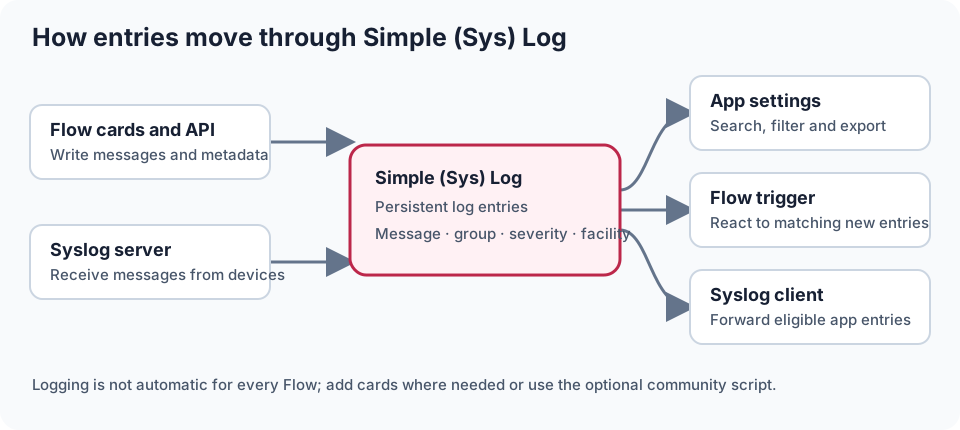
Illustration: Flow, API and Syslog messages can enter the local log; exports and forwarding provide separate destinations.
| I want to… | Start here |
|---|---|
| Install the app | Homey App Store (Homey v12.3.0 or newer) |
| Add my first message to the log | Getting started |
| Follow a practical Flow example | Examples |
| Use Simple (Sys) Log in Flows | Flows |
| Automatically add or remove logging cards in Flows | Flow logging scripts |
| Send messages to or receive messages from Syslog systems | Syslog devices |
| Look up severity levels or categories | Severity levels · Categories |
| Use dynamic text or export filenames with BLL | BLL coding |
| Review, filter, export or retain log entries | App settings |
| Read or write log entries from a script or another app | API reference |
| Fix a logging or settings issue | Troubleshooting |
- Add messages to a persistent log from a Flow.
- Group entries and attach severity and category (Syslog facility) values.
- Add a message to the log, Homey's Timeline, or both.
- Start another Flow when a log entry is generated.
- Optionally use a community script to add logging to selected Flows.
- Send selected or routine Homey log entries to an external Syslog receiver.
- Receive Syslog messages from other devices into the Simple (Sys) Log.
- Review entries in the app settings, including new entries as they arrive.
- Export the complete log as CSV, Excel or JSON.
- Clear the complete log or remove older entries.
Entries can be created by multiple Flows and integrations. Use a consistent group name to make related messages easy to filter, and choose a severity when you want to distinguish errors or warnings from routine events.
Scope: Simple (Sys) Log does not automatically record every Flow run. It records entries sent to it by its Flow cards, API or Syslog devices. Add logging cards where you need them, or use the optional community script to add them to selected Flows.
Logs can reveal routines, device names, network addresses and other private data. Do not log passwords or tokens. Restrict access to exports and receivers. The app exposes a public log-reading route; see API access and privacy. Syslog traffic is not encrypted by these devices.
Install Simple (Sys) Log from the Homey App Store; the app requires Homey v12.3.0 or newer. Create and enable a Flow with one of the app's logging actions; see Getting started.
Better Logic Library (BLL) is optional for basic logging. Without its settings assets, the app provides a simpler view of the temporary backlog and basic controls. Installing BLL enables the full settings interface and BLL-coded text fields. You can use ordinary text and Homey Flow tokens without making BLL a prerequisite. See BLL coding for supported fields and examples.
Flow card names may be translated in Homey and can vary between app versions.
Write your first entry, then filter or export it or try an example Flow.
Visit the Simple (Sys) Log Homey Community topic or report an issue on GitHub.