PCA-016 Catalog#2
Open
Captain-DAB wants to merge 6 commits into
Open
Conversation


Qoosim
requested changes
Oct 21, 2023
Owner

There was a problem hiding this comment.
Status: Required Changes ♻️
Hi @Captain-DAB,
Good job so far!
There are some issues that you still need to work on to go to the next project but you are almost there!
Highlights
- Implemented some ticket requirements. ✔️
- Fair file structure approach. ✔️
Required Changes ♻️
Check the comments under the review.
- It is highly recommended to provide
alt=" "with value for it provides visually impaired visitors with an alternative to images. Kindly use it here 👇
Alternative to image

- It is also part of best practices to to follow pascal name convention for naming our component. Every letter should start with capital letter. It should be
Catalog.jsx. Kindly change that too.

Optional suggestions
N/A
Cheers and Happy coding!👏👏👏
| } | ||
| @media (max-width: 768px) { | ||
| .courses-catalog { | ||
| padding: 20px 3%; |
Owner
There was a problem hiding this comment.
- Let's try to be consistent about the unit we adapt. That's the best practices. You can use px, rem, %, just be consistent about any one you choose at a point.
Comment on lines
+42
to
+44
| .catalog:hover { | ||
| transform: translate(-5px, -20px); | ||
| } |
Owner
There was a problem hiding this comment.
- Let's hold on about animation for now. Kindly remove it. We might need to use a package later to add animation in a very cool way.
Comment on lines
+37
to
+41
| .catalog { | ||
| padding: 20px; | ||
| background: rgba(245, 245, 220, 0.779); | ||
| transition: 0.5s; | ||
| } |
Owner
There was a problem hiding this comment.
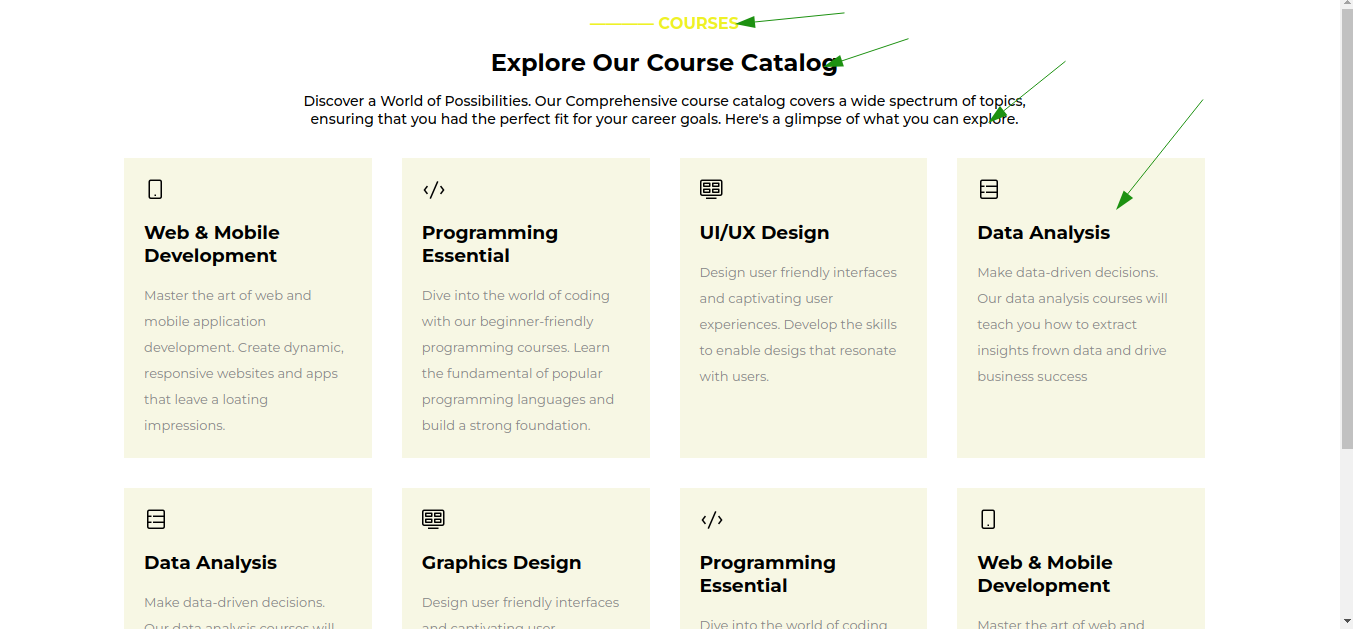
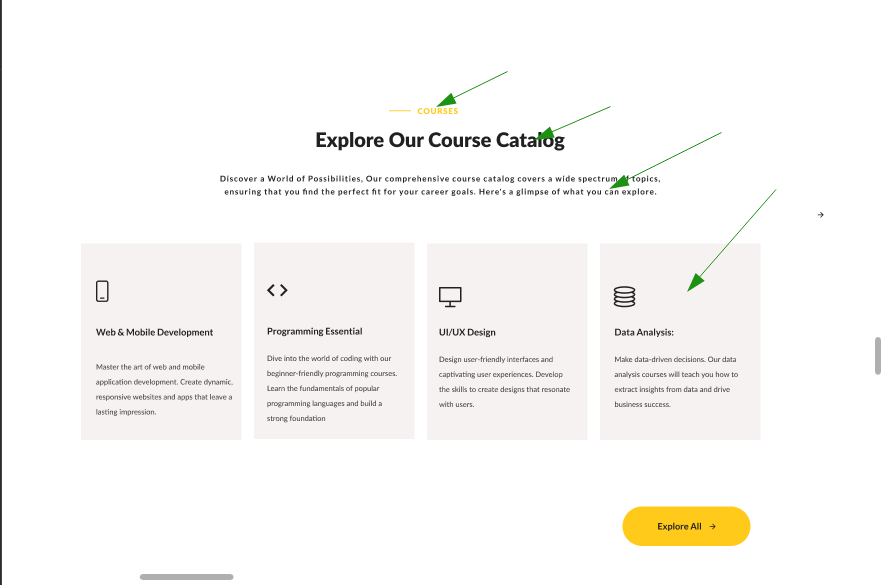
- It is required to produce a close replica of what we have on the figma design. This includes color, font, typograph, background color, layout. The background color on your design does not tally to what we have on the figma. Kindly check the color and apply accordingly. This is the color use for the cards
#F6F2F2
Your Design

Figma Design

Comment on lines
+34
to
+36
| .yellow-text { | ||
| color: rgb(238, 241, 38); | ||
| } |
Owner
There was a problem hiding this comment.
- This is the color for this text
#FFCA1A. Kindly apply it accordingly.
Comment on lines
+8
to
+57
| const [catalogs, setCatalog] = useState([ | ||
| { | ||
| image: smartphone, | ||
| title: "Web & Mobile Development", | ||
| body: "Master the art of web and mobile application development. Create dynamic, responsive websites and apps that leave a loating impressions.", | ||
| id: 1, | ||
| }, | ||
| { | ||
| image: code, | ||
| title: "Programming Essential", | ||
| body: "Dive into the world of coding with our beginner-friendly programming courses. Learn the fundamental of popular programming languages and build a strong foundation.", | ||
| id: 2, | ||
| }, | ||
| { | ||
| image: layout, | ||
| title: "UI/UX Design", | ||
| body: "Design user friendly interfaces and captivating user experiences. Develop the skills to enable desigs that resonate with users.", | ||
| id: 3, | ||
| }, | ||
| { | ||
| image: database, | ||
| title: "Data Analysis", | ||
| body: "Make data-driven decisions. Our data analysis courses will teach you how to extract insights frown data and drive business success", | ||
| id: 4, | ||
| }, | ||
| { | ||
| image: database, | ||
| title: "Data Analysis", | ||
| body: "Make data-driven decisions. Our data analysis courses will teach you how to extract insights frown data and drive business success", | ||
| id: 5, | ||
| }, | ||
| { | ||
| image: layout, | ||
| title: "Graphics Design", | ||
| body: "Design user friendly interfaces and captivating user experiences. Develop the skills to enable desigs that resonate with users.", | ||
| id: 6, | ||
| }, | ||
| { | ||
| image: code, | ||
| title: "Programming Essential", | ||
| body: "Dive into the world of coding with our beginner-friendly programming courses. Learn the fundamental of popular programming languages and build a strong foundation.", | ||
| id: 7, | ||
| }, | ||
| { | ||
| image: smartphone, | ||
| title: "Web & Mobile Development", | ||
| body: "Master the art of web and mobile application development. Create dynamic, responsive websites and apps that leave a loating impressions.", | ||
| id: 8, | ||
| }, | ||
| ]); |
Owner
There was a problem hiding this comment.
- There's no need to use
useStatehere. We don't make any state changes on the page at this moment. The best approach for this is to create a file saycatalogData.jsthen create an array of objects and import it inside yourCatalogcomponent to use. It should look something similar to this. 👇
  export const catalogData = [
     {
      image: smartphone,
      title: "Web & Mobile Development",
      body: "Master the art of web and mobile application development. Create dynamic, responsive websites and apps that leave a loating impressions.",
      id: 1,
    },
    {
      image: code,
      title: "Programming Essential",
      body: "Dive into the world of coding with our beginner-friendly programming courses. Learn the fundamental of popular programming languages and build a strong foundation.",
      id: 2,
    },
    {
      image: layout,
      title: "UI/UX Design",
      body: "Design user friendly interfaces and captivating user experiences. Develop the skills to enable desigs that resonate with users.",
      id: 3,
    },
    {
      image: database,
      title: "Data Analysis",
      body: "Make data-driven decisions. Our data analysis courses will teach you how to extract insights frown data and drive business success",
      id: 4,
    },
    {
      image: database,
      title: "Data Analysis",
      body: "Make data-driven decisions. Our data analysis courses will teach you how to extract insights frown data and drive business success",
      id: 5,
    },
    {
      image: layout,
      title: "Graphics Design",
      body: "Design user friendly interfaces and captivating user experiences. Develop the skills to enable desigs that resonate with users.",
      id: 6,
    },
    {
      image: code,
      title: "Programming Essential",
      body: "Dive into the world of coding with our beginner-friendly programming courses. Learn the fundamental of popular programming languages and build a strong foundation.",
      id: 7,
    },
    {
      image: smartphone,
      title: "Web & Mobile Development",
      body: "Master the art of web and mobile application development. Create dynamic, responsive websites and apps that leave a loating impressions.",
      id: 8,
    },
  ]
You can create the file inside your catalog folder.
Comment on lines
+2
to
+5
| import database from "./Images/database-icon.png"; | ||
| import smartphone from "./Images/smartphone-icon.png"; | ||
| import code from "./Images/code-icon.png"; | ||
| import layout from "./Images/layout-icon.png"; |
Owner
There was a problem hiding this comment.
- The path to these files are incorrect. There was an error message when I tested your app cos of their path. It should be like this. 👇
  import database from "../../Images/database-icon.png";
  import smartphone from "../../Images/smartphone-icon.png";
  import code from "../../Images/code-icon.png";
  import layout from "../../Images/layout-icon.png";
Collaborator
Author
|
Well understood, will work on it
…On Sat, Oct 21, 2023, 11:39 AM Qoosim AbdulGhaniyy ***@***.***> wrote:
***@***.**** requested changes on this pull request.
*Status: Required Changes* ♻️
Hi @Captain-DAB <https://github.com/Captain-DAB>,
Good job so far!
There are some issues that you still need to work on to go to the next
project but you are almost there!
Highlights
- Implemented some ticket requirements. ✔️
- Fair file structure approach. ✔️
<https://camo.githubusercontent.com/38ce8c8b213b08e2d9bb85a0b79702ad512f3910f803ec3d7917b4e0110c9044/68747470733a2f2f6d656469612e67697068792e636f6d2f6d656469612f7741366159414f336a4836526d55494259732f67697068792e676966>
Required Changes ♻️
*Check the comments under the review.*
Optional suggestions
N/A
Cheers and Happy coding!👏👏👏
------------------------------
In src/components/Catalog/catalog.css
<#2 (comment)>
:
> + font-weight: 600;
+ transition: 0.5s;
+ color: #000;
+}
+
+.explore:hover {
+ background: rgba(238, 241, 38, 0.624);
+}
***@***.*** (max-width: 1024px) {
+ .catalog {
+ grid-column: span 4;
+ }
+}
***@***.*** (max-width: 768px) {
+ .courses-catalog {
+ padding: 20px 3%;
- Let's try to be consistent about the unit we adapt. That's the best
practices. You can use px, rem, %, just be consistent about any one you
choose at a point.
------------------------------
In src/components/Catalog/catalog.css
<#2 (comment)>
:
> +.catalog:hover {
+ transform: translate(-5px, -20px);
+}
- Let's hold on about animation for now. Kindly remove it. We might
need to use a package later to add animation in a very cool way.
------------------------------
In src/components/Catalog/catalog.css
<#2 (comment)>
:
> +.catalog {
+ padding: 20px;
+ background: rgba(245, 245, 220, 0.779);
+ transition: 0.5s;
+}
- It is required to produce a close replica of what we have on the
figma design. This includes color, font, typograph, background color,
layout. The background color on your design does not tally to what we have
on the figma. Kindly check the color and apply accordingly. This is the
color use for the cards #F6F2F2
Your Design
[image: your-design]
<https://user-images.githubusercontent.com/26597432/277102997-d9317c68-a1d1-4aa2-bc66-1f6b18571583.png>
Figma Design
[image: figma-design]
<https://user-images.githubusercontent.com/26597432/277103003-2496de1f-9dad-4375-b18d-aad7b8e792aa.png>
------------------------------
In src/components/Catalog/catalog.css
<#2 (comment)>
:
> +.yellow-text {
+ color: rgb(238, 241, 38);
+}
- This is the color for this text #FFCA1A. Kindly apply it accordingly.
------------------------------
In src/components/Catalog/catalog.jsx
<#2 (comment)>
:
> + const [catalogs, setCatalog] = useState([
+ {
+ image: smartphone,
+ title: "Web & Mobile Development",
+ body: "Master the art of web and mobile application development. Create dynamic, responsive websites and apps that leave a loating impressions.",
+ id: 1,
+ },
+ {
+ image: code,
+ title: "Programming Essential",
+ body: "Dive into the world of coding with our beginner-friendly programming courses. Learn the fundamental of popular programming languages and build a strong foundation.",
+ id: 2,
+ },
+ {
+ image: layout,
+ title: "UI/UX Design",
+ body: "Design user friendly interfaces and captivating user experiences. Develop the skills to enable desigs that resonate with users.",
+ id: 3,
+ },
+ {
+ image: database,
+ title: "Data Analysis",
+ body: "Make data-driven decisions. Our data analysis courses will teach you how to extract insights frown data and drive business success",
+ id: 4,
+ },
+ {
+ image: database,
+ title: "Data Analysis",
+ body: "Make data-driven decisions. Our data analysis courses will teach you how to extract insights frown data and drive business success",
+ id: 5,
+ },
+ {
+ image: layout,
+ title: "Graphics Design",
+ body: "Design user friendly interfaces and captivating user experiences. Develop the skills to enable desigs that resonate with users.",
+ id: 6,
+ },
+ {
+ image: code,
+ title: "Programming Essential",
+ body: "Dive into the world of coding with our beginner-friendly programming courses. Learn the fundamental of popular programming languages and build a strong foundation.",
+ id: 7,
+ },
+ {
+ image: smartphone,
+ title: "Web & Mobile Development",
+ body: "Master the art of web and mobile application development. Create dynamic, responsive websites and apps that leave a loating impressions.",
+ id: 8,
+ },
+ ]);
- There no need to use useState here. We don't make any state changes
on the page at this moment. The best approach for this is to create a file
say catalogData.js then create an array of object and import it inside
your Catalog component to use. I should look something similar to
this. 👇
export const catalogData = [
{
image: smartphone,
title: "Web & Mobile Development",
body: "Master the art of web and mobile application development. Create dynamic, responsive websites and apps that leave a loating impressions.",
id: 1,
},
{
image: code,
title: "Programming Essential",
body: "Dive into the world of coding with our beginner-friendly programming courses. Learn the fundamental of popular programming languages and build a strong foundation.",
id: 2,
},
{
image: layout,
title: "UI/UX Design",
body: "Design user friendly interfaces and captivating user experiences. Develop the skills to enable desigs that resonate with users.",
id: 3,
},
{
image: database,
title: "Data Analysis",
body: "Make data-driven decisions. Our data analysis courses will teach you how to extract insights frown data and drive business success",
id: 4,
},
{
image: database,
title: "Data Analysis",
body: "Make data-driven decisions. Our data analysis courses will teach you how to extract insights frown data and drive business success",
id: 5,
},
{
image: layout,
title: "Graphics Design",
body: "Design user friendly interfaces and captivating user experiences. Develop the skills to enable desigs that resonate with users.",
id: 6,
},
{
image: code,
title: "Programming Essential",
body: "Dive into the world of coding with our beginner-friendly programming courses. Learn the fundamental of popular programming languages and build a strong foundation.",
id: 7,
},
{
image: smartphone,
title: "Web & Mobile Development",
body: "Master the art of web and mobile application development. Create dynamic, responsive websites and apps that leave a loating impressions.",
id: 8,
},
]
You can create the file inside your catalog folder.
------------------------------
In src/components/Catalog/catalog.jsx
<#2 (comment)>
:
> +import database from "./Images/database-icon.png";
+import smartphone from "./Images/smartphone-icon.png";
+import code from "./Images/code-icon.png";
+import layout from "./Images/layout-icon.png";
- The path to these files are incorrect. There was an error message
when I tested your app cos of their path. It should be like this. 👇
import database from "../../Images/database-icon.png";
import smartphone from "../../Images/smartphone-icon.png";
import code from "../../Images/code-icon.png";
import layout from "../../Images/layout-icon.png";
—
Reply to this email directly, view it on GitHub
<#2 (review)>,
or unsubscribe
<https://github.com/notifications/unsubscribe-auth/A3RAABIRD5OT33AIW7LNG4LYAOQ6PAVCNFSM6AAAAAA6JKK7GSVHI2DSMVQWIX3LMV43YUDVNRWFEZLROVSXG5CSMV3GSZLXHMYTMOJRGIZTAMBUGE>
.
You are receiving this because you were mentioned.Message ID:
***@***.***>
|
This file contains hidden or bidirectional Unicode text that may be interpreted or compiled differently than what appears below. To review, open the file in an editor that reveals hidden Unicode characters.
Learn more about bidirectional Unicode characters
Sign up for free
to join this conversation on GitHub.
Already have an account?
Sign in to comment
2 participants


Add this suggestion to a batch that can be applied as a single commit.This suggestion is invalid because no changes were made to the code.Suggestions cannot be applied while the pull request is closed.Suggestions cannot be applied while viewing a subset of changes.Only one suggestion per line can be applied in a batch.Add this suggestion to a batch that can be applied as a single commit.Applying suggestions on deleted lines is not supported.You must change the existing code in this line in order to create a valid suggestion.Outdated suggestions cannot be applied.This suggestion has been applied or marked resolved.Suggestions cannot be applied from pending reviews.Suggestions cannot be applied on multi-line comments.Suggestions cannot be applied while the pull request is queued to merge.Suggestion cannot be applied right now. Please check back later.
In this PR, I was able to do the following:
-Created responsive Catalog for courses
Link to the tickets