DEX Protocol for Tokenized Inventories. A bridge between finance and innovation to propel SMEs’ success and growth. Quadrix App is a decentralized exchange running on the Binance Smart Chain. The platform is connecting the digital world of cryptocurrencies with the physical world of business and supply-chain finance.
Swap
Instantly swap crypto tokens: no registration or account needed.
  **Low fees**
  Why pay more? Quadrix App runs on Binance Smart Chain, a blockchain with much lower transaction costs than Ethereum.

  **Decentralized**
  Trade directly from your wallet app.Unlike centralized exchanges like Binance or Coinbase, Quadrix App doesn’t hold
  your funds when you trade: you have 100% ownership of your own crypto.
Stake
Earn QDRX and other tokens for free with high interest rates.
  **Earn tokens with Staking Pools**
  Stake QDRX, and earn free tokens. It’s really that easy. QDRX holders right now are earning tens of millions of USD
  worth of free tokens each week from major projects. New projects join the party frequently, so you can earn
  more, for even longer.

  **Earn QDRX with Farming**
  Stake LP tokens, and earn QDRX. You take on a little more exposure to market fluctuations than with the Staking Pools
  but can earn a higher APR to offset the risk.

  **Earn Trading Fees**
  No farm? No problem. Even if your trading pair isn’t supported on the Farms page, you can still earn trading fees when
  you stake your tokens in Liquidity Pools (LPs).
Win
Quadrix App brings some fun to you while making money.
  **Lottery**
  Millions of dollars regularly go up for grabs on the Quadrix App Lottery. Join as many as 5,000 daily players for your
  chance to win big!

  **NFT Collectibles**
  Win collectible NFTs for participating in trading competitions and more fun & games.
Token swaps in Quadrix App are a simple way to trade one BEP-20 token for another via automated liquidity pools.
Trading Fee:
When you make a token swap (trade) in the Quadrix App you will pay a 0.25% trading fee, which is broken down as follows:
  0.17% - Returned to Liquidity Pools in the form of a fee reward for liquidity providers.

  0.03% - Sent to the Quadrix App Treasury.

  0.05% - Sent towards QBANK Token buyback and burn.
Trading in the Quadrix App
  1. Go to the exchange page here.

  2. Unlock your BNB Smart Chain-compatible wallet by clicking Connect Wallet in the top right-hand corner.

  3. Choose the token you want to trade from the dropdown menu in the "From" section. The default setting is BNB.

  4. Choose the token you want to trade to in the "To" section as above. Next, type an amount for your "To" currency
  by clicking inside the input box. Your "From" currency amount will be estimated automatically. You can also type
  your "From" amount and have the "To" amount estimate automatically if you like.

  5. Check the details, and click the Swap button.

  6. A window with more details will appear. Check the details are correct.
  When you are ready, click the Confirm Swap button. Your wallet will ask you to confirm the action.

  7. Done! You can click View on BscScan to see your transaction details on explorer.
How come my transaction won't go through?
Quadrix App is a Defi application such that it interacts with the wallet to complete on-chain transactions for swapping, creating LPs, staking in farms and pools, etc.
Gas Fees
As such, the first thing is to make sure you have enough BNB to pay for the gas fee of the on-chain transactions. Typically, the gas fee fluctuates depending on the number of transactions in the queue, if there are more transactions, a higher gas fee may be required to push through the transaction. On Binance Smart Chain, the gas fee typically ranges from cents to a dollar USD in BNB.
Transaction Fees
If your swapping action still doesn't go through and it is displaying an error for you to revise the Slippage Tolerance, you may want to check if the tokens you are trying to swap have any fees and restrictions on transactions. It is not uncommon for tokens on Binance Smart Chain to include a transaction fee in their contracts, usually these fees could be used for burning, funding a treasury of a fair launch project.
With the transaction fee, whether it is inclusive (a portion of the swap amount is sent elsewhere than your address so the output is less than expected for the estimated input) or exclusive (requiring an additional transfer from your address to send extra tokens so the input is more than expected for the estimated output), it affects the input and output amount that you agree for signing the transaction. In many cases, the transaction cannot meet the input and output requirements because of the tax.
Swapping with Transaction Fees
Before you swap any tokens, make sure you have visited their website to understand if they have a transaction fee mechanism (or tax as many projects put it). If there is, make sure you set a slippage that is sufficient to accommodate the transaction fee -- e.g. if there is a transaction fee of 5%, your slippage will have to be set at least 5% plus the normal trading slippage depending on your trading amount and the token's liquidity, say 5.5%-6%.
In some extreme cases including some scams, some tokens even have a block on most or all transfers on-chain, or only allow certain addresses to sell, in such cases, it is impossible to swap the token successfully. Learn first about the token you are trying to swap and be aware of any fees and restrictions.
When you add your token to a Liquidity Pool you will receive Liquidity Provider (LP) tokens and share in the fees.
LP Tokens
As an example, if you deposited QDRX and BNB into a Liquidity Pool, you'd receive QDRX-BNB LP tokens. The number of LP tokens you receive represents your portion of the QDRX-BNB Liquidity Pool. You can also redeem your funds at any time by removing your liquidity.
Liquidity Providers earn trading fees
Providing liquidity gives you a reward in the form of trading fees when people use your liquidity pool. Whenever someone trades in Quadrix App, the trader pays a 0.25% fee, of which 0.17% is added to the Liquidity Pool of the swap pair they traded on.
  For example:

  There are 10 LP tokens representing 10 QDRX and 10 BNB tokens.

  1 LP token = 1 QDRX + 1 BNB

  Someone trades 10 QDRX for 10 BNB

  Someone else trades 10 BNB for 10 QDRX

  The QDRX/BNB liquidity pool now has 10.017 QDRX and 10.017 BNB

  Each LP token is now worth 1.00017 QDRX + 1.00017 BNB
To make being a liquidity provider even more worth your while, you can also put your LP tokens to work and earn a fresh yield in the QDRX Farms, while still earning your 0.17% trading fee reward.
Impermanent Loss
Providing liquidity is not without risk, as you may be exposed to impermanent loss.
What Is Impermanent loss?
Simply put, impermanent loss is the difference between holding tokens in an AMM and holding them in your wallet. It occurs when the price of tokens inside an AMM diverge in any direction. The more divergence, the greater the impermanent loss.
Why “impermanent”?
Because as long as the relative prices of tokens in the AMM return to their original state when you entered the AMM, the loss disappears and you earn 100% of the trading fees. However, this is rarely the case. More often than not, impermanent loss becomes permanent, eating into your trade income or leaving you with negative returns.
"Liquidity" is central to how Quadrix App's Exchange works. You can add liquidity for any token pair by staking both through the Liquidity page. In return for adding liquidity, you'll receive trading fees for that pair, and receive LP Tokens you can stake in Farms to earn QDRX rewards!
Adding liquidity
To provide liquidity, you’ll need to commit an amount of any token pair you like. Your lowest value (in USD) of the two tokens will be the limit to the liquidity you can provide.You can easily trade for any tokens you need.
  In this example, we will add liquidity using BNB and QDRX.

  1. Visit the Liquidity page.

  2. Click the Add Liquidity button.

  3. For the top Input, click 'Select a currency. Then choose one of the tokens in the liquidity pair you want to add liquidity to.
  Here, we are going to use BNB as an example.

  4. For the bottom input, click ‘Select a currency. And choose the other token in the liquidity pair you want to add liquidity to.
  Here, we are going to use QDRX as an example.

  5. Enter an amount on one of the tokens under “Input”. The other should be calculated and filled automatically.
  (If one of the token does not have enough balance. You will see an error and the button being greyed out. Please enter a lower
  amount to proceed.)

  6. Click the Enable QDRX button. If you are adding liquidity against tokens other than BNB, you might need to click enable
  twice for each token in your pair. Your wallet will ask you to confirm the action.

  7. The Supply button will then light up. Click to proceed.

  8. Your wallet will ask you for confirmation. Confirm your transaction from your wallet.

  9. Soon after, you will see your LP Token balance at the bottom of the page.
You can repeat the above steps to add more liquidity or add liquidity to different pairs.
Removing liquidity
  To remove liquidity.

  1. Visit the Liquidity page.

  2. Click on the pair you want to remove liquidity from under “Your Liquidity".

  3. Click Remove. A new modal will appear.

  4. Use the buttons or slider to choose how much liquidity you want to remove. Choose MAX to remove all of your liquidity
  from this pair.

  5. Click Enable. Your wallet will ask you to sign the action.

  6. The Remove button will light up. Click to proceed.

  7. A window will appear showing how many tokens you will receive. Click Confirm. Your wallet will ask you to confirm the action.

  8. After the transaction is confirmed. You will receive two of the tokens from your pair. And if you haven't removed all of your
  liquidity, your remaining liquidity value will be updated on the "My Liquidity" page.
Yield Farming in Farms is a great way to earn QDRX rewards on Quadrix App. Unlike Staking Pools, Farms require you to stake two tokens to get LP Tokens, which you then stake in the Farm to earn rewards. This lets you earn QDRX while still keeping a position in your other tokens! Yield farming can give better rewards than Staking Pools, but it comes with a risk of Impermanent Loss. It’s not as scary as it sounds, but it is worth learning about the concept before you get started.
Getting Ready
Yield farming takes a little work to get set up. You’re going to need some "LP Tokens" to enter into a Farm with. Farms can only accept their own exact LP Token; for example, the QDRX-BNB Farm will only accept QDRX-BNB LP Tokens. To get the exact LP Token, you'll need to provide liquidity for that trading pair. So to get QDRX-BNB LP Tokens, you'll first have to provide liquidity for the QDRX-BNB pair. It may sound intimidating, but it's not too complicated. Let's go through step by step.
Finding your Farm
Before you proceed, you'll want to choose a Farm that's right for you. Visit the Farms page and you’ll see a list of available Farms. QDRX-BNB and BUSD-BNB are pinned to the top of the list with the default sorting. You can choose another sorting option if you like, such as by APR for the Farms with the highest reward rate currently. When you find a Farm that you'd like to use, note down the trading pair, e.g. BNB-QDRXin case you need it later.
Providing liquidity to get LP Tokens
Now that you've found a Farm to stake in, you will need to add liquidity to get your LP Tokens. Click on the Farm you've chosen from the list. It will open to show more details. On the left, you'll see some links. Click the Get (your pair) LP link. This will open the Add Liquidity page for your Farm's pair.
Putting your LP Tokens into a Farm
Now that you have your LP Tokens, you’re ready to start staking them on a Farm and earning rewards!
  Putting your LP Tokens into the Farm:

  Go back to the Farms page and locate your Farm.

  Click anywhere on the row showing your pair. It will expand to show more details. When you’re ready, click the Enable button
  and confirm your action in your wallet.

  After a short wait, the Enable button will change to Stake LP. Click it and a new window will appear. Type the amount of
  LP Tokens you would like to farm into the field, or just click Max to use all of your LP Tokens.

  When you have the amount entered, the Confirm button will light up. Click it. Your wallet will ask you to confirm your action.

  After a short wait, the window will close, and you will see your new staked LP Token balance in the details.
Adding or Removing LP Tokens from a Farm
You may decide you would like to add more LP Tokens to a Farm at a later date or to take some out of a Farm. You can do this very easily whenever you'd like. Return to the Farms page. At the top of the page, you'll see a Staked only toggle. Click the toggle. You should now only see the pairs you have LP Tokens in on the list, making it easier to find your Farm.
  1. Find the Farm you have LP Tokens in, and click the row to view details. You will see a - and + buttons on the right-hand side.
  Click - to remove LP Tokens, or + to add more LP Tokens.

  2. A window will open that looks like the one you used earlier to first stake your LP Tokens. Like last time, type the amount you
  would like to unstake/stake, or click Max to remove/add all available LP Tokens.

  3. Make sure your information is correct. When you are ready, click the Confirm button and confirm the action in your wallet.

  4. After a short wait, your new balance will show in the details section of your LP Token pair. If you've unstaked your LP Tokens,
  any unharvested rewards you had will automatically have been collected.
Collecting your farming rewards
Farming will bring you QDRX rewards over time. You can collect these rewards and use them to get more LP Tokens, stake them in Staking Pools, use them to play Lottery, or do anything else you’d like.
Returning to your Farm to Harvest
You can harvest your Farm and Staking Pool rewards together from the Home page. If you'd like to collect your farming rewards only, follow along. To collect your rewards, you’ll need to visit your chosen Farm and collect the QDRX waiting for you.
  1. Return to the Farms page.

  2. Find the Farm you staked your LP Tokens in, and click the row to view details. You should see an estimate of your
  rewards under “QDRX earned”.

  3. Click the Harvest button and confirm the action in your wallet. After a short wait, the QDRX will be claimed to your wallet
  for you to use as you like.
How often should I harvest my rewards?
How often you harvest your rewards is up to you, but it does help to remember that there is a small fee involved in harvesting. You can see this fee in your wallet when confirming after clicking Harvest. This shows the fee for harvesting as it appears in your wallet. Different wallets will show the information a little differently. Consider leaving your rewards to grow for a while so you pay fees less often. And that's all there is to it! You may also want to look at how to use Quadrix Staking Pools to earn rewards.
Playing the Quadrix App Lottery gives you a chance to win huge QDRX prizes! It's easy, and fair, and you can enter as often as you like as long as you have the CAKE to buy a ticket.
Specifics
  1. Lottery ticket cost for 1 ticket: ~$5 USD in QDRX.

  2. Individual user Lottery entry limit: No overall limit, but only 100 tickets can be bought at a time.

  3. Paying for one ticket will give users a random 6-digit combination with each digit being between 0-9, for e.g. “1-9-3-2-0-4”.
  Match numbers from the left to win prizes—the more numbers that match, the bigger the prize pool you'll share in.

  4. Lottery uses Chainlink's implementation of VRF for true, secure randomness.
Ticket costs and bulk purchase discount
Lottery ticket prices are set at the start of the new lottery round, and target $5 USD (may vary slightly with sudden price fluctuations). Buying multiple Lottery tickets at once gives a bulk discount on your purchase. You can buy as many as 100 tickets in one purchase, with the discount starting small at 2 tickets, and scaling up to 4.95% at 100 tickets.
How to win
Match numbers, from the left side of your ticket, to the winning numbers drawn at the end of a Lottery round.
  - Matching even just the first number will win you a small prize.

  - Match more numbers to win a share of a larger prize pool.
Prize sharing across prize brackets
After a round is drawn, and tickets with matching numbers are determined, the prizes are awarded. The amount won by each ticket will depend on how many other tickets are won in the same prize bracket. For example, if you have the only ticket that matched three numbers in order, and the predetermined share of the prize pool for your bracket was 2000 QDRX, you'll receive the full 2000 QDRX. If, however, you and three other people match three numbers in order, the 2000 QDRX would be split between the four winning tickets, meaning you would receive 500 QDRX.
What if there are no winners?
If QDRX in the prize pools isn't won it doesn't go to waste! Unclaimed QDRX rolls over to the next Lottery round.
My ticket matches several numbers but I can't claim a prize
Tickets are only eligible for prizes if matching numbers from left to right. See the Lottery documentation for a thorough explanation.
How are prizes broken down between brackets?
Each bracket's prize pool is a portion of the total QDRX in each Lottery round.
  Bracket (numbers matched in order)                           QDRX Allocation

  First 1 number                                                    2%

  First 2 numbers                                                   3%

  First 3 numbers                                                   5%

  First 4 numbers                                                   10%

  First 5 numbers                                                   20%

  First 6 numbers                                                   40%

  Burn                                                              20%
Can I swap my tickets back to QDRX?
No, once purchased you will not be able to convert your ticket back to QDRX.
If I win, do I need to manually claim the prize?
Yes, you will need to click the Check Now button under "Are you a winner?" on the Lottery page.
How often is the lottery?
A lottery draw occurs every 12 or 36 hours. One lottery draw occurs every day alternating between 0 AM UTC and 12 PM UTC, the next rounds after the 0 AM UTC rounds will be after 36 hours, next rounds after the 12 PM UTC rounds will be after 12 hours.
What transaction fee will I pay for buying tickets?
Every ticket purchase you make will be one transaction. Purchasing a single ticket in a Lottery purchase will cost the normal amount of fees for a transaction. However, buying more tickets in that purchase will increase the fee. Buying 100 tickets rather than 1 will not multiply the fee by 100, but may increase the fee amount by 5-6 times (though this varies).
How does the bulk discount work?
The bulk discount rewards buying larger amounts of tickets with a scaling discount. If you're only buying 2 tickets, the discount is negligible but will add up quickly as you increase the number of tickets to buy in one transaction. The discount only applies to each transaction up to 100 tickets. The discount does not carry over to the next transaction or the next round.
Why can I only buy 100 tickets?
You can only buy a maximum of 100 tickets in one purchase, but you can make multiple purchases. There's nothing to stop you from buying more tickets after your first 100.
If I manually create two or more tickets with the same numbers and they win, am I eligible for prizes for each ticket?
Yes, each ticket is treated as a separate entry to the Lottery. Keep in mind that the prizes will not be 1:1 though, as each winning ticket you have dilutes each share of the bracket's total prizes.
Injection schedule: When is QDRX added to the lottery?
When people buy tickets, the QDRX they spend is added to the lottery pot. In addition, 10,000 QDRX is also added (injected) to the lottery pot every other round on a regular schedule over the course of seven rounds per week as shown above in the lottery schedule figure.
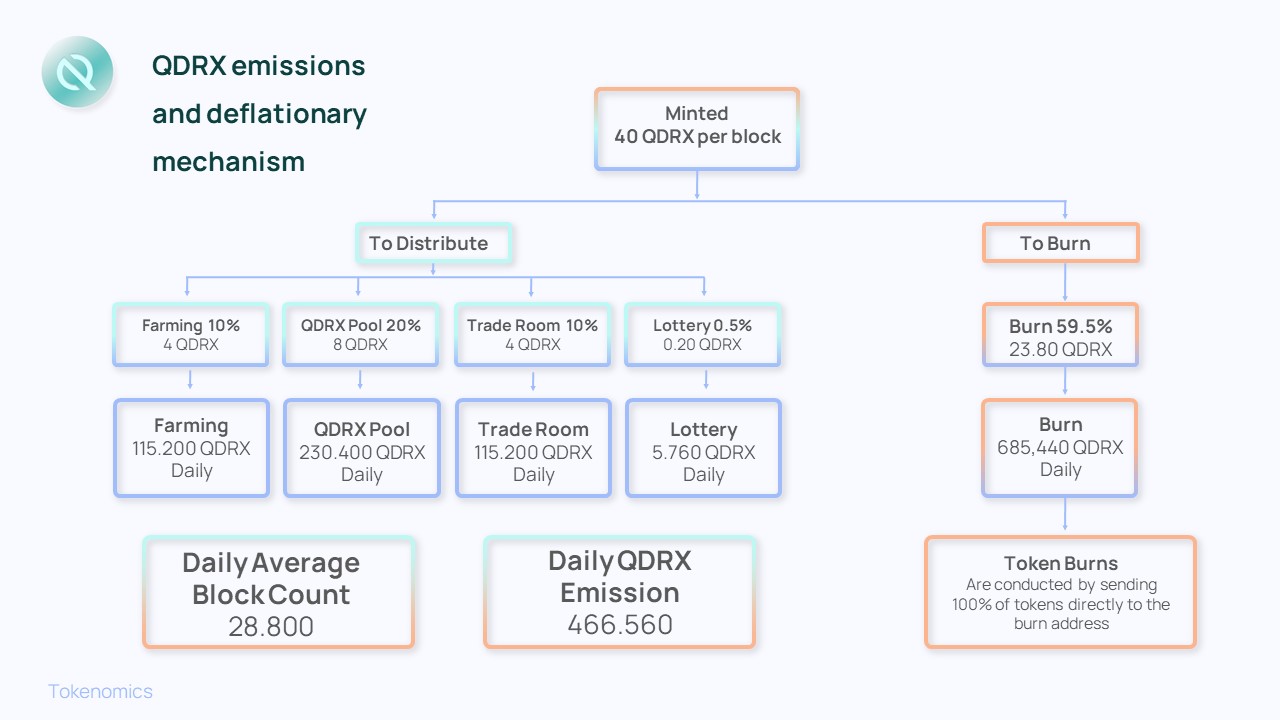
Emission Rate
Other Deflationary Mechanics
The burning process is currently manual. QDRX burning events will be hosted regularly on the platform. As we grow our community and features of the Quadrix App we will grow the burning events. To start we will focus on the following:
  0.05% of every trade fee made on Quadrix App

  20% of QDRX spent on lottery tickets

  10% of every Trade Room listing fees
Why is the QDRX burn manual?
To launch and start our journey, Quadrix App is launched as an MVP (minimum viable product) with the Quadrix Factory contract emitting 40 QDRX per block. For that reason, we didn't add additional functions such as the ability to customize the QDRX minting logic. The team will control QDRX emissions through a manual burn process.
How to Confirm QDRX Supply for yourself
To confirm that the circulating QDRX supply shown on the Quadrix App homepage is correct, head to the QDRX token contract on BscScan and see how much QDRX is held by the Burn Address. That's the total amount of QDRX that's been burned (removed from circulation FOREVER, and impossible to ever retrieve). Then, subtract this burned amount from the "Total Supply" that BscScan shows. This gives you the actual QDRX supply.
Does QDRX have a hard cap?
Yes, QDRX has a hard cap of 750M
How QDRX supply is reduced
The team's aim is to make deflation higher than emission by building deflationary mechanisms into Quadrix App's products. The goal is for more QDRX to leave circulation than the amount of QDRX that's produced.
Reducing block emissions
By reducing the amount of QDRX made per block, we slow inflation. This will be done in the future to reduce the number of QDRX entering circulation from 40 QDRX per block to a lower number. But we don't want to do this too frequently, too early, we want to still incentivize people to provide liquidity.
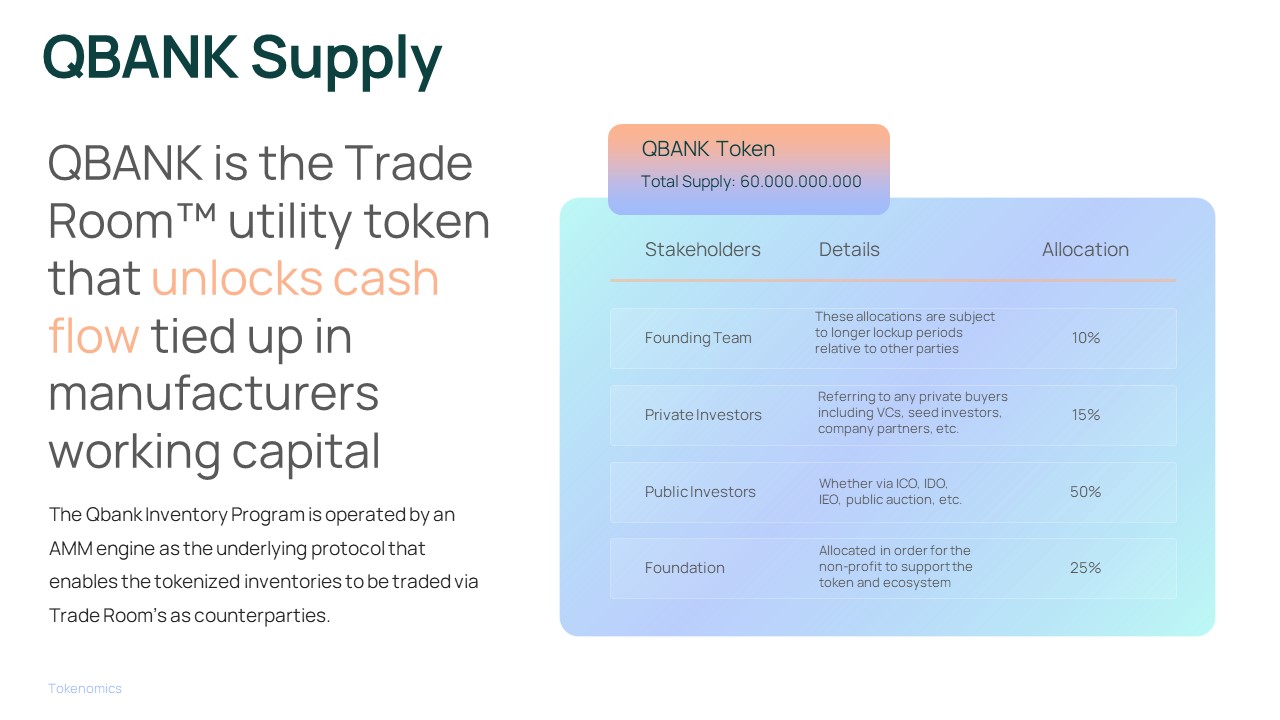
Vesting Periods
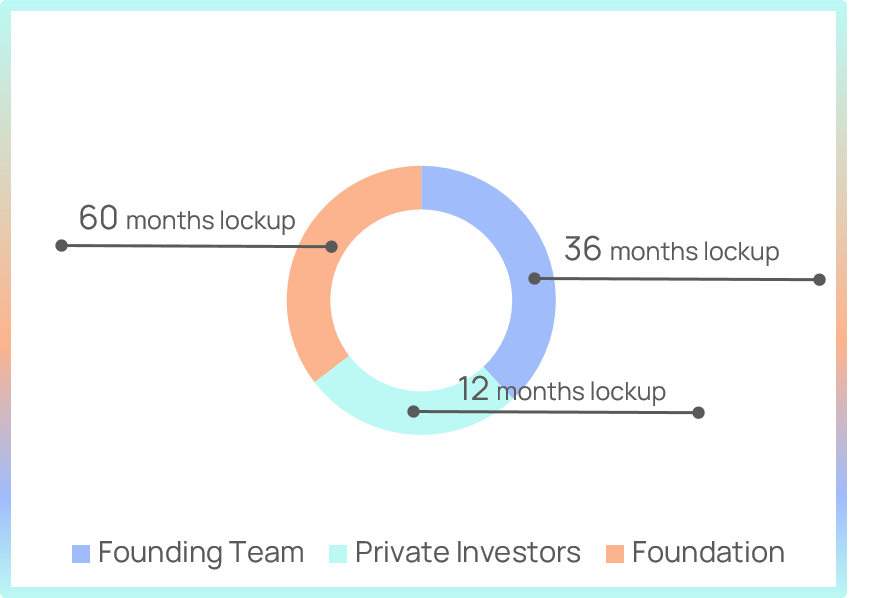
The vesting period refers to the time period where the sale of a token is restricted after initial distribution and is commonly also called the lockup period. The tokens are traditionally unlocked at regular intervals during a given period, with these intervals differing in length depending on which type of token holder it is.
The QBANK token vesting is time-based vesting with a 12 months lockup period and 5% linear release every month after lockup period ends. “Token lock-up periods are important incentivization tools to ensure that developer and insider motivations are aligned with those of token buyers”