Track your favourite cryptocurrency in real-time. Add it to your watchlist and find all the details of that cryptocurrency. Search for any currency and track its performance.

- Find all cryptocurrencies on the home page.
- Search for your favourite currency.
- Add them to the watchlist.

- GitHub
- Kotlin
- Android Studio
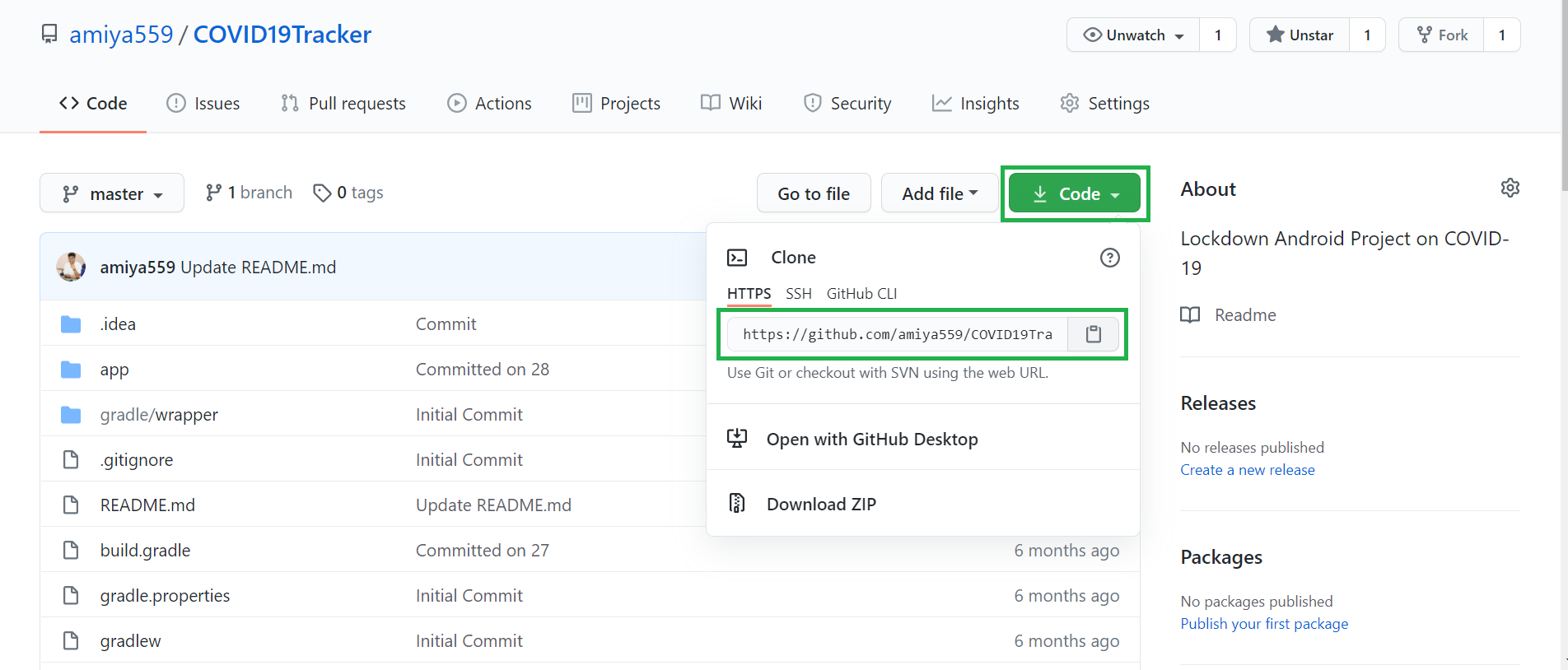
- Step 1: Copy the project url from this repository as shown below.
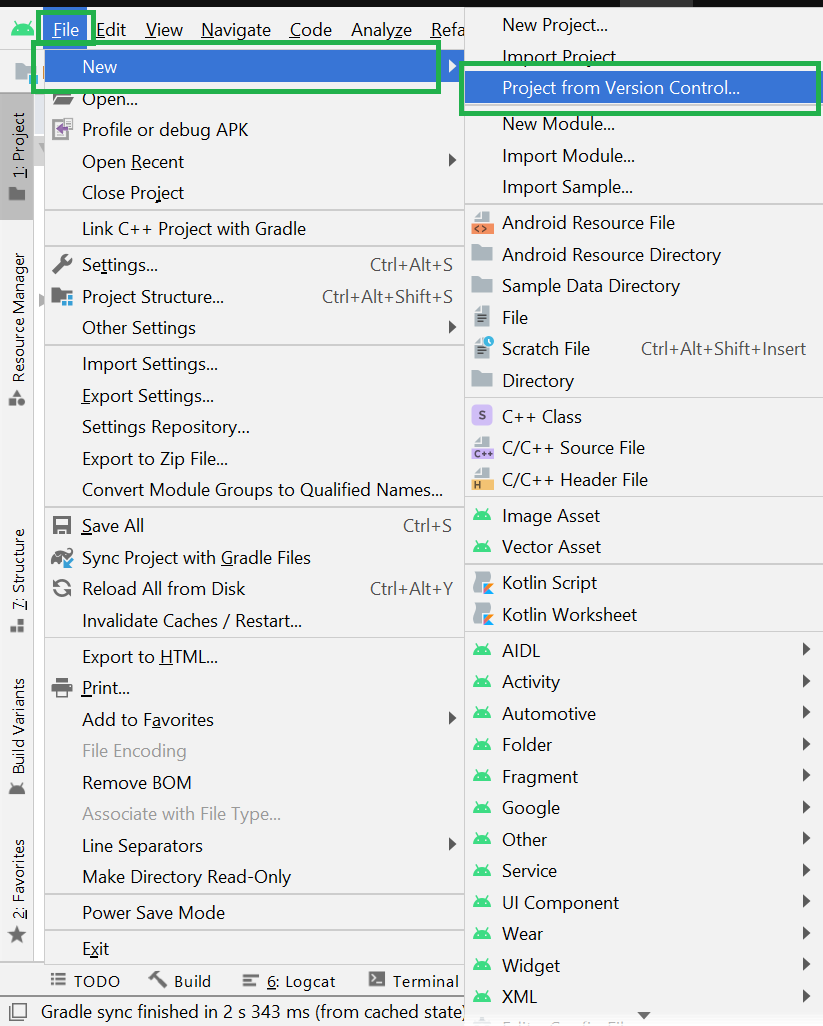
- Step 2: Open your Android Studio then go to the File > New > Project from Version Control.
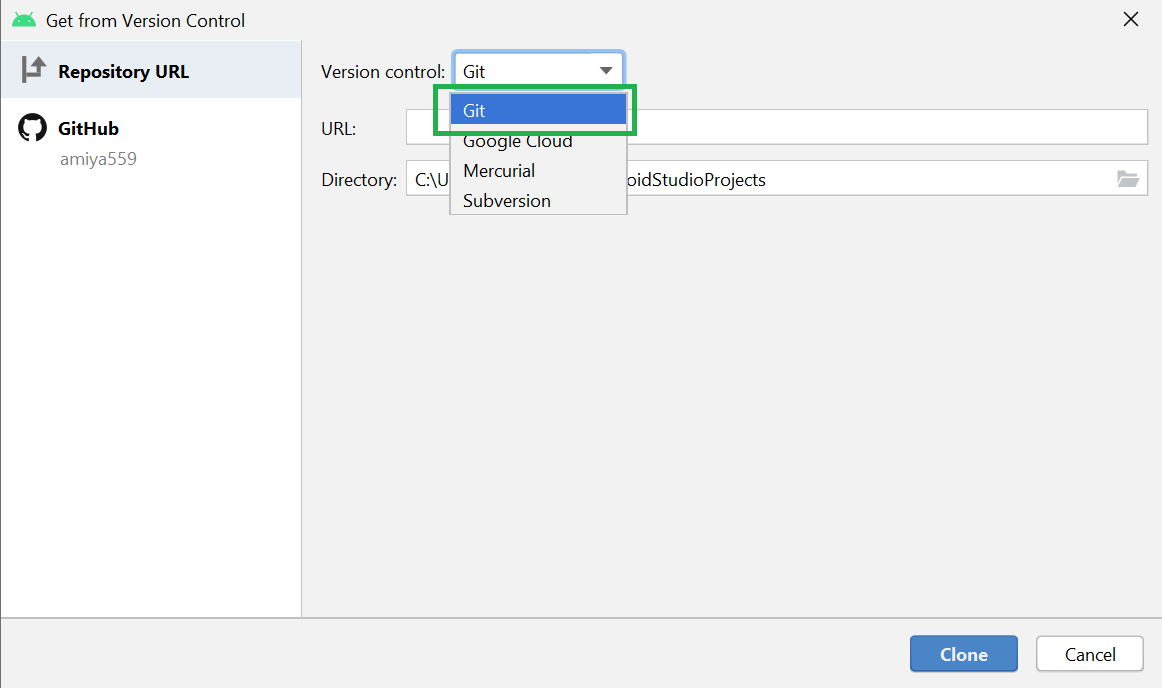
- Step 3: After clicking on the Project from Version Control a pop-up screen will arise. In the Version control choose Git from the drop-down menu.
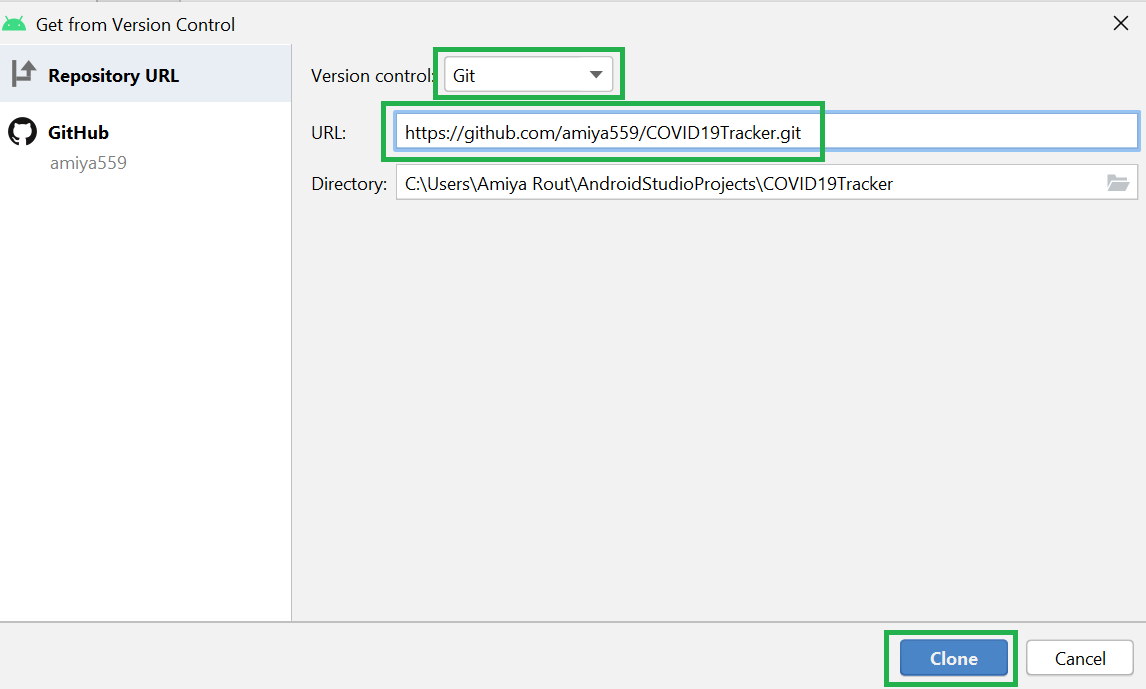
- Step 4: Then at last paste the link in the URL and choose your Directory. Click on the Clone button and you are done.
-
Open Git Bash
-
If Git is not already installed, it is super simple. Just go to the Git Download Folder and follow the instructions.
-
Go to the current directory where you want the cloned directory to be added.
-
To do this, input cd and add your folder location. You can add the folder location by dragging the folder to Git bash.
-
Go to the page of the repository that you want to clone
-
Click on “Clone or download” and copy the URL.
-
Use the git clone command along with the copied URL from earlier. $ git clone https://github.com/Ramsay2/CryptoInfo
-
Press Enter. $ git clone https://github.com/Ramsay2/CryptoInfo Cloning into Git … remote: Counting objects: 13, done. remote: Compressing objects: 100% (13/13), done. remove: Total 13 (delta 1), reused 0 (delta 1) Unpacking objects: 100% (13/13), done.
Congratulations, you have created your first local clone from your remote Github repository.
Open Android Studio. Go to File > New > Project From Version Control. Copy the link of this repositary. Paste the link in Url Box of Android Studio window and click on "Clone" button.
implementation 'io.reactivex.rxjava3:rxjava:3.1.2'
implementation 'io.reactivex.rxjava3:rxandroid:3.0.0'
implementation 'com.squareup.retrofit2:adapter-rxjava3:2.9.0'


implementation 'com.github.bumptech.glide:glide:4.12.0'
implementation 'androidx.legacy:legacy-support-v4:1.0.0'
kapt 'com.github.bumptech.glide:compiler:4.12.0'

// ViewModel and LiveData
def arch_version = '2.2.0-alpha01'
implementation("com.airbnb.android:lottie:4.1.0")

implementation "androidx.lifecycle:lifecycle-extensions:$arch_version"
implementation "androidx.lifecycle:lifecycle-viewmodel-ktx:$arch_version"
implementation "androidx.lifecycle:lifecycle-livedata-ktx:$arch_version"
implementation "androidx.lifecycle:lifecycle-runtime-ktx:$arch_version"
// Lifecycle
implementation "androidx.lifecycle:lifecycle-extensions:2.2.0"
implementation "androidx.lifecycle:lifecycle-viewmodel-ktx:2.4.0"
implementation "androidx.lifecycle:lifecycle-livedata-ktx:2.4.0"

implementation 'androidx.core:core-ktx:1.7.0'
implementation 'androidx.appcompat:appcompat:1.4.0'
implementation 'com.google.android.material:material:1.4.0'
implementation 'androidx.constraintlayout:constraintlayout:2.1.2'
implementation 'androidx.navigation:navigation-fragment-ktx:2.3.5'
implementation 'androidx.navigation:navigation-ui-ktx:2.3.5'
testImplementation 'junit:junit:4.13.2'
androidTestImplementation 'androidx.test.ext:junit:1.1.3'

androidTestImplementation 'androidx.test.espresso:espresso-core:3.4.0'

//Room
implementation 'androidx.room:room-ktx:2.3.0'
kapt 'androidx.room:room-compiler:2.3.0'

//Retrofit
def retrofit2_version = "2.9.0"
def okhttp3_version = "4.9.0"

implementation "com.squareup.retrofit2:retrofit:$retrofit2_version"
implementation "com.squareup.retrofit2:converter-gson:$retrofit2_version"


implementation "com.squareup.okhttp3:okhttp:$okhttp3_version"

//hilt
implementation("com.google.dagger:hilt-android:2.38.1")
kapt("com.google.dagger:hilt-android-compiler:2.38.1")

implementation 'com.github.arimorty:floatingsearchview:2.1.1'