A terminal app to track your personal spending with complete control over your data.
Built with the Python curses library and an SQLite database.
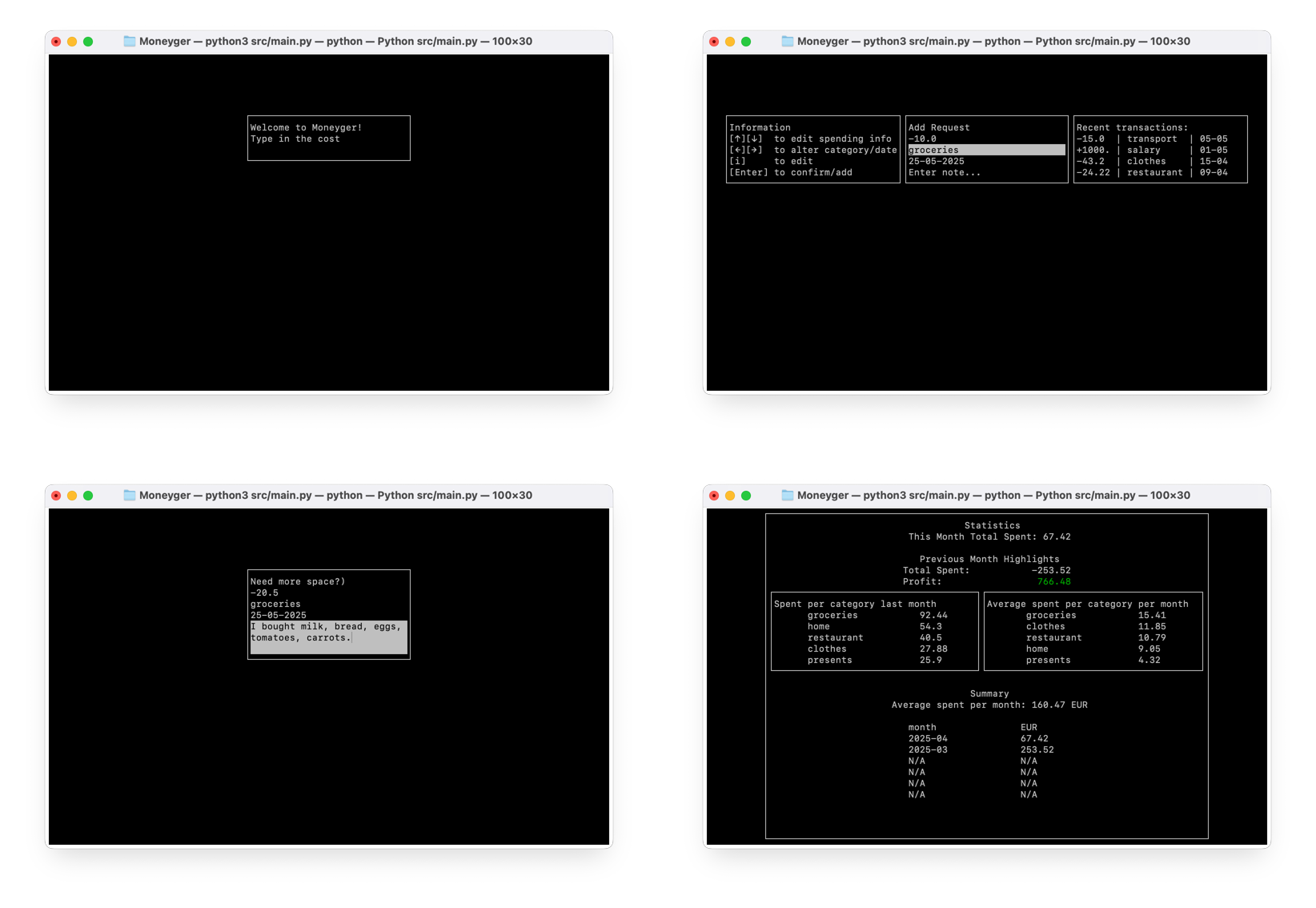
To start adding your transactions, enter the amount and press Enter. You can also add a description, category, and date. The app will automatically save your data to the database. To change the category, date, or description, navigate to the line and press i. Press Enter to save changes, and press Enter again to submit the transaction.
Use arrows ↑, ↓ to navigate between transaction metadata and ←,→ to scroll between different categories/dates.
To switch to the analysis screen, press s (stats). Here you can see your spending by category, date, and other statistics. You can return to the transactions screen by pressing t (transactions).
To exit the app, press q (quit).
-
Clone the repository:
git clone https://github.com/redhoven/moneyger.git
-
Navigate to the project directory:
cd moneyger -
Install the required dependencies:
python -m venv venv
source venv/bin/activate  # On Windows use `venv\Scripts\activate`
pip install -r requirements.txt
-
Run the app in the terminal:
# Initialize the database when running for the first time
python src/database.py --init
python src/main.py
Warning
Make sure your terminal is large enough to display the app properly. The recommended minimum size is 100x30 characters. The app will not start if the terminal window is too small.
- If the app crashes or something isn't working properly, check the logs in the
moneyger.logfile.
📂 src/
app.py— Initializes and runs the core application logicmain.py— Entry point: boots the app and starts the main loopstate.py— Defines the shared state of the applicationstate_manager.py— Controls navigation between screens based on the current statescreen_manager.py— Builds and manages the different screenskeys.py— Centralized key mappings for input handlingdatabase.py— Handles all data persistence and retrieval logicstats.py— Gathers and processes database stats for visual displayparsers.py— Parses incoming input data into a structured form
screen.py— Abstract base class for all screensmain_screen.py— Home screen for general interactionsextended_screen.py— Transaction screen with history and guidanceanalysis_screen.py— Visualizes data insights and trends
App (app.py)
Orchestrates the entire application lifecycle. Initializes core modules and performs actions based on the current shared state.
State Manager (state_manager.py)
Handles screen transitions by monitoring updates in the shared state.
Shared State (state.py)
Central storage for app state, responsible for consistent and reactive behavior across screens.
Screen (screens/*.py)
Each screen:
- Renders its UI content
- Handles user key inputs
- Returns a potential new state
Statistics (stats.py)
Pulls data from the database and transforms it into processed insights.
Database (database.py)
Low-level data layer responsible for CRUD operations and persistent storage.