WHAT IS JAVA?? LET'S COMPARE WITH PYTHON CODE
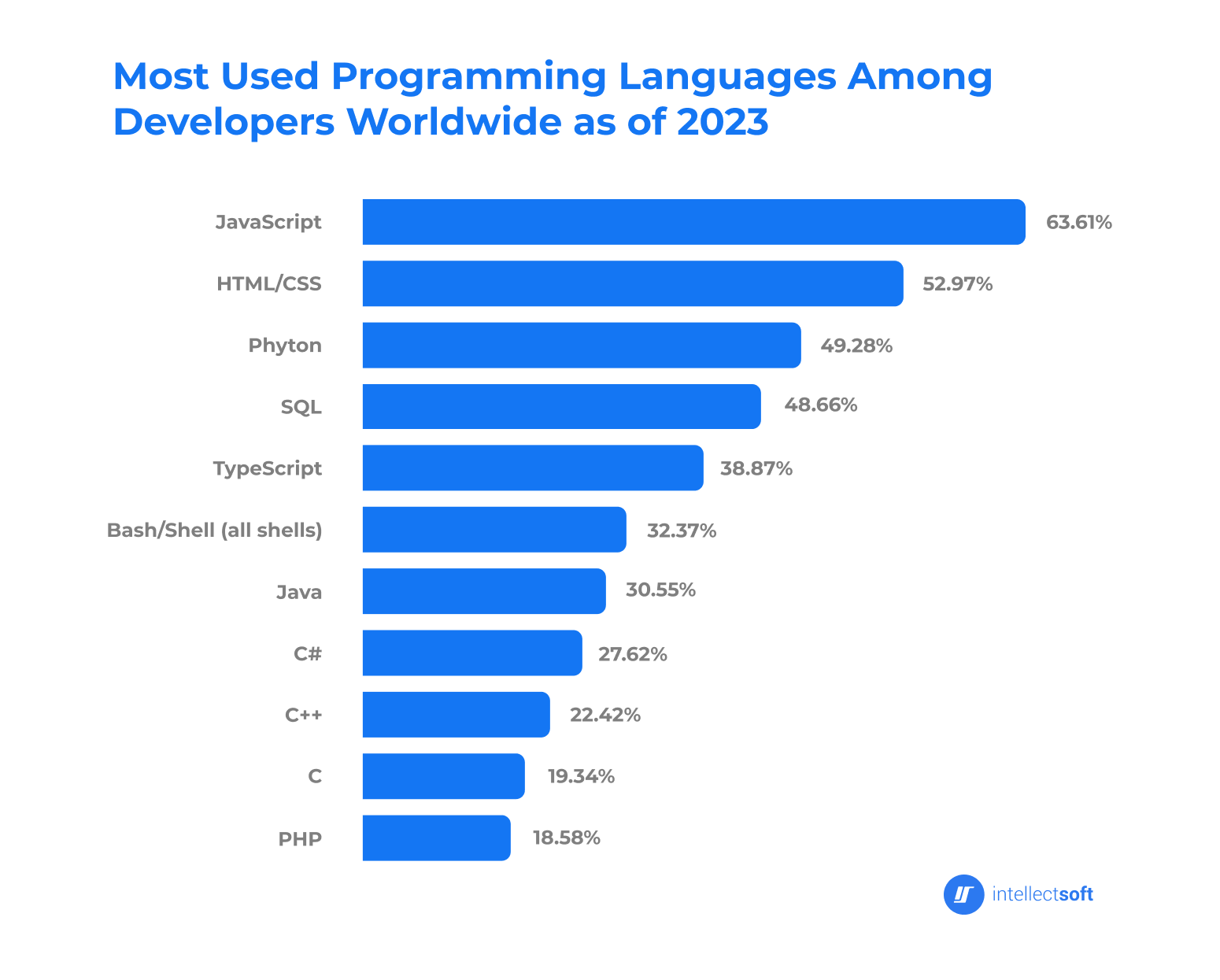
Java is a general-purpose, object-oriented language (1995), popular in Android development, web development, Big Data, and IoT.
- Platform-independent: "Write once, run anywhere."
- Faster apps: Supports multithreading and automatic memory management.
- Stability & backward compatibility: Errors are caught before compilation.
- Strong community: Large collection of libraries and helpful documentation.
- Wordy & complex syntax: Requires more code, frequent use of curly braces and semicolons.
- Difficult to master: Harder than Python due to its verbosity and syntax.
- High memory usage: Inefficient garbage collection, leading to high RAM consumption.
Python (1991) focuses on simplicity and readability. It's widely used for machine learning, data science, web development, and more.
- Simple syntax: Intuitive and concise.
- Fast development: Fewer lines of code; easy to write and read.
- Easy to learn: Friendly for beginners with a lot of learning resources.
- Powerful libraries: Django, Flask (web), TensorFlow, PyTorch (ML), Pandas, NumPy (data science).
- No multithreading: Limited CPU utilization, affecting performance.
- Not for native mobile apps: Requires additional libraries (e.g., Kivy, PyQt).
- Weak database connectivity: Lacks efficient native support, relying on external modules.
Java is robust, fast, and secure, making it ideal for:
- Mobile app development
- Web app development
- Big Data
- Internet of Things (IoT)
- Enterprise software development
Java is the go-to choice when building cross-platform products with stability and scalability.
Python is concise, flexible, and excels in:
- Machine learning
- Scientific computing
- Image processing
- Task automation
- Multimedia applications
Python shines when rapid development, data analysis, or automation is needed.
Both Java and Python have their strengths and are suitable for different types of projects:
-
Java is the better choice when building cross-platform, enterprise-level software, or applications requiring speed, stability, and scalability. It shines in mobile development, Big Data, and IoT projects.
-
Python, with its simplicity, is perfect for rapid development, machine learning, data science, and tasks requiring automation or scientific computing. Its ease of use and extensive libraries make it ideal for projects with tight deadlines or heavy data processing.
Ultimately, choose Java for performance-critical, large-scale systems, and Python for flexible, data-driven projects.
Berikut adalah perbedaan kode antara Java dan Python untuk berbagai konsep dasar:
-
Java:
public class Main {
    public static void main(String[] args) {
        System.out.println("Hello, World!");
    }
}
-
Python:
print("Hello, World!")
-
Java:
int a = 5;
int b = 2;
int sum = a + b; // Penjumlahan
int difference = a - b; // Pengurangan
int product = a * b; // Perkalian
int quotient = a / b; // Pembagian
int remainder = a % b; // Modulus
-
Python:
a = 5
b = 2
sum = a + b  # Penjumlahan
difference = a - b  # Pengurangan
product = a * b  # Perkalian
quotient = a / b  # Pembagian
remainder = a % b  # Modulus
| Operator | Name | Description | Example |
|---|---|---|---|
| && | Logical and | Returns true if both statements are true | x < 5 && x < 10 |
| Logical or | |||
| ! | Logical not | Reverses the result, returns false if true | !(x < 5 && x < 10) |
-
Java:
public class LogicalOperators {
    public static void main(String[] args) {
        // Variables
        boolean a = true;
        boolean b = false;

        // AND operator (&&)
        System.out.println("a && b: " + (a && b));  // false

        // OR operator (||)
        System.out.println("a || b: " + (a || b));  // true

        // NOT operator (!)
        System.out.println("!a: " + (!a));  // false
        System.out.println("!b: " + (!b));  // true

        // Combining logical operators
        System.out.println("a || (a && b): " + (a || (a && b)));  // true
        System.out.println("(a && !b) || (b || a): " + ((a && !b) || (b || a)));  // true
    }
}
| Operator | Description | Example |
|---|---|---|
| and | Returns True if both statements are true | x < 5 and x < 10 |
| or | Returns True if one of the statements is true | x < 5 or x < 4 |
| not | Reverses the result, returns False if true | not(x < 5 and x < 10) |
-
Python:
# Variables
a = True
b = False

# AND operator (and)
print("a and b:", a and b)  # False

# OR operator (or)
print("a or b:", a or b)  # True

# NOT operator (not)
print("not a:", not a)  # False
print("not b:", not b)  # True

# Combining logical operators
print("a or (a and b):", a or (a and b))  # True
print("(a and not b) or (b or a):", (a and not b) or (b or a))  # True
-
Java:
int num = 10;
double decimal = 10.5;
char letter = 'A';
boolean isTrue = true;
String text = "Hello, Java!";
-
Python:
num = 10  # Integer
decimal = 10.5  # Float
letter = 'A'  # Char (not explicitly defined)
is_true = True  # Boolean
text = "Hello, Python!"  # String
-
Java:
import java.util.ArrayList;
import java.util.HashMap;

// Array
int[] array = {1, 2, 3};

// ArrayList
ArrayList<Integer> list = new ArrayList<>();
list.add(1);
list.add(2);

// HashMap
HashMap<String, Integer> map = new HashMap<>();
map.put("One", 1);
map.put("Two", 2);
-
Python:
# List
array = [1, 2, 3]

# Dictionary
map = {"One": 1, "Two": 2}
-
Java:
public class Main {
    public static void printMessage() {
        System.out.println("This is a function in Java");
    }

    public static void main(String[] args) {
        printMessage();
    }
}
-
Python:
def print_message():
    print("This is a function in Python")

print_message()
-
Java:
for (int i = 0; i < 5; i++) {
    System.out.println(i);
}

int j = 0;
while (j < 5) {
    System.out.println(j);
    j++;
}
-
Python:
for i in range(5):
    print(i)

j = 0
while j < 5:
    print(j)
    j += 1
-
Java:
int x = 10;
if (x > 5) {
    System.out.println("x is greater than 5");
} else if (x == 5) {
    System.out.println("x equals 5");
} else {
    System.out.println("x is less than 5");
}
-
Python:
x = 10
if x > 5:
    print("x is greater than 5")
elif x == 5:
    print("x equals 5")
else:
    print("x is less than 5")
-
Java:
try {
    int result = 10 / 0;
} catch (ArithmeticException e) {
    System.out.println("Error: Division by zero");
} finally {
    System.out.println("This will always execute");
}
-
Python:
try:
    result = 10 / 0
except ZeroDivisionError:
    print("Error: Division by zero")
finally:
    print("This will always execute")
-
Java:
public class Person {
    String name;
    int age;

    // Constructor
    public Person(String name, int age) {
        this.name = name;
        this.age = age;
    }

    public void display() {
        System.out.println("Name: " + name + ", Age: " + age);
    }

    public static void main(String[] args) {
        Person p = new Person("John", 30);
        p.display();
    }
}
-
Python:
class Person:
    def __init__(self, name, age):
        self.name = name
        self.age = age

    def display(self):
        print(f"Name: {self.name}, Age: {self.age}")

p = Person("John", 30)
p.display()