
BottomSheetMap is an approximating the bottom sheet component found in google maps to for iOS. You can run the BottomSheetApp target to try it out.
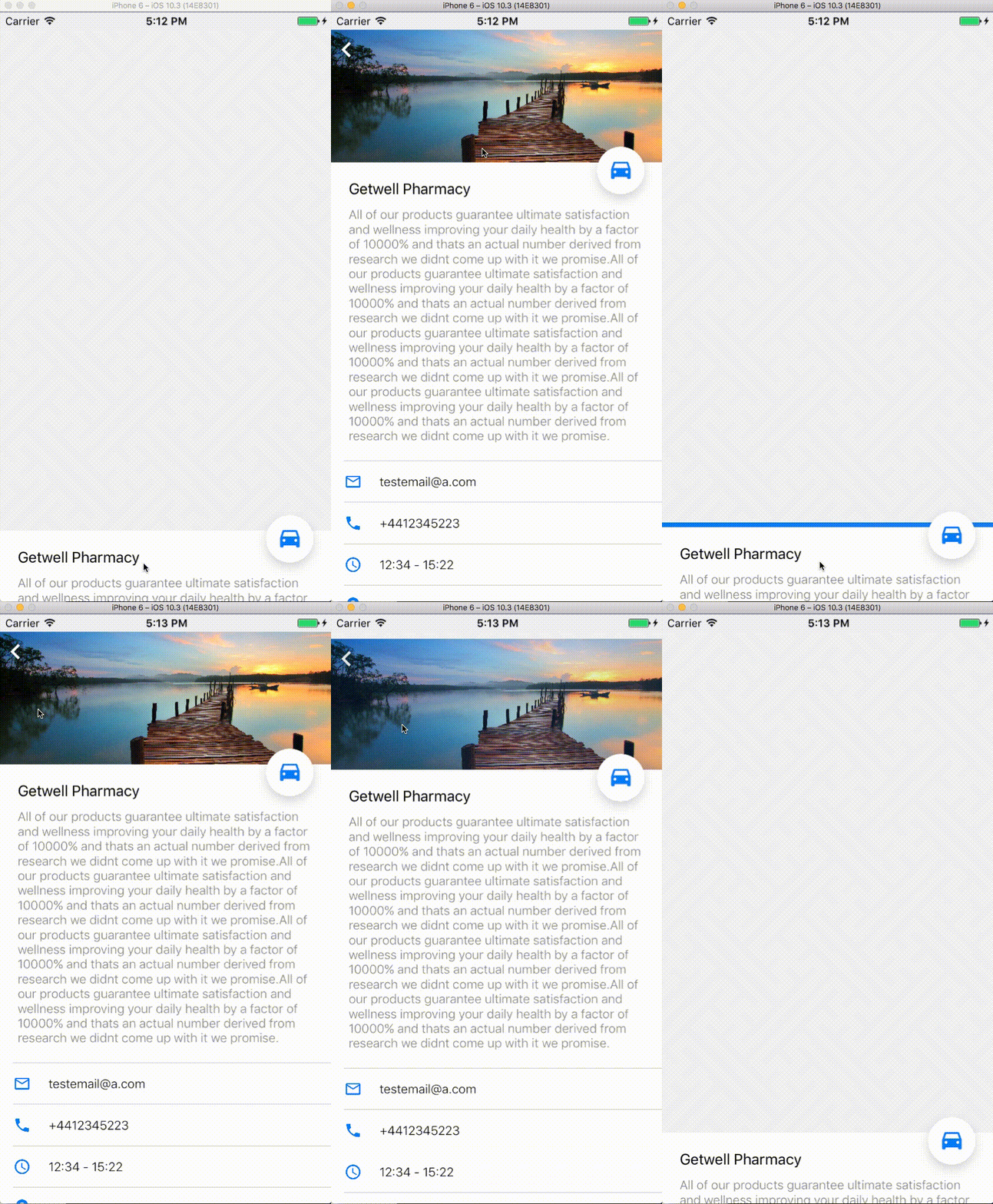
This repo is not maintained and has pretty much been written in a rush. Works for my use cases but use at own risk
This section describes how to quickly setup the BottomSheet component.
Load the component and add it to your view
var bottomSheet = BottomSheetMap.getBottomSheetComponent();
//add to subview
self.view.addSubview(bottomSheet);The component comes with a few default display options. Provide your data as described below and let BottomSheetMap take care of the rest.
        var customData = [String:String]()
        customData["email"] = "testemail@a.com"
        customData["address"] = "Wherever lane"
        customData["openHours"] = "12:34 - 15:22"
        customData["title"] = "Getwell Pharmacy"
        customData["description"] = "The description. All of our products guarantee ultimate satisfaction and wellness improving your daily health by a factor of 10000% and thats an actual number derived from research we didnt come up with it we promise.";
        customData["phone"] = "+4412345223"

        //if you want the navigation button to work, also provide longitute and latitude
        customData["longitude"] =
        customData["latitude"] =


        bottomSheet!.setUp(parentController: self)
bottomSheet!.setData(data: customData)You can provide your own table methods if you would rather use your own custom cells. To do that ,specify the delegate and data source when initializing the component.
bottomSheet!.setUp(parentController: self, tableDelegate: self, tableDataSource: self, maxBottomSheetHeight: 0)If you re using method B) then you NEED to implement scrollViewDidScroll and add scrollViewDidScroll on it as the BottomSheet component needs this.
    func scrollViewDidScroll(_ scrollView: UIScrollView) {
        bottomSheet!.scrollViewDidScroll(scrollView)
    }
Note : If anyone has a better idea on how to structure this im all ears, drop me a line. Generally multiple delegates are not considered a good idea : https://stackoverflow.com/questions/12774808/multiple-delegates-in-ios
Coming soon... Working on a solution that can mix and max methods B and A
You're done! Display your bottomSheet by calling
bottomSheet!.pullUpViewSetMode_SUMMARY()The bottom Sheet can be at any of four modes at any given time which you can get by using:
bottomSheet.getMode()Modes: FULL : The bottomSheet is fully rolled up. Triggerd by calling:
bottomSheet!.pullUpViewSetMode_FULL()SUMMARY: The bottomSheet is displaying at the bottom of it's parent
bottomSheet!.pullUpViewSetMode_SUMMARY()HIDDEN: The bottomSheet is hidden
bottomSheet!.pullUpViewSetMode_HIDDEN()OTHER: This covers all other modes like when in transit
If you want to be notified of events you can implement the BottomSheetMapViewDelegate methods on your parent object and be notified for:
modeWillSetTo(mode: BottomSheetMapMode); modeDidSetTo(mode: BottomSheetMapMode);
When initializing the BottomSheetMap you can either sepcify a maxHeight or leave it on automatic.
bottomSheet!.setUp(parentController: self)If left on automatic, upon expanding the BottomSheetMap to it's full mode, it will cover the entire containing view.
bottomSheet!.setUp(parentController: self, tableDelegate: nil, tableDataSource: nil, maxBottomSheetHeight: 0)The maxBottomSheetHeight property sets a limit to that in case you would preffer the bottomSheet would not go further up than a specific height.
You can change the properties below without worrying something will break. I think.
pullupHeightForModeSUMMARY = CGFloat(80); hideAnimationDuration = 0.3; showSummaryAnimationDuration = 0.3; showFullAnimationDuration = 0.3;
Currently when scrolling up, if the table inside the view has more info to scroll, you need to stop panning and start scrolling up again in order to keep scrolling up. This isnt a huge deal ( and it works the other way around which is the most important of the two anyway ) but would be still nice to find a way to work around this.
The component was written fast and out necessity.Im very open to input as I am still improving in iOS development so feel free to submit a pull request or any comments you might have.