Connect Server and Client within the local network without manually entering an IP address – and encrypted via AES.
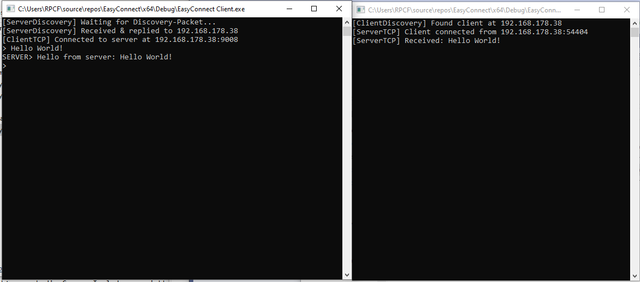
EasyConnect makes it possible to automatically connect a Server and a Client on the local network (discovery) without manually entering IP addresses. After that, EasyConnect establishes a TCP connection and encrypts the communication using AES.
- Ideal for users who want to avoid IP or network configuration hassles.
- Flexible: Thanks to the standard socket data stream, any type of data can be transferred.
-
UDP Broadcast Discovery
- Automatically “find” the other party in the LAN
- Saves you from manually typing IP addresses or ports
-
TCP Connection
- Establishes a socket connection to the discovered IP
- Allows any data or protocols
-
AES Encryption (CBC mode, PKCS#7)
- No plaintext visible in the network
- Uses a random IV for each message
- 4-byte length header before IV + ciphertext
-
Startup Order
- Optionally, discovery can run indefinitely so that Server & Client can start in any order
- By default: Server broadcasts first, Client listens
-
DiscoveryCommon.h
Constants & structures for UDP broadcast (e.g., ports, magic values, tokens, etc.) -
ServerDiscovery / ClientDiscovery
Send & receive broadcast packets; handle the discovery logic (how often to send, how long to wait). -
ServerTCP / ClientTCP
Establish the TCP connection and include methods likerunConsoleLooporrunEchoLoopfor data exchange. -
AES.h / AES.cpp
AES implementation (CBC, PKCS#7). Methods:EncryptCBC_PKCS7,DecryptCBC_PKCS7, etc. -
NetUtils.h / NetUtils.cpp
Utility functions likesendPacket,recvPacket,generateRandomIV,sendAll,recvAll, etc. -
CryptoConfig.h
Static 256-bit key (for demo). In a real scenario, a key exchange should be used. -
main_server.cpp / main_client.cpp
Entry points for Server & Client, start discovery and then the TCP communication.
- Operating System: Originally developed for Windows (WinSock2).
- With
#ifdef _WIN32or cross-platform socket libraries, it can also run on Linux/macOS.
- With
- Compiler: Visual Studio or another C++ compiler (MinGW, Clang, GCC).
- Libraries:
Ws2_32.lib(Windows) must be linked (already handled via pragma).- No additional external libraries needed (AES & discovery are self-implemented).
For a platform-independent solution, you can build the project using CMake, for example:
cd YourSolution
mkdir build
cd build
cmake ..
cmake --build .Vernetze Server und Client im lokalen Netzwerk, ganz ohne IP-Eingabe – und das verschlüsselt per AES.
EasyConnect ermöglicht es, einen Server und einen Client im lokalen Netzwerk automatisch miteinander zu verbinden (Discovery), ohne IP-Adressen händisch einzugeben. Anschließend baut EasyConnect eine TCP-Verbindung auf und verschlüsselt die Kommunikation via AES.
- Ideal für Anwender, die keinen IP- oder Netzwerkstress wollen.
- Flexibel: Dank normalem Socket-Datenstrom kann jede Art von Daten übertragen werden.
-
UDP-Broadcast Discovery
- Automatisches „Auffinden“ des Gegenübers im LAN
- Spart das manuelle Eintippen von IP-Adressen oder Ports
-
TCP-Verbindung
- Auf der ermittelten IP wird eine Socket-Verbindung aufgebaut
- Beliebige Daten oder Protokolle möglich
-
AES-Verschlüsselung (CBC-Modus, PKCS#7)
- Kein Klartext im Netzwerk sichtbar
- Pro Nachricht wird ein zufälliges IV verwendet
- 4-Byte-Längenheader vor IV + Ciphertext
-
Startreihenfolge
- Optional kann Discovery endlos laufen, damit Server & Client in beliebiger Reihenfolge starten
- Standardmäßig: Server broadcastet zuerst, Client hört zu
-
DiscoveryCommon.h
Konstanten & Strukturen für den UDP-Broadcast (z. B. Ports, Magic Values, Tokens etc.) -
ServerDiscovery / ClientDiscovery
Senden & Empfangen von Broadcast-Paketen, regeln die Discovery-Logik (Wie oft senden? Wie lange warten?). -
ServerTCP / ClientTCP
Bauen die TCP-Verbindung auf und enthalten z. B.runConsoleLoopoderrunEchoLoopfür den Datenaustausch. -
AES.h / AES.cpp
AES-Implementierung (CBC, PKCS#7). Methoden:EncryptCBC_PKCS7,DecryptCBC_PKCS7, etc. -
NetUtils.h / NetUtils.cpp
Hilfsfunktionen wiesendPacket,recvPacket,generateRandomIV,sendAll,recvAll, usw. -
CryptoConfig.h
Statischer 256-Bit Key (Demo). In echten Szenarien würde man einen Schlüsseltausch nutzen. -
main_server.cpp / main_client.cpp
Einstiegspunkte für Server & Client, starten die Discovery und danach TCP-Kommunikation.
- Betriebssystem: Ursprünglich Windows (WinSock2).
- Mit
#ifdef _WIN32oder Cross-Platform-Socket-Libs läuft es auch auf Linux/macOS.
- Mit
- Compiler: Visual Studio oder ein anderer C++-Compiler (MinGW, Clang, GCC).
- Bibliotheken:
Ws2_32.lib(Windows) "muss" verlinkt werden, sollte via pragma schon passieren.- Keine weiteren externen Libs nötig (AES & Discovery selbst implementiert)
Für eine plattformunabhängige Lösung kannst du das Projekt per CMake bauen, z. B.:
cd YourSolution
mkdir build
cd build
cmake ..
cmake --build .