This project has been designed to take 8 hours or less. Though, feel free to take more time if you need it. Please DO NOT fork this project, instead clone a fresh copy and submit a zip file with your work.
You are responsible for building the back-end CRUD interace only; thus you do not need to implement any show actions.
- The application must be built with Ruby on Rails.
- You may use Twitter Bootstrap or Zurb Foundation (Bootstrap 3 is included by default in this project).
- User authentication is not required for this application.
- Understanding of basic user flows and application design (MVC)
- Knowledge of the Ruby programming language, data modelling techniques, and the Rails framework
- Sense of web development best practices
There are a set of basic mockups available which should serve as a visual guideline for what you're building.
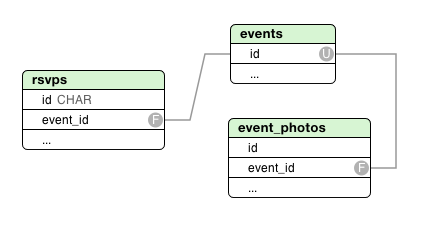
You must build an API endpoint for allowing a visitor to RSVP for an event. This endpoint should take the name of the attendee and an optional number of guests.
Your RSVP controller should accept a JSON endpoint that takes a payload such as:
POST /v1/events/123/rsvp
{
   "name":"Bob Smith",
   "guests":2
}
And creates the appropriate RSVP record.
For this project, the user should be able to upload images. You may want to look into CarrierWave or Paperclip to accomplish this.
It is sufficient to upload files directly to the filesystem for storage (instead of a CDN). Thumbnail generation is optional, but appreciated.
This page should show all events in the system except cancelled events and should be divided into two tabs: upcoming events and past events.
The list should be paginated and allow the user to click into the event detail page.
This page should allow the user to create a new event or edit an existing one and is divided into three tabs: event details, photos, and attendees.
This should allow the user to add the following data about an event:
- Event Title
- Image
- Speaker
- Description
- Location (street 1, street 2, city, state, zip)
- Start date & time
If the event has already been created, the user should have the ability to cancel the event, which flags it as cancelled and hides it from the list view.
If the event is new, the app should validate the presence of the event's title, description, location, and start date/time (must be in the future).
This tab is unavailable until the event has been created. This screen should allow the user to upload any number of photos and optionally add a caption to them. The user can also delete the photos.
See the section on image for specifications.
This tab is unavailable until the event has been created. This screen should list event attendees that have been submitted via the API endpoint described above. It should also allow the user to remove attendees.