Skip to content

Add devcontainer definition#254

Merged
theimowski merged 3 commits intomasterfrom
devcontainer
May 8, 2019
Merged

Add devcontainer definition#254
theimowski merged 3 commits intomasterfrom
devcontainer

Conversation

@Krzysztof-Cieslak
Copy link
Copy Markdown
Member

@Krzysztof-Cieslak Krzysztof-Cieslak commented May 3, 2019

Having in the devcontainer definition in the workspace will make VSCode (if user has remote-containers extension installed) prompt user to open the workspace inside the defined docker container.
As you can see in the docker container we have .Net SDK 2.2, Node, Yarn, Paket and FAKE - i.e all our requirements.
VSCode will also automatically install the extensions specified in devcontainer.json. (inside container instance - i.e. not polluting host installation)

All this means users can start developing applications with VSCode and docker as only requirements - and they will automatically get full configure development environment with all dependencies installed.

Copy link
Copy Markdown

@ghuntley ghuntley left a comment

Choose a reason for hiding this comment

The reason will be displayed to describe this comment to others. Learn more.

stealing this, thanks :D

Copy link
Copy Markdown

@ScottHutchinson ScottHutchinson left a comment

Choose a reason for hiding this comment

The reason will be displayed to describe this comment to others. Learn more.

# Install fake should be 	# Install paket

@Krzysztof-Cieslak
Copy link
Copy Markdown
Member Author

# Install fake should be 	# Install paket

Thanks, fixed

Comment thread Content/.devcontainer/Dockerfile Outdated
RUN echo "deb https://dl.yarnpkg.com/debian/ stable main" \
| tee /etc/apt/sources.list.d/yarn.list

# Install node, 7zip, yarn, mono, git, process tools
Copy link
Copy Markdown

Choose a reason for hiding this comment

The reason will be displayed to describe this comment to others. Learn more.

You're not installing mono, are you?

@ScottHutchinson
Copy link
Copy Markdown

Title "Add devocntainer definition" should be "Add devcontainer definition"

@theimowski
Copy link
Copy Markdown
Member

theimowski commented May 6, 2019

image

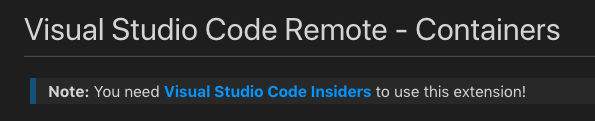
That's probably because the Remote - Containers extension is in preview version - wondering whether we should wait with that until it's in a stable version? I don't think many users have the insider version of VS Code installed (I didn't)

Then we could add an extension recommendation

@Krzysztof-Cieslak
Copy link
Copy Markdown
Member Author

wondering whether we should wait with that until it's in a stable version?

TBF, I think we should merge this despite being insiders-only. (But I'm super excited about this feature)

If someone has insiders version then it is just added value.
If someone has stable then those are just 3 small files they can ignore. And, what's important, people will already have this definition in their repos when the feature will got released in stable. I.e. they'll be able to use it without any additional work.

And yes, we definitly should add extension recommendation.

@Krzysztof-Cieslak Krzysztof-Cieslak changed the title Add devocntainer definition Add devcontainer definition May 6, 2019
@Nhowka
Copy link
Copy Markdown

Nhowka commented May 6, 2019

I'm behind a corporate proxy and couldn't make it work. The dotnet tools were installed, but at the end it's trying to connect to my host machine name on port 80 and it's failing. Not sure what is trying to connect or what do I have to do...

Edit: That was the error on friday. Today I'm getting a different error:

SECURITY WARNING: You are building a Docker image from Windows against a non-Windows Docker host. All files and directories added to build context will have '-rwxr-xr-x' permissions. It is recommended to double check and reset permissions for sensitive files and directories.
Run: docker run -a STDOUT -a STDERR -p 127.0.0.1:8080:8080 -p 127.0.0.1:8085:8085 -v c:/Users/desmerio/BridgeChat:/workspaces/BridgeChat -v C:\Users\desmerio\.gitconfig:/root/.gitconfig -l vsch.quality=insider -l vsch.local.folder=c:\Users\desmerio\BridgeChat -l vsch.remote.devPort=9753 vsc-bridgechat-d072018bff7ceda88d9569e3f8fc4b3e /bin/sh -c echo Container started ;  while sleep 1; do :; done
C:\Program Files\Docker\Docker\Resources\bin\docker.exe: Error response from daemon: driver failed programming external connectivity on endpoint eager_brahmagupta (9aa56a5cacf821751939199d2d9d1f0807c427625e78a8d539b35450d37023bc): Error starting userland proxy: mkdir /port/tcp:127.0.0.1:8085:tcp:172.17.0.2:8085: input/output error.
Failed: Starting the development container
Command failed: C:\Program Files\Docker\Docker\Resources\bin\docker.exe run -a STDOUT -a STDERR -p 127.0.0.1:8080:8080 -p 127.0.0.1:8085:8085 -v c:/Users/desmerio/BridgeChat:/workspaces/BridgeChat -v C:\Users\desmerio\.gitconfig:/root/.gitconfig -l vsch.quality=insider -l vsch.local.folder=c:\Users\desmerio\BridgeChat -l vsch.remote.devPort=9753 vsc-bridgechat-d072018bff7ceda88d9569e3f8fc4b3e /bin/sh -c echo Container started ;  while sleep 1; do :; done

@theimowski
Copy link
Copy Markdown
Member

Ok agreed.

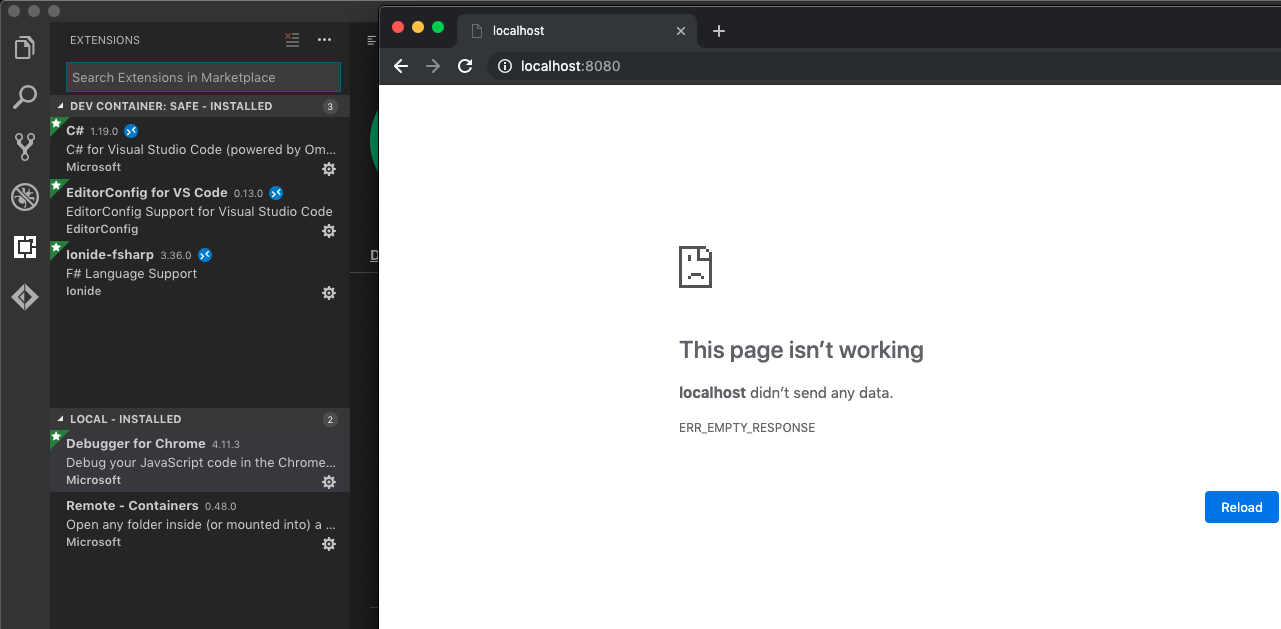
Does the Debugger for Chrome extension needs to be installed locally or remotely? I can't seem to get it working using Debug SAFE app:

image

theimowski added a commit to theimowski/webpack-config-template that referenced this pull request May 8, 2019
This allows accessing webpack dev server from outside of the box it's running.
Thanks to that change we can make SAFE-Stack/SAFE-template#254 work.
Another scenario where it comes handy is when you want to attach to webpack dev server with external device, such as mobile phone or tablet.
@theimowski theimowski merged commit 181d072 into master May 8, 2019
@theimowski theimowski deleted the devcontainer branch May 8, 2019 11:36
@theimowski
Copy link
Copy Markdown
Member

Thanks @Krzysztof-Cieslak
When fable-compiler/webpack-config-template#11 is merged it should fix accessing the webpack dev-server

alfonsogarciacaro pushed a commit to fable-compiler/webpack-config-template that referenced this pull request May 8, 2019
This allows accessing webpack dev server from outside of the box it's running.
Thanks to that change we can make SAFE-Stack/SAFE-template#254 work.
Another scenario where it comes handy is when you want to attach to webpack dev server with external device, such as mobile phone or tablet.
Sign up for free to join this conversation on GitHub. Already have an account? Sign in to comment

Labels

None yet

Projects

None yet

Development

Successfully merging this pull request may close these issues.

6 participants