
Switch CPU schedulers (sched-ext) and power profiles from the bar. Interfaces with scx_loader (the CachyOS sched-ext manager) via D-Bus.
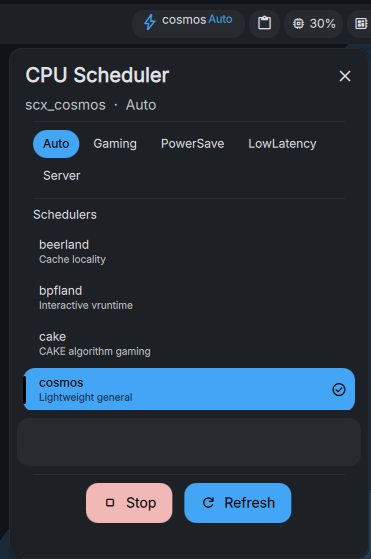
- 12 schedulers — switch between all available scx schedulers (bpfland, rusty, lavd, flow, rusty, etc.) with one click
- 5 power modes — Auto, Gaming, PowerSave, LowLatency, Server
- Hover descriptions — full scheduler information in the tooltip area
- Full settings panel — slider bars for poll/list intervals, toggles for animation and auto-refresh
- Popout panel — scrollable scheduler list with active indicator, mode selector, stop and refresh controls
- Right-click stop — right-click the bar pill to immediately stop the running scheduler
- Self-contained — pure QML + a helper shell script, no external dependencies
- DankMaterialShell 1.4+
scx_loader(ships with CachyOS; Arch:scx-schedspackage)- D-Bus session bus
- Open DMS Settings → Plugins
- Find Scheduler Picker
- Click Install
- Add the widget to your bar in DMS Bar Settings
mkdir -p ~/.config/DankMaterialShell/plugins
cd ~/.config/DankMaterialShell/plugins
git clone https://github.com/SK-DEV-AI/dankSchedPicker.git
Register in settings.json under barConfigs[].rightWidgets:
{"id": "dankSchedPicker", "enabled": true}Restart DMS.
| Action | Result |
|---|---|
| Left-click pill | Opens the scheduler picker popout |
| Right-click pill | Stops the current scheduler |
| Mode buttons | Switch power profile |
| Scheduler list | Click any to activate (active one has left accent bar + check mark) |
| Stop button | Stops the active scheduler |
| Refresh button | Refreshes the list and current state |
| Hover a scheduler | Shows full description in the tooltip area |
Open DMS Settings → Plugins → Scheduler Picker.
| Setting | Default | Range | Description |
|---|---|---|---|
| Poll Interval | 3s | 1–300 | How often to check scheduler state |
| List Refresh | 15s | 5–600 | How often to refresh scheduler list |
| Auto-refresh | On | — | Automatically refresh list |
| Animate transitions | On | — | Smooth color transitions in popout |
The settings panel also shows the currently active scheduler and mode.
- Per-scheduler mode presets
- CPU governor integration
- Custom scheduler arguments
MIT