

- Overview
- Features
- Getting started
- Simple tutorial of usage
- How it works
- Technologies
- Rest API description
- Contributing
- License info
CompreFace is the application for face recognition that can be integrated as a standalone server or deployed on cloud, and can be set up and used without machine learning knowledge.
We use one of the most popular face recognition methods based on deep neural networks, and provide a convenient API for Face Collection training and face recognition. We also provide a convenient roles system with which you can easily control who has access to the Face Collection.
Every user can create several Face Collections trained on different subsets of people.
The system shows sufficient accuracy even if only one example for each face is used.
CompreFace is:
- opensource code and fully on-premise (security of your data)
- can be set up and used without machine learning knowledge
- used one of the most popular face recognition methods with high accuracy face recognizing
- UI panel with roles for access control
- fast start with one docker command
To get started, perform the following steps:
- Install Docker
- Download archive from our latest release: https://github.com/exadel-inc/CompreFace/releases
- Unzip archive
- Run command:
docker-compose up --build - Open http://localhost:8000/
** Tips for Windows** (use Git Bash terminal)
- Turn of the git autocrlf with command:
git config --global core.autocrlf false - Make sure all your containers are down:
$ docker ps - In case some containers are working, they should be stopped:
$ docker-compose down - Clean all local datebases and images:
docker system prune --volumes - Last line in /dev/start.sh file change to
docker-compose -f docker-compose.yml up --remove-orphans --build - Go to Dev folder
cd dev - Run
sh start.shand make sure http://localhost:8000/ starts - Stopped all containers:
$ docker-compose down - Run
sh start--dev.shand make sure http://localhost:4200/ starts
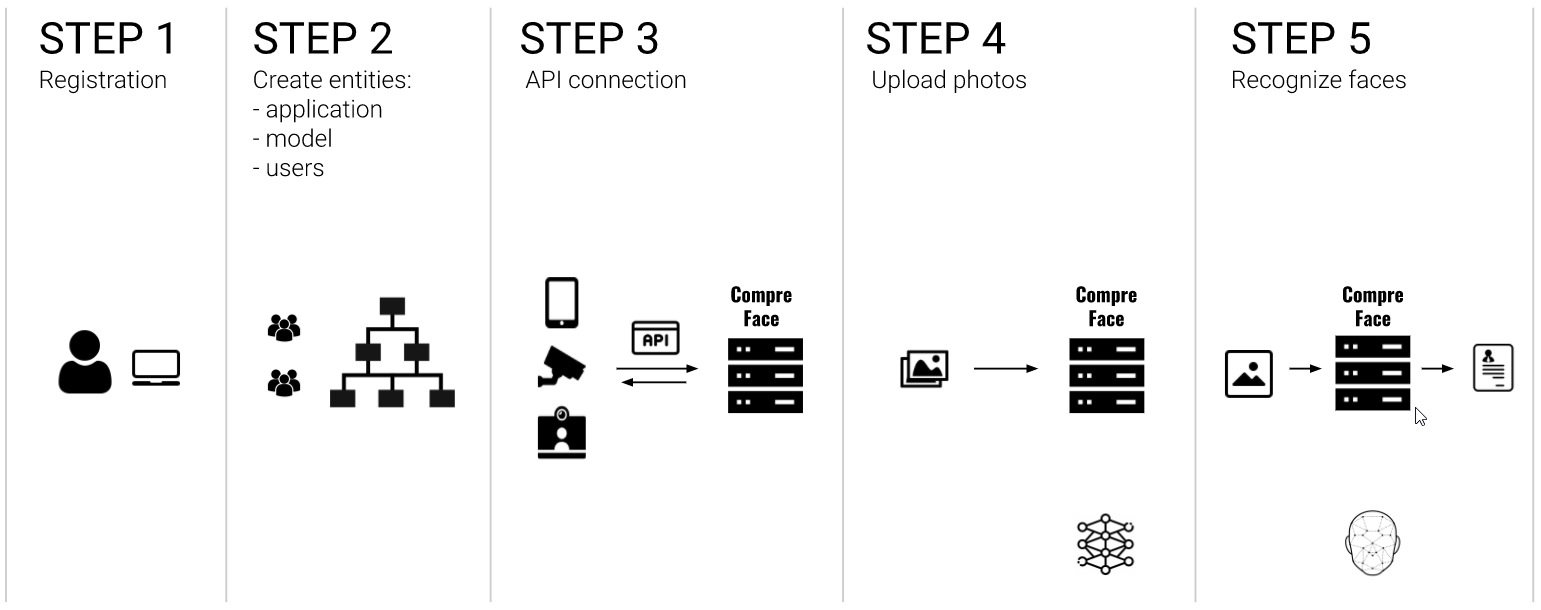
- Registration users in the app
- Creating applications, Face Collections, inviting users
- Integrating your app via API if need
- Images uploading, training a model with your own images by using the API key
- Send a new image to recognize the face on it.
Finding a face
Detecting one or more faces in an image. Multi-task Cascaded Convolutional Neural Networks (MTCNN) was used for face recognition.
Posing and projecting faces
Normalization of all found faces with rotate, scale and shear.
Calculate embedding from faces
Calculating embedding and classifying the face based on extracted features. We took CNN for face recognition and the last 3 fully connected layers were removed. As a result, - NN calculates embedding.
Use embedding for training model/recognize face using embedding
Recognizing the person in the photo. Haifengl/smile LogisticRegression as a classifier was used.
- MTCNN (Multi-task Cascaded Convolutional Networks)
- FaceNet
- Logistic Regression
-
FaceNet: A Unified Embedding for Face Recognition and Clustering Florian Schroff, Dmitry Kalenichenko, James Philbin (Submitted on 17 Jun 2015)
-
Joint Face Detection and Alignment using Multi-task Cascaded Convolutional Neural Networks Kaipeng Zhang, Zhanpeng Zhang, Zhifeng Li, Yu Qiao (Submitted on 11 Apr 2016)
-
Inception-v4, Inception-ResNet and the Impact of Residual Connections on Learning Christian Szegedy, Sergey Ioffe, Vincent Vanhoucke, Alex Alemi (Submitted on 23 Aug 2016)

- PostgreSQL
- Java 11
- Spring Boot
- Java 11
- Spring Boot
- Haifengl/Smile
- Python
- FaceNet
- InsightFace
- TensorFlow
- SciPy
- NumPy
- OpenCV (for images resizing)
By using the created API key, the user can add an image as an example of the face, retrieve a list of saved images, recognize a face from the uploaded image the Face Collection, and delete all examples of the face by the name.
Creates an example of the face by saving images. To train the system, you can add as many images as you want.
curl  -X POST "http://localhost:8000/api/v1/faces/?subject=<face_name>" \
-H "Content-Type: multipart/form-data" \
-H "x-api-key: <model_api_key>" \
-F file=@<local_file> \
-F det_prob_threshold=@<det_prob_threshold> \| Element | Description | Type | Required | Notes |
|---|---|---|---|---|
| Content-Type | header | string | required | multipart/form-data |
| x-api-key | header | string | required | api key of the model, created by the user |
| face_name | param | string | required | is the name you assign to the image you save |
| file | body | image | required | allowed image formats: jpeg, jpg, ico, png, bmp, gif, tif, tiff, webp. Max size is 5Mb |
| det_prob_ threshold | body | string | optional | minimum required confidence that a recognized face is actually a face. Value is between 0.0 and 1.0 |
Response body on success:
{
  "image_id": "<UUID>",
  "subject": "<face_name>"
}
| Element | Type | Description |
|---|---|---|
| image_id | UUID | UUID of uploaded image |
| subject | string | <face_name> of saved image |
Recognizes faces from the uploaded images.
curl  -X POST "http://localhost:8000/api/v1/recognize" \
-H "Content-Type: multipart/form-data" \
-H "x-api-key: <model_api_key>" \
-F file=<local_file>
-F limit=<limit>
-F prediction_count=<prediction_count>| Element | Description | Type | Required | Notes |
|---|---|---|---|---|
| Content-Type | header | string | required | multipart/form-data |
| x-api-key | header | string | required | api key of the model, created by the user |
| file | body | image | required | allowed image formats: jpeg, jpg, ico, png, bmp, gif, tif, tiff, webp. Max size is 5Mb |
| limit | body | integer | optional | maximum number of faces to be recognized. Value of 0 represents no limit. Default value: 0 |
| prediction_count | body | integer | optional | maximum number of predictions per faces. Default value: 1 |
Response body on success:
{
  "result": [
    {
      "box": {
        "probability": <probability>,
        "x_max": <integer>,
        "y_max": <integer>,
        "x_min": <integer>,
        "y_min": <integer>
      },
      "faces": [
        {
          "similarity": <similarity1>,
          "subject": <face_name1>
        },
        ...
      ]
    }
  ]
}
| Element | Type | Description |
|---|---|---|
| box | object | list of parameters of the bounding box for this face |
| probability | float | probability that a found face is actually a face |
| x_max, y_max, x_min, y_min | integer | coordinates of the frame containing the face |
| faces | list | list of similar faces with size of <prediction_count> order by similarity |
| similarity | float | similarity that on that image predicted person |
| subject | string | name of the subject in Face Collection |
Retrieves a list of images saved in a Face Collection
curl  -X GET "http://localhost:8000/api/v1/faces" \
-H "x-api-key: <model_api_key>" \| Element | Description | Type | Required | Notes |
|---|---|---|---|---|
| x-api-key | header | string | required | api key of the model, created by the user |
Response body on success:
{
  "faces": [
    {
      "image_id": <face_id>,
      "subject": <face_name>
    },
    ...
  ]
}
| Element | Type | Description |
|---|---|---|
| image_id | UUID | UUID of the face |
| subject | string | <face_name> of the person, whose picture was saved for this api key |
Deletes all image examples of the <face_name>.
curl  -X DELETE "http://localhost:8000/api/v1/faces/?subject=<face_name>" \
-H "x-api-key: <model_api_key>"| Element | Description | Type | Required | Notes |
|---|---|---|---|---|
| x-api-key | header | string | required | api key of the model, created by the user |
| face_name | param | string | optional | is the name you assign to the image you save. Caution! If this parameter is absent, all faces in Face Collection will be removed |
| Response body on success: |
[
  {
    "image_id": <face_id>,
    "subject": <face_name>
  },
  ...
]
| Element | Type | Description |
|---|---|---|
| image_id | UUID | UUID of the removed face |
| subject | string | <face_name> of the person, whose picture was saved for this api key |
Deletes image by ID.
curl  -X DELETE "http://localhost:8000/api/v1/faces/<image_id>" \
-H "x-api-key: <model_api_key>"| Element | Description | Type | Required | Notes |
|---|---|---|---|---|
| x-api-key | header | string | required | api key of the model, created by the user |
| image_id | variable | UUID | required | UUID of the removing face |
| Response body on success: |
{
  "image_id": <face_id>,
  "subject": <face_name>
}
| Element | Type | Description |
|---|---|---|
| image_id | UUID | UUID of the removed face |
| subject | string | <face_name> of the person, whose picture was saved for this api key |
Contributions are welcomed and greatly appreciated.
After creating your first contributing PR you will be requested to sign our Contributor License Agreement by commenting your PR with a special message.
For java just import dev/team_codestyle.xml file in your IntelliJ IDEA
Report bugs at https://github.com/exadel-inc/CompreFace/issues.
If you are reporting a bug, please include:
- Your operating system name and version.
- Any details about your local setup that might be helpful in troubleshooting.
- Detailed steps to reproduce the bug.
The best way to send feedback is to file an issue at https://github.com/exadel-inc/CompreFace/issues.
If you are proposing a feature, please:
- Explain in detail how it should work.
- Keep the scope as narrow as possible, to make it easier to implement.
CompreFace is Open Source software released under the Apache 2.0 license.