
Dein Mesh. Deine Karte. Deine Kontrolle.
Der kostenlose, native Windows-Client für Meshtastic-Geräte: Nachrichten senden, Funkstrecken analysieren, Nodes verwalten — und auch ganz ohne Internet den Überblick behalten. Entwickelt von der Meshhessen Community, gebaut für jedes Meshtastic-Mesh — egal wo.



English summary: Free Windows app for Meshtastic devices – offline maps (raster + vector incl. 3D terrain), radio-link analysis with elevation profiles & Fresnel zones, telemetry dashboards, traceroute, PKI decryption, full device & remote configuration, Virtual-Node TCP proxy. No installer, no cloud. → English version below

| Download | Neueste MeshhessenClient.exe aus den Releases — eine Datei, ohne Installer startbar, portabel |
| Voraussetzung | Windows 10/11 (x64) — sonst nichts: Die EXE bringt die komplette .NET-Laufzeitumgebung mit (self-contained) |
| Geräte | Alle Meshtastic-Geräte: LILYGO T-Beam, T-Deck, RAK4631, Heltec, Seeed u. v. m. |
| Verbindung | USB/Serial · TCP/WLAN · Bluetooth (BLE) |
| Privatsphäre | Vollständig offline-fähig — keine Cloud, keine Registrierung, keine Telemetrie zum Entwickler |
MeshhessenClient.exeherunterladen und starten — keine Installation, keine separate Runtime nötig- Meshtastic-Gerät anschließen (USB) oder IP/BT bereithalten → Verbindungstyp wählen → Verbinden
- 3–10 Sekunden warten, bis die Kanäle geladen sind — loslegen!
💡 Windows SmartScreen warnt beim ersten Start vor dem „unbekannten Herausgeber" — normal bei unsignierten Open-Source-Downloads. „Weitere Informationen → Trotzdem ausführen." Details, Prüfsummen-Check und erste Schritte: Schnellstart-Anleitung.
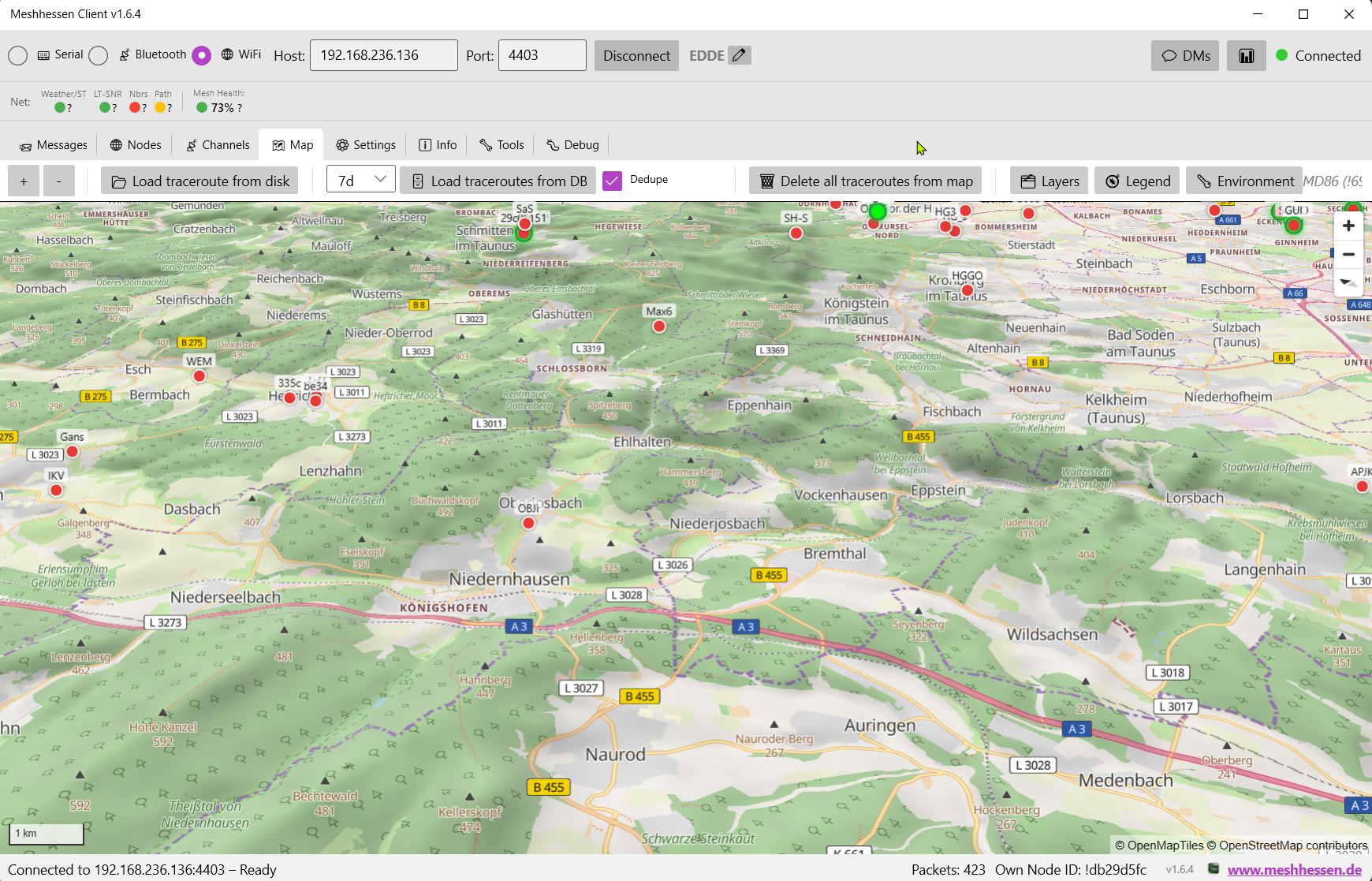
Offline-Karten (Raster + gestochen scharfe Vektorkarte), Node-Positionen, Traceroutes, Nachbar-Linien, Umwelt-Heatmaps und zuschaltbare Fach-Layer — plus echtes 3D-Gelände mit SRTM-Höhenmodell. Einmal betrachtete Gebiete funktionieren auch ohne Internet.
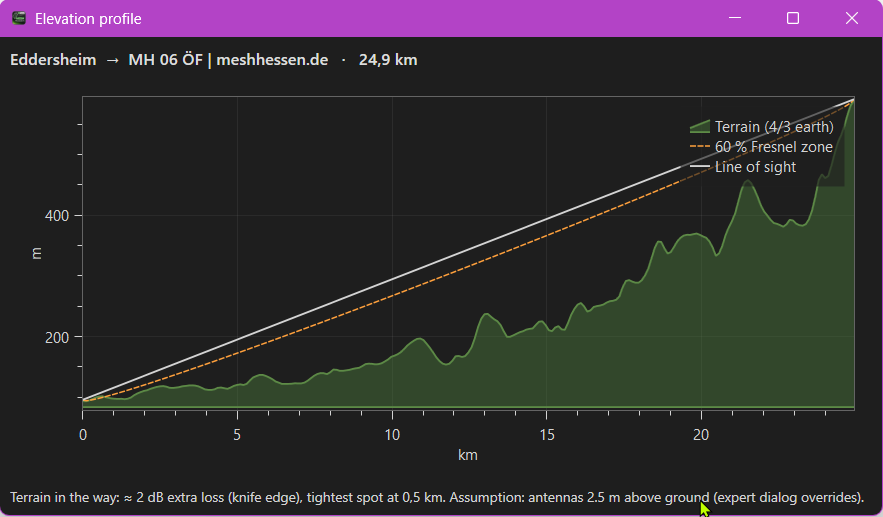
Echte HF-Nachbarn (belegt durch Direktempfang, Traceroutes und NeighborInfo — nicht bloß „gehört via MQTT"), SNR in beide Richtungen, und per Rechtsklick das Höhenprofil jeder Funkstrecke: SRTM-Gelände, Sichtlinie, Fresnel-Zone und die Antwort auf die Frage „steht da ein Berg im Weg?".
→ Telemetrie & Funkanalyse · Traceroute
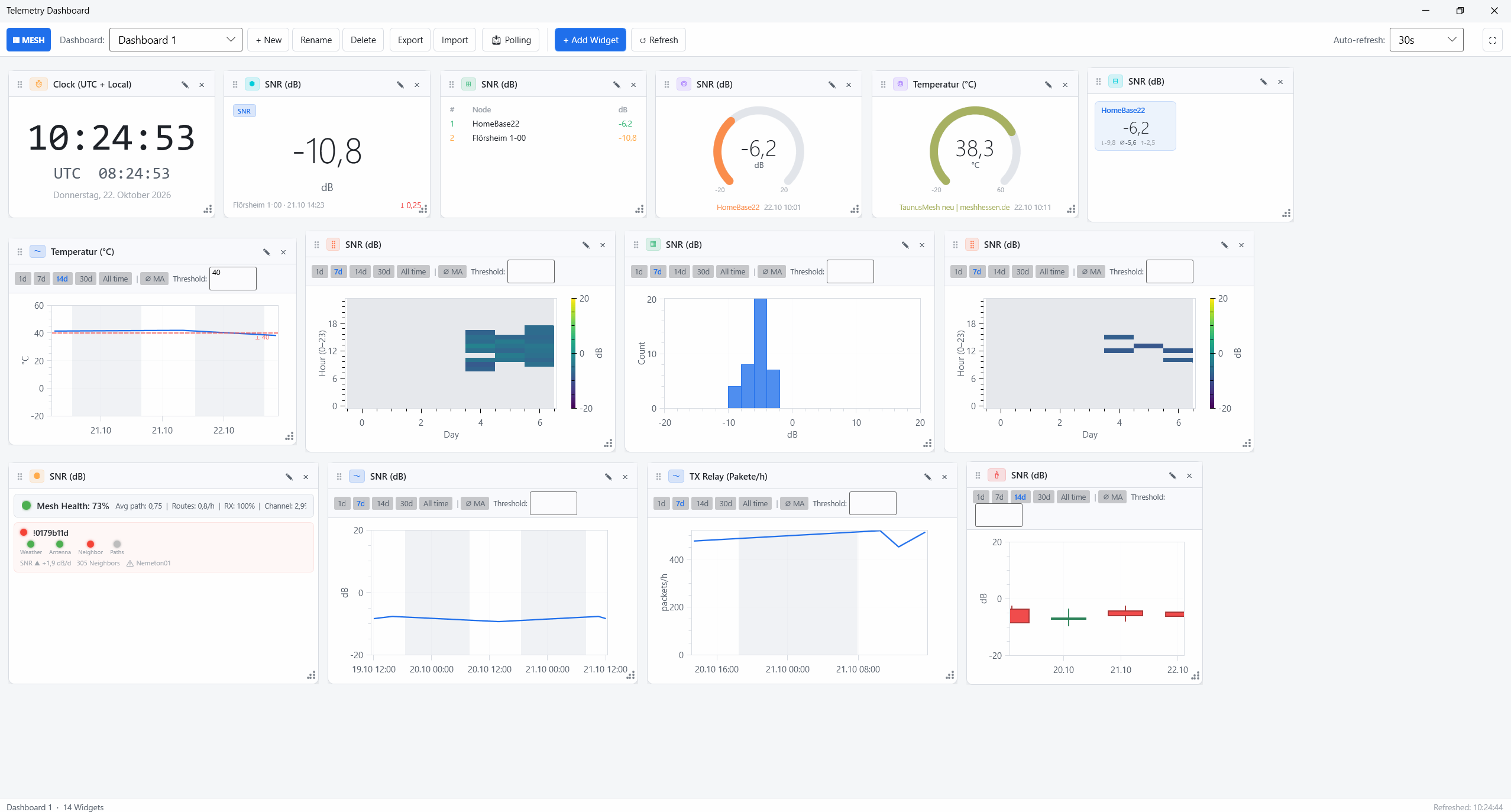
Frei konfigurierbares Telemetrie-Dashboard (11 Widget-Typen, Schwellwert-Alarme als Windows-Toast, Tag/Nacht-Schattierung, Vollbild für Wandmonitore), Node-Statistiken mit Tag/Nacht-Auswertung und LED-Ampeln für Signal, Nachbarn, Pfad-Stabilität und Mesh-Health.
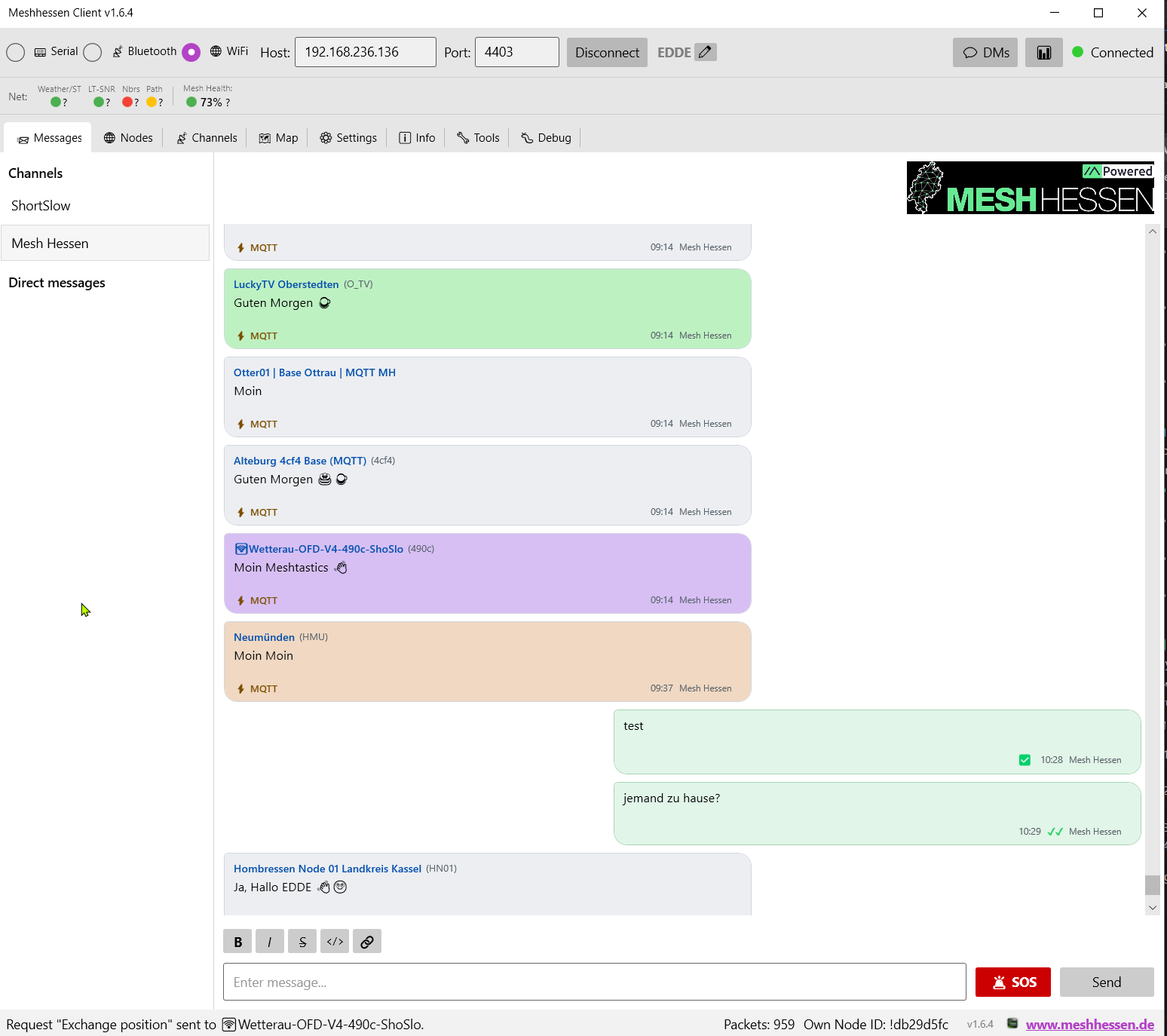
Kanal-Chat und Direktnachrichten mit Reaktionen, Antworten und optionaler Nachrichten-Historie — inklusive client-seitiger PKI-Entschlüsselung (X25519 + AES-256-CCM) und 🚨 Alert-Bell/SOS. Dazu Fernverwaltung entfernter Nodes (auch über Relay-/MQTT-Strecken) und vollständige Gerätekonfiguration.
→ Nachrichten · Node-Verwaltung & Fernkonfiguration
| 📶 Mesh-Betreiber | Antennenstandorte analysieren, Signalverläufe vergleichen, instabile Funkstrecken mit Höhenprofil und Fresnel-Zone identifizieren |
| 🏕️ Outdoor & Offline | Karten vorab herunterladen, Standorte darstellen, komplett ohne Internetverbindung arbeiten — auch auf dem T-Deck (SD-Karten-Assistent) |
| 🚒 Übungen & Notfunk | Lageübersicht, Nachrichten, Feuerwehr-/Rettungs-Layer und Kiosk-Modus auf einer Oberfläche — als Unterstützung für Ausbildung und Übungen (kein zertifiziertes BOS-/Alarmierungssystem) |
| 🔬 Technikbegeisterte | Geräte vollständig konfigurieren, Telemetrie auswerten, entfernte Nodes administrieren, Apps per Virtual Node anbinden |
📖 Komfortabel lesen: Dieselben Kapitel gibt es als durchsuchbares Handbuch unter meshhessenclient.de/handbuch.
Außerdem: Changelog · Website mit Telemetrie-Hilfe
Der Meshhessen Client ist ein Gemeinschaftsprojekt der Meshtastic-Community in Hessen — und läuft mit jedem Meshtastic-Mesh weltweit.
- 🌐 Website: www.meshhessen.de · meshhessenclient.de
- 🐛 Fehler gefunden / Idee? → Issues
- 📡 Netz: Airtime ist kein All-you-can-eat → Short Slow! ;)
- 🛠️ Aus Quellcode bauen: siehe Technik & Protokoll
Der Quellcode darf im Rahmen der Lizenz geforkt und angepasst werden — wir freuen uns über abgeleitete Projekte.
⚠️ Der Meshhessen-Tile-Server ist davon ausgenommen. Die Karten-Infrastruktur (tile.meshhessenclient.deund die zugehörigen Vektor-/Raster-Endpunkte) wird ausschließlich für den offiziellen Meshhessen Client bereitgestellt und aus Spenden der Community finanziert. Forks, abgeleitete oder umgebaute Clients (auch für andere Mesh-Protokolle wie MeshCore) dürfen diese Server nicht nutzen und müssen eigene Tile-Infrastruktur betreiben. Der Client bringt dafür alles mit: Karten-Modus „Online – eigener Tile-Server". Unautorisierte Zugriffe werden technisch unterbunden.
- Meshtastic Project – Firmware & Protokoll-Spezifikation
- ModernWPF – Fluent UI für WPF · Mapsui – Rasterkarte · MapLibre GL – Vektorkarte
- Meshhessen Community – Für das Netzwerk und die Inspiration
Made with ❤️ by the Meshhessen Community · www.meshhessen.de
Your mesh. Your map. Your control.
The free, native Windows client for Meshtastic devices: send messages, analyze radio links, manage nodes — and keep the full picture even without internet. Built by the Meshhessen Community in Hesse, Germany — made for every Meshtastic mesh, anywhere.
| Download | Latest MeshhessenClient.exe from Releases — a single file, runs without an installer, portable |
| Requirements | Windows 10/11 (x64) — nothing else: the EXE ships with the complete .NET runtime (self-contained) |
| Devices | All Meshtastic devices: LILYGO T-Beam, T-Deck, RAK4631, Heltec, Seeed and more |
| Connection | USB/Serial · TCP/WiFi · Bluetooth (BLE) |
| Privacy | Fully offline-capable — no cloud, no registration, no telemetry to the developer |
- Download and launch
MeshhessenClient.exe— no installation, no separate runtime needed - Plug in your Meshtastic device (USB) or have IP/BT ready → pick a connection type → Connect
- Wait 3–10 seconds for the channels to load — go!
💡 Windows SmartScreen may warn about an "unknown publisher" on first launch — normal for unsigned open-source downloads. "More info → Run anyway." Details, checksum verification and first steps: getting-started guide.
- ⛰ Your whole mesh on one map – offline maps (raster + crisp vector), node pins, traceroutes, neighbor lines, environment heatmaps, fire/rescue layers — plus real 3D terrain from an SRTM elevation model → Map & offline use
- 📡 Understand your radio links – real RF neighbors (proven by direct reception, traceroutes and NeighborInfo — not just "heard via MQTT"), SNR in both directions, and a right-click elevation profile per link: terrain, line of sight, Fresnel zone → Telemetry · Traceroute
- 📊 Spot problems before links die – configurable telemetry dashboard (11 widget types, threshold toasts, fullscreen for wall monitors), day/night statistics, LED health indicators → Telemetry
- 💬 Communicate comfortably from your PC – channel chat & DMs with reactions, replies and optional history, client-side PKI decryption (X25519 + AES-256-CCM), 🚨 alert bell/SOS → Messaging
- 🔧 Configure everything – full device configuration, remote admin across relay/MQTT paths, favorites sync → Node management
- 🧰 Power tools – Virtual-Node TCP proxy for phone apps, T-Deck SD-card map assistant, kiosk mode for shared stations → Virtual Node · T-Deck · Kiosk
🚀 Getting started · 🗺️ Map · 📨 Messaging · 📊 Telemetry · 📡 Traceroute · 🔧 Node management · 🖧 Virtual Node · 🔧 T-Deck · 🔒 Kiosk · 🏗️ Technology · Changelog
📖 Prefer a searchable manual? The same chapters live at meshhessenclient.de/handbuch.
You are welcome to fork and adapt the source code within the terms of the license. The Meshhessen tile server is not part of that: the map infrastructure (tile.meshhessenclient.de and the associated vector/raster endpoints) is provided exclusively for the official Meshhessen Client and funded by community donations. Forks and derivative clients (including ports to other mesh protocols) must run their own tile infrastructure — the "Online – custom tile server" map mode accepts any tile URLs. Unauthorized access is blocked technically.