
A LEGO Mindstorms–style abstraction layer for Arduino
The Mindstorm INO Library makes Arduino programming feel like LEGO Mindstorms. Instead of dealing with raw pins, delays, and low-level code, you interact with motors, sensors, display, Bluetooth, and servos using simple, high-level functions.
Lego Mindstorms are expensive, so this board aims to (sort of) act as a cheap-alternative to Lego. I built Mindstorm INO because I wanted a faster and simpler way to build robots without redesigning the hardware every time. I plan on to make it more compact by designing PCB boards.
This section explains the hardware required and how to wire the components to build your own Mindstorm INO–style programmable brick using Arduino.
| Quantity | Component |
|---|---|
| 1 | Arduino UNO / Nano |
| 1 | L293D Motor Driver IC |
| 4 | Push Buttons (UP / DOWN / OK / BACK) |
| 1 | HC-05 Bluetooth Module |
| 1 | I2C LCD Display (16×2) |
| 1+ | Breadboard(s) |
| — | Jumper Wires |
Below is the complete wiring diagram for the Mindstorm INO Intelligent Brick:
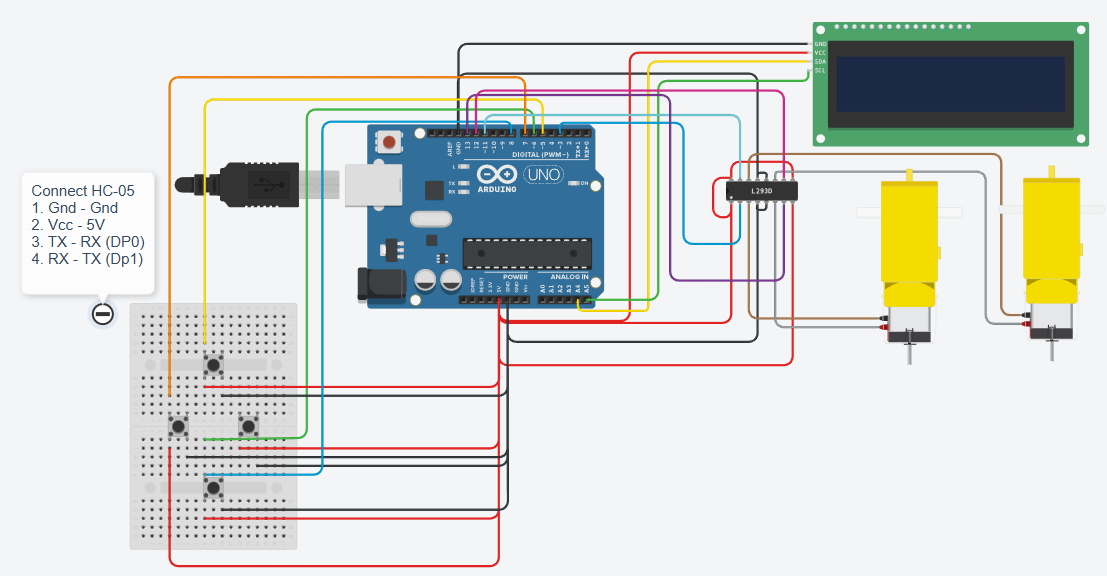
- The L293D is used to control DC motors (M1 and M2).
- The I2C LCD minimizes pin usage and simplifies wiring.
- Push buttons are configured using INPUT_PULLUP (no external resistors required).
- The HC-05 Bluetooth module enables wireless control and communication.
- This circuit is designed to be modular, similar to LEGO Mindstorms.
- Double-check power connections before turning on the circuit.
- Use a common GND for all modules.
- If motors behave erratically, add decoupling capacitors near the L293D.
- Keep Bluetooth RX/TX wiring correct (crossed).
Once the hardware is assembled:
- Upload the Mindstorm INO firmware
- Power on the system
- Navigate programs using the button-based menu
- Run Mindstorms-style robot programs
mindstorm.h     // Core library (REQUIRED)
display.h       // LCD display functions
bluetooth.h    // Bluetooth communication
infrared.h     // Infrared sensor
motors.h       // DC motor control
distance.h     // Ultrasonic distance sensor
servo.h        // Servo motor control
You must include mindstorm.h in every project.
You must call setup_modules() inside void setup().
Without this:
- Pins won’t be configured
- Modules won’t work
- Behavior is undefined
Correct usage:
#include "mindstorm.h"

void setup() {
  setup_modules();   // REQUIRED
}

void loop() {
}M1, M2A, B, CSA, SBFRONT
BACKUsed for LCD-based text output (like Mindstorms screen).
void start_display();
void write_text(int line, String text);#include "display.h"
start_display();
write_text(0, "Hello Robot");
write_text(1, "MindStorm OS");line can be 0 or 1 (for 16x2 LCD).
Used to receive commands wirelessly from a phone or computer.
String read_bluetooth();String cmd = read_bluetooth();
if (cmd == "F") {
move(M1, FRONT, 150);
}Used for IR obstacle detection or line sensing.
int check_infrared(uint8_t port);if (check_infrared(A) == 1) {
move(M1, BACK, 100);
}Returns a digital value (0 or 1).
Controls DC motors with speed and direction.
void move(uint8_t motor, uint8_t direction, uint8_t speed);move(M1, FRONT, 200);
move(M2, FRONT, 200);speed range: 0–255
Used with ultrasonic sensors to measure distance.
float find_distance(uint8_t port);float d = find_distance(B);
if (d < 10) {
move(M1, BACK, 120);
}Distance is returned in centimeters.
Used for arms, grippers, camera mounts, etc.
void servo_use(uint8_t port);
void servo_rotate(uint8_t port, int angle);servo_use(SA);
servo_rotate(SA, 90);Angle range: 0–180
#include "mindstorm.h"
#include "motors.h"
#include "distance.h"
void setup() {
setup_modules();
}
void loop() {
float dist = find_distance(A);
if (dist < 15) {
move(M1, BACK, 150);
move(M2, BACK, 150);
} else {
move(M1, FRONT, 200);
move(M2, FRONT, 200);
}
}