when train finished , i wanted to save graph in single .pb file , the save code like
`
public void SaveModel(Session sess)
{
//save checkpoint of model using train.Saver.
var saver = tf.train.Saver();
var save_path = saver.save(sess, ".resources/logistic_regression/model.ckpt");
print("Finish save checkpoint");
//this will only save the graph but variables will not be saved.
tf.train.write_graph(sess.graph, ".resources/logistic_regression", "model.pbtxt", as_text:true);
print("Finish write graph");
//this will freeze graph (graph + parametters)
        FreezeGraph.freeze_graph(input_graph: ".resources/logistic_regression/model.pbtxt",
                          input_saver: "",
                          input_binary: false,
                          input_checkpoint: ".resources/logistic_regression/model.ckpt",
                          output_node_names: "Softmax",
                          restore_op_name: "save/restore_all",
                          filename_tensor_name: "save/Const:0",
                          output_graph: ".resources/logistic_regression/model.pb",
                          clear_devices: true,
                          initializer_nodes: "");
        print("Finish freeze graph");
    }
`
but output only checkpoint file, text graph WITHOUT .pb file
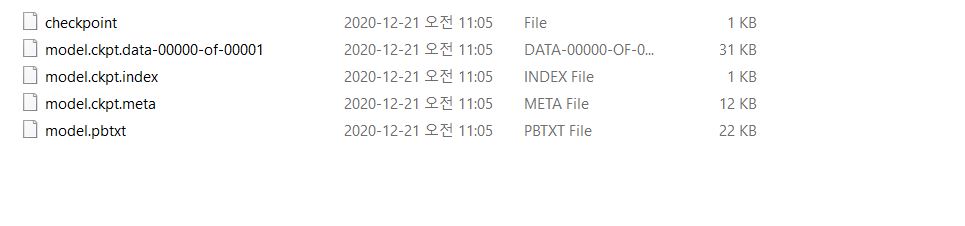
#702
How to save the model as .pb file ?
Thank you very much.

when train finished , i wanted to save graph in single .pb file , the save code like
`
public void SaveModel(Session sess)
{
//save checkpoint of model using train.Saver.
var saver = tf.train.Saver();
var save_path = saver.save(sess, ".resources/logistic_regression/model.ckpt");
print("Finish save checkpoint");
//this will only save the graph but variables will not be saved.
tf.train.write_graph(sess.graph, ".resources/logistic_regression", "model.pbtxt", as_text:true);
print("Finish write graph");
//this will freeze graph (graph + parametters)
`

but output only checkpoint file, text graph WITHOUT .pb file
#702
How to save the model as .pb file ?
Thank you very much.