Give your AI coding agent photographic memory. Local screen capture → on-device OCR → LLM summaries → exposed to Claude Code and Codex CLI over MCP. Runs 100% offline with Ollama or LM Studio — or plug in any cloud LLM (Anthropic / OpenAI / Fireworks).


Every developer knows this moment:
"Why is this failing?" — Claude has no idea what "this" is.
Or:
"Continue where I left off." — Claude has no idea where you left off.
AI coding agents forget your context the moment you switch apps. Open Chronicle fixes that by giving them a rolling, local, screen-derived memory of what you were just doing.

- Capture — menubar app screenshots the frontmost editor/terminal/browser every few seconds
- Extract — Apple Vision OCRs each capture, on-device, no cloud
- Summarize — MCP server groups captures into 1-minute windows and asks an LLM for a 2-sentence summary
- Serve — Claude Code or Codex CLI calls the MCP server when you ask ambiguous questions, and answers with specific, grounded context
Supported LLM providers:
- Anthropic, OpenAI, Fireworks — cloud APIs
- Ollama, LM Studio — fully local, no API key required
- OpenAI-Compatible (custom) — any endpoint speaking the OpenAI API: Baseten, Groq, Together, DeepInfra, Perplexity, self-hosted vLLM / TGI, etc.
All switchable from the Settings tab.
Install is source-based for now — the binary isn't code-signed / notarized yet, so Gatekeeper would block a downloaded .app for most users. Clone and build locally:
git clone https://github.com/Screenata/open-chronicle
cd open-chronicle/app
swift run -c release
Click the memory-chip icon that appears in your menubar. A first-run wizard walks you through:
- Screen Recording permission — one-click grant
- LLM provider + API key — pick provider, paste key
- Agent integrations — auto-detects Claude Code / Codex CLI and wires both up (MCP registration + auto-invoke rule in
~/.claude/CLAUDE.mdand~/.codex/AGENTS.md)
Restart Claude Code (or Codex) — that's it.
- macOS 14+
- Xcode Command Line Tools (
xcode-select --install) - Node 20+
- An API key from Anthropic, OpenAI, or Fireworks — or a local Ollama install for 100% offline summarization
- Claude Code and/or Codex CLI
Work in your editor for 2-3 minutes. Then open Claude Code from anywhere and ask:
what was I just working on?
continue where I left off
why is this failing?
The agent will auto-invoke Chronicle and answer with specific file names, PR numbers, and error messages pulled from what it saw on your screen.
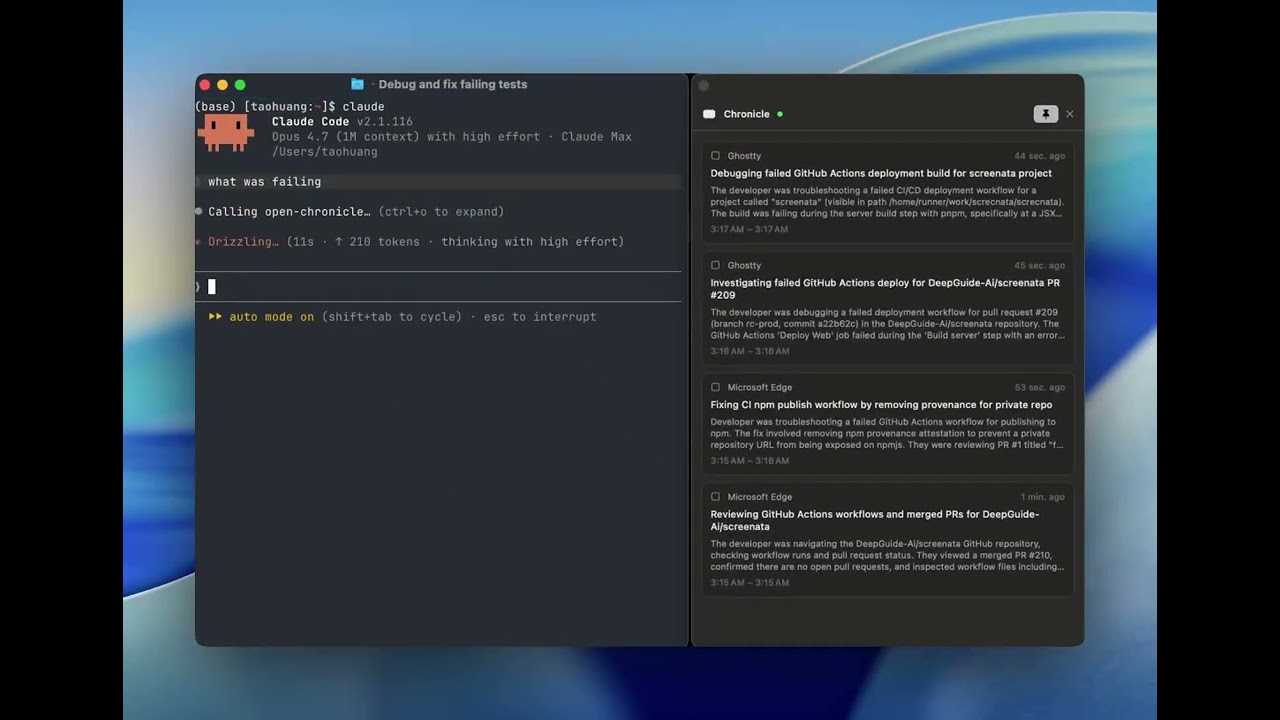
Left: terminal with Claude Code. Right: Chronicle's live memory sidebar.
- Menubar app — record/pause toggle, timeline of recent memory cards, detail view with screenshot preview
- Onboarding wizard — one-click install and agent registration, no terminal commands required
- Floating window — detach the memory view as an always-on-top panel (great for demos and persistent awareness)
- Multi-agent — Claude Code and Codex CLI both supported; onboarding detects and configures each
- Privacy-first defaults — password managers, messaging apps (Slack, WeChat, Signal, WhatsApp, Messages), mail clients, and system utilities are excluded from capture by default
- User exclusion list — add more apps to skip from the Settings tab
- Configurable everything — capture interval, memory window, screenshot TTL, LLM provider/model all editable in-app
All settings live in ~/.open-chronicle/open-chronicle.db and are editable from the Settings tab in the menubar app.
| Setting | Default | What |
|---|---|---|
| Capture interval | 10 sec | How often to take a screenshot when the active app changes |
| Memory window | 60 sec | How much activity is grouped into a single memory |
| Screenshot retention | 30 min | How long raw PNGs are kept before auto-deletion |
Environment variables (in mcp/.env):
| Var | Default | What |
|---|---|---|
CHRONICLE_LLM_PROVIDER |
anthropic |
anthropic, openai, or fireworks |
CHRONICLE_LLM_MODEL |
provider default | Specific model ID |
CHRONICLE_MEMORY_INTERVAL_MS |
30000 |
How often the memory builder polls for new windows |
Everything is under ~/.open-chronicle/:
open-chronicle.db— SQLite (captures, memories, settings)screenshots/— raw PNGs, auto-expire per retention settingmcp.log— diagnostic log from the memory builder
Nothing is synced or uploaded. If you pick a cloud LLM (Anthropic / OpenAI / Fireworks), the only outbound network call is to that provider for text summaries. If you pick Ollama or LM Studio, there are zero outbound network calls — the entire pipeline runs on-device. Your API keys (if any) stay in mcp/.env on your machine.
You can wipe all data at any time from Settings → Data → Clear all data.
Chronicle never captures these, regardless of your configuration:
- Password managers: 1Password, Bitwarden, Dashlane, LastPass
- Messaging: Messages, Slack, Discord, Signal, Telegram, WhatsApp, Lark, WeChat, QQ
- Mail: Apple Mail, Outlook, Spark, AirMail
- System: Finder, System Settings, Activity Monitor, Wallet
You can add more exclusions from the Settings tab.
A single screenshot is worth a thousand prompts — try these:
what was I just working on?— rolling memory retrievalcontinue where I left off— task resumptionwhy is this failing?— ambiguous pronoun resolutionwhich docs page was I reading?— browser history, but bettersummarize my last hour— unexpected productivity tool
"Screenshot failed — check Screen Recording permission"
System Settings → Privacy & Security → Screen Recording → toggle Terminal (or wherever you launched the app from) on. Relaunch.
No memories appearing
The MCP server is what generates memories, and it's only running when Claude Code (or Codex) has it connected. Restart your agent. Or test the pipeline manually: cd mcp && npm run dev. You should see log lines like [open-chronicle] Memory created: "...".
Also check ~/.open-chronicle/mcp.log for any LLM API errors.
Agent doesn't auto-invoke Chronicle
Check that ~/.claude/CLAUDE.md (or ~/.codex/AGENTS.md) contains the <!-- chronicle-auto-invoke --> block. If missing, re-run the onboarding wizard.
Verify MCP is connected: run /mcp in Claude Code and confirm open-chronicle is listed.
Stale MCP process
If you updated the code but the agent still shows the old behavior:
pkill -f 'open-chronicle/mcp/src/index'Then restart your agent.
Intentionally out of scope:
- Cross-platform (Linux/Windows) — macOS-first is a feature, not a limitation
- Long-term memory consolidation across weeks/months
- Audio or accessibility-tree capture
- Cloud sync
- Vector embeddings / semantic search
- ScreenCaptureKit migration (replace deprecated
CGWindowListCreateImage) - Per-project memory scoping
- FTS5 keyword search
- Local LLM support via Ollama
- Brew formula for one-command install
This is a proof-of-concept launched to prove a thesis. If you find it useful, please:
- ⭐ Star the repo — it helps other devs discover it
- 🐦 Share the demo — tag @Screenata or whoever built this for you
- 🐛 Open an issue — bug reports, feature requests, or just "this helped me today"
- 🔧 PR it — especially: new supported editors (add bundle IDs), new LLM providers, UI polish
MIT — see LICENSE.
Built by developers tired of retyping context to their AI agent.