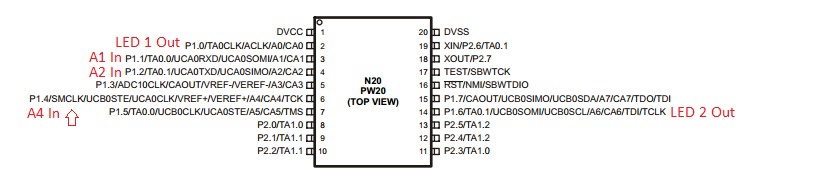
The goal of the lab was to use the three IR sensor/receiver pairs on the bot to detect if objects were close by, and, if so, turning on the corresponding LED (left, right, both for center).
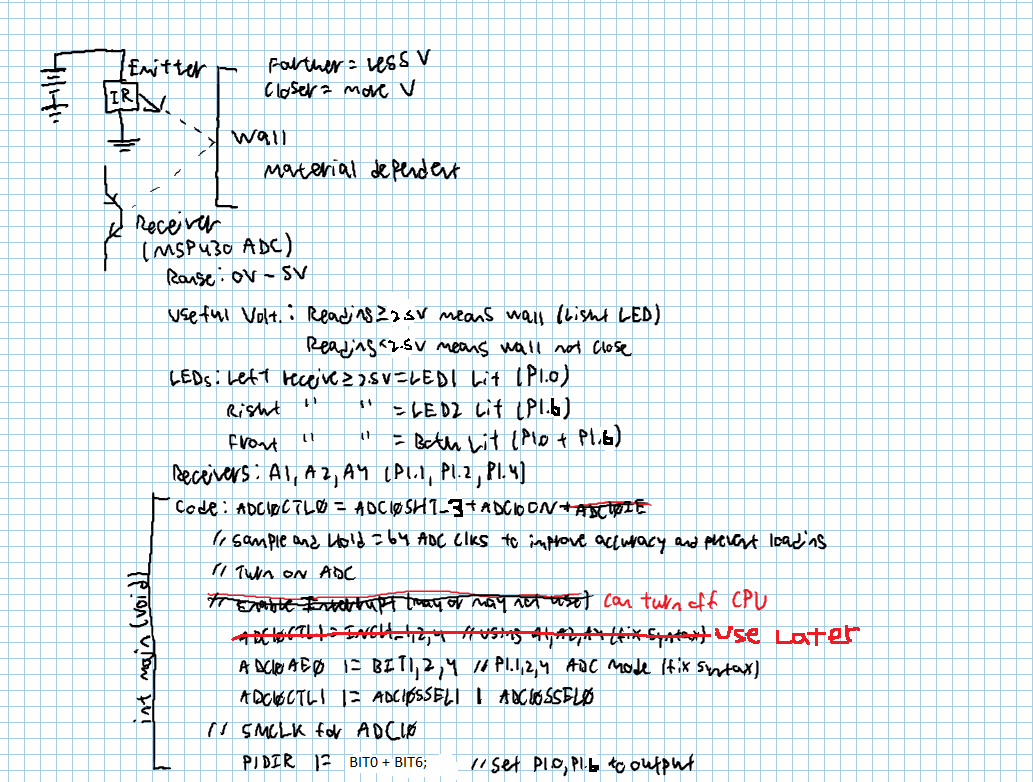
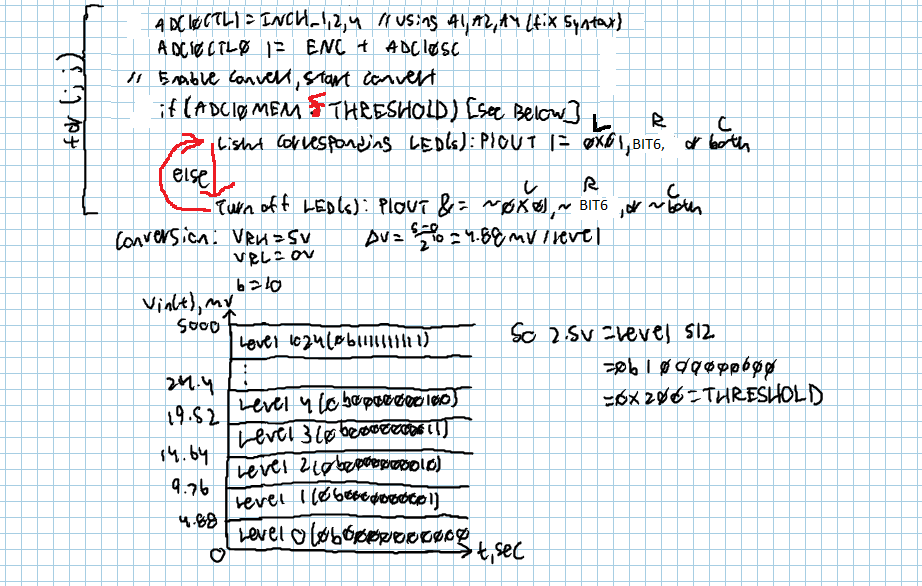
- Define Threshold constants
- Setup ADC10 on the MSP430 (main)
- Establish LED's as output (main)
- Sample ADC10 input channel (for loop)
- Convert reading to a voltage (for loop)
- Compare voltage to threshold for respective side (for loop)
- Turn LED on or off (if statement)
- Repeat for each channel (for loop)
- Infinite for loop (4 to 9)
/***
 * Sean Gavan
 * 8 Dec. 14
 * Lab 7 -- Detecting walls with IR sensors
 * For this lab we were to use the IR transmitter/receiver pairs to detect when obstacles were near the bot.
 * Documentation: I asked Capt. Trimble on multiple occassion how to fix some issues with the green LED
 * always staying on.
 */
#include <msp430.h>

/*
 * main.c
 */
int THRESHOLDLEFT = 0x3B0;		// Threshold voltage for wall prescence
int THRESHOLDRIGHT = 0x0FF;
int THRESHOLDCENTER = 0x3D0;

void main(void) {
    WDTCTL = WDTPW | WDTHOLD;				  // Stop watchdog timer
    ADC10CTL0 = ADC10SHT_3 + ADC10ON + ADC10IE; 		  // 64 ADC clks to combat loading, ADC10ON
    ADC10AE0 |= BIT1 + BIT2 + BIT4;           // P1.1, P1.2, P1.4 to ADC mode (A1,A2,A4)
    ADC10CTL1 |= ADC10SSEL1|ADC10SSEL0;       // Select SMCLK
    P1DIR |= BIT0 + BIT6;

    for (;;) {
    	ADC10CTL1 = INCH_4;				// Right receiver A4
    	ADC10CTL0 |= ENC + ADC10SC;
    	__bis_SR_register(CPUOFF + GIE);        // LPM0, ADC10_ISR will force exit
    	if (ADC10MEM > THRESHOLDRIGHT) {
        	P1OUT |= BIT6;				// P1.6 on
     	} else {
     		P1OUT &= ~BIT6;				// P1.6 off
     	}

    	ADC10CTL1 = INCH_1;				// Left receiver A1
    	ADC10CTL0 |= ENC + ADC10SC;     // Sampling and conversion start
    	 __bis_SR_register(CPUOFF + GIE);        // LPM0, ADC10_ISR will force exit
    	if (ADC10MEM < THRESHOLDLEFT) {		// Wall close (less V when wall close)
    		P1OUT |= BIT0;             // P1.0 LED on
    		P1OUT &= ~BIT6;
    	} else {						// Wall close
    		P1OUT &= ~BIT0;              // P1.0 LED off
    		P1OUT &= ~BIT6;
    	}

    	ADC10CTL1 = INCH_2;				// Center receiver A2
    	ADC10CTL0 |= ENC + ADC10SC;
    	 __bis_SR_register(CPUOFF + GIE);        // LPM0, ADC10_ISR will force exit
    	if (ADC10MEM < THRESHOLDCENTER) {
    		P1OUT |= BIT0 + BIT6;				// Both on
    	} else {
    		P1OUT &= ~(BIT0 + BIT6);			// Both off
    	}
   }
}

// ADC10 interrupt service routine
#pragma vector=ADC10_VECTOR
__interrupt void ADC10_ISR(void)
{
	ADC10CTL0 &= ~ENC;
  __bic_SR_register_on_exit(CPUOFF);        // Clear CPUOFF bit from 0(SR)
}
ADC10MEM not changing for each input channel. FIX: Declare input channel individually. INCH_X refers to what the active channel is. Each channel has to be declared and then sampled individually in order to get each ACD10MEM value. I also added the interrupt included in the class notes so that there would be time to stop samping and convert the signal to a voltage.
Ran the program through the debugger to see how ADC10MEM would change - found that the center and left receivers would read a lower voltage as an object got closer as opposed to the higher-voltage-if-a-wall-is-closer idea. Right receiver worked normally. This also changed the threshold values since each receiver was different. I had to find the base line voltages and then the voltages for when a wall was close to each receiver. This resulted in the threshold constants in the above code.
From the lab, I've been able to see how useful an analog-to-digital conversion system can be. Being able to sense where walls are, in this case, can be a small part in an even greater project. This will be especially helpful in Lab 8, where this system, in conjunction with the motors, will guide the bot through a maze
I used the class notes as a template for coding the ADC10 on the MSP430.