SeasonOCR for EasyOCR Models is a .NET OCR library for ONNX models converted from the EasyOCR Python project.
The initial public release focuses on a clean CPU-only API:
- caller-managed long-lived
InferenceSessioninstances - no complex model path binding inside the library
- EasyOCR-style box detection, recognition, and paragraph grouping
- optional annotated output image and optional debug report
- GitHub: SeasonRealms/SeasonOCR
- Models: SeasonEngine/SeasonOCR on Hugging Face
- ONNX export workflow: export-easyocr-onnx.yml
If you prefer to build the ONNX models yourself, clone the repository and run the workflow logic locally.
- The OCR pipeline is translated and adapted from EasyOCR.
- The intended model inputs are ONNX files converted from EasyOCR Python models.
- Files translated from EasyOCR Python sources include source attribution and an explicit modification notice in the file header.
- EasyOCR-style CRAFT post-processing
- CRNN / CTC recognition
- Beam search by default
- Optional dictionary-aware word beam search
- Perspective rectification for rotated text regions
- Optional rotation TTA, disabled by default
- Structured OCR output with boxes, paragraphs, and summary text
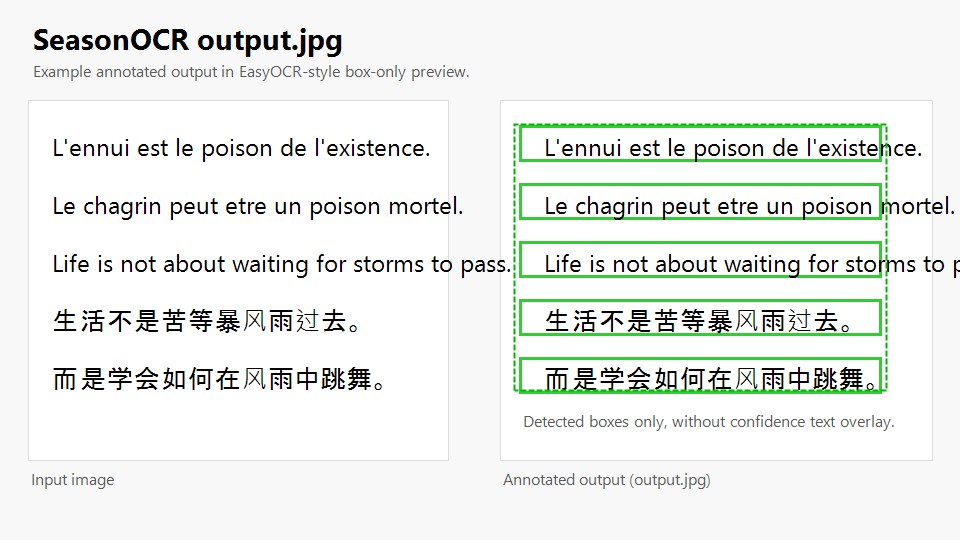
- Optional JPEG annotated image in box-only preview style
- Optional debug report controlled by
SeasonOcr.EnableDebugOutput - Automatic recognizer language discovery from ONNX metadata
- Embedded dictionary loading from recognizer ONNX metadata
dotnet add package SeasonOCRusing System.Text;
using Microsoft.ML.OnnxRuntime;
using SeasonOCR;
using StbImageSharp;
SeasonOcr.EnableDebugOutput = true;
var detectorBytes = File.ReadAllBytes(@"craft_mlt_25k.onnx");
using var detectorSession = new InferenceSession(detectorBytes);
var recognizerBytes = File.ReadAllBytes(@"recognizer_ch_sim.onnx");
using var recognizerSession = new InferenceSession(recognizerBytes);
using var stream = File.OpenRead(@"chinese.jpg");
var image = ImageResult.FromStream(stream, ColorComponents.RedGreenBlue);
var result = SeasonOcr.Detect(
detectorSession,
recognizerSession,
image,
createAnnotatedImage: true);
Console.WriteLine(result.Summary);
foreach (var paragraph in result.Paragraphs)
{
Console.WriteLine($"{paragraph.Confidence:P0}: {paragraph.Text}");
}
if (result.AnnotatedImage.Length > 0)
File.WriteAllBytes(@"output.jpg", result.AnnotatedImage);
if (!string.IsNullOrWhiteSpace(result.DebugReport))
File.WriteAllText(@"output.debug.txt", result.DebugReport, Encoding.UTF8);This initial API is intentionally session-based:
- You create and reuse
InferenceSessioninstances yourself. - The library only consumes the prepared detector session, recognizer session, and decoded image.
- This avoids hidden path resolution rules inside the OCR call path.
- It also fits engine-style hosts and service applications that want explicit control over model lifetime.
For the first release, the recommended runtime target is CPU execution.
SeasonOcr.Detect(...) current signature:
public static SeasonOcrResult Detect(
    InferenceSession detectorSession,
    InferenceSession recognizerSession,
    ImageResult imageResult,
    bool enableWordBeamSearch = false,
    bool allowRotatedRecognition = false,
    bool createAnnotatedImage = false,
    int beamWidth = 5,
    string? dictionary = null)
Parameter behavior:
enableWordBeamSearch: enables dictionary-aware decoding when usable dictionary data is availableallowRotatedRecognition: enables rotation TTA for recognition; default isfalsecreateAnnotatedImage: whentrue,result.AnnotatedImagecontains a JPEG likeoutput.jpgbeamWidth: beam width used by beam searchdictionary: optional in-memory dictionary content; when omitted, embedded model dictionaries are used if present
Multilingual support
- "en", "recognizer_en.onnx", "English"
- "latin", "recognizer_latin.onnx", "Latina"
- "zh-CN", "recognizer_ch_sim.onnx", "中文简体"
- "zh-TW", "recognizer_ch_tra.onnx", "中文繁體"
- "ja", "recognizer_ja.onnx", "日本語"
- "ko", "recognizer_ko.onnx", "한국어"
- "th", "recognizer_th.onnx", "ไทย"
- "ta", "recognizer_ta.onnx", "தமிழ்"
- "te", "recognizer_te.onnx", "తెలుగు"
- "kn", "recognizer_kn.onnx", "ಕನ್ನಡ"
- "ar", "recognizer_ar.onnx", "العربية"
- "ru", "recognizer_ru.onnx", "Русский"
- "hi", "recognizer_hi.onnx", "हिन्दी"
- "bn", "recognizer_bn.onnx", "বাংলা"
Enable debug output before calling the OCR API:
SeasonOcr.EnableDebugOutput = true;When enabled:
- internal debug logging is emitted through
Debug.WriteLine(...) SeasonOcrResult.DebugReportis populated- per-box debug information can be inspected through
SeasonOcrResult.DebugBoxes
When disabled:
- debug logging is skipped
DebugReportstays empty unless explicitly produced by the current flow
SeasonOcrResult can contain:
Summary: human-readable OCR summaryBoxes: recognized text boxes kept in the final resultParagraphs: grouped paragraph outputAnnotatedImage: JPEG bytes for the box-only preview imageDebugBoxes: per-box debug dataDebugReport: plain-text debug report suitable for saving asoutput.debug.txt
Recommended model sources:
- Download ready-made ONNX models from Hugging Face
- Or generate them yourself from the repository workflow: export-easyocr-onnx.yml
Recognizer metadata support:
SeasonOCRreads embedded recognizer charset metadata when availableSeasonOCRreads recognizerlang_listmetadata when available- Embedded dictionaries such as
dict_<lang>are used automatically for word beam search
When createAnnotatedImage is true, the library generates a JPEG preview similar to the official EasyOCR examples:
- green detection boxes only
- no confidence text overlay
- suitable for saving directly as
output.jpg
Current release scope:
- CPU-first
- stable public OCR API
- session-based integration for application hosts
Planned for later:
- engine-oriented runtime helpers
- GPU provider options
- additional provider-specific optimization layers
- The project is distributed under Apache License 2.0.
- See LICENSE and THIRD_PARTY_NOTICES.md for attribution and third-party details.