security
The files in this repository were used to configure the network depicted below.
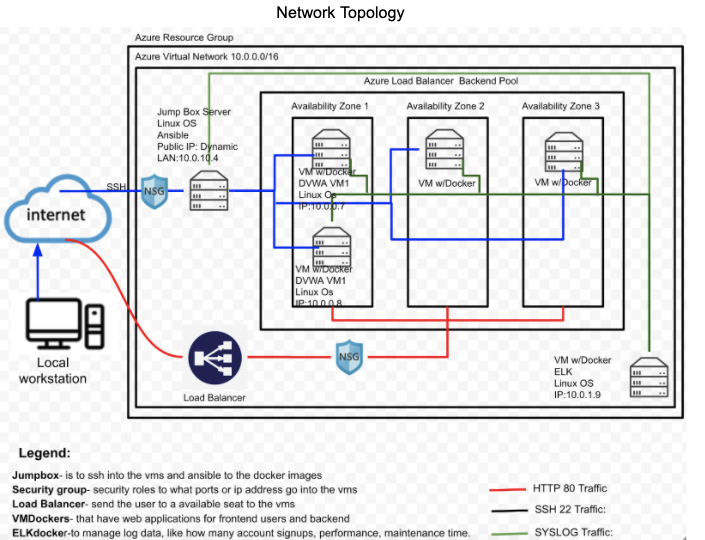
These files have been tested and used to generate a live ELK deployment on Azure. They can be used to either recreate the entire deployment pictured above. Alternatively, select portions of the YAML file may be used to install only certain pieces of it, such as Filebeat.
-
name: installing and launching filebeat hosts: webservers become: yes tasks:
-
name: download filebeat deb command: curl -L -O https://artifacts.elastic.co/downloads/beats/filebeat/filebeat-7.4.0-amd64.deb
-
name: install filebeat deb command: dpkg -i filebeat-7.4.0-amd64.deb
-
name: drop in filebeat.yml copy: src: /etc/ansible/files/filebeat-configuration.yml dest: /etc/filebeat/filebeat.yml
-
name: enable and configure system module command: filebeat modules enable system
-
name: setup filebeat command: filebeat setup
-
name: start filebeat service command: systemctl start filebeat
-
This document contains the following details:
- Description of the Topology
- Access Policies
- ELK Configuration
- Beats in Use
- Machines Being Monitored
- How to Use the Ansible Build
The main purpose of this network is to expose a load-balanced and monitored instance of DVWA, the D*mn Vulnerable Web Application.
Load balancing ensures that the application will be highly available, in addition to restricting permissions to the network.
- What aspect of security do load balancers protect? To protect an application from losings service when one server goes down another availabilty zone is still active. To direct traffic evenly or redirect to available zone.
- What is the advantage of a jump box? By using jumpbox you can restrict IP addresses to have access. We can also monitor who logs in and out.
Integrating an ELK server allows users to easily monitor the vulnerable VMs for changes to the Virtual Machines and system Logs.
- What does Filebeat watch for? Monitors and Collect log files.
- What does Metricbeat record? system wide and CPU and memory statistics for an elasticsearch deployment.
The configuration details of each machine may be found below.
| Name | Function | IP Address | Operating System |
|---|---|---|---|
| Jump Box | Gateway | 10.0.10.4 | Linux |
| DVWA | 10.0.0.7 | ||
| DVWA2 | 10.0.0.8 | ||
| ELK | 10.0.1.9 |
The machines on the internal network are not exposed to the public Internet.
Only the Local Workstation machine can accept connections from the Internet. Access to this machine is only allowed from the following IP addresses:
- 174.194.130.199
Machines within the network can only be accessed by jumpbox.
- Which machine did you allow to access your ELK VM? Jumpbox and two DVWA servers.
- What was its IP address? 10.0.10.4, 10.0.0.7, 10.0.0.8
A summary of the access policies in place can be found in the table below.
| Name | Publicly Accessible | Allowed IP Addresses |
|---|---|---|
| Jump Box | No | 10.0.0.7 10.0.0.8 |
Ansible was used to automate configuration of the ELK machine. No configuration was performed manually, which is advantageous because...
- What is the main advantage of automating configuration with Ansible?
The playbook implement the following tasks:
- apt install docker.io
- docker pull sepb/elk
- docker run into your ansible
- change the ansible hosts to your elkserver
- change the ansible remote user to your host name.
- create a yaml script to make connection to the elk application
- make sure your ports are connected to 5601,9200 and 5044
The following screenshot displays the result of running docker ps after successfully configuring the ELK instance.

This ELK server is configured to monitor the following machines:
- 10.0.10.4, 10.0.0.7, and 10.0.0.8
We have installed the following Beats on these machines:
- Filebeat.yml
- Metricbeat.yml
These Beats allow us to collect the following information from each machine:
- The Beats allow us to keep track on whos logging in to these servers and monitor the behaviors they are achiving.
- Also Metrobeats used for monitoring their performance, as well as that of different external services such as CPU, memory and load.
In order to use the playbook, you will need to have an Ansible control node already configured. Assuming you have such a control node provisioned:
SSH into the control node and follow the steps below:
- Copy the ssh-keygen file to ssh public key.
- Update the security rule file to include the ip_address
- Run the playbook, and navigate to terminal to check that the installation worked as expected.
TODO: Answer the following questions to fill in the blanks:
- Which file is the playbook? Where do you copy it?
- _Which file do you update to make Ansible run the playbook on a specific machine? Update the Hosts(PrivateIpAddress) and ansible.cfg(remote_user:HOSTNAME)
- How do I specify which machine to install the ELK server on versus which to install Filebeat on?
- _Which URL do you navigate to in order to check that the ELK server is running? http://<(YourIpAddress)>:5601/app/kibana#/home
As a Bonus, provide the specific commands the user will need to run to download the playbook, update the files, etc._
- ssh jump@(IpAddress)
- docker run -ti container/ansible
- change dir. /etc/ansible
- ssh-keygen to your web service
- nano hosts (update IP on[webservers][elkservers]
- nano ansible.cfg (remote_user to which server you want to use)