Turn VS Code into your compliant AI playground! With Agent Maestro, spin up Cline or Roo on demand and plug Claude Code, Codex, or Gemini CLI straight in through an OpenAI/Anthropic/Gemini-compatible API.
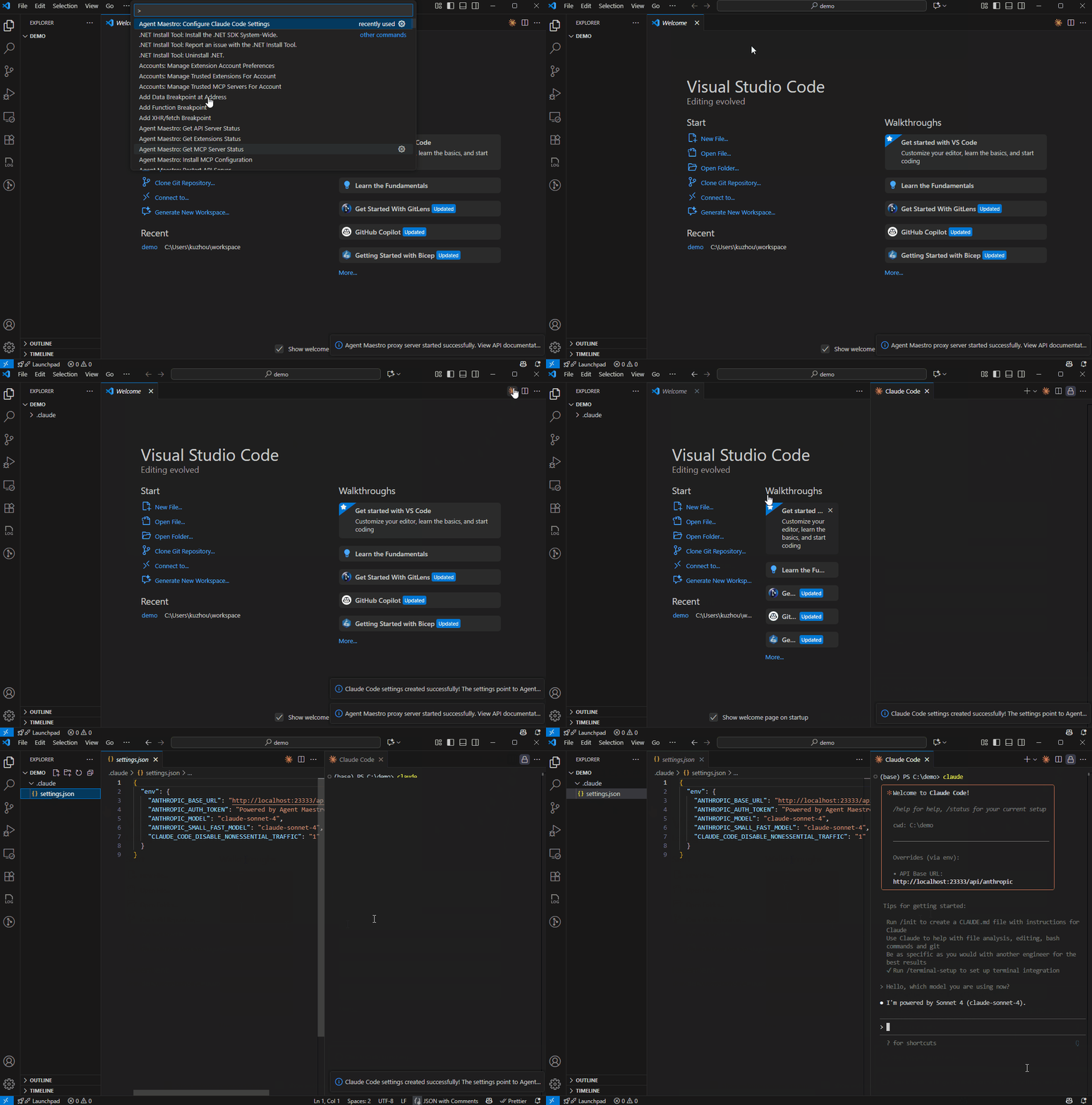
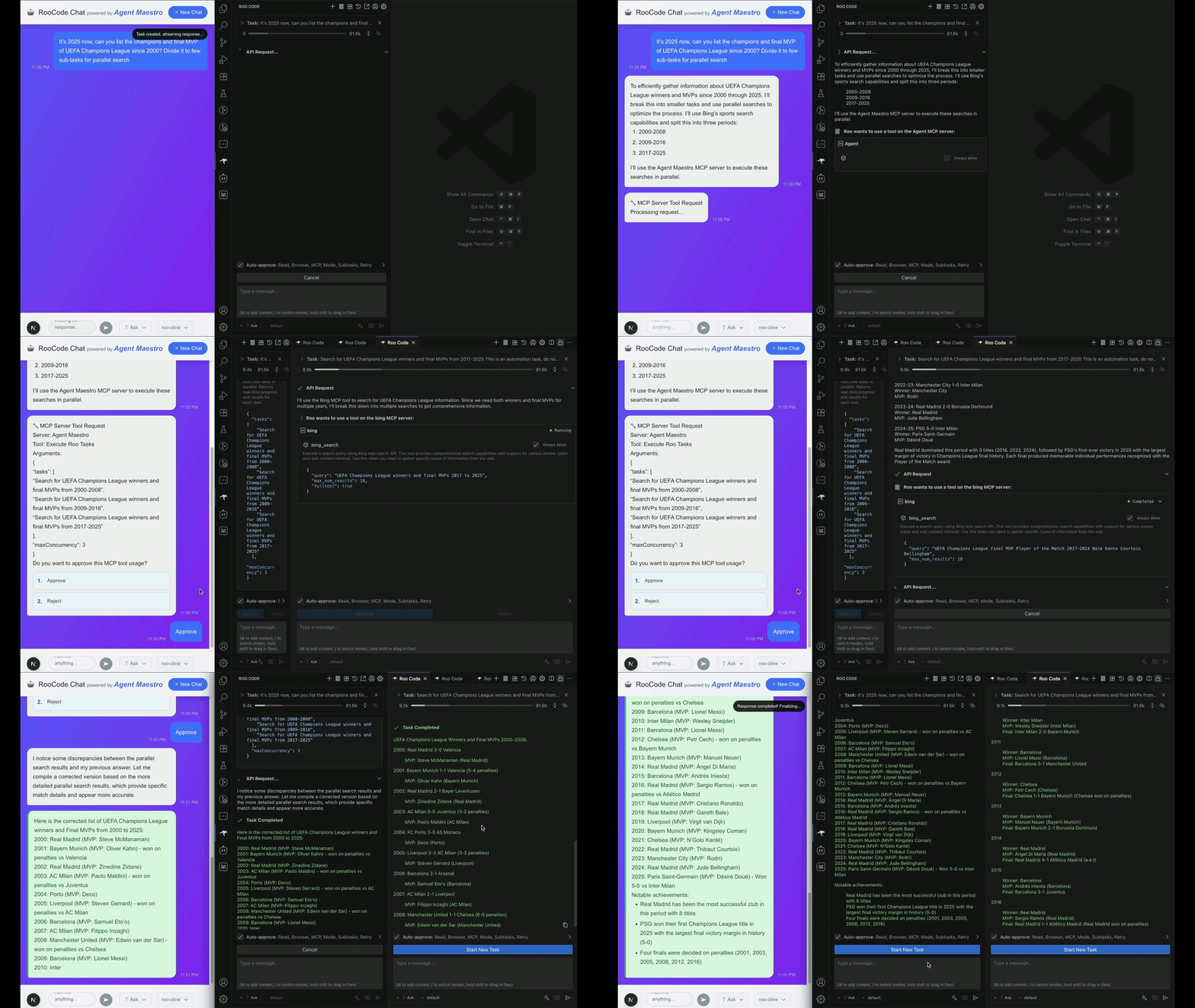
Turn VS Code into your compliant AI playground with powerful API compatibility and one-click setup:
- Universal API Compatibility: Anthropic (
/messages), OpenAI (/chat/completions,/responses), and Gemini compatible endpoints - use Claude Code, Codex, Gemini CLI or any LLM client seamlessly- Context Window Management: Configurable scale factors to prevent context window exceeded errors caused by tokenizer differences between VS Code's API and model providers
- One-Click Setup: Automated configuration commands for instant Claude Code, Codex, and Gemini CLI integration
- Headless AI Agent Control: Create and manage tasks through REST APIs for Roo Code and Cline extensions
- Comprehensive APIs: Complete task lifecycle management with OpenAPI documentation at
/openapi.json - Parallel Execution: Run up to 20 concurrent RooCode (and its variants like Kilo Code) tasks with built-in MCP server integration
- Real-time Streaming: Server-Sent Events (SSE) for live task monitoring and message updates
- Flexible Configuration: Workspace-level settings, environment variables, and extension auto-discovery
- Comprehensive APIs: Complete task lifecycle management with OpenAPI documentation at
Agent Maestro assumes you already installed one of the supported AI coding extensions:
- Roo Code or its variants for comprehensive API control
- Claude Code for personal development routines
- Codex for personal development routines
- Gemini CLI for personal development routines
Install the Agent Maestro extension from the VS Code Marketplace. Once activated, Agent Maestro automatically starts its API server on startup.
Configure Claude Code to use VS Code's language models with a single command Agent Maestro: Configure Claude Code Settings via Command Palette.
This automatically creates or updates .claude/settings.json with Agent Maestro endpoint and fills in available LLM models from VS Code.
That's it! You can now use Claude Code with VS Code's built-in language models.
1M Context Support: Agent Maestro supports Claude 1M context models (e.g.
claude-opus-4.6-1m). To use the extended context window, switch to the 1M variant in Claude Code via the/modelcommand (e.g. selectOpus (1M)). Without this, Claude Code defaults to the standard 200K context window even though Agent Maestro proxies to the 1M model.
Configure Codex to use VS Code's language models with a single command Agent Maestro: Configure Codex Settings via Command Palette.
This automatically creates or updates ~/.codex/config.toml with Agent Maestro endpoint and sets up GPT-5-Codex as the recommended model.
Configure Gemini CLI to use VS Code's language models with a single command Agent Maestro: Configure Gemini CLI Settings via Command Palette.
You can choose between:
- User Settings (
~/.env): Personal global settings for all projects - Project Settings (
.envin workspace): Team-shared project settings in source control
This automatically creates or updates the .env file with:
GOOGLE_GEMINI_BASE_URL: Agent Maestro Gemini endpointGEMINI_API_KEY: Default authentication token (preserved if already set)GEMINI_MODEL: Your selected model from available VS Code language modelsGEMINI_TELEMETRY_ENABLED: Disable telemetry by default
Additionally, it creates or updates settings.json in the same folder to skip the authentication method selection on first launch:
{
  "security": {
    "auth": {
      "selectedType": "gemini-api-key"
    }
  }
}Enable additional models in GitHub Copilot Chat with the Agent Maestro: Fix GitHub Copilot Chat - Model is not supported error command. (ref)
This feature:
- Automatically locates your GitHub Copilot Chat extension
- Creates a timestamped backup before making changes
- Removes the
x-onbehalf-extension-idheader restriction - Verifies the fix was applied successfully
- Prompts you to reload VS Code for changes to take effect
Note: This modification may be overwritten when the Copilot Chat extension updates. Simply run the command again after updates if needed.
-
Explore API Capabilities: Access the complete OpenAPI specification at
http://localhost:23333/openapi.json. -
VS Code Commands: Access functionality through the Command Palette:
Server Management:
Agent Maestro: Start API Server- Start the proxy API serverAgent Maestro: Stop API Server- Stop the proxy API serverAgent Maestro: Restart API Server- Restart the proxy API serverAgent Maestro: Get API Server Status- Check current server status
MCP Server Management:
Agent Maestro: Start MCP Server- Start the Model Context Protocol serverAgent Maestro: Stop MCP Server- Stop the MCP serverAgent Maestro: Get MCP Server Status- Check current MCP server statusAgent Maestro: Install MCP Configuration- Install MCP configuration for supported extensions
Extension Management:
Agent Maestro: Get Extensions Status- Check the status of supported AI extensions
Configuration Commands:
Agent Maestro: Configure Claude Code Settings- One-click Claude Code setupAgent Maestro: Configure Codex Settings- One-click Codex setupAgent Maestro: Configure Gemini CLI Settings- One-click Gemini CLI setupAgent Maestro: Fix GitHub Copilot Chat - Model is not supported error- Remove header restriction to enable additional modelsAgent Maestro: Set LLM API Key- Configure authentication for LLM API endpoints
-
Development Resources:
- API Documentation: Complete reference in
docs/roo-code/ - Type Definitions:
@roo-code/typespackage - Examples: Reference implementation in
examples/demo-site(testing purposes)
- API Documentation: Complete reference in
Agent Maestro supports optional API key authentication to secure access to the LLM API endpoints (Anthropic, OpenAI, and Gemini). When enabled, all requests to these endpoints must include a valid API key.
- Open the Command Palette (
Ctrl+Shift+P/Cmd+Shift+P) - Run
Agent Maestro: Set LLM API Key - Enter your desired API key (or leave empty to disable authentication)
The API key is stored securely using VS Code's built-in secrets storage and persists across sessions.
Once authentication is enabled, include your API key in requests using the standard header format for each provider:
Anthropic API (/api/anthropic/*):
curl -H "x-api-key: YOUR_LLM_API_KEY" \
  http://localhost:23333/api/anthropic/v1/messages
OpenAI API (/api/openai/*):
curl -H "Authorization: Bearer YOUR_LLM_API_KEY" \
  http://localhost:23333/api/openai/v1/chat/completions
Gemini API (/api/gemini/*):
curl -H "x-goog-api-key: YOUR_LLM_API_KEY" \
http://localhost:23333/api/gemini/v1beta/models/gemini-3-pro:generateContent- Authentication is disabled by default for ease of local development
- When authentication is disabled, the proxy accepts all requests without validation
- API keys are compared using constant-time comparison to prevent timing attacks
- Failed authentication attempts are logged for security monitoring
You can customize Agent Maestro's server ports using environment variables:
| Variable | Description | Default |
|---|---|---|
AGENT_MAESTRO_PROXY_PORT |
Proxy server port | 23333 |
AGENT_MAESTRO_MCP_PORT |
MCP server port | 23334 |
Usage:
# Set custom ports
export AGENT_MAESTRO_PROXY_PORT=8080
export AGENT_MAESTRO_MCP_PORT=8081

# Launch VS Code
code .
Note: Environment variables take precedence over extension settings.
You can configure Agent Maestro settings per workspace by adding them to your project's .vscode/settings.json file:
{
  "agent-maestro.defaultRooIdentifier": "rooveterinaryinc.roo-cline",
  "agent-maestro.proxyServerPort": 23333,
  "agent-maestro.mcpServerPort": 23334
}
Available Settings:
| Setting | Description | Default |
|---|---|---|
agent-maestro.defaultRooIdentifier |
Default Roo extension to use | "rooveterinaryinc.roo-cline" |
agent-maestro.proxyServerPort |
Proxy server port | 23333 |
agent-maestro.mcpServerPort |
MCP server port | 23334 |
agent-maestro.anthropic.tokenCountScaleFactor |
Scale factor for Anthropic token count estimation (range: 1.0–2.0) | 1.25 |
agent-maestro.codex.contextWindowScaleFactor |
Scale factor for Codex context window calculation (range: 1.0–2.0) | 1.3 |
This allows different projects to use different configurations without affecting your global VS Code settings.
Agent Maestro proxies requests through VS Code's Language Model API, which uses a different tokenizer (OpenAI's tiktoken / O200K) than the actual model providers. This mismatch means the token counts reported locally can be lower than the real usage, potentially causing requests to exceed the model's context window and fail unexpectedly.
To prevent this, Agent Maestro provides configurable scale factors that inflate the local token counts to better approximate the actual usage. Different coding agent clients require different approaches:
-
anthropic.tokenCountScaleFactor(for Claude Code and other Anthropic API clients): Applied to every token count reported in API responses. The proxy multiplies the raw VS Code token count by this factor (e.g., 10,000 tokens × 1.25 = 12,500 reported). This helps the client detect when it's approaching the context limit and trigger actions like auto-compaction before hitting the wall. Increase this value if you still encounter context window errors; decrease it if you want to use more of the available context. -
codex.contextWindowScaleFactor(for Codex): Used only when generating Codex'sconfig.tomlto set themodel_context_windowvalue (calculated asmaxInputTokens × scaleFactor). This tells Codex the effective context window size upfront so it manages its own conversation history accordingly.
💡 Always refer to
/openapi.jsonfor the latest API documentation.
- REST API:
http://localhost:23333/api/v1 - Anthropic API:
http://localhost:23333/api/anthropic - OpenAI API:
http://localhost:23333/api/openai - Gemini API:
http://localhost:23333/api/gemini - MCP Server:
http://localhost:23334
Perfect for GitHub Copilot and Claude Code integration:
POST /api/anthropic/v1/messages- Anthropic Claude API compatibility using VS Code's Language Model APIPOST /api/anthropic/v1/messages/count_tokens- Token counting for Anthropic-compatible messages
Perfect for Codex and OpenAI model integration:
POST /api/openai/v1/chat/completions- OpenAI Chat Completions API compatibility using VS Code's Language Model APIPOST /api/openai/v1/responses- OpenAI Responses API compatibility using VS Code's Language Model API
Perfect for Gemini CLI integration:
POST /api/gemini/v1beta/models/{model}:generateContent- Google Gemini API compatibility using VS Code's Language Model APIPOST /api/gemini/v1beta/models/{model}:streamGenerateContent- Streaming support for Gemini APIPOST /api/gemini/v1beta/models/{model}:countTokens- Token counting for Gemini-compatible messages
Full-featured agent integration with real-time streaming:
POST /api/v1/roo/task- Create new RooCode task with SSE streamingPOST /api/v1/roo/task/{taskId}/message- Send message to existing task with SSE streamingPOST /api/v1/roo/task/{taskId}/action- Perform actions (pressPrimaryButton, pressSecondaryButton, cancel, resume)GET /api/v1/roo/settings- Get current RooCode settingsGET /api/v1/roo/modes- Get available RooCode modes
Direct access to VS Code's language model ecosystem:
GET /api/v1/lm/tools- Lists all tools registered vialm.registerTool()GET /api/v1/lm/chatModels- Lists available VS Code Language Model API chat models
Basic integration support:
POST /api/v1/cline/task- Create new Cline task (basic support)
GET /openapi.json- Complete OpenAPI v3 specification
Agent Maestro automatically logs detailed error diagnostics when API requests fail. Each extension launch creates a timestamped log file in your workspace root: {YYYY}-{MM}-{DD}_{HH}-{MM}-{SS}-{mmm}-debug.log. All errors during that session are appended to the same file.
What's logged: Request payload, transformed VSCode LM messages, error details, extension metadata, model ID, endpoint, and timestamp.
Supported endpoints:
/api/anthropic/v1/messages(content sanitized)/api/openai/v1/chat/completions(TODO: sanitization)/api/openai/v1/responses(TODO: sanitization)/api/gemini/v1beta/models/{model}:generateContent|streamGenerateContent(TODO: sanitization)
Privacy protection:
- Anthropic only: User content is automatically redacted (text, images, documents, tool I/O, search results →
[REDACTED]) - OpenAI/Gemini: Not yet sanitized - review carefully before sharing logs
Error responses include the log file path for easy troubleshooting:
{
  "error": {
    "message": "...",
    "log_file": "/path/to/workspace/2025-12-28_14-30-45-123-debug.log"
  }
}Tip: Add *-debug.log to .gitignore to prevent committing diagnostic files.
-
Roo Task SSE Events Renamed
- Events now follow
RooCodeEventNameenum - The
messageevent remains unchanged (most commonly used) - Removed events:
stream_closed,task_completed,task_aborted,tool_failed,task_created,error,task_resumed
- Events now follow
-
OpenAPI Path Change
- Old:
/api/v1/openapi.json - New:
/openapi.json
- Old:
Our development roadmap includes several exciting enhancements:
- Production Deployment: Code-server compatibility for containerization and deployment
- Headless AI Agent Control: Complete REST API integration for Claude Code and Codex extensions with task lifecycle management
- Task Scheduler: Cron-like scheduling system for automated AI agent tasks and workflows
Contributions Welcome: We encourage community contributions to help expand Agent Maestro's capabilities and support for additional AI coding agents. We recommend using AI coding agents themselves to accelerate your development workflow when contributing to this project.
This project is licensed under the terms specified in the LICENSE file.
⭐ Star this project if you find it useful!
Built with ❤️ by AI agents for AI agents