

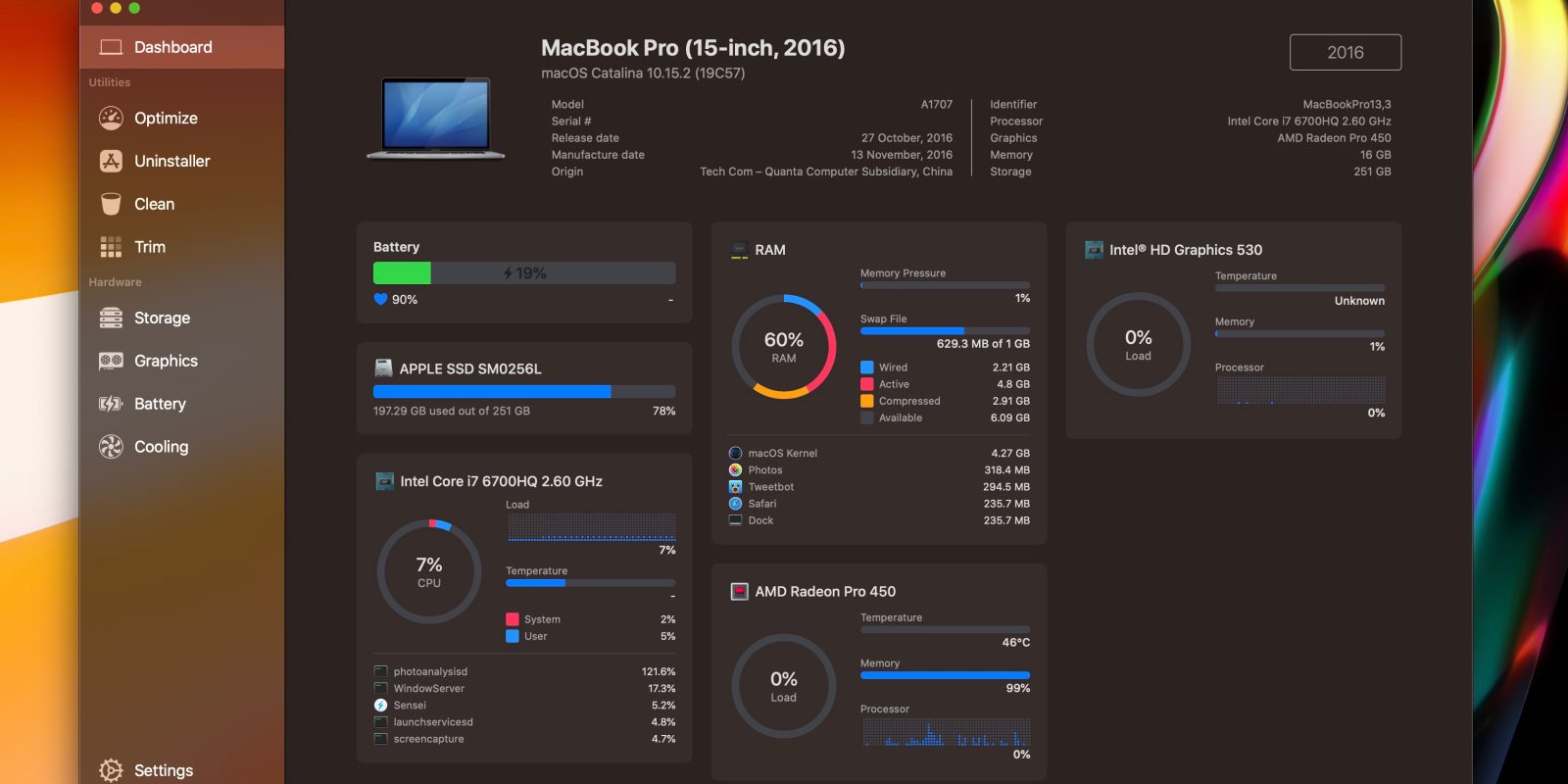
- 📊 Real-Time System Monitoring: Gain deep insights into CPU, GPU, memory, disk, network, and battery performance with detailed live graphs.
- 🧼 Comprehensive Cleaning Suite: Remove system junk, duplicate files, and outdated backups to reclaim significant storage space safely.
- 🔧 Pro-Level Optimization Tools: Manage startup items, uninstall apps completely, analyze disk usage, and optimize storage with advanced features.
Sensei is a premium, professional-grade utility application engineered for modern systems, designed to provide unparalleled system monitoring and optimization capabilities. It acts as a central dashboard for your computer's health, offering real-time telemetry and powerful tools that go far beyond basic cleaning. Sensei is built for users who demand detailed control and visibility over their system's performance, from developers and creative professionals to power users who want to maximize their hardware's potential.
The application delivers a modern, intuitive interface that presents complex system data in an easily digestible format. Its powerful algorithms perform deep scans to identify not just common junk files, but also provide insights into hardware temperature, storage health, and component lifespan. With modules for performance benchmarking, storage optimization, and privacy management, Sensei consolidates the functionality of multiple utilities into one cohesive, native experience, empowering you to maintain your computer at its absolute best.
- ✅ Deep Hardware Insights: Monitor storage health (SMART status), battery condition, GPU/CPU temperatures, and system metrics.
- ✅ Native Performance: Fully optimized for modern hardware architectures (ARM and x86), ensuring maximum efficiency.
- ✅ Benchmarking Tools: Measure and compare your system's performance with standardized tests for CPU, GPU, and disk speed.
- ✅ Modern & Intuitive UI: A beautifully designed, dark-mode ready interface that makes advanced system management accessible.
- Operating System: Latest stable version or one major version prior
- Processor: Modern 64-bit CPU (ARM or x86 architecture)
- Memory: 1 GB RAM (minimum)
- Storage: 150 MB of available disk space for the application
- Monitoring system resource usage to identify performance bottlenecks or runaway processes.
- Performing deep storage analysis and cleanup before a major system upgrade or migration.
- Checking hardware health metrics like component temperatures and storage wear levels.
- Benchmarking your system's performance after a hardware upgrade or software configuration change.
sensei, sarutobi sensei, sensei in hiragana, sensei master, system performance monitor, optimization toolkit, sensei download, storage health monitor, sensei mac, sensei macos, sensei for mac, hardware monitor, real-time system stats, benchmarking tool, storage analyzer, Sensei for modern hardware, system optimization software, monitor hardware health, storage health check, benchmarking app download, system stats utility
Download Sensei – the advanced performance monitor and optimization toolkit. Get real-time hardware insights, deep cleaning, benchmarking, and storage health monitoring for your system. The professional's choice for system management.