Features
The Upgrades System allows server owners to expand, balance, and
control progression for all ChestLink inventories.
Players can upgrade individual linked chests to increase capacity,
automate sorting, apply item filters, and compress resources.
This page documents:
- How upgrades work
- What each upgrade type does
- How to access the upgrades menu
- Permissions
- Configuration keys (directly from
upgrades.yml) - Example tuned configurations (Balanced / Hardcore / Casual)
Each linked chest has an associated upgrade profile stored in its
ChestLink data.
Upgrades are defined in:
upgrades.yml
Every upgrade supports:
- Global enable/disable
- Per-level configuration
- Per-level costs (Economy, XP, Items, or Mixed)
- Upgrade limits (optional per-rank caps)
ChestLink currently supports four upgrade types:
- Capacity Upgrade
- Auto-Sort Upgrade
- Filter Upgrade (Whitelist / Blacklist)
- Compression Upgrade
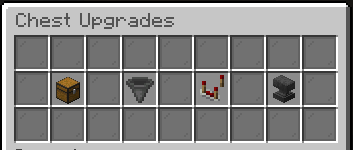
Players can open the upgrades menu for any linked chest they own:
/chestlink upgrades <id>
Where <id> is the numeric ChestLink inventory ID or custom name.
GUI provides:
- Upgrade icons
- Cost display
- Locked/unlocked states
- Max level indicators
| Permission | Description |
|---|---|
chestlink.upgrades.use |
Allows players to open and interact with the upgrades menu. |
chestlink.upgrades.bypass |
Allows free upgrades without paying costs (for admins/testing). |
chestlink.limits.bypass |
Allows bypassing max-level or max-upgraded-chests limits. |
All values come directly from the plugin's upgrades.yml.
Expands the number of slots available in the linked inventory.
Config section:
capacity:
  enabled: true
  max-slots: -1
  levels:
    1: 36
    2: 45
    3: 54
  double-levels:
    1: 63
    2: 72
    3: 81
  costs:
    1:
      type: economy
      amount: 500.0
    2:
      type: economy
      amount: 1500.0
    3:
      type: economy
      amount: 3000.0
Notes:
-
max-slots: -1means unlimited by config (uses level definitions instead). -
double-levelsapply when the player links a double chest.
Automatically sorts incoming items.
Config section:
auto_sort:
  enabled: true
  strategy: alphabetical
  costs:
    1:
      type: economy
      amount: 750.0
Supported strategies:
alphabetical
Allows whitelist/blacklist filtering of items entering the chest.
Config section:
filter:
  enabled: true
  default-mode: blacklist
  overflow-behavior: return
  max-entries: 27
  costs:
    1:
      type: items
      items:
        comparator: 4
        redstone: 32
Key behaviors:
-
default-mode:whitelistorblacklist -
overflow-behavior:returnorvoid -
max-entries: maximum number of filter entries
Automatically compresses items based on configured recipes.
Config section:
compression:
  enabled: true
  recipes:
    iron_ingot: iron_block
    gold_ingot: gold_block
    coal: coal_block
    redstone: redstone_block
    diamond: diamond_block
    emerald: emerald_block
    lapis_lazuli: lapis_block
    copper_ingot: copper_block
  costs:
    1:
      type: xp
xp-levels: 15You may limit how many upgrades players can apply or cap maximum upgrade levels per type.
Config section:
limits:
  enabled: false
  ranks:
    default:
      permission:
      max-upgraded-chests: -1
      bypass-limits: false
      max-levels:
        capacity: 3
        auto_sort: 1
        filter: 1
        compression: 1
Set enabled: true to activate.
Below are complete upgrade presets tuned for various types of servers.
These can be directly copied into your upgrades.yml.
upgrades:
  capacity:
    enabled: true
    max-slots: -1
    levels:
      1: 36
      2: 45
      3: 54
    double-levels:
      1: 63
      2: 72
      3: 81
    costs:
      1:
        type: economy
        amount: 400
      2:
        type: economy
        amount: 1200
      3:
        type: economy
        amount: 2500

  auto_sort:
    enabled: true
    strategy: alphabetical
    costs:
      1:
        type: economy
        amount: 1000

  filter:
    enabled: true
    default-mode: blacklist
    overflow-behavior: return
    max-entries: 27
    costs:
      1:
        type: items
        items:
          comparator: 3
          redstone: 24

  compression:
    enabled: true
    recipes: (same as default)
    costs:
      1:
        type: xp
xp-levels: 20upgrades:
capacity:
enabled: true
max-slots: -1
levels:
1: 36
2: 45
3: 54
double-levels:
1: 63
2: 72
3: 81
costs:
1:
type: economy
amount: 2500
2:
type: economy
amount: 7500
3:
type: economy
amount: 15000
auto_sort:
enabled: true
strategy: alphabetical
costs:
1:
type: economy
amount: 5000
filter:
enabled: true
default-mode: whitelist
overflow-behavior: return
max-entries: 18
costs:
1:
type: items
items:
comparator: 6
hopper: 2
redstone: 64
compression:
enabled: true
recipes: (same as default)
costs:
1:
type: xp
xp-levels: 35upgrades:
capacity:
enabled: true
max-slots: -1
levels:
1: 36
2: 45
3: 54
double-levels:
1: 63
2: 72
3: 81
costs:
1:
type: economy
amount: 100
2:
type: economy
amount: 300
3:
type: economy
amount: 600
auto_sort:
enabled: true
strategy: alphabetical
costs:
1:
type: economy
amount: 250
filter:
enabled: true
default-mode: blacklist
overflow-behavior: return
max-entries: 27
costs:
1:
type: items
items:
redstone: 8
compression:
enabled: true
recipes: (same as default)
costs:
1:
type: xp
xp-levels: 5