Annotation
On this page are examples of how QOL.plots can help you annotate plots:
- Find the "least bad" spot on a plot for annotation, and...
- ...put a textbox there
- ...put a legend there (TODO: this example)
- ...show visually the "badness" grid
Before running any of the following examples, make sure to do:
import matplotlib.pyplot as plt
import numpy as np
import QOL.plots as pqolpqol.text("Hello, World!") #places textbox with "Hello, World!" on plot, at "emptiest" spot.For more complicated uses, check out the example image generated by the code below.
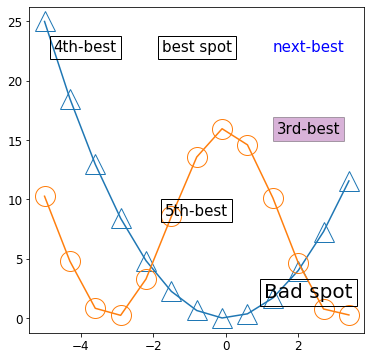
x = np.arange(-5, 4, 0.7)                             #pick some x data
plotstyle = dict(markersize=20, fillstyle='none')     #just for style
plt.plot(x,       x**2     , marker='^', **plotstyle) #plot    x^2   , with style
plt.plot(x, 8*(1+np.cos(x)), marker='o', **plotstyle) #plot 8+8cos(x), with style
pqol.text("best spot", badness=0)
pqol.text("next-best", badness=1, color="blue", bbox=None)
pqol.text("3rd-best", badness=2, bbox=dict(facecolor='purple', alpha=0.3))
pqol.text("4th-best", badness=3)
pqol.text("5th-best", badness=4)
pqol.text("Bad spot", badness=10, fontsize=30)
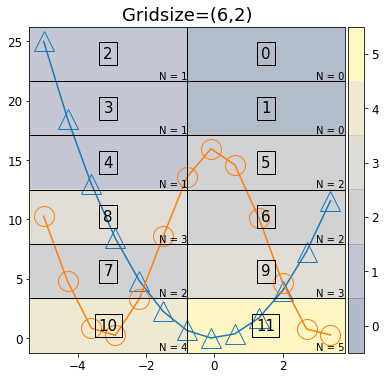
plt.show()pqol.locs_visual()If having trouble getting your annotations to go where you want them, try using locs_visual, choosing the number you want, and passing that to pqol.text or pqol.legend using the parameter badness. (For example, pqol.legend(badness=2) will put the legend in the box that is labeled 2 by locs_visual)
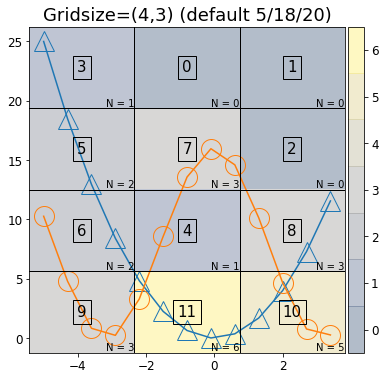
x = np.arange(-5, 4, 0.7)
plotstyle = dict(markersize=20, fillstyle='none') #just for style
plt.plot(x,       x**2     , marker='^', **plotstyle) #plot, with style
plt.plot(x, 8*(1+np.cos(x)), marker='o', **plotstyle) #plot, with style
plt.title("Gridsize=(4,3) (default 5/18/20)") #default at time of writing
pqol.locs_visual()
plt.show()

x = np.arange(-5, 4, 0.7)
plotstyle = dict(markersize=20, fillstyle='none') #just for style
plt.plot(x,       x**2     , marker='^', **plotstyle) #plot, with style
plt.plot(x, 8*(1+np.cos(x)), marker='o', **plotstyle) #plot, with style
plt.title("Gridsize=(6,2)")
pqol.locs_visual(gridsize=(6,2))
plt.show()
The values (N=__) in the lower corner of each box represent the number of data points in that box. This overlap is what determines "badness" (in ascending order, i.e. low badness means low overlap).
You can also adjust the grid size via the gridsize optional parameter, in this function (and also in pqol.text() and pqol.legend()). For example, pqol.legend(badness=2, gridsize=(6,2)) will put the legend in the box labeled 2 in the "gridsize=(6,2)" image). By default at time of writing, gridsize=(4,3), for 4 rows and 3 columns.