Enabled 7TV for embedded Twitch Chats#193
Conversation


Enabled 7TV for embedded Twitch Chats

Added comments

|
The all frames should be included in the stage manifest aswell. |


|
Opened a pull request to you branch with the requested changes |
Enabled 7TV for embedded Twitch Chats

Added comments

fixed trailing whitespace

updated staging manfiest

 ryankashi
left a comment
ryankashi
left a comment
ryankashi
left a comment
There was a problem hiding this comment.
Fixed all manifest, linting, and changes
 AnatoleAM
left a comment
AnatoleAM
left a comment
AnatoleAM
left a comment
There was a problem hiding this comment.
This seems to work overall without adverse effects, the only thing is I'd like a changelog entry for this (under 2.1.2)
AnatoleAM
left a comment
AnatoleAM
left a comment
There was a problem hiding this comment.
This seems fine. Thank you

| * cause major memory leak problems. | ||
| */ | ||
| constructor() { | ||
| if (!window.location.href.match(this.channelRegex)) return; |
There was a problem hiding this comment.
@ryankashi was there a reason for this? Just now realized after it deployed that this partially breaks the loading mechanism of the extension. It prevents it from loading up if the user loads up twitch.tv then switches to a channel
There was a problem hiding this comment.
That was a change added in by @Excellify to replace my proposed change to SiteApp.tsx 0b36478.
My original change was to fix a very specific edge case:
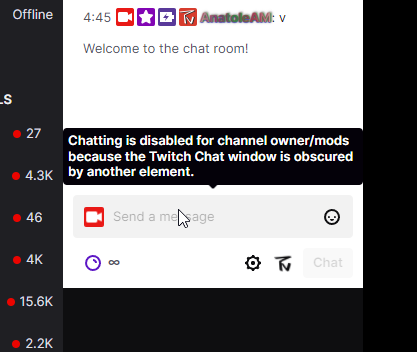
If a Twitch chat is embedded onto a twitch.tv page, if the person is logged in as a moderator to that chat, they will be blocked from typing anything into the chat by Twitch.tv. This ONLY applies to twitch embeds via https://dev.twitch.tv/docs/embed/chat and I BELIEVE only when embedded on a Twitch.tv parent.
Note that this does not affect Tenami as we can manually control whether to show or hide this overlay, so it can be removed without affecting us.
Specifically, my addition for this line of code is that if a Twitch chat is embedded onto a twitch.tv page
There was a problem hiding this comment.
Is there a way to fix this behavior without breaking the extension
There was a problem hiding this comment.
You can do two options, both of which will work:
-
Remove the line of code
-
Remove the line of code, and implement our changes in SiteApp.tsx via the above commit.
Number 1 will work for all Twitch embeds outside of Twitch, and for all Twitch embeds on twitch.tv that viewers are not a moderator of (the regular twitch chats are completely unaffected by this change)
Number 2 will address the specific edge case of when a Twitch embed is injected into a native twitch.tv, AND you are a moderator in the chat. As far as I know, Tenami is the only app or extension that does this, and we already have a fix for it ourselves, but I put it in just in case others may so the same.
If option two is not breaking for your tests I would go with that, otherwise you can just use option one and it will work just fine for everyone as well
There was a problem hiding this comment.
Tried re-introducing the changes in SiteApp but it doesn't seem to fix this (tested by adding an embed iframe inside a twitch page)
There was a problem hiding this comment.
I can answer more on discord I'm driving right now sorry. This should disappear when you set the 7 TV overlay style to hidden
There was a problem hiding this comment.
@AnatoleAM okay so I did some deeper due diligence and the reason you were blocked in this scenario was not due to 7tv, it was due to the Twitch page itself. This can be easily tested by disabling 7TV and then reinjecting chat in the exact same place.
When an embedded version of chat is injected into a page, if you are logged in as a moderator (or broadcaster), the Twitch embed is extremely specific in order to ensure that no elements or divs are placed on top of the chat. If an element is placed on top of the Twitch chat, then the chat will be disabled for that moderator.
Under your circumstance, what happened is that the literal Twitch page has a massive overlay ontop of it, and when you tried to inject the embed, it detected this overlay and disabled the chat. However, under certain circumstances that I do not understand, a div with class:
<div class="seventv-overlay"></div>
can also be injected on top of the embedded chat as well as inside of the embedded chat. I do not understand enough about 7TV to know when the seventv-overlay is injected, however what I do know is that this is only possible on twitch.tv pages and youtube.com pages based on permissions. An example of where this corner case exists is when embedding a chat on a URL such as:
https://player.twitch.tv/?channel=xqcow&enableExtensions=true&muted=true&parent=twitch.tv&player=popout
When you inject a chat on this page, a seventv-overlay will be created both inside the native player.twitch.tv website, as well as the iframe that you use to create the chat. The line of code,
if(!location.href.match("https:\/\/(www.)?twitch.tv\/"))
app.style.display = 'none';
ensures that the class="seventv-overlay" div will NOT be the root cause of disabling the embedded chat for moderators on all non www.twitch.tv websites that the content script could possibly run on (i.e. player.twitch.tv).
It turns out that in reality, Tenami is most likely the only extension that injects a chat embed onto the chat website cleanly enough such that no other div other than seventv-overlay causes an obstruction, and in that scenario, we can just hide the div ourselves without affecting any other potential untested (by me) use cases.
In other words, I think that the line of code
if (!window.location.href.match(this.channelRegex)) return;
and
if(!location.href.match("https:\/\/(www.)?twitch.tv\/"))
app.style.display = 'none';
Should both be removed from the 7TV extension.

There was a problem hiding this comment.
Didn't realize the channelRegex didnt match all twitch pages, my bad.

| * cause major memory leak problems. | ||
| */ | ||
| constructor() { | ||
| if (!window.location.href.match(this.channelRegex)) return; |
There was a problem hiding this comment.
Didn't realize the channelRegex didnt match all twitch pages, my bad.

|
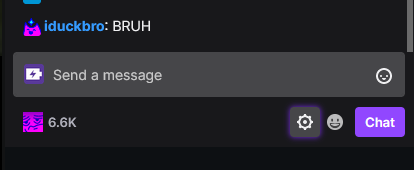
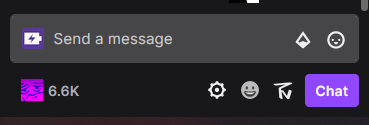
Looks like it stop working for embedded chats? Embedded: On Twitch: |


5 participants


Enables 7TV for embedded Twitch Chats using the documentation located at:
https://dev.twitch.tv/docs/embed/chat