| title | emoji | colorFrom | colorTo | sdk | pinned | app_port |
|---|---|---|---|---|---|---|
AutoLoop |
➰ |
blue |
indigo |
docker |
false |
7860 |
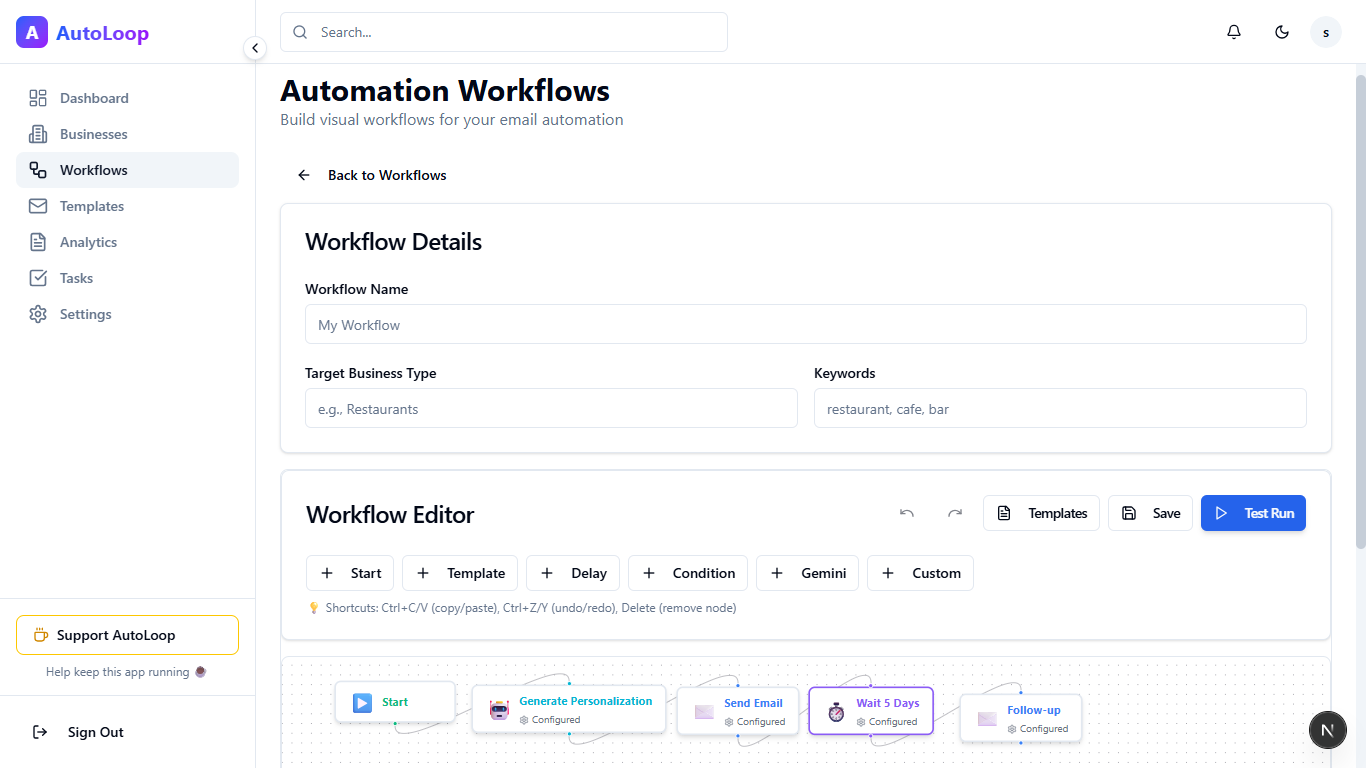
AutoLoop is an intelligent, production-ready automation platform designed to streamline lead generation and engagement. It combines multi-source scraping (Google Maps, LinkedIn), AI-powered personalization, and visual workflow automation to help you find, qualify, and convert your ideal customers across multiple channels.
Key capabilities include continuous lead sourcing, smart email drafting with Google Gemini AI, LinkedIn automation, and managing complex outreach sequences via a drag-and-drop editor.
- Google Maps: Automatically scrape businesses based on keywords and location. Extract valid emails, phone numbers, and websites.
- LinkedIn Integration: Scrape profiles using Google Search heuristics and automate messages via Puppeteer (simulated browsing).
Design complex automation flows with a drag-and-drop node editor.
- Triggers: Schedule-based or Event-based (e.g., "New Lead Found").
- Actions: Send Email, Send WhatsApp, API Request, Scraper Action.
- Logic: Conditionals, A/B Testing, Delays, Merges, Loops.
- Persistence: Workflows save variable state between executions, enabling long-running multi-step sequences.
- Google Gemini 2.0: Generate hyper-personalized email drafts based on prospect data and website content.
- Dynamic Variables: Use
{{business.name}},{{business.website}}, etc., in your templates.
- Gmail Integration: Send emails from your own account via OAuth.
- Delivery Tracking: Real-time tracking of Opens and Clicks via pixel injection and link wrapping.
- Rate Limiting: Built-in protection to prevent spam flagging (e.g., max 50 emails/day per account).
- Bounce Handling: Automatic detection and handling of failed deliveries.
- Execution Monitoring: Watch workflows run in real-time.
- Success/Failure Rates: Identify bottlenecks in your automation.
- Quota Tracking: Monitor your email sending limits and remaining quota.
- Export: Download execution logs as CSV for offline analysis.
- LinkedIn: Automate connection requests and messages.
- Instagram / Facebook: Dashboard for scheduling Posts & Reels (Integration ready).
AutoLoop is built for reliability and scale:
- Horizontal Scaling: Separated Web Server and Worker processes.
- Queue System: Redis + BullMQ powers a robust job queue for critical tasks (Sending emails, Scraping, Workflow execution).
- Self-Healing: Automatic retry logic with exponential backoff for failed tasks.
- Monitoring: Self-ping mechanism to ensure worker uptime on container platforms.
- Framework: Next.js 15 (App Router)
- Language: TypeScript
- Styling: Tailwind CSS 4 + Shadcn UI
- Database: PostgreSQL (Neon) + Drizzle ORM
- Authentication: NextAuth.js v5 (Google OAuth)
- AI: Google Gemini API
- Worker: Node.js dedicated process
- Node.js 18+
- pnpm (recommended)
- PostgreSQL Database (e.g., Neon)
- Redis Instance (Local or Upstash)
- Google Cloud Project (Enabled Gmail API & OAuth credentials)
- Clone the repository
git clone https://github.com/yourusername/autoloop.git
cd autoloop- Install dependencies
pnpm install- Configure Environment
Create a .env file in the root directory (see Environment Variables).
- Setup Database
pnpm db:push
# Optional: Seed sample data
npx tsx scripts/seed-data.ts- Run Development Server
pnpm devThe web app will run at http://localhost:3000.
- Start Background Workers (Critical for automation)
Open a separate terminal and run:
pnpm workerNote: This starts the dedicated worker process that handles queued jobs and scraping.
Create a .env file with the following keys:
# Database (Neon/Postgres)
DATABASE_URL="postgresql://..."

# NextAuth Configuration
NEXTAUTH_URL="http://localhost:3000"
NEXTAUTH_SECRET="your-super-secret-key"

# Google OAuth & Gmail API
GOOGLE_CLIENT_ID="..."
GOOGLE_CLIENT_SECRET="..."

# Google AI (Gemini)
GEMINI_API_KEY="..."

# Redis (Queue)
REDIS_URL="redis://localhost:6379"

# App URL (For Self-Ping & Webhooks)
NEXT_PUBLIC_APP_URL="http://localhost:3000"

# Hugging Face (Optional)
HF_TOKEN="..."

# Admin Credentials (for seed/testing)
ADMIN_EMAIL="admin@example.com"This repo includes a Dockerfile and is configured for Hugging Face Spaces.
Important for Cloud Deployment:
- Worker Process: Ensure your deployment platform runs
scripts/worker.ts. In Docker, you might use a process manager likepm2or run the worker in a separate container/service. - Keep-Alive: The worker includes a self-ping mechanism. Ensure
NEXT_PUBLIC_APP_URLis set to your production URL (e.g.,https://my-app.hf.space) so the ping hits the public route and keeps the container active.
Live Demo: https://shubhjn-autoloop.hf.space
Contributions are welcome! Please feel free to submit a Pull Request.
Made with ❤️ by Shubh Jain