Repository navigation
Upgrading to a new version
-
disable addon
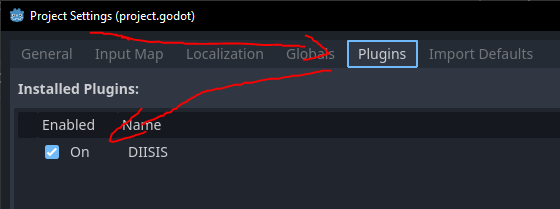
-
delete addon files (
addons/diisis)Watch out you don't delete your script.
-
- don't forget to enable the plugin again, and reload the editor afterwards
Sometimes new versions introduce new underlying file structure to diisis. When you upgrade to a new version, it is recommended that the first thing you do is open diisis, and - if no file corruption happens - click through all the pages in the document so that you can load the old data and serialized it with the new underlying data structures. (Alternatively, use Utility > Step through pages to let DIISIS do it for you) If the file is missing things, or the console gives you a bunch of errors, the diisis version you're trying to upgrade to is probably incompatible with the one you created your project in.
I try to make my code backwards-compatible where possible, but sometimes new versions do break compatibility. Sorry!
-
Remove all template-specific autoloads (Project Settings -> Globals)

-
By downloading the plugin again, you'll have downloaded duplicates of all scenes in the VN template. This will conflict with their
class_names. Delete the new files in the template in the plugin folder (all contents ofaddons/diisis/templates/visual_novel). -
Run through the automated setup again. Don't forget to reload the project again.


