Login to a google account
In order to send requests to the Google People API, a login with OAuth2 authentication to the desired Google account with the needed scope is required.
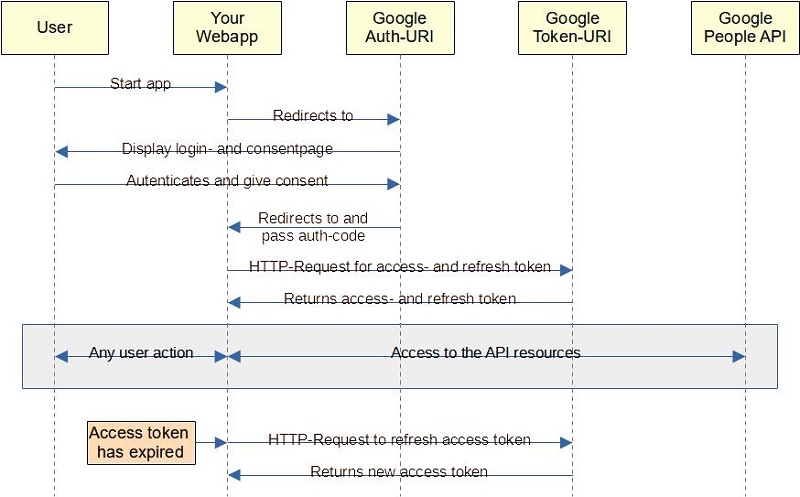
- User Starts the web application.
- The application build an google auth URL using the client-id and specifies the needed scope.
The browser have to be redirected to this URL. - The google auth URL shows a login page where the user
- has to enter/select the google account and login
- needs to give consent to the requested scope
- User authentictes and gices consent.
- After a successfull login and consent, the browser is redirected to the configured redirect-URI of your web application and pass an authentication code.
- The web application sends a HTTP request to the google token URI usinf the received code, the client-ID and the client-secret to fetch access- and refresh token.
- On success, the web application get the tokens and save both.
- Access the API resources.
- After the access token has expired, the web application can send a request for a new access token using the refresh token (or can simply perform a new login - which will certainly annoy the user...).
- The application can decide (or ask the user...), how long the refresh-token is saved (keeped loggin until...).
At least 2 PHP fiels are needed to realize this login:
- Build the auth-URI and redirect to
- The configured redirect-URI to receive the auth-code
Prerequistes is an existing OAuth client configuration in the secrets/google_secrets.json file
See Create a google project for mor information
After the user has logged in and gave consent to acces the requested scope, the configured redirect-URI for the used OAuth-client is called and the the auth code is passed in the URI param. If the configured redirect URI is not available, the authentication failes and the generated authentication code is invalid!.
$oSecrets = new GSecrets();
$oClient = new GClient();
$oClient->setOAuthClient($oSecrets->getClientSecrets());
$oClient->addScope(GContacts::CONTACTS);
$oClient->addScope(GContacts::CONTACTS_OTHER_READONLY);

$strAuthURL = $oClient->buildAuthURL();

header('Location: ' . filter_var($strAuthURL, FILTER_SANITIZE_URL));
Note:
If the OAuth client configuration is available on another location and/or in another file thansecrets/google_secrets.json, use thesetSecretsPath()andsetSecretsFilename()methods of theGSecrets()class.In any case, it should be ensured that this file cannot be accessed from outside, since it contains the client secret in addition to the IDs and URIs, which is required to query the tokens.
$oSecrets = new GSecrets();
$oClient = new GClient();
$oClient->setOAuthClient($oSecrets->getClientSecrets());
if ($oClient->fetchTokens($_GET['code'])) {
    $oSecrets->saveRefreshToken($oClient->getRefreshToken());
    $oSecrets->saveAccessToken($oClient->getAccessToken());
    header('Location: ./ContactList.php');
}
Note:
After the tokens has been received and saved, the application can start at his entry point.
In the example the contact list is displayed.