Option Find and Find/Replace focus #6803

Description

This is not related to the latest version 3.6.12, it is common for all versions. The problem is when you use the option Find or Find/Replace in SE, that dialog has the full focus, and you can't go anywhere when this dialog window is open. Problems:
-
Option Find. This option finds only one occurrence of the desired word or letter(s) and disappears. In MS Word, you can change the word you find and you can find all occurrences of this word. This is the case with hall other kinds of programs. They have some arrows and you can jump from one occurrence of that word to another until you see them all. And the focus can be changed if you double-click on some other thing, the find dialog window doesn't stop you from doing this. You can even minimize the window while the found dialogue window is open. If you want to do anything, you must close this dialogue first. This is not practical.
-
Option replace. The problem with Replace is the same. It has the full focus, you can't simply find something in the subtitle to edit (some other thing), to click on the subtitle and focus to be in that subtitle. You simply can't go out of the Replace dialogue. If you want to edit something you didn't see is wrong, you must close Replace dialogue window, then edit, and reopen the dialogue window. It gives no comfort during work.
If I wasn't clear, I want to focus to be removed from the Find/Replace dialogue, so I can minimize the whole SE window, do whatever I want, like editing a line of subtitle, without losing the Find/Replace dialogue, it should stay until I give it focus again. Option Replace in MS Word works like that. I can change anything while the dialogue Replace is open, and to do what I need, then go back to the Replace dialogue. In SE, you can't do anything while Replace dialogue is opened. The focus stays on it. You can't go to change a subtitle line (this is so natural if you find some error), and then continue to find/replace some other occurrences of some term or word.
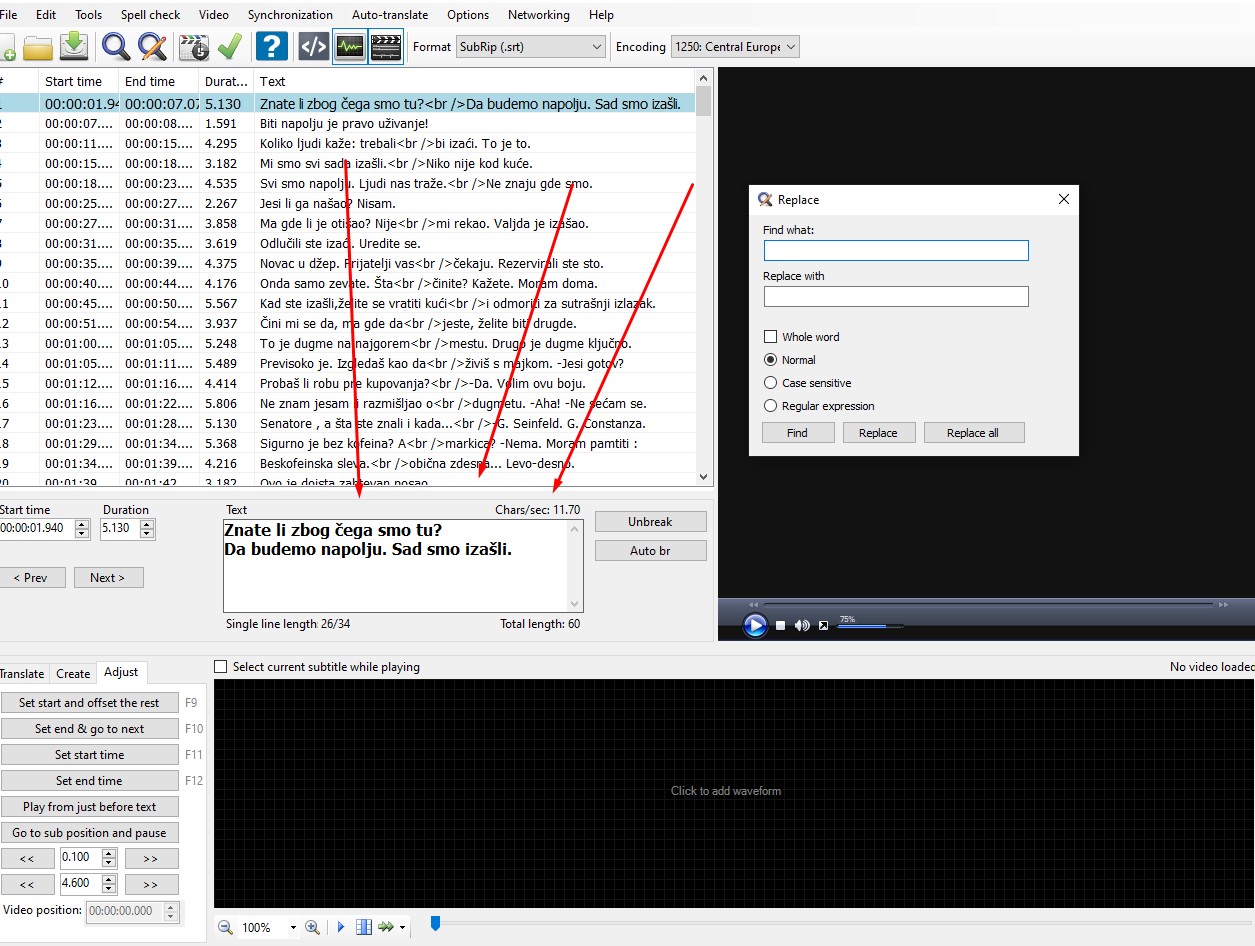
In the picture, I showed how I want to go to this area (see the arrows) to edit subtitles, but I can't, because Replace dialogue has a constant focus, and I can see some errors, but I can't go out of the dialogue. It simply won't let me. This is a very big restriction, I want to go where I want while Replace dialogue is opened, edit what I want, then go back to this Replace dialogue, like it is the case in any other program. Or I want to minimize the window of the program, without the need that I have to close dialogue Replace first.
I use the term FOCUS and DIALOGUE as the programmers do.