Universal, headless bottom-sheet engine. One core, eight adapters, GPU-accelerated, fully tested.




A framework-agnostic bottom-sheet primitive. Spring physics, Pointer Events, GPU-only motion, full keyboard a11y, hardware-back interception, multi-sheet stacking — and the exact same engine behind every adapter.
                       ┌───────────────────────────────────────┐
                       │           ENGINE (~9.15 KB gzip)      │
                       │   spring · gestures · snap math       │
                       │   focus trap · scroll lock · stack    │
                       └────────────┬──────────────────────────┘
                                    │
       ┌──────┬──────┬──────┬──────┬──────┬─────────────┬─────────┐
       ▼      ▼      ▼      ▼      ▼      ▼             ▼         ▼
    React  Vue 3  Svelte  Solid  Lit   Web Comp.    Vanilla   Angular
                                                              (recipe)
| Feature | vaul | react-modal-sheet | this lib |
|---|---|---|---|
| React adapter | ✓ | ✓ | ✓ |
| Vue / Svelte / Web Component | — | — | ✓ ✓ ✓ |
| Vanilla / no framework | — | — | ✓ |
bottom mode |
✓ | ✓ | ✓ |
top / left / right / overlay |
— | — | ✓ |
| Spring physics with velocity carry | ✓ | partial | ✓ |
| Pointer-type-aware tuning | — | — | ✓ |
| Hardware-back interception (Android) | — | — | ✓ |
env(safe-area-inset-*) |
partial | — | ✓ |
| WCAG 2.1 AA keyboard slider | partial | — | ✓ |
| Multi-sheet stacking | — | — | ✓ |
| Sheet-manager registry (typed) | — | — | ✓ |
| Tests (unit + e2e) | partial | partial | 253 + 32 |
npm i @surdeddd/bottom-sheetReact / Vue / Svelte are listed as optional peer deps — install only the framework you use, the bundle pays only for that adapter.
import { BottomSheet } from '@surdeddd/bottom-sheet/react';
import '@surdeddd/bottom-sheet/styles';

<BottomSheet
  snapPoints={[
    { id: 'minimized', size: 96 },
    { id: 'half', size: '45dvh' },
    { id: 'full', size: '85%' },
  ]}
  initial='minimized'
  animation='spring'
  spring={{ stiffness: 260, damping: 28 }}
  focusTrap
  closeOnEscape
  header={<h2>Search vehicles</h2>}
>
  <YourList />
</BottomSheet>;<script setup>
import { BottomSheet } from '@surdeddd/bottom-sheet/vue';
import '@surdeddd/bottom-sheet/styles';
</script>
<template>
<BottomSheet
:snap-points="snaps"
initial="minimized"
focus-trap
@snap="onSnap"
>
<template #header><h2>Search</h2></template>
<YourList />
</BottomSheet>
</template><script lang="ts">
import { createBottomSheet } from "@surdeddd/bottom-sheet/svelte";
import "@surdeddd/bottom-sheet/styles";
let sheetEl: HTMLElement | undefined = $state();
let handleEl: HTMLElement | undefined = $state();
let contentEl: HTMLElement | undefined = $state();
const ctrl = createBottomSheet({
snapPoints: [{ id: "min", size: 96 }, { id: "full", size: "85%" }],
initial: "min",
});
$effect(() => {
if (!sheetEl) return;
return ctrl.attach({ element: sheetEl, handle: handleEl, scrollContainer: contentEl });
});
</script>
<section class="bs-sheet" bind:this={sheetEl} data-mode="bottom">
<div class="bs-handle" bind:this={handleEl}><h2>Search</h2></div>
<div class="bs-content" bind:this={contentEl}><!-- list --></div>
</section><link rel="stylesheet" href="/styles.css" />
<script type="module" src="/element.js"></script>
<bottom-sheet
snap-points='[{"id":"min","size":96},{"id":"full","size":"85%"}]'
initial="min"
animation="spring"
focus-trap="true"
>
<h2 slot="header">Search</h2>
<ul>
...
</ul>
</bottom-sheet>Drop-in usage from a static HTML page. The IIFE bundle registers
<bottom-sheet> as a side effect — no JS glue required.
<!-- CDN, no bundler -->
<link
  rel="stylesheet"
  href="https://unpkg.com/@surdeddd/bottom-sheet/dist/styles.css"
/>
<script src="https://unpkg.com/@surdeddd/bottom-sheet/dist/element.iife.js"></script>
<bottom-sheet
  snap-points='[{"id":"min","size":96},{"id":"full","size":"85%"}]'
  initial="min"
>
  <h2 slot="header">Title</h2>
  <p>Content</p>
</bottom-sheet>import { BottomSheetEngine } from '@surdeddd/bottom-sheet';
import '@surdeddd/bottom-sheet/styles';
const engine = new BottomSheetEngine({
element: document.querySelector('.bs-sheet'),
handle: document.querySelector('.bs-handle'),
scrollContainer: document.querySelector('.bs-content'),
backdrop: document.querySelector('.bs-backdrop'),
snapPoints: [
{ id: 'min', size: 96 },
{ id: 'full', size: '85%' },
],
animation: 'spring',
});
engine.snapTo('full');type SnapPoint =
| number // pixels
| `${number}%` // percent of viewport along the axis
| 'fit' // natural height of header
| 'full' // 100 % of axis
| string; // any CSS length — "50dvh", "clamp(200px, 60%, 800px)"| Option | Default | What it does |
|---|---|---|
snapPoints |
required | Ordered list of { id, size } |
allowed |
all ids | Subset the sheet may settle on right now |
initial |
first allowed | Snap id to start at |
mode |
"bottom" |
bottom | top | left | right |
animation |
"spring" |
spring | tween |
spring |
snappy | { stiffness, damping, mass } |
flickVelocity |
0.65 px/ms |
Mobile flick threshold |
dragThreshold |
18 px |
Below this, drag snaps back |
rubberBand |
true |
iOS-style soft over-drag |
backdropRange |
[0, 1] |
Progress range over which backdrop fades |
focusTrap |
false |
Trap Tab focus inside the sheet when open |
closeOnEscape |
true |
Listen for Escape and close |
closeOnBack |
false |
Intercept Android back button (history.popstate) |
lockBodyScroll |
true |
iOS-safe body lock (position: fixed) |
inertSiblings |
false |
Mark page siblings inert while open (full modal) |
engine.on('snap', ({ id, size }) => {}); // settled state change
engine.on('open', ({ id }) => {}); // 0 → >0
engine.on('close', () => {}); // → 0
engine.on('dragstart', ({ size }) => {});
engine.on('drag', ({ size, delta }) => {}); // ~60 fps
engine.on('dragend', ({ size, velocity }) => {});
engine.on('progress', ({ value, size }) => {}); // ~60 fpsengine.snapTo('half');
engine.open(); // → first non-closed allowed
engine.close(); // → "closed" or first allowed
engine.setAllowed(ids, snapId); // dynamic allowlist
engine.setSnapPoints(points); // re-measure
engine.destroy(); // remove listeners + cancel animationThe scrim is the dim layer behind/around the sheet (screenComponent). All
scrim properties can be mutated at runtime — no remount needed.
| Method | Purpose |
|---|---|
setScrimMode('full' | 'above-sheet' | 'off') |
Switch positioning at runtime. 'off' fully disables the scrim layer. |
setScrimEnabled(boolean) |
Convenience switch — stashes/restores opacity ranges. |
setScrimTapToClose(boolean) |
Install/teardown click-to-close on the scrim. |
setScrimColor(color | null) / setScrimBlur(blur | null) |
Live color & backdrop-filter blur. null clears. |
setScrimInteractive(boolean) |
Toggle pointer-events on the scrim layer. |
setBackdropRange([s, e]) / setScreenRange([s, e]) |
Opacity-range mapping (progress 0..1 → opacity 0..1). |
setScrim({ ... }) |
Batch — applies preset + individual fields in one pass with a single applySize. |
setScrimOverlay({ children, position, interactive }) |
Inject a positioned floating element into the scrim area. Returns a teardown. Useful for monitoring-style "dim everything except this badge" UX. |
getScrimState() |
Read-only { mode, enabled } snapshot. Stable public API for introspection without coupling to internals. |
Presets: 'subtle' | 'standard' | 'monitoring' | 'cinematic' — use via scrimPreset constructor option or setScrim({ preset }).
The overlay engine (@surdeddd/bottom-sheet/overlay) is a standalone slide-up
panel that mirrors the scrim's runtime-mutability story for content.
| Method | Purpose |
|---|---|
setOverlayChildren(node | fragment | factory) |
Replace overlay contents at runtime. Pass a Node, a DocumentFragment, or a () => Node factory. |
clearOverlayChildren() |
Remove any injected content. |
setOverlay({ children, ... }) |
Batch update — children is one of the accepted fields alongside positioning/preset overrides. |
Presets: OverlayPreset is 'sheet' | 'dialog' | 'sidebar' | 'toast' —
exposed as the OVERLAY_PRESETS const map and accepted by setOverlay({ preset }).
import { createSheetManager } from "@surdeddd/bottom-sheet";

const sheets = createSheetManager<"home" | "marker" | "panorama">({
  home:   { snapPoints: [...], allowed: ["min", "half", "full"], onOpen: loadHome },
  marker: { snapPoints: [...], allowed: ["half", "full"],         onOpen: focusMarker, onClose: blur },
});

// In your route watcher:
sheets.transition(prev, next);
const cfg = sheets.resolve(currentRoute); // typed!Three deliberate choices keep things 60 fps even on mid-range Android:
- Transform-based positioning. The sheet's
heightis set once to the largest snap; size changes apply viatransform: translate3d(...). Stays on the compositor — zero layout per frame. - Spring sub-stepping with single DOM write. Stiff springs integrate at
240 Hz internally for stability, but the engine writes to the DOM exactly
once per
requestAnimationFrame. - Settled-state-only React snapshot.
useSyncExternalStorerefreshes only onsnap/dragstart/dragend. Drag pixels and animation frames propagate via CSS variables (--bs-progress,--bs-size) and direct imperative subscriptions — no React re-renders on every frame.
All visuals are driven by CSS custom properties. Override anywhere:
.bs-root {
  --bs-surface: #18181b;
  --bs-handle-color: #71717a;
  --bs-radius: 28px;
  --bs-shadow: 0 -8px 30px rgba(0, 0, 0, 0.6);
}
The engine writes --bs-progress (0..1) and --bs-size (px) to the sheet
element — drive any CSS animation from drag without touching JS:
.fab {
  transform: scale(calc(1 - var(--bs-progress) * 0.3));
}
.map-canvas {
  filter: blur(calc(var(--bs-progress) * 8px));
}
.search-input {
  opacity: calc(1 - var(--bs-progress));
}npm run demo
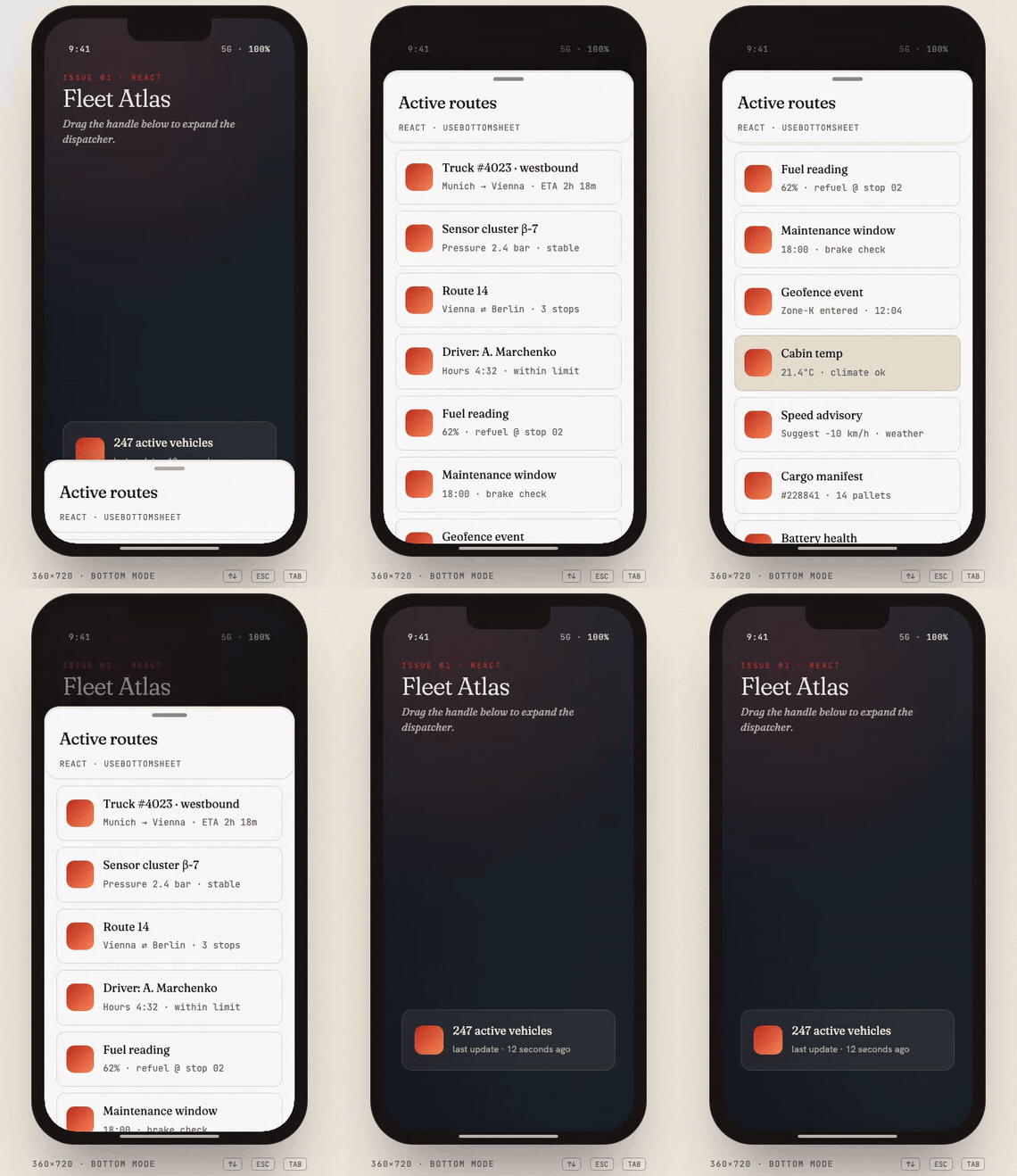
# http://localhost:5173The editorial demo showcases all five adapters, every gesture, every mode
(bottom · top · left · right · overlay), and live engine readouts (active
snap, progress, velocity, FPS). EN/RU and light/dark toggles in the corner.
npm test                 # 253 unit tests via vitest + happy-dom (~6s)
npx playwright test      # 32 e2e via Playwright on mobile-Chrome (~25s)
npm run typecheck        # TypeScript --noEmit
CI runs all three across Node 18/20/22 on every PR and tag.
npm installnpm run dev— tsup watch modenpm run demo— Vite dev server with live demonpm test— vitest watch- Open a PR with a focused diff. The CI matrix gates merging.
MIT — see LICENSE.