Firmware Design
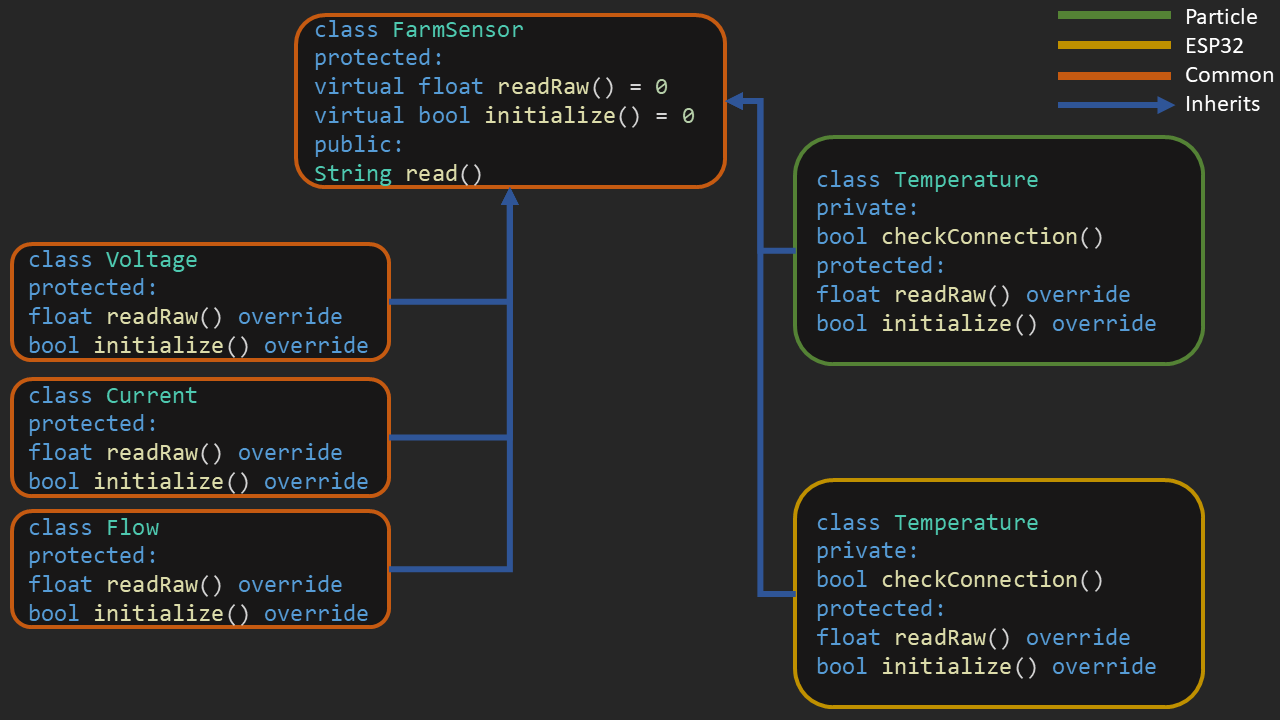
The repository is split into 3 folders (Common, ESP32 and Particle)
Includes header and source files that are compiled for all boards. In other words, these files are common to all boards.
Includes header and source files that are compiled only for ESP32 as well as symbolic links to files in Common folder.
Includes header and source files that are compiled only for Particle as well as symbolic links to files in Common folder.
A symbolic link is a file that points to another file. They work like shortcuts in Windows. They are used in Particle and ESP32 folders to point to files in Common. In Windows, symbolic links can be created using mklink in command line. The process of creating symbolic links in this repository is automated via scripts. Running these scripts deletes and recreates the symbolic links. The scripts are:
- Particle/src/create_symlinks.bat
- ESP32/include/create_symlinks.bat
- ESP32/src/create_symlinks.bat
to run a script in Windows, open cmd as administrator. Then navigate to the path where the script is and run .\create_symlinks.bat.