User Manual
Required Downloads
- Flash Tool Download
- From Latest Release: Flash.zip (See right sidebar on GitHub Code page)
- Connect the ESP32 to your computer
- Extract/Unzip the Flash Download tool
- In the extracted folder, open the Flash Download Tool (Will be named something like: flash_download_tool_3.8.5.exe)
- Press Developer Mode then ESP32 DownloadTool
- Go back to where you downloaded Flash.zip and extract this file
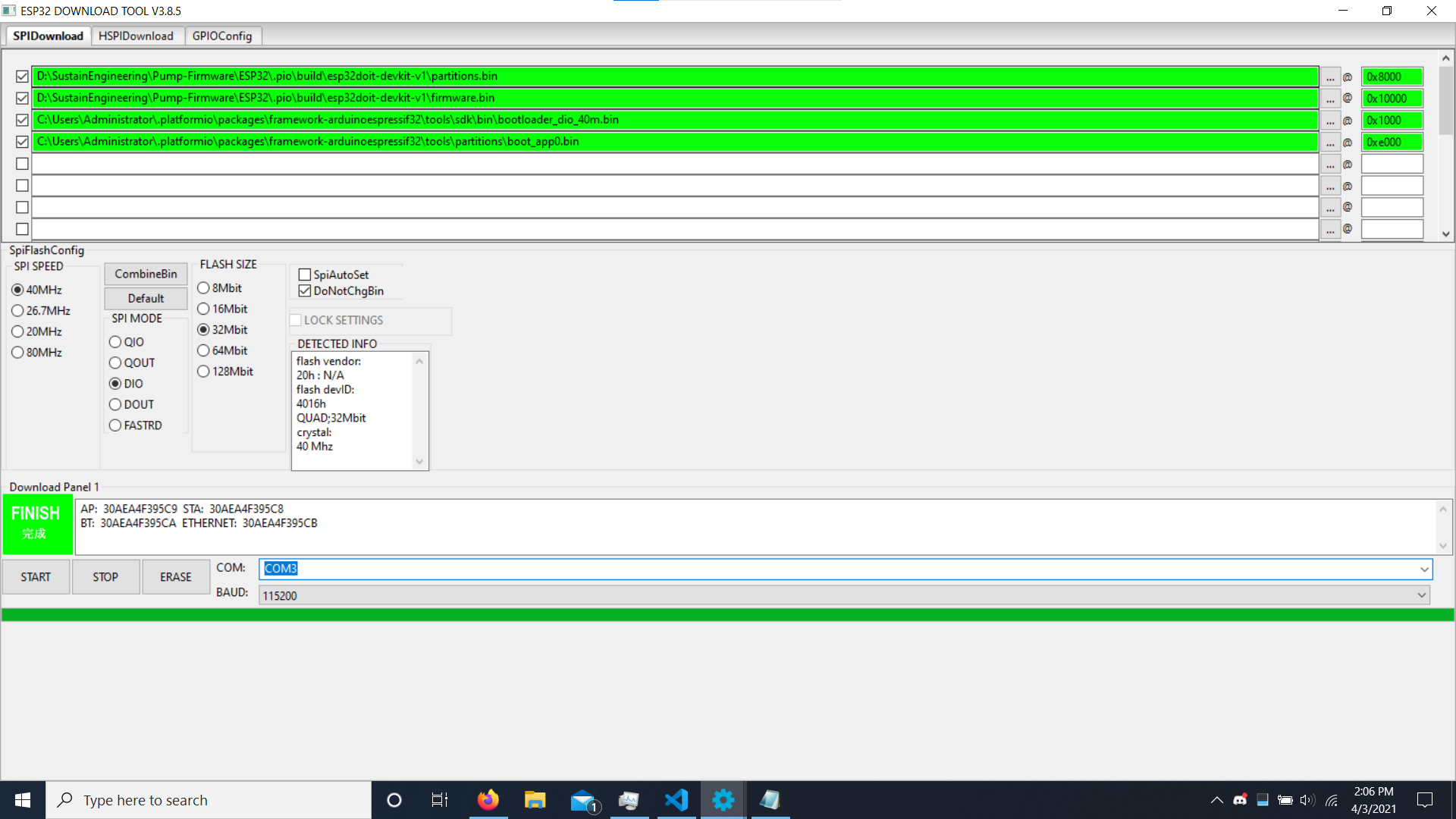
- Add the extracted files inside Flash.zip to tool (Click the "..." boxes next to the lines to browse and find the files)
- Next to the files, there is a "@" symbol followed by a box, make sure each file had the right entry next to it
- partitions.bin - 0x8000
- firmware.bin - 0x10000
- boot_app0.bin - 0xe000
- bootloader_dio_40m.bin - 0x1000
- Ensure SPI Speed is 40MHz, SPI MODE is DIO, FLASH SIZE is 32Mbit, and DoNotChngBin is checked
- Ensure the COM port is set and BAUD is 115200
- Refer to the Picture below to double check are settings are correct
- Press Start to begin uploading
- Should be complete when the green box says "Finished"